



Java study & review; this article mainly references Java Core Technologies Volume as the learning reference.
Chapter 4: Objects and Classes
1. Class
Object-Oriented Programming (OOP)
Class: encapsulates instance fields + methods
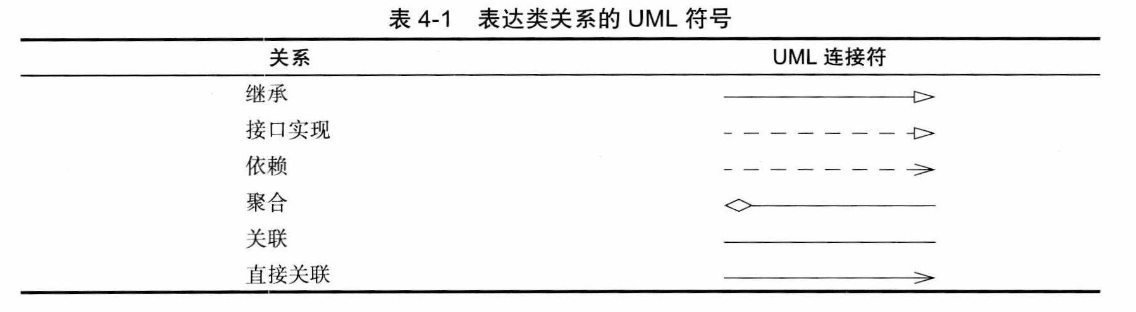
Class >== Inheritance (is-a)/ Dependency (uses-a)/ Aggregation (has-a) ==> Class
2. Built-in Classes
// Math
// DateDate date = null; //类似于cpp的对象指针date = new Date();System.out.println(date.toString());LocalDate
// LocalDateSystem.out.println(LocalDate.now());LocalDate date = LocalDate.now(); //construct current datedate = LocalDate.of("year","month","day"); //construct specified dateint today = date.getDayOfMonth();int getYear();int getMonthValue();int getDayofMonth();int getDayofWeek(); //1~7
// n days earlier, n days laterdate = date.minusDays(n);date = date.plusDays(n);
// is leap yeardate.isLeapYear();
// number of days in the current year and in the current monthdate.lengthOfYear();date.lengthOfMonth();- Use
LocalDateto print the current month’s calendar
public class chapter04main { public static void main(String[] args) { LocalDate date = LocalDate.now(); int month = date.getMonthValue(); int today = date.getDayOfMonth(); date = date.minusDays(today-1); // first day of the month DayOfWeek week = date.getDayOfWeek(); System.out.println("Mon Tue Wed Thu Fri Sat Sun"); for(int i=0;i<week.getValue();i++) System.out.printf(" "); while (date.getMonthValue() == month){ int now = date.getDayOfMonth(); System.out.printf("%3d",now); // print date if(now == today) System.out.printf("*"); else System.out.printf(" "); date = date.plusDays(1); // next day if(date.getDayOfWeek().getValue() == 1) System.out.println(); } }}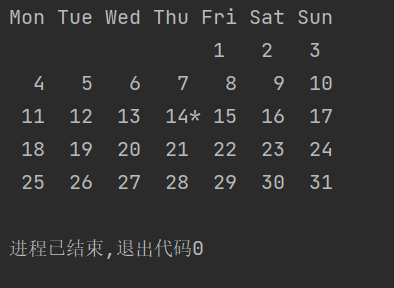
3. Custom Classes
class Test{ //field private int t;
//constructor public Test(/*...*/){ //... }
// method public void test(int n){ System.out.println("just test"); }}- Run multiple source files
javac Test*.java- Instantiation
// Using the constructorTest test1 = new Test();var test2 = new Test();
// detect nullt = Objects.requireNonNullElse(n,"unknown"); //warn but acceptObjects.requireNonNull(n,"not to be null"); //reject directly- Explicit parameter, implicit parameter
In test1.test(3), test1 is the implicit parameter, and 3 is the explicit parameter.
- Encapsulation
Do not return private objects of the class
- Access modifiers
public: public
private: private
- final
Must be initialized, and the reference cannot be changed to point to another object, though the object it points to can be modified.
private final StringBuilder eva;eva = new StringBuilder(); //must be initializedeva.append("ok!\\n"); //legal4. Static Methods and Static Fields
static int number = 1; //static field, shared by the class
static final double PI = 3.141592653589; //static constant- Static methods
static int getNum(){...}
There are no implicit instances; call directly on the class. e.g. Test.getNum()
No object state required; just access the class’s static fields
- Factory methods
Similar to the constructors of LocalDate and NumberFormat.
- main
The main method is also a static method.
5. Method Parameters
- Call by value (Java default)
- Call by reference
- Call by name (used by Algol)
Call by value: parameters are copies (primitive data types).
Object references allow the parameter to refer to the object, but it is still passed by value. e.g., you cannot swap two objects.
6. Object Construction
- Overloading
Same name, different parameter lists (not including return type)
- No-arg constructor
Initialize to default values.
P.S. When there is custom construction, you must provide a no-arg constructor yourself.
- Explicit field initialization
private String name = ""; initialize directly in the class.
- Using this to delegate to another constructor
public Test(double s){ this("Test "+Double.toString(s));}- Initialization blocks
class Test{ private static int Aid = 1;
private int id; // initialization block // static, if present, runs when the class is loaded for the first time. { id = Aid; Aid ++; }
//...}As long as you construct an object, the initialization block will run. It runs before the constructor.
- Destruction
Java can perform automatic garbage collection
7. Packages
package
- Package name
- Importing classes
Directly use all classes within the package.
Use public classes from other packages.
Fully qualified name
java.time.LocalDate today = java.time.LocalDate.now();
- import
import java.time.*; | import java.time.LocalDate;You can only use
*to import a package,
- Static imports
import static java.lang.System.*;
You can directly use out.println();
- Packages
package cc.dreaife.chapter04;
If there is no package statement, the classes in the file belong to the unnamed package.
- Package access
If neither public nor private is specified, it can be accessed within the same package.
- Class path
Classes can be stored in JAR files, which can contain multiple class files and subdirectories.
JARs organize files and subdirectories using ZIP format.
# Set the classpathjava -classpath ${PATH(JAR)} ${className};export CLASSPATH=${PATH};set CLASSPATH=${PATH}8. JAR Files
- Creating a jar file
jar cvf jarFileName file1 file2 ...
- Manifest file
META-INF/MANIFEST.MF
jar cfm jarName manifestName ...
- Executable jar file
java -jar jarName
- Multi-version jar files
9. Documentation Comments
javadoc => HTML files
- Comment placement
Public classes and interfaces at the module/package level, public or protected fields, public or protected constructors and methods
/**...*/ comments
@ param tag + free-form text (the first sentence should be a brief summary; HTML modifiers may be used)
- Class comments
After imports, before the class definition
- Method comments
@param
Parameter description, can span multiple lines, HTML modifiers may be used
- @return
Return value, can span multiple lines, HTML modifiers may be used
- @throws
Thrown exceptions
/** * testA * @param s * @param num * @return string */ public String testA(String s,int num){ return s + Integer.toString(num); }- Field comments
- General notes
@author name@since text@version text@see | @link (use hyperlinks to packages, classes, and methods)
- Package comments
Add a separate file within the package directory.
package-info.javapackage.html extract the text between …
- Comment extraction
javadoc -encoding UTF-8 -d ../doc Chapter04 #extract packagejavadoc -encoding UTF-8 -d docTest test.java #extract class10. Class Design Tips
- Ensure data is private
- Data initialization
- Don’t use too many primitive types
- Not everything needs get() and set()
- Avoid classes with too many responsibilities
- Class names and method names should reflect their responsibilities
- Prefer immutable classes
If this article helped you, please share it with others!
Some information may be outdated