



Correct declaration of thread pools
Thread pools must be declared manually through ThreadPoolExecutor ‘s constructor; avoid using the Executors class to create thread pools, which can lead to OOM.
Executors returning thread pool objects has the following drawbacks:
FixedThreadPoolandSingleThreadExecutor: use an unboundedLinkedBlockingQueue; the task queue can reach a maximum length ofInteger.MAX_VALUE, which may accumulate a large number of requests and lead to OOM.CachedThreadPool: uses the synchronous queueSynchronousQueue, allowing up toInteger.MAX_VALUEthreads, which may create a large number of threads and cause OOM.ScheduledThreadPoolandSingleThreadScheduledExecutor: use the unbounded delaying queueDelayedWorkQueue, the task queue maximum length isInteger.MAX_VALUE, which may accumulate a large number of requests and lead to OOM.
In short: use bounded queues and control the number of threads created.
Besides avoiding OOM, there are other reasons not to use the two quick-thread-pool options provided by Executors:
- In practice you need to manually configure thread pool parameters according to your machine’s performance and your business scenario, such as core pool size, the task queue to use, saturation policies, etc.
- We should explicitly name our thread pools, which helps us locate problems.
Monitoring thread pool status
You can monitor the running state of a thread pool through various means, such as Spring Boot’s Actuator component.
In addition, you can use the APIs of ThreadPoolExecutor to build a simple monitor. ThreadPoolExecutor provides methods to obtain the current pool size, the number of active threads, the number of completed tasks, the number of tasks in the queue, and so on.
Here is a simple Demo. printThreadPoolStatus() prints the thread pool size, active count, completed task count, and the number of tasks in the queue every second.
/** * Print the status of a thread pool * * @param threadPool the thread pool object */public static void printThreadPoolStatus(ThreadPoolExecutor threadPool) { ScheduledExecutorService scheduledExecutorService = new ScheduledThreadPoolExecutor(1, createThreadFactory("print-images/thread-pool-status", false)); scheduledExecutorService.scheduleAtFixedRate(() -> { log.info("========================="); log.info("ThreadPool Size: [{}]", threadPool.getPoolSize()); log.info("Active Threads: {}", threadPool.getActiveCount()); log.info("Number of Tasks : {}", threadPool.getCompletedTaskCount()); log.info("Number of Tasks in Queue: {}", threadPool.getQueue().size()); log.info("========================="); }, 0, 1, TimeUnit.SECONDS);}Use different thread pools for different types of work
Many people encounter this question in real projects: My project has multiple business areas that require thread pools—should I define a separate pool for each area, or should I define a single shared pool?
The usual recommendation is to use different thread pools for different businesses, configuring each pool according to the current business scenario, because different businesses have different concurrency levels and resource usage, and the optimization should focus on the system’s bottlenecks.
Let’s look at a real incident case
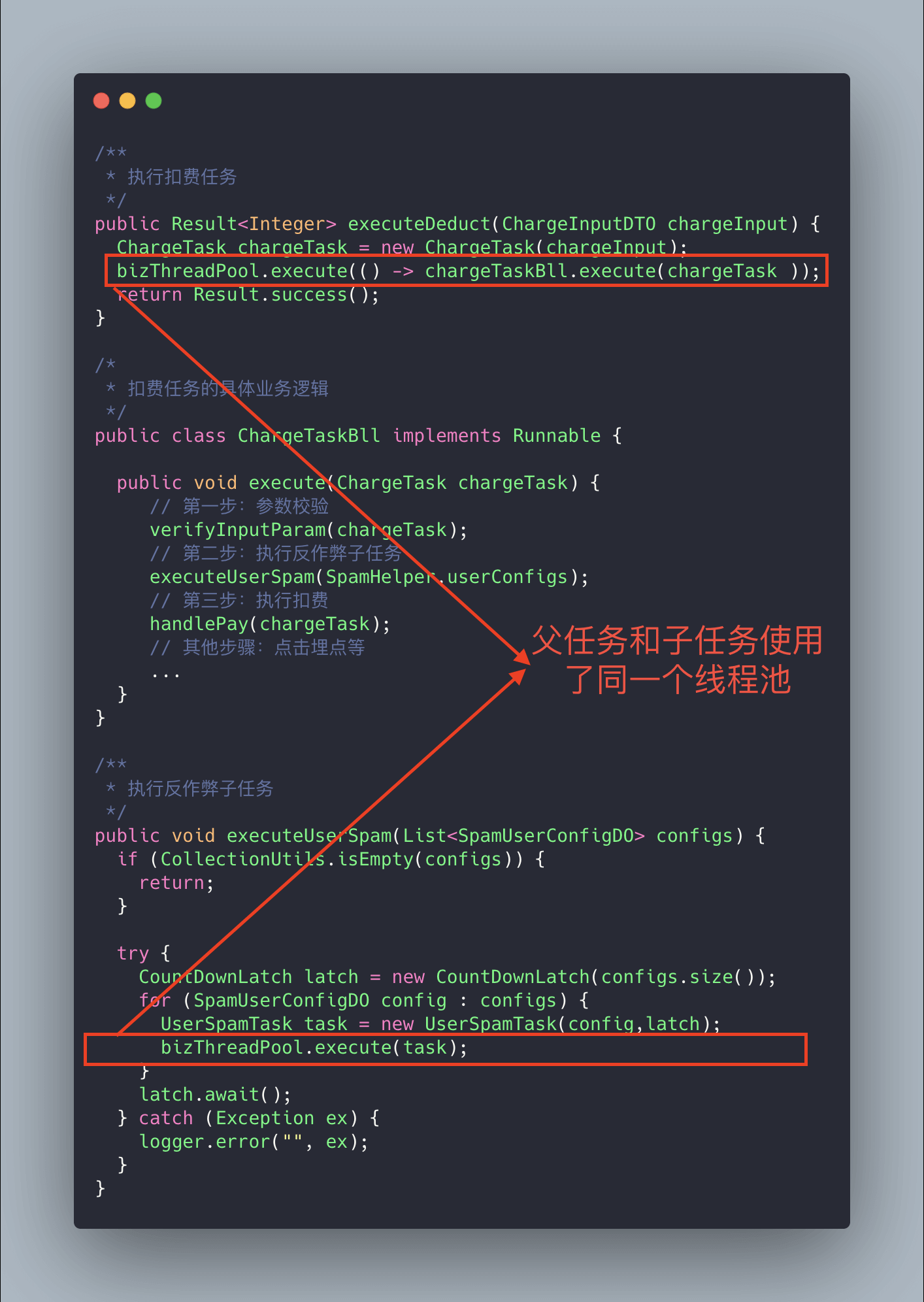
The code above may have a deadlock situation. Why?
Imagine an extreme scenario: suppose the core pool size of our thread pool is n, the number of parent tasks (charge deduction tasks) is n, and under each parent task there are two sub-tasks (sub-tasks under the deduction task), one of which has already completed while the other is queued. Because the parent task has exhausted the core thread resources, the sub-task cannot obtain a thread resource and cannot proceed, so it remains blocked in the queue. The parent task waits for the sub-task to complete, while the sub-task waits for the parent task to release the thread pool resources, which leads to a “deadlock”.
The solution is simple: add a new thread pool dedicated to executing the sub-tasks.
Don’t forget to name your thread pools
When initializing a thread pool, you should explicitly name it (set a thread pool name prefix); this helps with debugging.
By default, created thread names look like pool-1-thread-n, which lacks business meaning and makes it harder to locate problems.
There are usually two ways to name the threads in a thread pool:
- Using Guava’s
ThreadFactoryBuilder
ThreadFactory threadFactory = new ThreadFactoryBuilder() .setNameFormat(threadNamePrefix + "-%d") .setDaemon(true).build();ExecutorService threadPool = new ThreadPoolExecutor(corePoolSize, maximumPoolSize, keepAliveTime, TimeUnit.MINUTES, workQueue, threadFactory)- Implementing your own
ThreadFactory.
import java.util.concurrent.ThreadFactory;import java.util.concurrent.atomic.AtomicInteger;
/** * Thread factory that sets thread names to help locate issues. */public final class NamingThreadFactory implements ThreadFactory {
private final AtomicInteger threadNum = new AtomicInteger(); private final String name;
/** * Create a thread factory with a name prefix. */ public NamingThreadFactory(String name) { this.name = name; }
@Override public Thread newThread(Runnable r) { Thread t = new Thread(r); t.setName(name + " [#" + threadNum.incrementAndGet() + "]"); return t; }}Correctly configure thread pool parameters
Let’s first review the common ways books and blogs recommend configuring thread pool parameters, which can serve as a reference.
General practices
The impact of having too many threads is similar to how many people you allocate to do the work. In multithreaded scenarios, the main effect is to increase the cost of context switching.
- If the thread pool size is too small, when many tasks/requests arrive at once, many will queue up waiting to execute, or the queue may fill up and prevent new tasks from being processed, or a large number of tasks may accumulate in the queue causing OOM. This is clearly problematic, as the CPU is not utilized efficiently.
- If the thread count is too large, many threads may compete for CPU resources, causing a lot of context switching and increasing the execution time for each thread, reducing overall efficiency.
A simple, widely applicable formula:
- CPU-bound tasks (N+1): These tasks primarily consume CPU resources; you can set the thread count to N (CPU cores) + 1. The extra thread helps prevent the impact of occasional page faults or other reasons for task pauses. When a task pauses, the CPU would be idle; the extra thread can make better use of that idle time.
- I/O-bound tasks (2N): In practice, these tasks spend most of their time waiting for I/O; while waiting, the threads don’t use CPU, so you can give CPU time to other threads. For I/O-bound workloads, you can configure more threads, with a rule of thumb of 2N.
How to determine CPU-bound vs IO-bound tasks?
CPU-bound tasks are those that use CPU compute, such as sorting large data in memory. Any operation involving network reads or file reads tends to be I/O-bound. These tasks typically spend little time on CPU calculations compared to waiting for I/O.
A more rigorous calculation for the optimal thread count is: bestThreadCount = N (CPU cores) * (1 + WT/ST), where WT = total running time - ST.
The higher the proportion of waiting time, the more threads you need. The higher the proportion of compute time, the fewer threads you need.
You can use VisualVM, a tool included with the JDK, to view the WT/ST ratio.
For CPU-bound tasks, WT/ST is close to 0, so set the number of threads to N * (1 + 0) = N, which is similar to the N cores case discussed above.
For IO-bound tasks, WT is almost entirely waiting time; theoretically you could set the thread count to 2N (in practice WT/ST would be large; the choice of 2N helps avoid creating an excessive number of threads).
Note: the formulas above are only references; in real projects you rarely set thread pool parameters strictly by formulas, since different scenarios require different needs. Dynamic tuning based on actual runtime conditions is advisable.
Meituan’s optimization approach
Meituan’s technical team, in the article Java Thread Pool Implementation Principles and Practices in Meituan, discusses ideas and methods for making thread pool parameters configurable.
Their approach focuses on making core thread pool parameters customizable. The three core parameters are:
corePoolSize: core thread count; defines the minimum number of threads that can run simultaneously.maximumPoolSize: when the queue is full, the maximum number of threads that can run concurrently.workQueue: when a new task arrives, the pool first checks whether the current number of running threads has reached the core pool size; if so, the new task is stored in the queue.
Why these three parameters?
These are the most important parameters for ThreadPoolExecutor; they largely determine the pool’s handling strategy for tasks.
Note that corePoolSize is special: during runtime, if you call setCorePoolSize(), the pool will first check if the current number of worker threads is greater than corePoolSize; if so, it will shrink the workers.
Also, you’ll notice there’s no dynamic way to set the queue length above; Meituan’s approach customizes a queue called ResizableCapacityLinkedBlockingQueue (essentially removing the final modifier on the capacity field of LinkedBlockingQueue, making it mutable).
If your project also wants to achieve this, you can leverage existing open-source projects:
- Hippo4j: asynchronous thread pool framework, supports dynamic changes, monitoring, and alerting with no code changes required. Supports multiple usage modes; aims to improve system reliability.
- Dynamic TP: lightweight dynamic thread pool with built-in monitoring and alerting; integrates with third-party middleware thread pool management; based on mainstream configuration centers (Nacos, Apollo, Zookeeper, Consul, Etcd; SPI extension available).
Don’t forget to shut down thread pools
When a thread pool is no longer needed, you should explicitly shut it down to release resources.
Thread pools offer two shutdown methods:
shutdown(): shuts down the thread pool; its state becomesSHUTDOWN. It will not accept new tasks, but tasks in the queue will be completed.shutdownNow(): shuts down the thread pool; its state becomesSTOP. It will attempt to stop currently executing tasks, halt processing of queued tasks, and return a list of tasks that are awaiting execution.
Calling shutdownNow and shutdown does not mean the shutdown is complete; it merely asynchronously requests the pool to stop. If you need to wait synchronously for the pool to fully shut down before proceeding, you should call awaitTermination to wait.
// ...// Shutdown the thread poolexecutor.shutdown();try { // Wait for shutdown, up to 5 minutes if (!executor.awaitTermination(5, TimeUnit.MINUTES)) { // If waiting times out, log System.err.println("Thread pool did not terminate within 5 minutes"); }} catch (InterruptedException e) { // Exception handling}Try to avoid submitting long-running tasks to the thread pool
The purpose of a thread pool is to improve task execution efficiency and avoid the overhead of repeatedly creating and destroying threads. If you submit long-running tasks to the pool, threads may be occupied for a long time, preventing timely responses to other tasks, and could even cause the pool to crash or the program to hang.
Therefore, when using a thread pool, try to avoid submitting time-consuming tasks to it. For long-running operations such as network requests or file I/O, consider asynchronous processing to avoid blocking threads in the pool.
Some gotchas when using thread pools
Pitfall of repeatedly creating thread pools
Thread pools are reusable; do not create a new thread pool for every request, for example:
@GetMapping("wrong")public String wrong() throws InterruptedException { // Custom thread pool ThreadPoolExecutor executor = new ThreadPoolExecutor(5,10,1L,TimeUnit.SECONDS,new ArrayBlockingQueue<>(100),new ThreadPoolExecutor.CallerRunsPolicy());
// Process tasks executor.execute(() -> { // ...... } return "OK";}The problem stems from insufficient understanding of thread pools; improve your knowledge of thread pools.
Pitfalls of Spring’s internal thread pools
When using Spring’s internal thread pools, you must manually customize the pool with reasonable parameters, otherwise you may encounter production issues (one thread per request).
@Configuration@EnableAsyncpublic class ThreadPoolExecutorConfig {
@Bean(name="threadPoolExecutor") public Executor threadPoolExecutor(){ ThreadPoolTaskExecutor threadPoolExecutor = new ThreadPoolTaskExecutor(); int processNum = Runtime.getRuntime().availableProcessors(); int corePoolSize = (int) (processNum / (1 - 0.2)); int maxPoolSize = (int) (processNum / (1 - 0.5)); threadPoolExecutor.setCorePoolSize(corePoolSize); threadPoolExecutor.setMaxPoolSize(maxPoolSize); threadPoolExecutor.setQueueCapacity(maxPoolSize * 1000); threadPoolExecutor.setThreadPriority(Thread.MAX_PRIORITY); threadPoolExecutor.setDaemon(false); threadPoolExecutor.setKeepAliveSeconds(300); threadPoolExecutor.setThreadNamePrefix("test-Executor-"); return threadPoolExecutor; }}Pitfalls where ThreadLocal and thread pools collide
Using a thread pool with ThreadLocal can cause a thread to read stale or dirty values. This happens because the pool reuses worker threads, and the ThreadLocal variables bound to the thread’s class are reused as well, so a thread might read another thread’s ThreadLocal value.
Don’t assume that not explicitly using a thread pool in your code means there’s no thread pool involved; web servers like Tomcat use thread pools to handle requests and concurrency, often using custom thread pools built on top of native Java thread pools.
Of course, you could configure Tomcat to handle requests with a single thread, but this is not advisable as it would severely limit throughput.
server.tomcat.max-threads=1A recommended solution to the above issue is Alibaba’s open-source TransmittableThreadLocal (TTL). The TransmittableThreadLocal class extends and enhances the JDK’s built-in InheritableThreadLocal. In components that pool and reuse threads, TTL provides propagation of ThreadLocal values to solve context transmission problems in asynchronous execution.
TransmittableThreadLocal project page: https://github.com/alibaba/transmittable-thread-local.
If this article helped you, please share it with others!
Some information may be outdated