



numpy
Introduction
NumPy(Numerical Python) is an extension library for the Python language that supports extensive multi-dimensional array and matrix operations, and also provides a large collection of mathematical functions for array operations.
NumPy is a fast mathematical library, primarily used for array computations, and includes:
- A powerful N-dimensional array object ndarray
- Broadcasting function facilities
- Tools for integrating C/C++/Fortran code
- Functions for linear algebra, Fourier transforms, random number generation, and more
Applications
NumPy is typically used together with SciPy (Scientific Python) and Matplotlib (the plotting library)
This combination is widely used as a replacement for MATLAB and provides a powerful scientific computing environment, helping us learn data science or machine learning through Python.
SciPy is an open-source Python algorithms library and mathematical toolkit.
SciPy includes modules for optimization, linear algebra, integration, interpolation, special functions, fast Fourier transforms, signal processing and image processing, solving ordinary differential equations, and other computations commonly used in science and engineering.
Matplotlib is the visualization interface for Python programming language and its NumPy numerical extension package.
It provides an API for embedding plots into applications using common GUI toolkits such as Tkinter, wxPython, Qt, or GTK+.
Installation
- Install from a distribution package
- Install via pip:
pip3 install numpy scipy matplotlib
Installation verification
from numpy import *eye(4)NumPy Data
NumPy ndarray Object
One of NumPy’s most important features is its N-dimensional array object, ndarray. It is a collection of elements of the same type, indexed from 0.
An ndarray object is a multidimensional array used to store elements of the same type.
Each element in an ndarray occupies a memory region of the same size.
An ndarray internally consists of the following parts:
- A pointer to the data (a block in memory or in a memory-mapped file).
- A data type (
dtype) that describes the fixed-size element slots in the array. - A tuple representing the array shape, i.e., the size of each dimension.
- A stride tuple, whose integers indicate how many bytes to skip to move to the next element along each dimension.
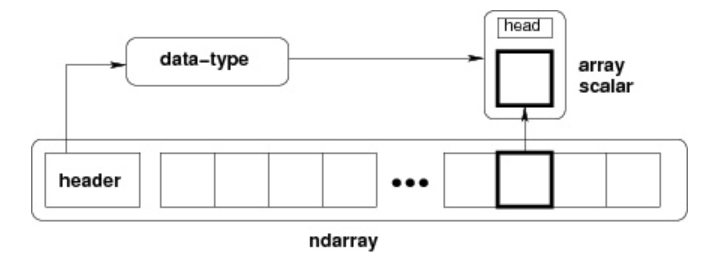
An ndarray consists of a contiguous one-dimensional memory block plus an indexing scheme that maps each element to a position in that block. Elements are stored in row-major order (C-style) or column-major order (FORTRAN/MatLab-style, i.e. F-order).
Create ndarray
To create an ndarray, simply call NumPy’s array function:
numpy.array(object,dtype = None,copy = True,order = None,subok = False,ndmin = 0)
# object:数组或嵌套的数列# dtype:数组元素的数据类型,可选# copy:对象是否需要复制,可选# order:创建数组的样式,C为行方向,F为列方向,A为任意方向(默认)# subok:默认返回一个与基类类型一致的数组# ndmin:指定生成数组的最小维度Example
import numpy as npa = np.array([1,2,3])print (a)
a = np.array([[1, 2], [3, 4]])print (a)
# 最小维度a = np.array([1, 2, 3, 4, 5], ndmin = 2)print (a)
# dtype 参数a = np.array([1, 2, 3], dtype = complex)print (a)Data Types
NumPy supports many more data types than Python built-ins, and most of them correspond to C language data types. Some of them also map to Python built-in types.
bool,int,intc,intp,int8,int16,int32,int64,uint8,uint16,uint32,uint64,float,float16,float32,float64,complex_,complex128,complex64,complex128
A data type object (an instance of numpy.dtype) describes how the memory area corresponding to an array is used. It describes the following aspects of the data:
- The data type (integer, floating point, or Python object)
- The size of the data (for example, how many bytes an integer uses)
- The byte order of the data (little-endian or big-endian)
- For structured types, the field names, each field’s data type, and the portion of memory occupied by each field
- If the data type is a sub-array, its shape and data type
Byte order is determined by prefixing the data type with < or >. < means little-endian (least significant bytes at lower addresses), and > means big-endian (most significant bytes at lower addresses).
A dtype object is constructed using the following syntax:
numpy.dtype(object, align, copy)
# object - 要转换为的数据类型对象# align - 如果为 true,填充字段使其类似 C 的结构体。# copy - 复制 dtype 对象 ,如果为 false,则是对内置数据类型对象的引用Usage:
import numpy as np# 使用标量类型dt = np.dtype(np.int32)print(dt)
# 首先创建结构化数据类型dt = np.dtype([('age',np.int8)])# 将数据类型应用于 ndarray 对象a = np.array([(10,),(20,),(30,)], dtype = dt)print(a)Each built-in type has a unique character code, as shown below:
| Character | Corresponding Type |
|---|---|
| b | Boolean |
| i | (Signed) integer |
| u | Unsigned integer |
| f | Floating-point |
| c | Complex floating-point |
| m | timedelta (time interval) |
| M | datetime (date-time) |
| O | (Python) object |
| S, a | (byte-)string |
| U | Unicode |
| V | Raw data (void) |
NumPy Arrays
NumPy Array Attributes
The number of dimensions in a NumPy array is called its rank, which is the number of axes. A 1D array has rank 1, a 2D array has rank 2, and so on.
In NumPy, each linear array is called an axis, i.e., a dimension. For example, a 2D array can be seen as an array of 1D arrays.
So in NumPy, a one-dimensional direction is an axis. The first axis corresponds to the outer array, and the second axis corresponds to arrays inside it. The number of axes (rank) is the number of dimensions.
In many operations you can specify axis. axis=0 means operating along axis 0 (typically column-wise), while axis=1 means operating along axis 1 (typically row-wise).
Important ndarray attributes in NumPy arrays include:
-
ndarray.ndim Rank, i.e., the number of axes or dimensions
import numpy as npa = np.arange(24)print (a.ndim) # a 现只有一个维度# 现在调整其大小b = a.reshape(2,4,3) # b 现在拥有三个维度print (b.ndim) -
ndarray.shape Array dimensions; for a matrix,
nrows bymcolumnsndarray.shapecan also be used to reshape an array.NumPy also provides the
reshapefunction to resize/reshape arrays.import numpy as npa = np.array([[1,2,3],[4,5,6]])print (a.shape)a.shape = (3,2)print (a)a = np.array([[1,2,3],[4,5,6]])b = a.reshape(3,2)print (b) -
ndarray.size The total number of array elements, equivalent to
n*min.shape(for matrices) -
ndarray.dtype Element type of the
ndarrayobject -
ndarray.itemsize Size of each element in the
ndarray, in bytesimport numpy as np# 数组的 dtype 为 int8(一个字节)x = np.array([1,2,3,4,5], dtype = np.int8)print (x.itemsize)# 数组的 dtype 现在为 float64(八个字节)y = np.array([1,2,3,4,5], dtype = np.float64)print (y.itemsize) -
ndarray.flags Memory information of the
ndarrayobjectProperty Description C_CONTIGUOUS (C) Data is stored in a single C-style contiguous segment F_CONTIGUOUS (F) Data is stored in a single Fortran-style contiguous segment OWNDATA (O) The array owns the memory it uses, or borrows it from another object WRITEABLE (W) The data area is writable; if set to False, the data becomes read-onlyALIGNED (A) The data and all elements are properly aligned for hardware UPDATEIFCOPY (U) This array is a copy of another array; when released, the original array content is updated import numpy as npx = np.array([1,2,3,4,5])print (x.flags) -
ndarray.real Real part of
ndarrayelements -
ndarray.imag Imaginary part of
ndarrayelements -
ndarray.data Buffer containing the actual array elements. Since elements are usually accessed via indexing, this attribute is not often used directly.
Creating NumPy Arrays
Besides using the underlying ndarray constructor, NumPy arrays can also be created in the following ways.
-
numpy.empty
The
numpy.emptymethod creates an uninitialized array with a specified shape and data type:numpy.empty(shape, dtype = float, order = 'C')# shape 数组形状# dtype 数据类型,可选# order 有"C"和"F"两个选项,分别代表,行优先和列优先,在计算机内存中的存储元素的顺序。Usage:
import numpy as npx = np.empty([3,2], dtype = int)print (x) -
numpy.zeros
Create an array of the specified size, filled with
0s:numpy.zeros(shape, dtype = float, order = 'C')# shape 数组形状# dtype 数据类型,可选# order 'C' 用于 C 的行数组,或者 'F' 用于 FORTRAN 的列数组Usage:
import numpy as np# 默认为浮点数x = np.zeros(5)print(x)# 设置类型为整数y = np.zeros((5,), dtype = int)print(y)# 自定义类型z = np.zeros((2,2), dtype = [('x', 'i4'), ('y', 'i4')])print(z) -
numpy.ones
Create an array of the specified shape, filled with
1s:numpy.ones(shape, dtype = float, order = 'C')# shape 数组形状# dtype 数据类型,可选# order 'C' 用于 C 的行数组,或者 'F' 用于 FORTRAN 的列数组Usage:
import numpy as np# 默认为浮点数x = np.ones(5)print(x)# 自定义类型x = np.ones([2,2], dtype = int)print(x) -
numpy.zeros_like/ones_like
numpy.zeros_likecreates an array with the same shape as a given array, filled with0s.Both
numpy.zerosandnumpy.zeros_likeare used to create arrays whose elements are all0.The difference is that
numpy.zerosdirectly specifies the shape to create, whilenumpy.zeros_likecreates an array with the same shape as an existing array.numpy.zeros_like(a, dtype=None, order='K', subok=True, shape=None)# a 给定要创建相同形状的数组# dtype 创建的数组的数据类型# order 数组在内存中的存储顺序,可选值为 'C'(按行优先)或 'F'(按列优先),默认为 'K'(保留输入数组的存储顺序)# subok 是否允许返回子类,如果为 True,则返回一个子类对象,否则返回一个与 a 数组具有相同数据类型和存储顺序的数组# shape 创建的数组的形状,如果不指定,则默认为 a 数组的形状。Usage:
import numpy as np# 创建一个 3x3 的二维数组arr = np.array([[1, 2, 3], [4, 5, 6], [7, 8, 9]])# 创建一个与 arr 形状相同的,所有元素都为 0 的数组zeros_arr = np.zeros_like(arr)print(zeros_arr)
Create from Existing Arrays
-
numpy.asarray
numpy.asarrayis similar tonumpy.array, butnumpy.asarrayonly has three parameters, two fewer thannumpy.array.numpy.asarray(a, dtype = None, order = None)# 参数说明:# 参数 描述# a 任意形式的输入参数,可以是,列表, 列表的元组, 元组, 元组的元组, 元组的列表,多维数组# dtype 数据类型,可选# order 可选,有"C"和"F"两个选项,分别代表,行优先和列优先,在计算机内存中的存储元素的顺序。# 使用:import numpy as np# 列表x = [1,2,3]a = np.asarray(x)print (a)# 元组x = (1,2,3)a = np.asarray(x)print (a)# 元组列表x = [(1,2,3),(4,5)]a = np.asarray(x)print (a)x = [1,2,3]a = np.asarray(x, dtype = float)print (a) -
numpy.frombuffer
numpy.frombufferis used to create arrays from buffer-like objects.numpy.frombufferaccepts a buffer input and reads it as a stream, converting it into anndarrayobject.Note: When the buffer is a string, Python 3 uses Unicode
strby default, so convert it to a bytestring by addingbbefore the original string.numpy.frombuffer(buffer, dtype = float, count = -1, offset = 0)# 参数说明:# 参数 描述# buffer 可以是任意对象,会以流的形式读入。# dtype 返回数组的数据类型,可选# count 读取的数据数量,默认为-1,读取所有数据。# offset 读取的起始位置,默认为0。# 使用:import numpy as nps = b'Hello World'a = np.frombuffer(s, dtype = 'S1')print (a) -
numpy.fromiter
The
numpy.fromitermethod creates anndarrayobject from an iterable and returns a one-dimensional array.numpy.fromiter(iterable, dtype, count=-1)# 参数说明:# iterable 可迭代对象# dtype 返回数组的数据类型# count 读取的数据数量,默认为-1,读取所有数据# 使用:import numpy as np# 使用 range 函数创建列表对象list=range(5)it=iter(list)# 使用迭代器创建 ndarrayx=np.fromiter(it, dtype=float)print(x)
Create from Numeric Ranges
-
numpy.arange
In NumPy, the
arangefunction is used to create a numeric range and return anndarrayobject. The function format is:An
ndarrayis generated according to the range specified bystartandstopand the step size set bystep.numpy.arange(start, stop, step, dtype)# 参数说明:# start 起始值,默认为0# stop 终止值(不包含)# step 步长,默认为1# dtype 返回ndarray的数据类型,如果没有提供,则会使用输入数据的类型。# 使用:import numpy as npx = np.arange(5)print (x)# 设置了 dtypex = np.arange(5, dtype = float)print (x)# 设置了起始值、终止值及步长:x = np.arange(10,20,2)print (x) -
numpy.linspace
The
numpy.linspacefunction is used to create a one-dimensional array made of an arithmetic progression. The format is:np.linspace(start, stop, num=50, endpoint=True, retstep=False, dtype=None)# 参数说明:# start 序列的起始值# stop 序列的终止值,如果endpoint为true,该值包含于数列中# num 要生成的等步长的样本数量,默认为50# endpoint 该值为 true 时,数列中包含stop值,反之不包含,默认是True。# retstep 如果为 True 时,生成的数组中会显示间距,反之不显示。# dtype ndarray 的数据类型# 使用:import numpy as npa = np.linspace(1,10,10)print(a)a = np.linspace(1,1,10)print(a)a = np.linspace(10, 20, 5, endpoint = False)print(a)a =np.linspace(1,10,10,retstep= True)print(a)b =np.linspace(1,10,10).reshape([10,1])print(b) -
numpy.logspace
The
numpy.logspacefunction is used to create a geometric progression. The format is:np.logspace(start, stop, num=50, endpoint=True, base=10.0, dtype=None)# 参数说明:# start 序列的起始值为:base ** start# stop 序列的终止值为:base ** stop。如果endpoint为true,该值包含于数列中# num 要生成的等步长的样本数量,默认为50# endpoint 该值为 true 时,数列中包含stop值,反之不包含,默认是True。# base 对数 log 的底数。# dtype ndarray 的数据类型# 使用:import numpy as np# 默认底数是 10a = np.logspace(1.0, 2.0, num = 10)print (a)a = np.logspace(0,9,10,base=2)print (a)
Array Slicing and Indexing
Slicing and Indexing
The contents of an ndarray can be accessed and modified through indexing or slicing, similar to slicing operations on Python lists.
ndarray arrays can be indexed with positions from 0 to n. Slices can be created with Python’s built-in slice function by setting start, stop, and step, producing a new array from the original one.
Explanation of
:: if only one index is provided, such as[2], it returns the single element at that index. If it is[2:], it means all items after that index are selected. If two parameters are used, such as[2:7], it selects items between the two indices (excluding the stop index).Slices can also include an ellipsis
...to make the selection tuple length match the array dimensions. If the ellipsis is used in the row position, it returns anndarraycontaining the elements in the row.
import numpy as np
a = np.arange(10)s = slice(2,7,2) # 从索引 2 开始到索引 7 停止,间隔为2print (a[s])
# 也可以通过冒号分隔切片参数 start:stop:step 来进行切片操作a = np.arange(10)b = a[2:7:2] # 从索引 2 开始到索引 7 停止,间隔为 2print(b)
a = np.arange(10) # [0 1 2 3 4 5 6 7 8 9]b = a[5]print(b)
print(a[2:])
print(a[2:5])
# 多维a = np.array([[1,2,3],[3,4,5],[4,5,6]])print(a)# 从某个索引处开始切割print('从数组索引 a[1:] 处开始切割')print(a[1:])
# 省略号a = np.array([[1,2,3],[3,4,5],[4,5,6]])print (a[...,1]) # 第2列元素print (a[1,...]) # 第2行元素print (a[...,1:]) # 第2列及剩下的所有元素Advanced Indexing
NumPy provides more indexing methods than ordinary Python sequences.
In addition to integer and slice indexing, arrays can also be indexed with integer arrays, boolean indexing, and fancy indexing.
Advanced indexing in NumPy refers to using integer arrays, boolean arrays, or other sequences to access array elements. Compared with basic indexing, advanced indexing can access arbitrary elements and is useful for more complex operations and modifications.
Integer Array Indexing
Integer array indexing means using one array to access elements in another array. Each element in the indexing array is an index value along some dimension of the target array.
import numpy as np
# 获取数组中 (0,0),(1,1) 和 (2,0) 位置处的元素x = np.array([[1, 2], [3, 4], [5, 6]])y = x[[0,1,2], [0,1,0]]print (y)
# 获取了 4X3 数组中的四个角的元素。 行索引是 [0,0] 和 [3,3],而列索引是 [0,2] 和 [0,2]x = np.array([[ 0, 1, 2],[ 3, 4, 5],[ 6, 7, 8],[ 9, 10, 11]])print ('我们的数组是:' )print (x)print ('\\n')rows = np.array([[0,0],[3,3]])cols = np.array([[0,2],[0,2]])y = x[rows,cols]print ('这个数组的四个角元素是:')print (y)
# 可以借助切片 : 或 … 与索引数组组合a = np.array([[1,2,3], [4,5,6],[7,8,9]])b = a[1:3, 1:3]c = a[1:3,[1,2]]d = a[...,1:]print(b)print(c)print(d)Boolean Indexing
We can index a target array using a boolean array.
Boolean indexing uses boolean operations (such as comparison operators) to obtain an array of elements that satisfy specified conditions.
import numpy as np
x = np.array([[ 0, 1, 2],[ 3, 4, 5],[ 6, 7, 8],[ 9, 10, 11]])print ('我们的数组是:')print (x)print ('\\n')# 现在我们会打印出大于 5 的元素print ('大于 5 的元素是:')print (x[x > 5])
a = np.array([np.nan, 1,2,np.nan,3,4,5])print (a[~np.isnan(a)])
a = np.array([1, 2+6j, 5, 3.5+5j])print (a[np.iscomplex(a)])Fancy Indexing
Fancy indexing refers to indexing with integer arrays.
Fancy indexing retrieves values by using the values in the index array as indices along a target array axis.
When using a one-dimensional integer array as an index: if the target is a 1D array, the result is the elements at those positions; if the target is a 2D array, the result is the rows at those indices.
Unlike slicing, fancy indexing always copies data into a new array.
-
One-dimensional array
A two-dimensional array has two axes, so indexing can retrieve data along the corresponding axes:
import numpy as npx = np.arange(9,0,-1)print(x)print(x[[0,2]]) -
Two-dimensional array
A two-dimensional array has two axes, so indexing can retrieve data along the corresponding axes:
import numpy as npx=np.arange(32).reshape((8,4))print(x)# 二维数组读取指定下标对应的行print("-------读取下标对应的行-------")print (x[[4,2,1,7]])px=np.arange(32).reshape((8,4))print (x[[-4,-2,-1,-7]]) -
Pass in multiple index arrays
The
np.ix_function takes two arrays and produces index arrays representing their Cartesian-product mapping.import numpy as npx=np.arange(32).reshape((8,4))print (x[np.ix_([1,5,7,2],[0,3,1,2])])
Broadcasting
Broadcasting is NumPy’s way of performing numeric computations on arrays of different shapes. Arithmetic operations on arrays are usually performed element-wise.
If two arrays a and b have the same shape, i.e. a.shape == b.shape, then a*b multiplies corresponding elements. This requires the same number of dimensions and the same length in each dimension.
When the shapes of two arrays in an operation are different, NumPy automatically triggers broadcasting. Adding a 4x3 2D array and a length-3 1D array is equivalent to repeating array b four times along a new dimension and then performing the operation:
import numpy as np
a = np.array([[ 0, 0, 0], [10,10,10], [20,20,20], [30,30,30]])b = np.array([0,1,2])print(a + b)
bb = np.tile(b, (4, 1)) # 重复 b 的各个维度print(a + bb)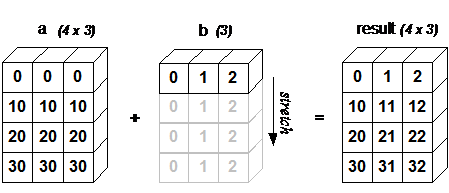
Broadcasting rules:
- Align all input arrays to the array with the most dimensions; prepend
1s to shapes with fewer dimensions. - The output shape takes the maximum size along each dimension of the input shapes.
- For each dimension, an input array can participate if its length matches the output dimension or its length is
1; otherwise an error occurs. - When an input array has length
1on a dimension, the first value along that dimension is reused during computation.
If the conditions are not satisfied, a ValueError: frames are not aligned exception is raised.
Array Operations
Iterating Arrays
The NumPy iterator object numpy.nditer provides a flexible way to access elements of one or more arrays.
The most basic task of an iterator is to access array elements.
import numpy as np
a = np.arange(6).reshape(2,3)print ('原始数组是:')print (a,'\\n')print ('迭代输出元素:')for x in np.nditer(a): print (x, end=", " )print ('\\n')
for x in np.nditer(a.T): print (x, end=", " )print ('\\n')
for x in np.nditer(a.T.copy(order='C')): print (x, end=", " )print ('\\n')From the example above, we can see that a and a.T are traversed in the same order, which means their storage order in memory is also the same. However, the traversal result of a.T.copy(order = 'C') is different because its storage layout differs from the first two. By default, nditer uses K-order, i.e., an order as close as possible to the array’s actual memory layout.
Control Traversal Order
for x in np.nditer(a, order='F'): Fortran order, i.e., column-major traversal;for x in np.nditer(a.T, order='C'): C order, i.e., row-major traversal;
import numpy as np
a = np.arange(0,60,5)a = a.reshape(3,4)print ('原始数组是:')print (a)print ('\\n')print ('原始数组的转置是:')b = a.Tprint (b)print ('\\n')print ('以 C 风格顺序排序:')c = b.copy(order='C')print (c)for x in np.nditer(c): print (x, end=", " )print ('\\n')print ('以 F 风格顺序排序:')c = b.copy(order='F')print (c)for x in np.nditer(c): print (x, end=", " )print ('\\n')# 可以通过显式设置,来强制 nditer 对象使用某种顺序:print ('以 C 风格顺序排序:')for x in np.nditer(a, order = 'C'): print (x, end=", " )print ('\\n')print ('以 F 风格顺序排序:')for x in np.nditer(a, order = 'F'): print (x, end=", " )``
### 修改数组元素
nditer对象有另一个可选参数op_flags。默认情况下,nditer将视待迭代遍历的数组为只读对象(read-only),为了在遍历数组的同时,实现对数组元素值的修改,必须指定readwrite或者writeonly的模式。
```pythonimport numpy as np
a = np.arange(0,60,5)a = a.reshape(3,4)print ('Original array:')print (a)print ('\\n')for x in np.nditer(a, op_flags=['readwrite']): x[...]=2*xprint ('Modified array:')print (a)使用外部循环
nditer 类的构造器拥有 flags 参数,它可以接受下列值:
| 参数 | 描述 |
|---|---|
| c_index | 可以跟踪 C 顺序的索引 |
| f_index | 可以跟踪 Fortran 顺序的索引 |
| multi_index | 每次迭代可以跟踪一种索引类型 |
| external_loop | 给出的值是具有多个值的一维数组,而不是零维数组 |
import numpy as npa = np.arange(0,60,5)a = a.reshape(3,4)print ('Original array:')print (a)print ('\\n')print ('Modified array:')for x in np.nditer(a, flags = ['external_loop'], order = 'F'): print (x, end=", " )广播迭代
如果两个数组是可广播的,nditer组合对象能够同时迭代它们。假设数组a的维度为3X4,数组b的维度为1X4,则使用以下迭代器(数组b被广播到a的大小)。
import numpy as np
a = np.arange(0,60,5)a = a.reshape(3,4)print ('The first array is:')print (a)print ('\\n')print ('The second array is:')b = np.array([1, 2, 3, 4], dtype = int)print (b)print ('\\n')print ('Modified array is:')for x,y in np.nditer([a,b]): print ("%d:%d" % (x,y), end=", " )数组操作
改变数组形状
| 函数 | 描述 | 函数 |
|---|---|---|
| reshape | 不改变数据的条件下修改形状 | numpy.reshape(arr, newshape, order=['C'|'F'|'A'|'k']) |
| flat | 数组元素迭代器 | 数组元素迭代器(for e in a.flat:) |
| flatten | 返回一份数组拷贝,对拷贝所做的修改不会影响原始数组 | ndarray.flatten(order=['C'|'F'|'A'|'k']) |
| ravel | 返回展开数组 | numpy.ravel(a, order=['C'|'F'|'A'|'k']) |
翻转数组
| 函数 | 描述 | 函数 |
|---|---|---|
| transpose | 对换数组的维度 | numpy.transpose(arr, axes) |
| ndarray.T | 和 self.transpose() 相同 | 类似 numpy.transpose |
| rollaxis | 向后滚动指定的轴 | numpy.rollaxis(arr, axis, start) |
| swapaxes | 对换数组的两个轴 | numpy.swapaxes(arr, axis1, axis2) |
修改数组维度
| 函数 | 描述 | 函数 |
|---|---|---|
| broadcast | 产生模仿广播的对象 | 该函数使用两个数组作为输入参数 |
| broadcast_to | 将数组广播到新形状 | numpy.broadcast_to(array, shape, subok) |
| expand_dims | 扩展数组的形状 | numpy.expand_dims(arr, axis) |
| squeeze | 从数组的形状中删除一维条目 | numpy.squeeze(arr, axis) |
连接数组
| 函数 | 描述 | 函数 |
|---|---|---|
| concatenate | 连接沿现有轴的数组序列 | numpy.concatenate((a1, a2, ...), axis) |
| stack | 沿着新的轴加入一系列数组。 | numpy.stack(arrays, axis) |
| hstack | 水平堆叠序列中的数组(列方向) | numpy.hstack(arrays) |
| vstack | 竖直堆叠序列中的数组(行方向) | numpy.vstack(arrays |
分割数组
| 函数 | 描述 | 函数 |
|---|---|---|
| split | 将一个数组分割为多个子数组,左闭右开 | numpy.split(ary, indices_or_sections, axis) |
| hsplit | 将一个数组水平分割为多个子数组(按列) | numpy.hsplit(ary, indices_or_sections) |
| vsplit | 将一个数组垂直分割为多个子数组(按行) | numpy.vsplit(ary, indices_or_sections) |
数组元素的添加与删除
| 函数 | 描述 | 函数 |
|---|---|---|
| resize | 返回指定形状的新数组 | numpy.resize(arr, shape) |
| append | 将值添加到数组末尾 | numpy.append(arr, values, axis=None) |
| insert | 沿指定轴将值插入到指定下标之前 | numpy.insert(arr, obj, values, axis) |
| delete | 删掉某个轴的子数组,并返回删除后的新数组 | Numpy.delete(arr, obj, axis) |
| unique | 查找数组内的唯一元素 | numpy.unique(arr, return_index, return_inverse, return_counts) |
If this article helped you, please share it with others!
Some information may be outdated