



计算机系统由硬件和系统软件组成,共同工作来运行应用程序。
#include<stdio.h>int main(){ printf("hello world! C"); return 0;}追踪程序hello.c的生命周期—>创建,运行,输出,终止。
1 信息=位+上下文
hello.c即为源程序,hello程序的开始,程序员编写的文本文件—由字节(8个位组成一组)组成。
大部分使用ASCII标准。程序以字节序列的方式存储在文件中,每字节的整数值对应一个字符。只由ASCII字符构成的文件称为文本文件,其他文件称为二进制文件。
基本思想:系统中的所有信息都是由一串比特(位)来表示的。通过数据的上下文来区分不同的数据对象。数字的机器表示与实际数不同,为真值的有限近似值。
2 程序被其他程序翻译成不同格式
高级C语言—转化—>低级机器语言指令—打包—>可执行目标程序
gcc -o hello hello.c./hello
编译系统
编译系统:预处理器、编译器、汇编器、链接器
-
预处理
预处理器(cpp)根据#开头命令修改原始程序,将头文件内容直接插入到程序文本。
hello.c—cpp—>hello.i
-
编译
编译器(ccl)将上步.i文件翻译成.s文件,包含一个汇编语言程序。
hello.i—ccl—>hello.s
-
汇编
汇编器(as)将.s文件翻译成机器语言指令,并打包成可重定位目标程序,保存在.o的二进制文件中。
hello.s—as—>hello.o
-
链接
链接器(ld)合并当前.o文件以及调用库函数的预编译目标文件,得到可执行目标文件,可以被系统执行。
hello.o+printf.o—ld—>hello
3 了解编译系统的帮助
- 优化查询性能
- 理解链接出现的错误
- 避免安全漏洞
4 处理器读取解释指令
4.1 系统硬件组成
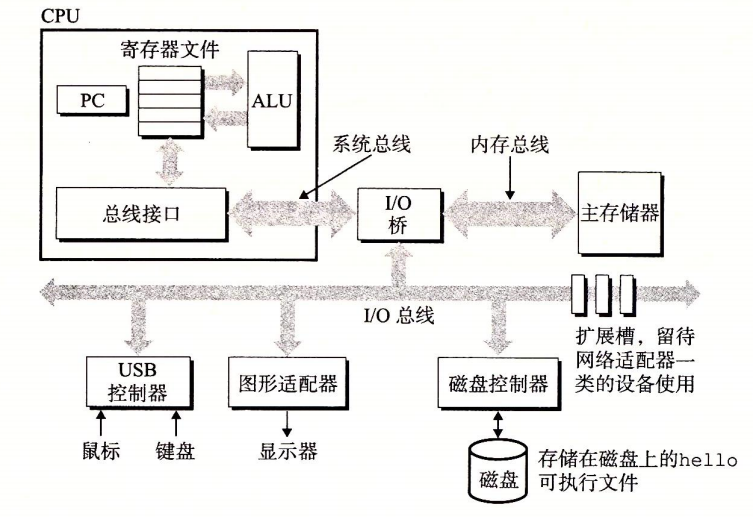
系统的硬件组成
-
总线
是贯穿系统的一组电子管道,携带信息字节进行传递。传送定长的字节块word(字)。字中的字节数随系统不同,为基本系统参数,如:4字节(32位),8字节(64位)。
系统总线、内存总线、I/O总线
-
I/O设备
负责系统与外部联系。输入的键盘和鼠标、输出的显示器、长期存储的磁盘等等。
I/O设备通过控制器或者适配器与I/O总线相连。
-
控制器和适配器区别
封装方式不同。
控制器:I/O设备本身或系统主板上的芯片组。
适配器:一块插在主板插槽上的卡。
-
-
主存
是临时存储设备,存放程序和程序处理的数据。
物理上是动态随机存取处理器(DRAM)芯片组成;逻辑上是一个线性的字节数组,各个字节地址唯一,地址从零开始。
-
处理器
中央处理单元(CPU),是解释存储在主存中指令的引擎。
核心是一个大小为一个字的存储设备,叫程序计数器(PC),指向主存中的某条机器语言指令(的地址)。从通电开始,处理器不断执行PC指向的指令,再更新PC并执行下一条指令。
处理器按照指令操作模型(由指令集架构决定)来操作,在模型中,指令按照严格顺序进行执行,执行一条指令包括:cpu从pc指向内存读取指令,解释指令中的位,执行指令指示的简单操作,更新pc以指向下条指令。
如上简单操作并不多,它们围绕主存、寄存器文件[一个小的存储设备,由一些单个字长的寄存器组成,各自名字唯一]、算术/逻辑单元(ALU)[计算新的数据和地址值]进行。
- 简单操作
-
加载
从主存复制一个字节或者字到寄存器,覆盖寄存器原来内容
-
存储
从寄存器复制一个字节或者一个字到主存的某个位置,以覆盖这个位置上原来的内容。
-
操作
把两个寄存器的内容复制到ALU,ALU对这两个字做算术运算,并将结果存放到一个寄存器中,以覆盖该寄存器中原来的内容。
-
跳转
从指令本身中抽取一个字,并将这个字复制到程序计数器(PC)中,以覆盖pc中原来的值
-
处理器形式上是指令集架构的简单实现,实际上使用了非常复杂的机制来加速程序的执行。因此将处理器的指令集架构和处理器的微体系结构区分开来:指令集架构描述的是每条机器代码指令的效果;而微体系结构描述的是处理器实际上是如何实现的。
- 简单操作
4.2 运行程序
过程:
shell程序执行指令,等待输入命令;输入./hello,shell程序将字符逐一读入寄存器,再存入内存;敲回车,执行命令;加载hello文件,将其中代码和数据从磁盘复制到主存。
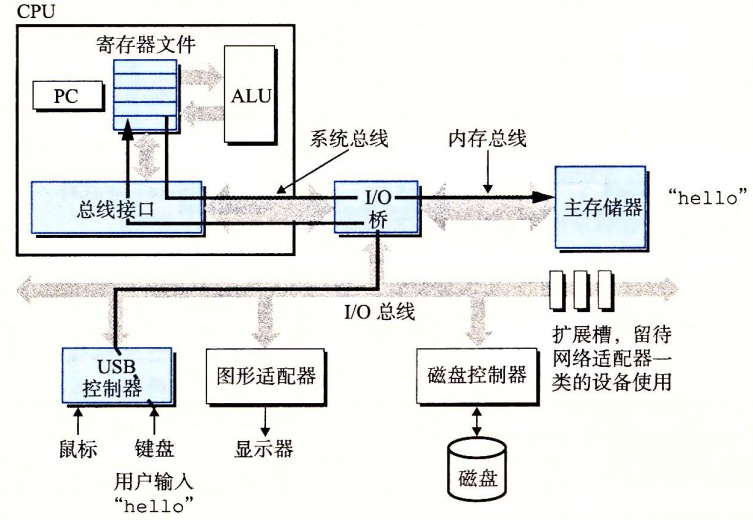
读取hello命令
使用直接存储器存取(DMA),数据可以不通过处理器直接从磁盘到主存。
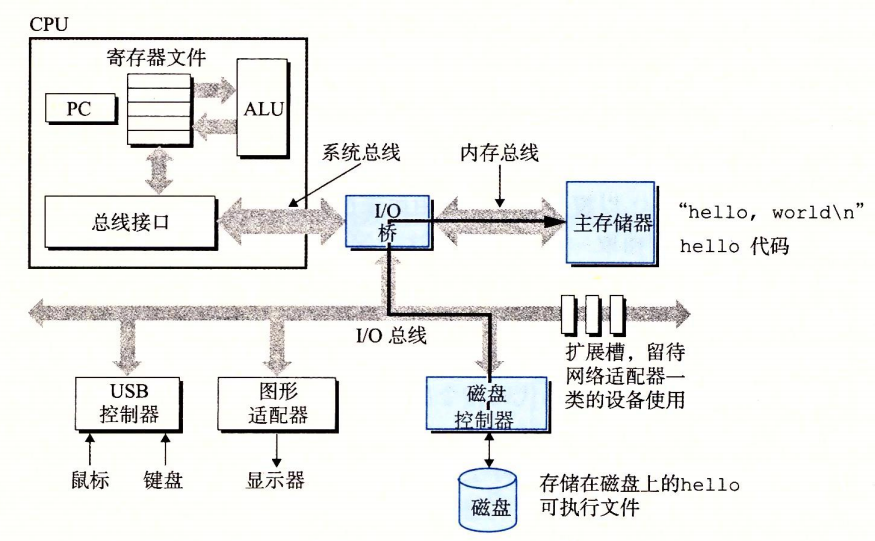
磁盘加载可执行文件到主存
然后开始执行hello程序的main中的机器语言指令,将“hello world! C”字符串中的字节从主存复制到寄存器,再从寄存器复制到显示设备,最终显示在屏幕。
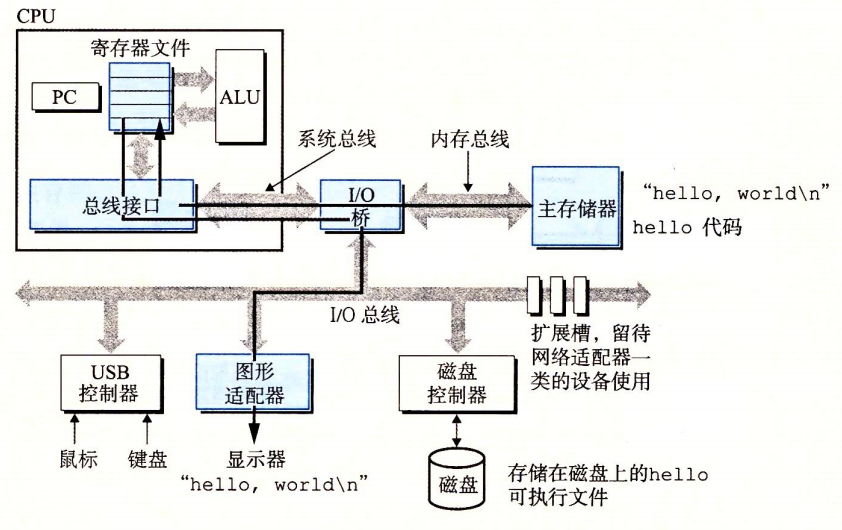
字符串输出到屏幕
5 高速缓存重要
如上可以发现,系统花费了大量时间用于信息的移动,这些复制在一定程度上减慢了程序的工作。
针对处理器和主存速度上的差异,使用高速缓存存储器(cache),存放近期可能使用的信息。L1缓存、L2缓存…使用静态随机访问存储器(SRAM)硬件技术实现。利用高速缓存的局部性原理:程序具有访问剧本区域里的数据和代码的趋势。
利用高速缓存可以使程序的性能提高一个数量级。
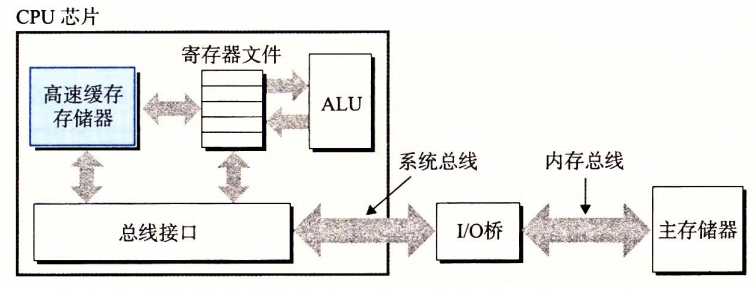
高速缓存存储器 cache
6 存储设备的层次结构
存储器层次结构,在处理器和一个较大较慢的设备间插入更小更快的存储设备。
主要思想是使用上一层的存储器作为低一层存储器的高速缓存。
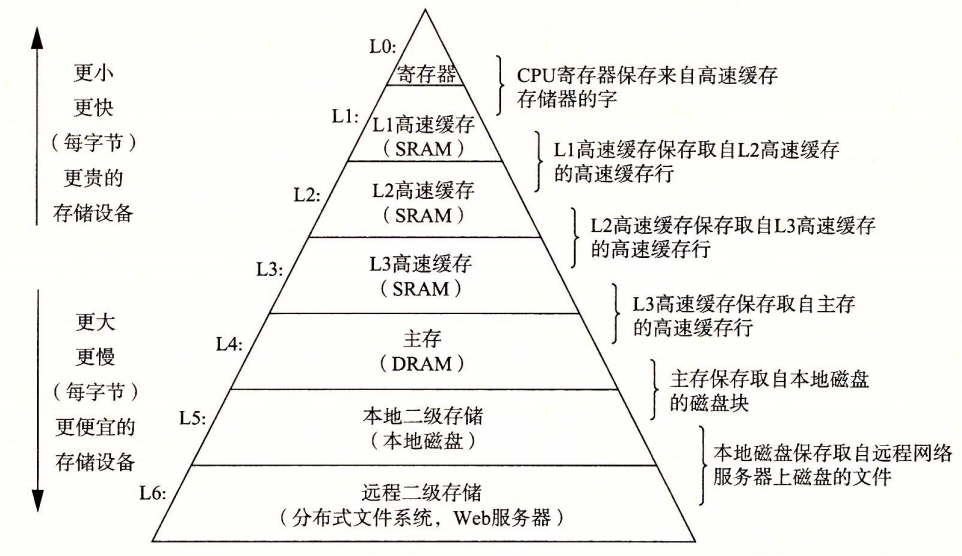
存储器层次结构
7 操作系统管理硬件
程序通过操作系统提供的服务来访问硬件。所有应用程序对硬件的操作都必须通过操作系统。
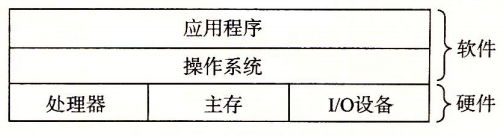
计算机系统分层视图
操作系统可以防止硬件被失控的应用程序滥用和向应用程序提供简单一致的机制来控制复杂不同的硬件设备。其实现是由几个抽象概念(进程、虚拟内存、文件)来实现。
文件是对I/O设备的抽象,虚拟内存是对主存和I/O设备的抽象,进程是对处理器、主存和I/O设备的抽象。
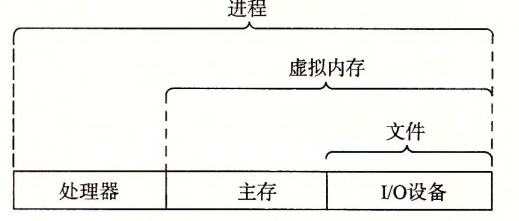
操作系统提供的抽象表示
7.1 进程
程序运行时,操作系统会提供当前程序正在独占处理器、主存和I/O设备的假象。该假象是通过进程来实现的。
进程是操作系统对正在运行的程序的抽象。一个系统可以有多个进程同时运行,而每个进程好像各自独占着使用硬件。
并发运行是指一个进程指令和另一个进程指令交错执行。其通过处理器在进程间切换来实现,实现的机制被称为上下文切换。
上下文是操作系统跟踪的进程运行所需的所有状态信息的这种状态,包括PC、寄存器的当前值、主存内容等等。由于单处理器系统只能执行一个进程的代码,当需要运行其他进程时,就需要上下文切换(保存当前进程的上下文,恢复新进程的上下文)。
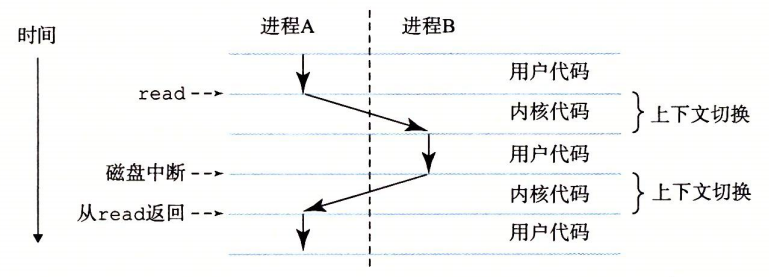
进程的上下文切换
如图,进程的切换是由操作系统内核(kernel)管理的,即操作系统代码常驻主存的部分,是操作系统管理全部进程所用代码和数据结构的集合。当应用程序需要操作系统功能时,内核就会执行一条特殊的系统调用(system call)指令,将控制权传递给内核。然后内核执行请求的操作,再返回给应用程序。
7.2 线程
一个进程可以由多个执行单元(线程)组成,每个线程运行在进程的上下文中,共享同样的代码和全局数据。多线程相较多进程更容易共享数据,因此线程一般比进程高效。
7.3 虚拟内存
虚拟内存为进程提供了其独占地使用主存的假象。每个进程看到的内存一致,称为虚拟地址空间。Linux中地址空间最上的区域是给操作系统中的代码和数据的,底部存放用户进程定义的代码和数据。
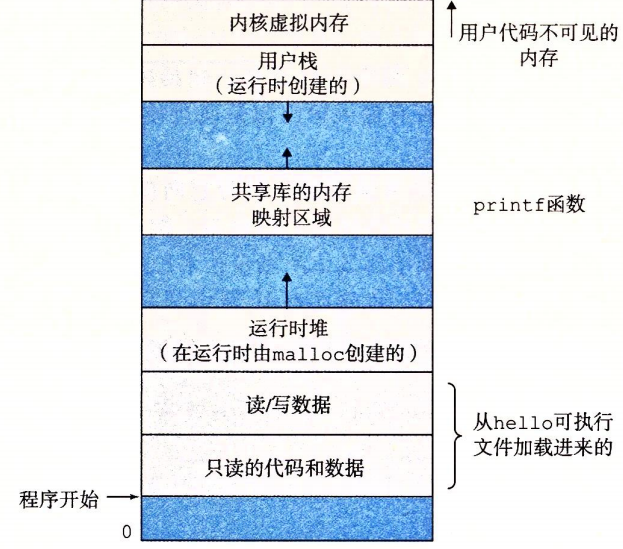
虚拟地址空间
-
程序代码和数据
对所有进程而言,代码从同一固定地址开始,然后是C全局变量相对应的数据位置。
-
堆
运行时堆,当调用类似
malloc和free时,堆可以在运行时动态地扩展和收缩。 -
共享库
空间的中间存放类似于C标准库和数学库的共享库代码和数据。
-
栈
用户栈位于用户虚拟内存空间顶部,编译器用它实现函数调用,同样可以在运行时动态地扩展和收缩。当调用一个函数时,栈增长;一个函数返回时,栈收缩。
-
内核虚拟内存
位于地址空间顶部。不允许应用程序读写其所在区域内容或直接调用内核代码定义的函数,必须通过内核来调用。
基本思想是把一个进程虚拟内存的内容存储在磁盘上,然后用主存作为磁盘的高速缓存。
7.4 文件
文件就是字节序列,每个I/O设备都可以看成文件。linux系统的输入输出都是通过使用一小组称为Unix I/O的系统函数调用读写文件来实现的。
文件向应用程序提供了一个统一的视图来看待各种I/O设备。
8 系统间网络通信
从单独系统来看,网络可以视为一个I/O设备。系统可以读取从其他机器发来的数据,并把数据复制到自己的主存。
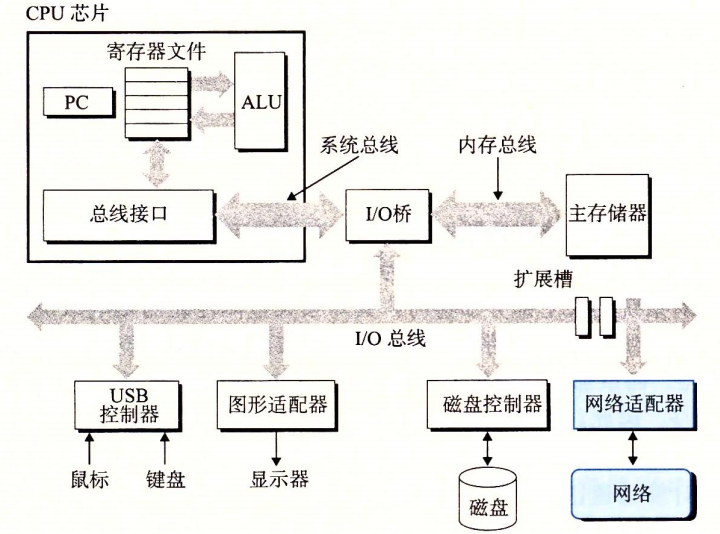
网络设备I/O
对于hello程序,我们也可以通过远程服务器来运行,通过网络与其通信,并获取返回结果。

利用telnet通过网络远程运行hello
9 重要主题
9.1 Amdahl定律
对系统部分加速时,对系统整体响取决于该部分的重要性和加速程度。
为该部分时间于总时间占比,为性能提升比例。
计算加速比
当k趋向于无穷时,
9.2 并发和并行
并发:指一个同时具有多个活动的系统;并行:指用并发来使系统运行更快。
-
线程级并发
使用进程,可以同时让多个程序执行,从而导致并发。这种并发是模拟出来的,是一台计算机在其执行的进程间快速切换来实现,可以允许多个用户同时与系统交互、用户同时运行多个任务。
多核处理器是将多个CPU集成到一个集成电路芯片上。
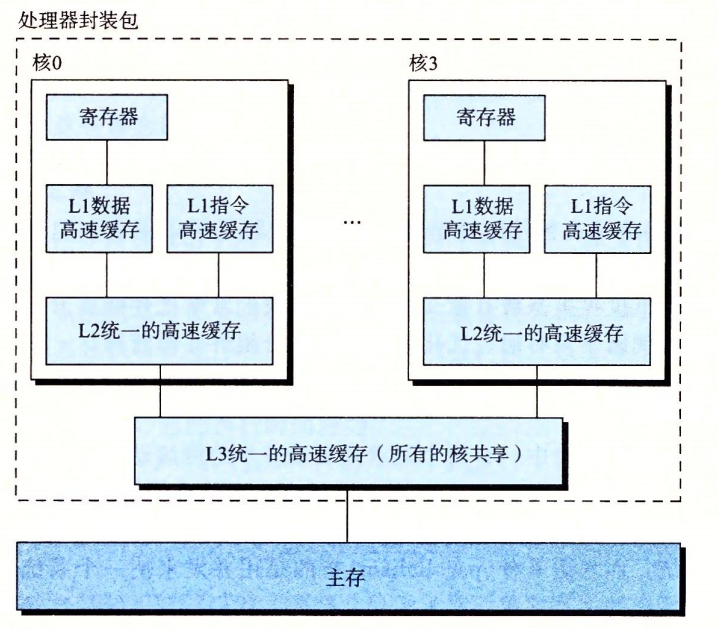
多核处理器
超线程,或称同时多线程,是项允许一个CPU执行多个控制流的技术。超线程处理器可以在单个周期的基础上决定要执行哪个线程,使CPU能更好地利用其处理资源。
多处理器对系统性能的提高:1.减少了多个任务模拟并发的需要;2.让应用程序运行更快(需要程序以多线程方式编写)
-
指令级并行
指处理器可以同时执行多条指令。处理器通过流水线的使用,提高了指令的执行速率。将指令执行划分成不同步骤,将处理器硬件组织成一系列阶段,每个阶段执行一个步骤。阶段并行操作,处理不同指令的不同步骤。
超标量处理器—有比一个周期一条指令更快的执行速率的处理器。
-
单指令、多数据并行
通过处理器的特殊硬件,允许一条指令产生多个可以并行执行的操作,称为单指令、多数据,即SIMD并行。大多是为了提高处理影像、声音和视频数据应用的执行速度。可以使用编译器支持的特殊向量数据类型来写程序。
9.3 抽象的重要性
抽象的使用是计算机科学中最为重要的概念之一。
在处理器中,指令集架构提供对实际处理器硬件的抽象。
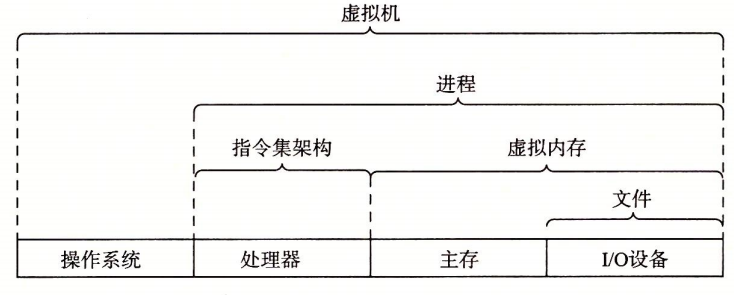
计算机系统的抽象
虚拟机是对整个计算机的抽象,包括操作系统、处理器和程序。
A computer system consists of hardware and system software, which work together to run applications.
#include<stdio.h>int main(){ printf("hello world! C"); return 0;}Trace the life cycle of the program hello.c → creation, execution, output, termination.
1 Information = Bit + Context
hello.c is the source program, the beginning of the hello program, a text file written by the programmer—composed of bytes (8 bits per group).
Most use the ASCII standard. Programs are stored in files as a sequence of bytes, with the integer value of each byte corresponding to a character. Files consisting only of ASCII characters are called text files, while other files are called binary files.
The basic idea: all information in a system is represented by a string of bits. Data objects are distinguished by the context of the data. The machine representation of numbers is different from their actual values, and is a finite-precision approximation of truth values.
2 Programs translated by other programs into different formats
High-level C language — translation —> low-level machine language instructions — packaging —> executable target program
gcc -o hello hello.c./hello
Compiler system
Compiler system: preprocessor, compiler, assembler, linker
-
Preprocessing
The preprocessor (cpp) modifies the original program according to # directives, inserting the contents of header files directly into the program text.
hello.c—cpp—>hello.i
-
Compilation
The compiler (ccl) translates the previous step’s .i file into a .s file, containing an assembly language program.
hello.i—ccl—>hello.s
-
Assembling
The assembler (as) translates the .s file into machine language instructions, and packages them into a relocatable object file, stored in the .o binary file.
hello.s—as—>hello.o
-
Linking
The linker (ld) merges the current .o file with precompiled target files for library functions, producing an executable target file that can be run by the system.
hello.o+printf.o—ld—>hello
3 How understanding the compilation system helps
- Improve runtime performance
- Understand linker errors
- Avoid security vulnerabilities
4 How the processor fetches and interprets instructions
4.1 System hardware components
System hardware components
-
Buses
A set of electronic channels that run through the system and carry information bytes. They transfer fixed-length groups of bytes called words. The number of bytes per word varies by system, as a basic system parameter, e.g., 4 bytes (32-bit), 8 bytes (64-bit).
System buses, memory buses, I/O buses
-
I/O devices
Responsible for the system’s contact with the outside world. Input devices such as keyboards and mice, output displays, long-term storage disks, and so on.
I/O devices connect to the I/O bus through controllers or adapters.
-
Difference between controllers and adapters
Packaging methods differ.
Controller: the I/O device itself or the chipset on the system motherboard.
Adapter: a card plugged into a motherboard slot.
-
-
Main memory
A temporary storage device that stores programs and the data they operate on.
Physically, it is composed of Dynamic Random-Access Memory (DRAM) chips; logically, it is a linear array of bytes with unique addresses starting at zero.
-
Processor
Central Processing Unit (CPU), the engine that interprets instructions stored in main memory.
The core is a storage unit the size of one word, called the program counter (PC), which points to the address of a machine-language instruction in memory. From power-on, the processor continually executes the instruction pointed to by the PC, then updates the PC to the next instruction.
The processor operates according to an instruction execution model (defined by the instruction set architecture). In the model, instructions are executed in strict sequence. To execute one instruction, the CPU reads the instruction from memory via the PC, decodes the bits in the instruction, performs the simple operations the instruction specifies, and updates the PC to point to the next instruction.
The simple operations are not many; they revolve around the main memory, the register file [a small storage device consisting of registers of fixed word length, each with a unique name], and the Arithmetic/Logic Unit (ALU) [computes new data and address values].
- Simple operations
-
Load
Copy a byte or a word from main memory into a register, overwriting the register’s previous contents
-
Store
Copy a byte or a word from a register into a location in main memory, overwriting whatever was there.
-
Operate
Copy the contents of two registers to the ALU, the ALU performs arithmetic on these two words, and stores the result in a register, overwriting the original contents of that register.
-
Jump
Extract a word from the instruction itself and copy this word into the program counter (PC), overwriting the previous value in PC
-
Formally, the processor is a simple implementation of the instruction set architecture, but in practice it uses very complex mechanisms to speed up execution. Therefore the instruction set architecture and the processor’s microarchitecture are distinguished: the instruction set architecture describes the effect of each machine code instruction; the microarchitecture describes how the processor is actually implemented.
- Simple operations
4.2 Running a program
Process:
The shell runs commands and waits for input; when you type ./hello, the shell reads characters into registers one by one, then stores them in memory; press Enter to execute the command; load the hello file, copying its code and data from disk into main memory.
Reading the hello command
Using Direct Memory Access (DMA), data can move directly from disk to main memory without going through the processor.
Disk loads the executable file into main memory
Then begin executing the machine-language instructions in hello’s main, copying the bytes of the string “hello world! C” from main memory to the registers, and then from the registers to the display device, finally shown on the screen.
The string is output to the screen
5 The Importance of Caches
As shown above, the system spends a lot of time moving information; these copies slow the program down to some extent.
To address speed differences between the processor and main memory, use a cache memory (cache) to store recently used information. L1 cache, L2 cache, etc., implemented with Static RAM (SRAM) hardware. By exploiting the locality principle: programs tend to access data and code within a working set.
Using caches can improve program performance by an order of magnitude.
Cache memory
6 Hierarchy of storage devices
A memory hierarchy inserts smaller, faster storage between the processor and a larger, slower device.
Memory hierarchy
7 Operating System Manages Hardware
Programs access hardware through services provided by the operating system. All hardware operations by applications must go through the OS.
Layered view of the computer system
The operating system can prevent hardware from being misused by untrusted applications and provides a simple, consistent mechanism to control a variety of different hardware devices. This is implemented using a few abstractions (processes, virtual memory, files).
Files are an abstraction of I/O devices, virtual memory is an abstraction of main memory and I/O devices, and processes are abstractions of the processor, main memory, and I/O devices.
Abstract representations provided by the operating system
7.1 Processes
During execution, the OS provides the illusion that the current program alone owns the processor, memory, and I/O devices. This illusion is implemented via processes.
A process is the OS’s abstraction of a running program. A system can have multiple processes running simultaneously, and each process appears to have exclusive use of the hardware.
Concurrency means that instructions from one process and another process are interleaved in execution. This is achieved by the processor switching between processes, a mechanism called context switching.
Context switching of a process
As shown, process switching is managed by the OS kernel (kernel), the portion of OS code resident in main memory, a collection of code and data structures used to manage all processes. When an application needs OS functionality, the kernel executes a special system call instruction, transferring control to the kernel. Then the kernel performs the requested operation and returns to the application.
7.2 Threads
A process can consist of multiple execution units (threads), each running in the process’s context and sharing the same code and global data. Threads are generally more efficient than processes because they share data more easily.
7.3 Virtual Memory
Virtual memory provides a process with the illusion of exclusive use of main memory. Each process sees a consistent memory space, called the virtual address space. In Linux, the top region of the address space is for the OS code and data, and the bottom stores the user process-defined code and data.
-
Program code and data
For all processes, the code starts at the same fixed address, followed by the data locations corresponding to C global variables.
-
Heap
The run-time heap, which can dynamically grow and shrink when malloc and free are called.
-
Shared libraries
The middle portion stores shared library code and data, such as the C standard library and math library.
-
Stack
The user stack sits at the top of the user virtual memory space, used by the compiler to implement function calls, and can also dynamically grow and shrink at runtime. When a function is called, the stack grows; when a function returns, the stack shrinks.
-
Kernel virtual memory
Located at the top of the address space. Applications are not allowed to read or write the contents of its region or directly call kernel code-defined functions; calls must go through the kernel.
The basic idea is to store a process’s virtual memory contents on disk and use main memory as a cache for the disk.
7.4 Files
Files are sequences of bytes, and every I/O device can be viewed as a file. Linux I/O is implemented by reading and writing files using a small set of system calls known as Unix I/O.
Files provide applications with a uniform view of various I/O devices.
8 Inter-system Network Communication
From the perspective of a single system, the network can be viewed as an I/O device. A system can read data sent from other machines and copy it into its own main memory.
Network device I/O
For the hello program, we can also run it via a remote server, communicate with it over the network, and obtain the results.
Run hello remotely over the network using Telnet
9 Key Topics
9.1 Amdahl’s Law
When speeding up part of a system, the overall system speedup depends on the importance and the speedup of that part.
α is the fraction of the total time spent in that part, k is the speedup factor.
Compute the speedup S = T_old / T_new
As k tends to infinity,
9.2 Concurrency and Parallelism
Concurrency: a system with multiple active activities at once; parallelism: using concurrency to make the system run faster.
-
Thread-level concurrency
Using processes, multiple programs can run concurrently. This concurrency is simulated by fast switching between processes on a single computer, enabling multiple users to interact with the system simultaneously and users to run multiple tasks at the same time.
A multi-core processor integrates multiple CPUs on a single integrated circuit die.
Multi-core processors
Hyper-threading, or simultaneous multithreading, is a technique that allows a CPU to execute multiple control flows. Hyper-threading processors can decide which thread to execute on a per-cycle basis, enabling better use of the processor’s resources.
Performance gains from multiple processors: 1. reduces the need to simulate concurrency for multiple tasks; 2. makes applications run faster (requires multi-threaded programming)
-
Instruction-level parallelism
Refers to the ability of a processor to execute multiple instructions simultaneously. Processors increase instruction throughput through pipelining. Splitting instruction execution into different steps, organizing processor hardware into a series of stages, with each stage performing one step. Stages operate in parallel, processing different steps of different instructions.
A superscalar processor is one that can execute more than one instruction per cycle.
-
Single Instruction, Multiple Data (SIMD) parallelism
Through special hardware in the processor, a single instruction can produce multiple parallel operations, called SIMD parallelism. It is largely used to speed up processing of images, sound, and video data. You can write programs using special vector data types supported by the compiler.
9.3 The Importance of Abstraction
The use of abstraction is one of the most important concepts in computer science.
In the processor, the instruction set architecture provides an abstraction of the actual processor hardware.
Abstractions of computer systems
Virtual machines are abstractions of an entire computer, including the operating system, processor, and programs.
コンピュータシステムはハードウェアとシステムソフトウェアで構成され、アプリケーションを実行するために協力して動作します。
#include<stdio.h>int main(){ printf("hello world! C"); return 0;}hello.cのライフサイクルを追跡する → 作成、実行、出力、終了。
1 情報=ビットとコンテキスト
hello.cはソースプログラムであり、Helloプログラムの出発点、プログラマが作成したテキストファイル—8ビットから成るバイト列で構成されている。
ほとんどはASCII標準を使用します。プログラムはファイル中にバイト列として保存され、各バイトの整数値が1文字に対応します。ASCII文字だけからなるファイルをテキストファイルと呼び、そうでないファイルはバイナリファイルと呼ばれます。
基本的な考え方:システム内のすべての情報はビットの列として表されます。データの文脈によって異なるデータオブジェクトを区別します。数値の機械表現は実際の値とは異なり、真理値の有限近似です。
2 プログラムは他のプログラムによって異なる形式へ翻訳される
高度なC言語—変換—>低級機械語指令—パッケージ化—>実行可能ターゲットプログラム
gcc -o hello hello.c./hello
コンパイルシステム
コンパイルシステム:プリプロセッサ、コンパイラ、アセンブラ、リンカ
-
プリプロセス
プリプロセッサ(cpp)は # で始まる命令に従って原始プログラムを修正し、ヘッダファイルの内容をプログラム本文に直接挿入します。
hello.c—cpp—>hello.i
-
コンパイル
コンパイラ(ccl)は前の.iファイルを .s ファイルへ翻訳し、アセンブリ言語プログラムを含みます。
hello.i—ccl—>hello.s
-
アセンブリ
アセンブラ(as)は .s ファイルをマシン語命令へ翻訳し、再配置可能なターゲットプログラムとして、.o のバイナリファイルに保存します。
hello.s—as—>hello.o
-
リンケージ
リンカ(ld)は現在の .o ファイルとライブラリ関数を呼び出すプリコンパイル済みターゲットファイルを結合し、実行可能なターゲットファイルを得て、システムで実行可能になります。
hello.o+printf.o—ld—>hello
3 コンパイルシステムの利点を理解する
- クエリ性能の最適化
- リンケージ時に発生するエラーの理解
- 安全性の脆弱性を回避する
4 プロセッサが命令を読み取り解釈する
4.1 システムハードウェアの構成
システムのハードウェア構成
-
バス
システムを貫く一連の電子的パイプで、情報をバイト単位で伝送します。固定長のバイトブロック(ワード)を伝送します。ワード内のバイト数はシステムによって異なり、基本的なシステムパラメータとして例として4バイト(32ビット)、8バイト(64ビット)などがあります。
システムバス、メモリバス、I/Oバス
-
I/Oデバイス
システムと外部との連絡を担います。入力のキーボードとマウス、出力のディスプレイ、長期保存のディスクなど。
I/Oデバイスはコントローラまたはアダプタを介してI/Oバスに接続されます。
-
コントローラとアダプタの違い
パッケージ化方式が異なります。
コントローラ:I/Oデバイス自体、またはシステムマザーボード上のチップセット。
アダプタ:マザーボードのスロットに挿さるカード。
-
-
主記憶(メインメモリ)
一時的な記憶装置で、プログラムとプログラムが処理するデータを格納します。
物理的にはダイナミックRAM(DRAM)チップで構成され、論理的には連続したバイト配列で、各バイトのアドレスは一意で、アドレスは0から始まります。
-
プロセッサ
中央処理装置(CPU)は、主記憶に格納された命令を解釈するエンジンです。
コアは1ワード分のストレージ装置で、プログラムカウンタ(PC)と呼ばれ、主記憶中のある機械語命令のアドレスを指します。電源投入後、プロセッサはPCが指す命令を絶えず実行し、PCを更新して次の命令を実行します。
プロセッサは命令操作モデル(ISAにより決定)に従って動作します。モデル内では命令は厳密な順序で実行され、1つの命令を実行するには、PCからメモリへ命令を読み取り、命令のビットを解釈し、命令が指示する単純な操作を実行し、PCを更新して次の指令へ向けます。
上記の単純な操作は多くはなく、それらは主記憶、レジスタファイル(小さな記憶デバイスで、いくつかの単一ワード長のレジスタから成り、それぞれ名前は一意)、 算術/論理演算ユニット(ALU)[新しいデータとアドレス値を計算]を中心に展開します。
- 単純操作
-
ロード
主記憶から1バイトまたは1ワードをレジスタへコピーし、レジスタの元の内容を上書きします。
-
ストア
レジスタから1バイトまたは1ワードを主記憶のある位置へコピーし、その位置の元の内容を上書きします。
-
演算
2つのレジスタの内容をALUへコピーし、ALUがこの2つの数で算術演算を行い、結果を1つのレジスタに格納して、そのレジスタの元の内容を上書きします。
-
ジャンプ
命令自体から1ワードを取り出し、そのバイトをプログラムカウンタ(PC)へコピーして、PCの元の値を上書きします。
-
表面的には、プロセッサはISAの単純実装ですが、実際にはプログラムの実行を加速するために非常に複雑な仕組みを使用しています。したがって、プロセッサのISAとマイクロアーキテクチャを区別します:ISAは各機械コード命令の効果を記述し、マイクロアーキテクチャはプロセッサが実際にどのように実現されているかを記述します。
- 単純操作
4.2 プログラムの実行
手順:
シェルはコマンドを実行し、コマンド入力を待ちます。./helloと入力すると、シェルは文字を1文字ずつレジスタへ読み込み、それをメモリへ格納します。エンターを押すとコマンドが実行されます。helloファイルをロードし、その中のコードとデータをディスクから主記憶へコピーします。
hello コマンドの読み取り
DMA(直接メモリアクセス)を使用して、データはプロセッサを経由せずにディスクから主記憶へ直接転送されます。
ディスクは実行可能ファイルを主記憶へロードします
次に、helloプログラムのmain内の機械語命令を実行し、‘hello world! C’ という文字列のバイトを主記憶からレジスタへ、そしてレジスタから表示装置へコピーし、最終的に画面に表示されます。
文字列を画面へ出力
5 キャッシュの重要性
上記のとおり、システムは情報の移動に多くの時間を費やします。これらのコピーは、ある程度、プログラムの動作を遅くします。
プロセッサと主記憶の速度差を埋めるため、キャッシュメモリ(cache)を使用します。最近使用される可能性がある情報を格納します。L1キャッシュ、L2キャッシュ…、SRAMハードウェア技術を使用して実装します。キャッシュの局所性原理を利用します:プログラムはデータとコードを頻繁にアクセスする傾向があります。
キャッシュを活用することで、プログラムの性能を1桁向上させることができます。
高速缓存存储器 cache
6 保存デバイスの階層構造
メモリ階層構造は、プロセッサと比較的大きくて遅いデバイスとの間に、より小さく高速な記憶装置を挿入する考え方です。
主な考え方は、上一層の記憶を低い層の記憶の高速キャッシュとして使用することです。
メモリ階層構造
7 オペレーティングシステムがハードウェアを管理する
プログラムは、OSが提供するサービスを通じてハードウェアにアクセスします。すべてのアプリケーションによるハードウェアの操作はOSを通じて行われなければなりません。
コンピュータシステムの階層ビュー
OSは、ハードウェアが制御不能なアプリケーションに乱用されるのを防ぎ、複雑で異なるハードウェアデバイスを制御するための、アプリケーションに対して単純で一貫したメカニズムを提供します。その実現は、いくつかの抽象概念(プロセス、仮想メモリ、ファイル)によって実現されます。
ファイルはI/Oデバイスの抽象、仮想メモリは主記憶とI/Oデバイスの抽象、プロセスは処理系、主記憶、I/Oデバイスの抽象です。
OSが提供する抽象表現
7.1 プロセス
プログラムが実行されると、OSは現在のプログラムが独占的にプロセッサ、主記憶、I/Oデバイスを使用しているという仮想を提供します。その仮想はプロセスを通じて実現されます。
プロセスは、実行中のプログラムをOSが持つ抽象です。1つのシステムには複数のプロセスが同時に実行されることがありますが、それぞれのプロセスはハードウェアを独占しているように見えます。
並行に実行されるとは、1つのプロセスの命令と別のプロセスの命令が交互に実行されることを指します。これは、プロセッサがプロセス間で切り替わることによって実現します。その仕組みはコンテキストスイッチと呼ばれます。
プロセスのコンテキストスイッチ
図のように、プロセスの切り替えはOSのカーネル(kernel)によって管理されます。OSのコードは主記憶に常駐する部分で、全てのプロセスを管理するコードとデータ構造の集合です。アプリケーションがOS機能を必要とするとき、カーネルは特別なシステムコール(system call)命令を実行して制御をカーネルへ渡します。その後、カーネルは要求された操作を実行し、再度アプリケーションへ戻します。
7.2 スレッド
1つのプロセスは、複数の実行単位(スレッド)で構成されることがあり、各スレッドはプロセスのコンテキスト内で動作し、同じコードと全局データを共有します。マルチスレッドはマルチプロセスよりデータ共有が容易なため、スレッドは通常プロセスより効率的です。
7.3 仮想メモリ
仮想メモリは、プロセスに対して独占的に主記憶を使用しているかのような仮想感を提供します。各プロセスが見るメモリは一様で、仮想アドレス空間と呼ばれます。Linuxでは、アドレス空間の最上部の領域がOSのコードとデータの領域で、下部にはユーザープロセスが定義するコードとデータが格納されます。
仮想アドレス空間
-
プログラムのコードとデータ
すべてのプロセスにとって、コードは同じ固定アドレスから開始し、その後にCのグローバル変数に対応するデータ領域が続きます。
-
ヒープ
実行時のヒープ。mallocやfreeの呼び出しによって、実行時に動的に拡張・縮小します。
-
共有ライブラリ
C標準ライブラリや数学ライブラリのような共有ライブラリのコードとデータが中間部に格納されます。
-
スタック
ユーザスタックはユーザ仮想メモリの最上部にあり、関数呼び出しを実現するために使用されます。実行時にも動的に拡張・縮小します。関数を呼び出すとスタックは増え、関数が戻るとスタックは縮みます。
-
カーネル仮想メモリ
アドレス空間の最上部に位置します。アプリケーションはその領域の内容を読み書きしたり、カーネルコードが定義する関数を直接呼ぶことは許されず、必ずカーネルを経由して呼び出します。
基本的な考え方は、1つのプロセスの仮想メモリの内容をディスク上に保存し、主記憶をディスクの高速キャッシュとして使用することです。
7.4 ファイル
ファイルはバイト列であり、各I/Oデバイスはファイルとして見ることができます。Linuxシステムの入出力は、Unix I/Oと呼ばれる一連のシステム関数呼び出しを用いてファイルを読み書きすることで実現されます。
ファイルはアプリケーションに対して、さまざまなI/Oデバイスを一様に扱うビューを提供します。
8 システム間ネットワーク通信
1台のシステムから見ると、ネットワークはI/Oデバイスとして扱えます。システムは他のマシンから送られてくるデータを読み取り、それを自分の主記憶へコピーします。
ネットワークデバイスI/O
helloプログラムについても、リモートサーバー上で実行し、ネットワークを介して通信し、戻り値を取得することが可能です。
telnetを用いてネットワーク経由でhelloをリモート実行する
9 重要なテーマ
9.1 アムダールの法則
システムの一部を高速化したとき、システム全体のスループットはその部分の重要性と高速化の程度に依存します。
αはその部分が全体時間に占める割合、kは性能向上の倍率です。
加速比S=T_{old}/T_{new}を計算します。
kが無限大に近づくと、
9.2 同時実行と並列性
同時実行(コンカレンシー):同時に複数の活動を持つシステムを指します。並列性(並列処理):並行性を用いてシステムをより速く動作させることを指します。
-
スレッドレベルの並行
プロセスを用いて、複数のプログラムを同時に実行させることができ、これにより並行性が生まれます。この並行性は模擬的なもので、1台の計算機が実行中のプロセス間を高速に切り替えて実現します。これにより、複数のユーザーが同時にシステムと対話したり、同時に複数のタスクを実行したりできます。
マルチコアプロセッサは、複数のCPUを1つの集積回路チップに統合したものです。
マルチコアプロセッサ
ハイパースレッディング、または同時多スレッドは、1つのCPUが複数の実行経路(スレッド)を実行できる技術です。ハイパースレッディング対応のプロセッサは、1サイクルを基準としてどのスレッドを実行するかを決定し、CPUが処理資源をよりよく利用できるようにします。
複数のプロセッサがシステム性能を向上させる理由は2つあります:1) 複数のタスクを模擬的に同時実行する必要が減る、2) アプリケーションがより速く動作する(プログラムをマルチスレッドで書く必要がある場合が多い)
-
命令レベルの並列
プロセッサは同時に複数の命令を実行できます。プロセッサはパイプラインを利用して命令の実行速度を高め、命令の実行を異なる段階に分割して、プロセッサのハードウェアを一連の段階に組織します。各段は1つのステップを実行します。段階は並行して動作し、異なる命令の異なるステップを処理します。
スーパーサカラー・プロセッサ — 1サイクルあたり1命令以上の実行速度を持つプロセッサ。
-
単一命令・多データ並列
プロセッサの特殊なハードウェアを利用して、1つの命令で複数の並列演算を生成する仕組みを、単一命令・多データ(SIMD)並列と呼びます。主に画像・音声・動画データ処理の速度向上を狙います。コンパイラがサポートする特別なベクトルデータ型を用いてプログラムを記述できます。
9.3 抽象の重要性
抽象の利用は、計算機科学において最も重要な概念の1つです。
プロセッサでは、ISAが実際のハードウェアを抽象化します。
コンピュータシステムの抽象
仮想マシンは、OS、プロセッサ、プログラムを含む、コンピュータ全体の抽象です。
部分信息可能已经过时