



1.实验目的
- 了解互联网的域名结构、域名系统DNS及其域名服务器的基本概念
- 熟悉DNS协议及其报文基本组成、DNS域名解析原理
- 掌握常用DNS测量工具dig使用方法和DNS测量的基本技术
2.实验环境
- 硬件要求:阿里云云主机ECS 一台。
- 软件要求:Linux/ Windows 操作系统
3.实验内容
3.1 查看和配置本机的DNS系统
首先查看本机DNS服务器配置情况,其次增加一个DNS服务器:114.114.114.114或者8.8.8.8。
3.2 DNS信息测量
dig是著名的DNS软件 Bind提供的DNS分析和测量工具。Dig可以查询DNS包括NS记录,A记录,MX记录等相关信息的工具,利用它可以进行DNS测量和分析。 安装dig命令并进行以下查询和测量
dig www.xju.edu.cndig aaaa www.xju.edu.cndig cname www.sohu.comdig www.xju.edu.cn @8.8.8.8dig mx xju.edu.cndig ns xju.edu.cn @8.8.8.8dig www.xju.edu.cn +trace 重要dig edu.cn +dnssec @8.8.8.8 重要dig edu.cn +dnssec @114.114.114.114 //解释RRSIG作用参考资料: https://www.isc.org/bind/https://www.cnblogs.com/machangwei-8/p/10353216.html
3.3 DNS协议分析
使用tcpdump抓取DNS查询网络通信数据包,利用wireshark分析UDP和DNS协议数据
4.实验结果与分析
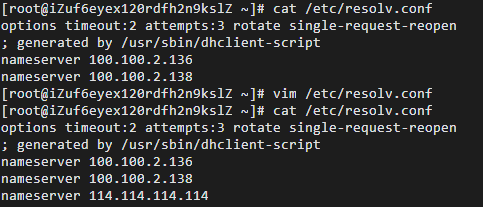
3.1 查看和配置本机的DNS系统
首先查看本机DNS服务器配置情况,其次增加一个DNS服务器:114.114.114.114。
3.2 DNS信息测量
dig是著名的DNS软件 Bind提供的DNS分析和测量工具。Dig可以查询DNS包括NS记录,A记录,MX记录等相关信息的工具,利用它可以进行DNS测量和分析,下面进行以下查询和测量。
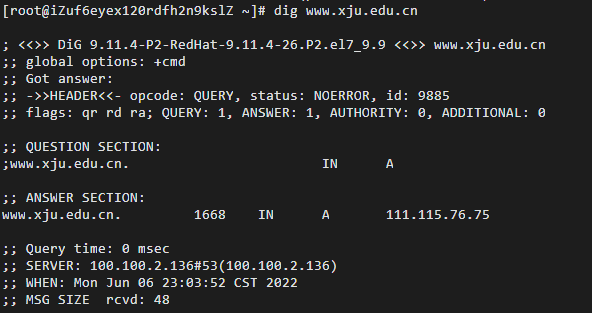
1.****dig www.xju.edu.cn
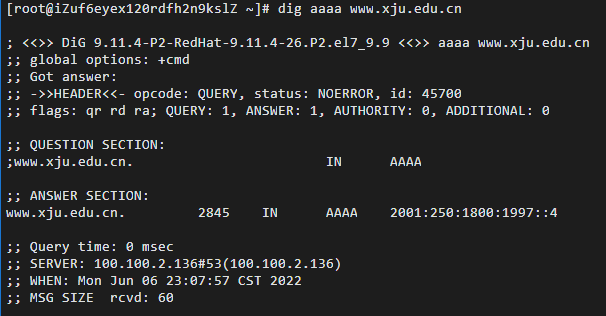
2.****dig aaaa www.xju.edu.cn
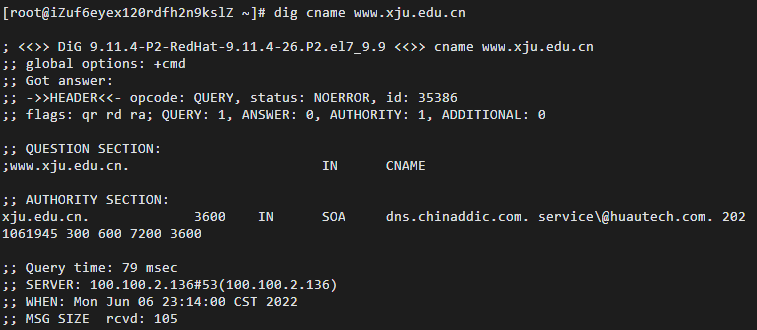
3.****dig cname www.sohu.com
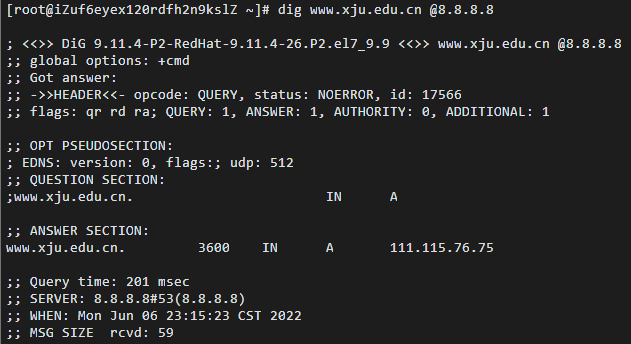
4. dig www.xju.edu.cn @8.8.8.8
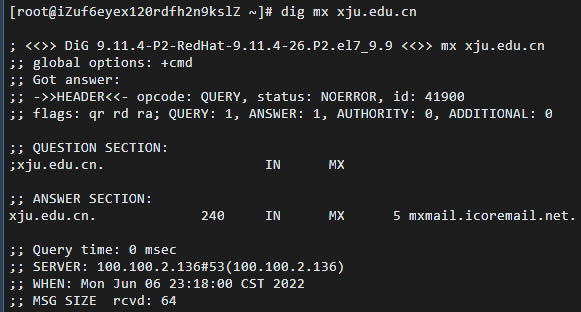
5. dig mx xju.edu.cn
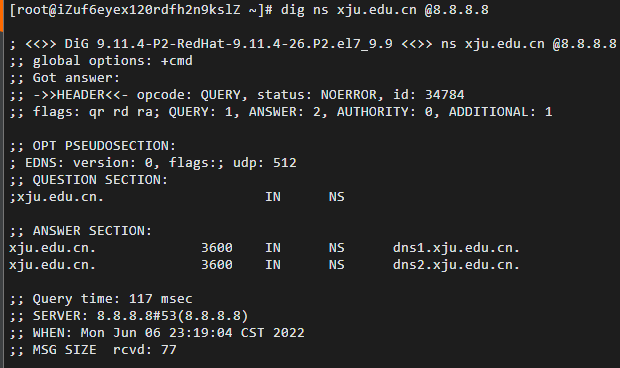
6. dig ns xju.edu.cn @8.8.8.8
7. dig www.xju.edu.cn +trace

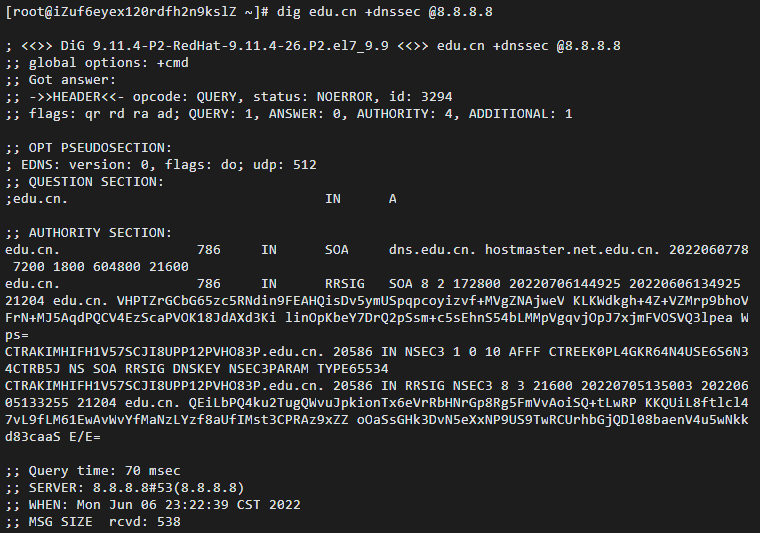
8. dig edu.cn +dnssec @8.8.8.8
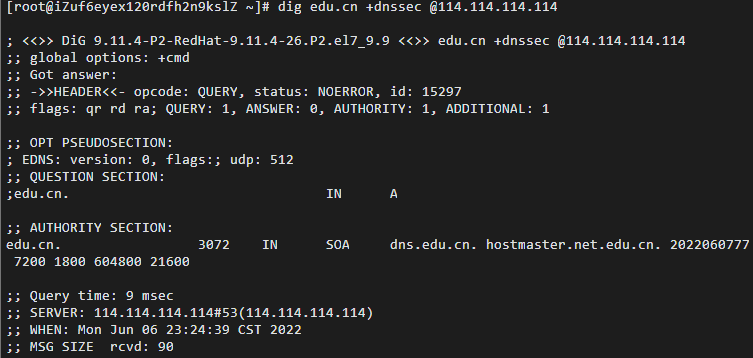
9. dig edu.cn +dnssec @114.114.114.114
3.3 DNS协议分析
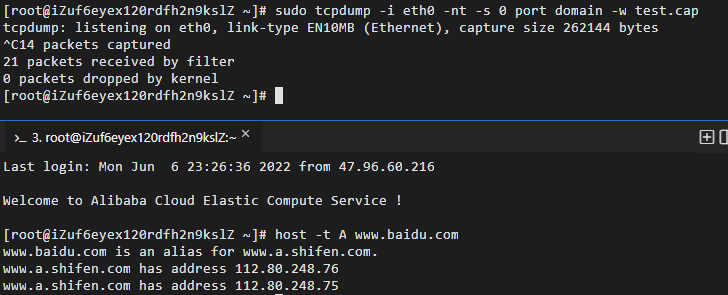
1. 使用**tcpdump**对DNS查询进行抓包
2. 利用**wireshark**进行分析
- DNS查询UDP数据分析
对抓包结果进行dns过滤并分析UDP数据,如下图
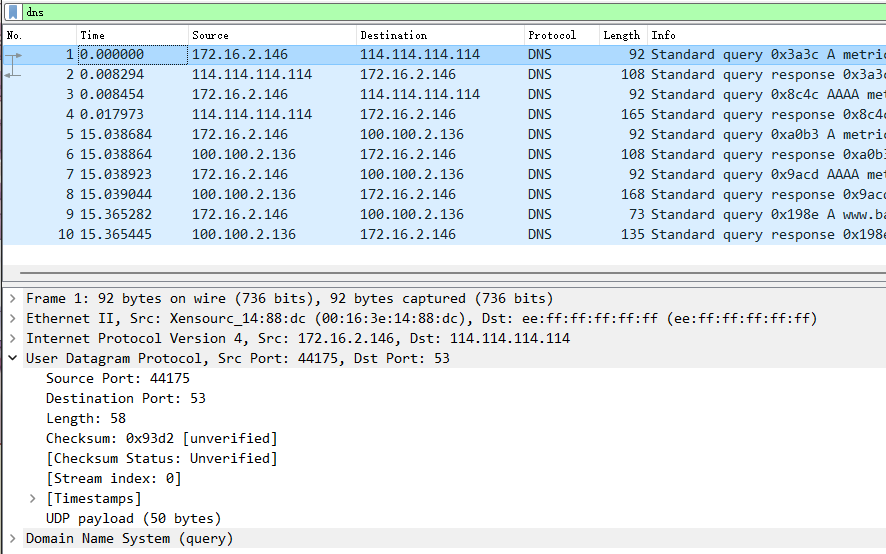
将获取数据填入下表
| 字段名 | 字段值 | 字段信息 |
|---|---|---|
| Source Port | 44175 | Source Port: 44175 |
| Destination Port | 53 | Destination Port: 53 |
| Length | 58 | Length: 58 |
| Checksum | 0x93d2 | Checksum: 0x93d2 [unverified] |
- DNS协议分析
DNS数据包含内容主要有:
| 字段 | 说明 |
|---|---|
| Transaction ID (2字节) | 标识字段,用于辨别DNS应答报文是哪个请求报文的响应 |
| Flags (2字节) | 标志字段,每一位的含义不同 |
| QR (1bit) | 查询/响应标志,0 为查询报文,1 为响应报文 |
| opcode (4bit) | 0 表示标准查询,1 表示反向查询,2 表示服务器状态请求,3-15 是保留值 |
| AA (1bit) | 表示授权回答,该字段在应答的时候才有意义,指出给出应答的服务器是查询域名的授权解析服务器; |
| TC (1bit) | 表示可截断的,用来指出报文比允许的长度还要长,导致被截断 |
| RD (1bit) | 表示期望递归,该字段被请求设置,应答的时候使用的相同的值返回。如果设置了 RD,就建议域名服务器进行递归解析,递归查询的支持是可选的 |
| RA (1bit) | 表示可用递归,该字段在应答中设置或取消,用来代表服务器是否支持递归查询 |
| ZERO (1bit) | 全0保留字段 |
| RCODE (4bit) | 返回码,0为无差错,1为格式错误,2为域名服务器出现错误,3为域参照问题,4为查询类型不支持,5为被禁止,6~15为保留 |
| Questions (2字节) | 问题数,通常为1 |
| Answer RRs (2字节) | 资源记录数 |
| Authority RRs (2字节) | 授权资源记录数 |
| Additional RRs (2字节) | 额外资源记录数 |
| Queries (38字节) | 查询或者响应的正文部分,分为Name Type Class |
| Name (34字节) | 查询名称,这里是ping后的参数,不定长度以0结束 |
| Type (2字节) | 查询类型,这里是主机A记录 |
| Class (2字节) | 类,IN表示Internet数据,通常为1 |
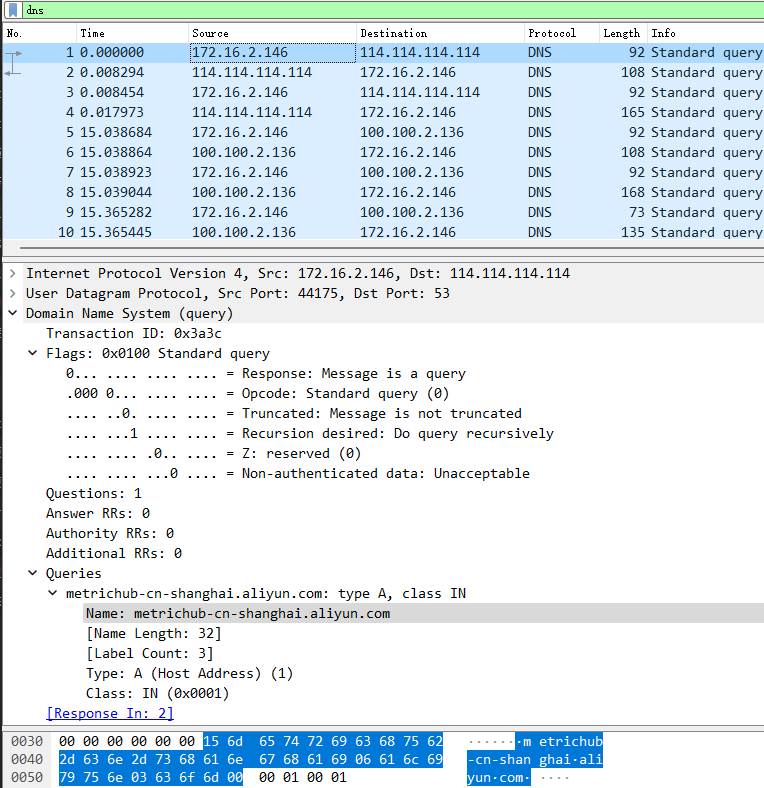
分析请求包
字段名 字段值 字段信息 UDP Dst Port 53 UDP Dst Port: 53 IPv4 Src 172.16.2.146 IPv4 Src: 172.16.2.146 Transaction ID (2字节) 0x3a3c Transaction ID: 0x3a3c QR (1bit) 0 0… … … … = Response: Message is a query opcode (4bit) 0 .000 0… … … = Opcode: Standard query (0) TC (1bit) 0 … ..0. … … = Truncated: Message is not truncated RD (1bit) 1 … …1 … … = Recursion desired: Do query recursively ZERO (1bit) 0 … … .0.. … = Z: reserved (0) Questions (2字节) 1 Questions: 1 Answer RRs (2字节) 0 Answer RRs: 0 Authority RRs (2字节) 0 Authority RRs: 0 Additional RRs (2字节) 0 Additional RRs: 0 Name (34字节) metrichub-cn-shanghai.aliyun.com Name: metrichub-cn-shanghai.aliyun.com Type (2字节) 1 Type: A (Host Address) (1) Class (2字节) 1 Class: IN (0x0001)
- 分析响应包
其中由于Answer RRs为1,所以Answers项中出现一个结果。
Answers字段可以看成一个List,集合中每项为一个资源记录,除了上面提到过的Name,Type,Class之外,还有Time to Live,Data length,Address。
字段名 字段值 字段信息 Time to live 75 Time to live: 75 (1 minute, 15 seconds) Data length 4 Data length: 4 Address 100.100.109.104 Address: 100.100.109.104
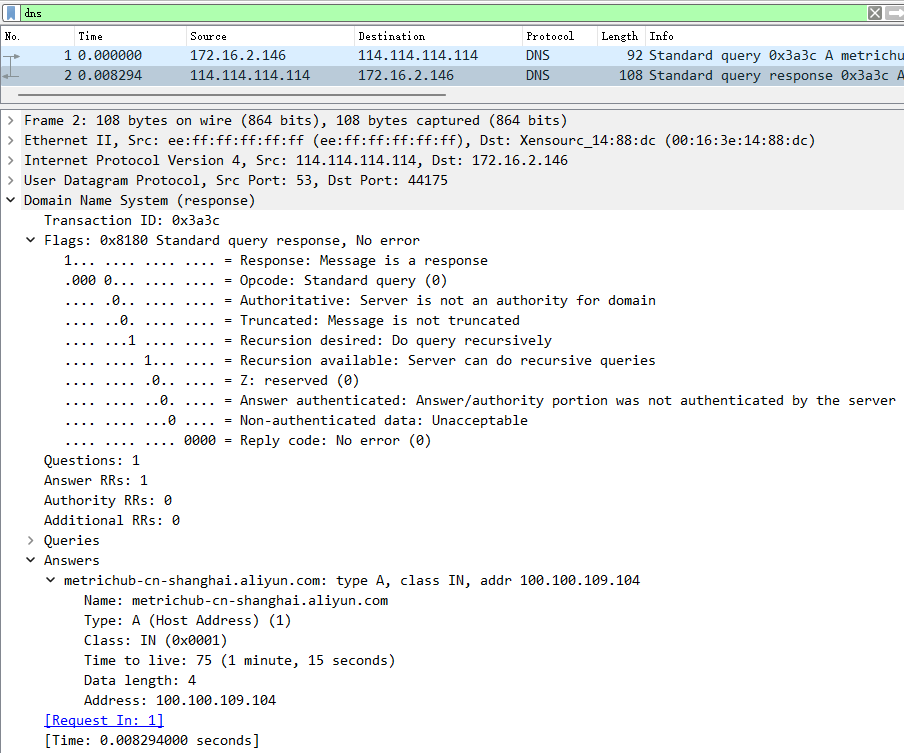
5、实验小结
5.1 问题与解决办法
问题使用dig命令时,出现-bash: dig: command not found错误解决方法此问题是由于未安装dig支持组件,默认系统中缺少bind-utils工具包,使用yum安装即可。yum -y install bind-utils
5.2 心得体会
- 本次实验报告熟系了对DNS协议分析过程中代码及软件的操作,以及对UDP报文的分析与提取,实现对课上知识的印证。通过这次实验,我掌握了dig命令使用中的具体流程,了解了常用DNS协议分析软件的基本用法,提高了自身编程能力。
- 通过这些常用的DNS协议分析命令操作,对DNS协议使用时的跟踪分析,DNS、UDP报文的结构分析,让我印证了上课所学的知识。
1. Objectives
- Understand the Internet’s domain name structure, the DNS (Domain Name System), and its domain name servers
- Be familiar with the DNS protocol and the basic composition of its messages, as well as the principles of DNS name resolution
- Master using the common DNS measurement tool dig and the basic techniques of DNS measurement
2. Experimental Environment
- Hardware requirements: One Alibaba Cloud ECS instance
- Software requirements: Linux/Windows operating systems
3. Experimental Content
3.1 View and configure the local DNS system
First view the configuration of the local machine’s DNS servers; then add a DNS server: 114.114.114.114 or 8.8.8.8.
3.2 DNS Information Measurement
dig is a well-known DNS analysis and measurement tool provided by the DNS software BIND. Dig can query DNS information including NS records, A records, MX records, etc.; it can be used for DNS measurement and analysis. Install the dig command and perform the following queries and measurements
dig www.xju.edu.cndig aaaa www.xju.edu.cndig cname www.sohu.comdig www.xju.edu.cn @8.8.8.8dig mx xju.edu.cndig ns xju.edu.cn @8.8.8.8dig www.xju.edu.cn +trace 重要dig edu.cn +dnssec @8.8.8.8 重要dig edu.cn +dnssec @114.114.114.114 //解释RRSIG作用References: https://www.isc.org/bind/https://www.cnblogs.com/machangwei-8/p/10353216.html
3.3 DNS Protocol Analysis
Use tcpdump to capture DNS query network traffic packets, and analyze UDP and DNS protocol data with wireshark.
4. Experimental Results and Analysis
3.1 View and configure the local DNS system
First view the configuration of the local machine’s DNS servers, then add a DNS server: 114.114.114.114.
3.2 DNS Information Measurement
dig is a well-known DNS analysis and measurement tool provided by the DNS software BIND. Dig can query DNS information including NS records, A records, MX records, etc., and can be used for DNS measurement and analysis, below are the following queries and measurements.
1.****dig www.xju.edu.cn
2.****dig aaaa www.xju.edu.cn
3.****dig cname www.sohu.com
4. dig www.xju.edu.cn @8.8.8.8
5. dig mx xju.edu.cn
6. dig ns xju.edu.cn @8.8.8.8
7. dig www.xju.edu.cn +trace
8. dig edu.cn +dnssec @8.8.8.8
9. dig edu.cn +dnssec @114.114.114.114
3.3 DNS Protocol Analysis
1. Using**tcpdump**to capture DNS queries
2. Analyze with**wireshark****
- DNS Query UDP data analysis
Filter and analyze UDP data from the captured packet, as shown below
Fill the obtained data into the table below
| Field name | Field value | Field information |
|---|---|---|
| Source Port | 44175 | Source Port: 44175 |
| Destination Port | 53 | Destination Port: 53 |
| Length | 58 | Length: 58 |
| Checksum | 0x93d2 | Checksum: 0x93d2 [unverified] |
- DNS Protocol Analysis
The DNS message contains mainly the following fields:
| Field | Description |
|---|---|
| Transaction ID (2 bytes) | Identifier, used to match DNS responses to requests |
| Flags (2 bytes) | Flag field, the meaning of each bit varies |
| QR (1 bit) | Query/Response flag, 0 for query messages, 1 for responses |
| opcode (4 bits) | 0 indicates standard query, 1 inverse query, 2 server status request, 3–15 reserved |
| AA (1 bit) | Authoritative answer; meaningful only in responses, indicates the responding server is the authoritative DNS server for the queried domain |
| TC (1 bit) | Truncated; indicates the message is longer than the permitted length and was truncated |
| RD (1 bit) | Recursion desired; this field is set in the request and the same value is returned in the response. If RD is set, it is suggested that the name server perform a recursive lookup. Recursive query support is optional |
| RA (1 bit) | Recursion available; set or cleared in the response to indicate whether the server supports recursive queries |
| ZERO (1 bit) | All zeros reserved field |
| RCODE (4 bits) | Return code, 0 for no error, 1 format error, 2 server failure, 3 name error, 4 not implemented, 5 refused, 6–15 reserved |
| Questions (2 bytes) | Number of questions, usually 1 |
| Answer RRs (2 bytes) | Number of answer resource records |
| Authority RRs (2 bytes) | Number of authority resource records |
| Additional RRs (2 bytes) | Number of additional resource records |
| Queries (38 bytes) | The payload of the query or response, consisting of Name, Type, Class |
| Name (34 bytes) | Query name, here the parameter after ping, ends with 0, variable length |
| Type (2 bytes) | Query type, here A record |
| Class (2 bytes) | Class, IN indicates Internet data, usually 1 |
Analysis of the request packet
Field name Field value Field information UDP Dst Port 53 UDP Dst Port: 53 IPv4 Src 172.16.2.146 IPv4 Src: 172.16.2.146 Transaction ID (2 bytes) 0x3a3c Transaction ID: 0x3a3c QR (1 bit) 0 0… … … … = Response: Message is a query opcode (4bit) 0 .000 0… … … = Opcode: Standard query (0) TC (1bit) 0 … ..0. … … = Truncated: Message is not truncated RD (1bit) 1 … …1 … … = Recursion desired: Do query recursively ZERO (1bit) 0 … … .0.. … = Z: reserved (0) Questions (2 bytes) 1 Questions: 1 Answer RRs (2 bytes) 0 Answer RRs: 0 Authority RRs (2 bytes) 0 Authority RRs: 0 Additional RRs (2 bytes) 0 Additional RRs: 0 Name (34 bytes) metrichub-cn-shanghai.aliyun.com Name: metrichub-cn-shanghai.aliyun.com Type (2 bytes) 1 Type: A (Host Address) (1) Class (2 bytes) 1 Class: IN (0x0001)
- Analysis of the response packet
Among them, because the Answer RRs is 1, there is one result in the Answers section.
The Answers field can be viewed as a List; each item in the collection is a resource record. In addition to the Name, Type, and Class mentioned above, there are Time to Live, Data length, and Address.
Field name Field value Field information Time to live 75 Time to live: 75 (1 minute, 15 seconds) Data length 4 Data length: 4 Address 100.100.109.104 Address: 100.100.109.104
5. Experimental Summary
5.1 Problems and Solutions
When using the dig command, the error -bash: dig: command not found occurred. The solution is that the dig support components were not installed; the system default lacks the bind-utils package. Install with yum: yum -y install bind-utils
5.2 Reflections
- This lab report familiarized me with the operation of code and software involved in DNS protocol analysis, as well as the analysis and extraction of UDP packets, validating the knowledge taught in class. Through this experiment, I have mastered the concrete workflow of using the dig command, understood the basic usage of common DNS protocol analysis software, and improved my programming skills.
- Through these common DNS protocol analysis commands, tracing and analyzing the DNS protocol, and the structure analysis of DNS and UDP packets, I have validated the knowledge learned in class.
1. 実験目的
- インターネットのドメイン名構造、DNS(Domain Name System)およびそのドメイン名サーバの基本概念を理解する
- DNSプロトコルおよびそのメッセージの基本構成、DNSドメイン名解決の原理を熟知する
- よく使われるDNS測定ツールdigの使い方とDNS測定の基本技術を習得する
2. 実験環境
- ハードウェア要件: Alibaba Cloud ECS を1台。
- ソフトウェア要件: Linux/ Windows オペレーティングシステム
3. 実験内容
3.1 ローカルマシンのDNSシステムの確認と設定
まず、本機のDNSサーバー設定状況を確認し、次に DNS サーバーを1つ追加します:114.114.114.114 または 8.8.8.8。
3.2 DNS情報測定
digは、著名なDNSソフトウェア「Bind」が提供するDNS分析および測定ツールです。DigはDNSのNSレコード、Aレコード、MXレコードなどの関連情報を照会するツールで、これを用いてDNS測定と分析を行うことができます。 digコマンドをインストールし、以下の照会と測定を行います
dig www.xju.edu.cndig aaaa www.xju.edu.cndig cname www.sohu.comdig www.xju.edu.cn @8.8.8.8dig mx xju.edu.cndig ns xju.edu.cn @8.8.8.8dig www.xju.edu.cn +trace 重要dig edu.cn +dnssec @8.8.8.8 重要dig edu.cn +dnssec @114.114.114.114 //解释RRSIG作用参考资料: https://www.isc.org/bind/https://www.cnblogs.com/machangwei-8/p/10353216.html
3.3 DNSプロトコル分析
tcpdumpを用いてDNSクエリのネットワーク通信データをキャプチャし、wiresharkを用いてUDPとDNSプロトコルデータを分析する
4. 実験結果と分析
3.1 ローカルマシンのDNSシステムの確認と設定
まず、本機のDNSサーバー設定を確認し、次に DNS サーバーを追加します:114.114.114.114。
3.2 DNS情報測定
digは、著名なDNSソフトウェア Bindが提供するDNS分析および測定ツールです。DigはDNSのNSレコード、Aレコード、MXレコードなどの関連情報を照会するツールで、これを利用してDNS測定と分析を行います。以下の照会と測定を実施します。
1. dig www.xju.edu.cn
2. dig aaaa www.xju.edu.cn
3. dig cname www.sohu.com
4. dig www.xju.edu.cn @8.8.8.8
5. dig mx xju.edu.cn
6. dig ns xju.edu.cn @8.8.8.8
7. dig www.xju.edu.cn +trace
8. dig edu.cn +dnssec @8.8.8.8
9. dig edu.cn +dnssec @114.114.114.114
3.3 DNSプロトコル分析
1. tcpdumpを使用してDNSクエリをパケットキャプチャする
2. wiresharkを用いて分析する
- DNSクエリUDPデータ分析
キャプチャ結果をDNSでフィルタリングしてUDPデータを分析します。下の図
以下の表にデータを入力します
| フィールド名 | フィールド値 | フィールド情報 |
|---|---|---|
| Source Port | 44175 | Source Port: 44175 |
| Destination Port | 53 | Destination Port: 53 |
| Length | 58 | Length: 58 |
| Checksum | 0x93d2 | Checksum: 0x93d2 [unverified] |
- DNSプロトコル分析
DNSデータには主に以下の内容が含まれます:
| フィールド | 説明 |
|---|---|
| Transaction ID (2字节) | トランザクションID、DNS応答パケットがどのリクエストに対する応答かを識別するためのフィールド |
| Flags (2字节) | フラグ、各ビットの意味が異なる |
| QR (1bit) | クエリ/応答フラグ、0はクエリ、1は応答 |
| opcode (4bit) | 0 は標準クエリ、1 は逆引きクエリ、2 はサーバー状態リクエスト、3-15 は保留値 |
| AA (1bit) | 認証応答を示す。応答時にのみ意味を持ち、返答を提供するサーバーが照会ドメインを認証済みの解析サーバーであることを指す; |
| TC (1bit) | 断片化可能を示す。メッセージが許容長を超えて断片化されている場合に設定される |
| RD (1bit) | 再帰を希望するかを示す。要求時に設定され、応答時にも同じ値で返される。RDが設定されている場合、ドメイン名サーバは再帰解析を行うことを推奨します。 |
| RA (1bit) | 再帰を利用可能かを示す。応答で設定または取消され、サーバが再帰クエリをサポートしているかを表す |
| ZERO (1bit) | 全0の保留フィールド |
| RCODE (4bit) | 応答コード。0はエラーなし、1は形式エラー、2はドメイン名サーバのエラー、3はドメイン参照の問題、4はクエリタイプ未対応、5は禁止、6-15は保留 |
| Questions (2字节) | 問い合わせ数、通常は1 |
| Answer RRs (2字节) | リソースレコード数 |
| Authority RRs (2字节) | 権威リソースレコード数 |
| Additional RRs (2字节) | 追加リソースレコード数 |
| Queries (38字节) | クエリまたは応答の本文部分。Name Type Class |
| Name (34字节) | クエリ名。ここではping後のパラメータ。長さは0で終端される |
| Type (2字节) | クエリタイプ。ここではAレコード |
| Class (2字节) | クラス。INはインターネットデータを表す。通常は1 |
分析リクエストパケット
フィールド名 フィールド値 フィールド情報 UDP Dst Port 53 UDP Dst Port: 53 IPv4 Src 172.16.2.146 IPv4 Src: 172.16.2.146 Transaction ID (2字节) 0x3a3c Transaction ID: 0x3a3c QR (1bit) 0 0… … … … = Response: Message is a query opcode (4bit) 0 .000 0… … … = Opcode: Standard query (0) TC (1bit) 0 … ..0. … … = Truncated: Message is not truncated RD (1bit) 1 … …1 … … = Recursion desired: Do query recursively ZERO (1bit) 0 … … .0.. … = Z: reserved (0) Questions (2字节) 1 Questions: 1 Answer RRs (2字节) 0 Answer RRs: 0 Authority RRs (2字节) 0 Authority RRs: 0 Additional RRs (2字节) 0 Additional RRs: 0 Name (34字节) metrichub-cn-shanghai.aliyun.com Name: metrichub-cn-shanghai.aliyun.com Type (2字节) 1 Type: A (Host Address) (1) Class (2字节) 1 Class: IN (0x0001)
- 分析応答パケット
このうち、Answer RRsが1であるため、Answers項目には1つの結果が現れます。
AnswersフィールドはListとして見ることができ、集合の各項は1つのリソースレコードです。Name、Type、Classの他にTime to Live、Data length、Addressがあります。
フィールド名 フィールド値 フィールド情報 Time to live 75 Time to live: 75 (1分15秒) Data length 4 Data length: 4 Address 100.100.109.104 Address: 100.100.109.104
5、実験のまとめ
5.1 問題点と解決策
digコマンドを使用した際、-bash: dig: command not foundというエラーが表示される問題の解決方法は、digサポートコンポーネントが未インストールのためです。デフォルトのシステムにはbind-utilsパッケージが不足しているので、yumでインストールします。yum -y install bind-utils
5.2 感想
- 本実験レポートは、DNSプロトコル分析の過程でのコードおよびソフトウェアの操作、UDPパケットの分析と抽出、授業で学んだ知識を実証しました。今回の実験を通じて、digコマンドの具体的な使用手順を習得し、一般的なDNSプロトコル分析ソフトウェアの基本的な使い方を理解し、自身のプログラミング能力を向上させました。
- これらの一般的なDNSプロトコル分析コマンドの操作を通じて、DNSプロトコルの使用時のトレース分析、DNSおよびUDPパケットの構造分析を行い、授業で学んだ知識を裏付けました。
部分信息可能已经过时