



1.实验目的
- 理解电子邮件系统基本结构
- 理解客户端和服务器端,以及服务器之间的通信
- 分析理解SMTP,POP3协议
2.实验环境
- 硬件要求:阿里云云主机ECS 一台。
- 软件要求:Linux/ Windows 操作系统
3.实验内容
3.1 使用邮件代理收发邮件
配置邮件用户代理(例如windows Outlook Express,linux 雷鸟软件等;可以使用系统自带,也可以自行下载。),实现本地撰写,收取自己的QQ邮件。
3.2 本地收发邮件
利用本地客户端撰写和发送QQ电子邮件。同时利用Wireshark抓包分析其通信过程和通信协议。
3.3 web邮件
利用浏览器登录QQ邮箱,撰写和发送QQ电子邮件。同时利用Wireshark抓包分析其通信过程和通信协议。
3.4 telnet收发邮件
利用telnet命令登陆QQ邮件服务器,发送电子邮件。同时利用Wireshark抓包分析其通信过程和通信协议。
具体操作命令和端口查询自行网络资料解决。
4.实验结果与分析
4.1 使用邮件代理收发邮件
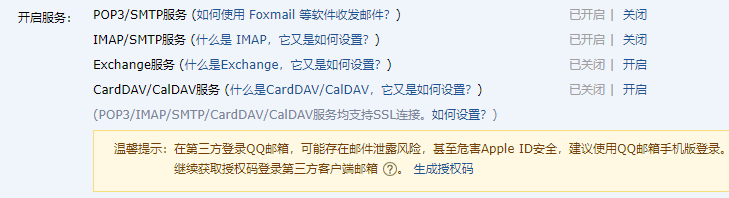
- 进入QQ邮箱,开启POP3/SMTP服务,获取授权码。
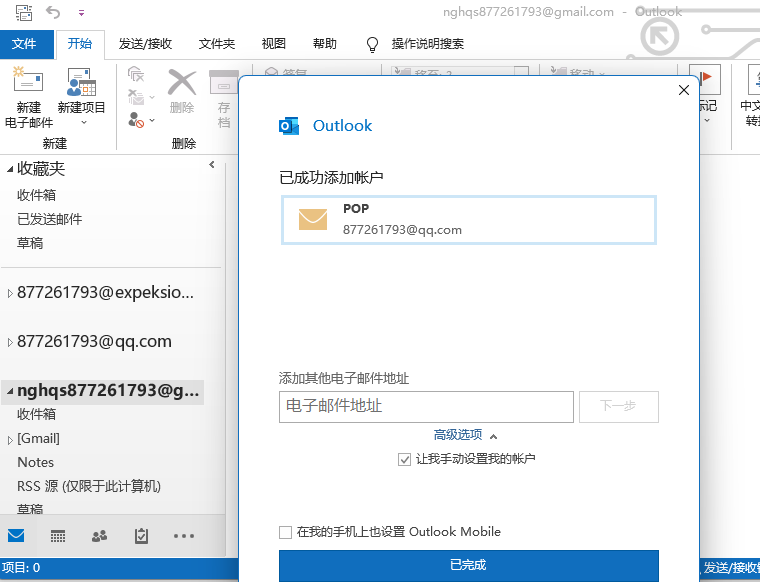
- 按照QQ邮箱给予教程,完成outlook对QQ邮箱的绑定
4.2 本地收发邮件
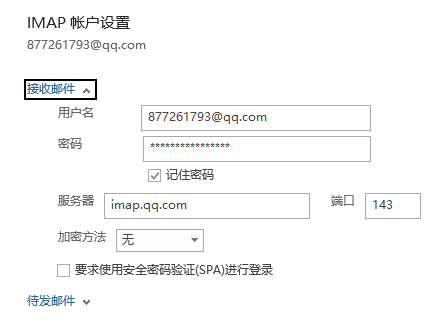
- 关闭账号SSL
- 使用
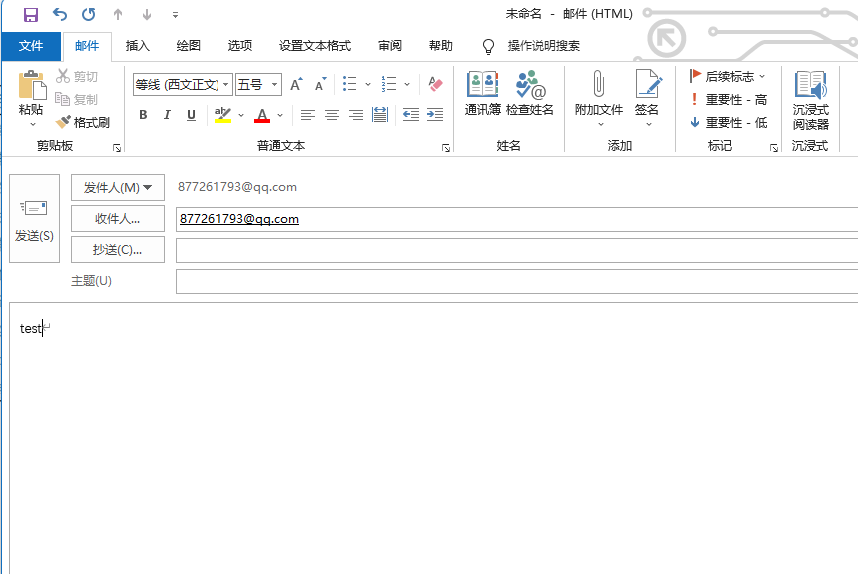
wireshark对WLAN进行抓包,并发送邮件
- 使用
wireshark对SMTP进行追踪
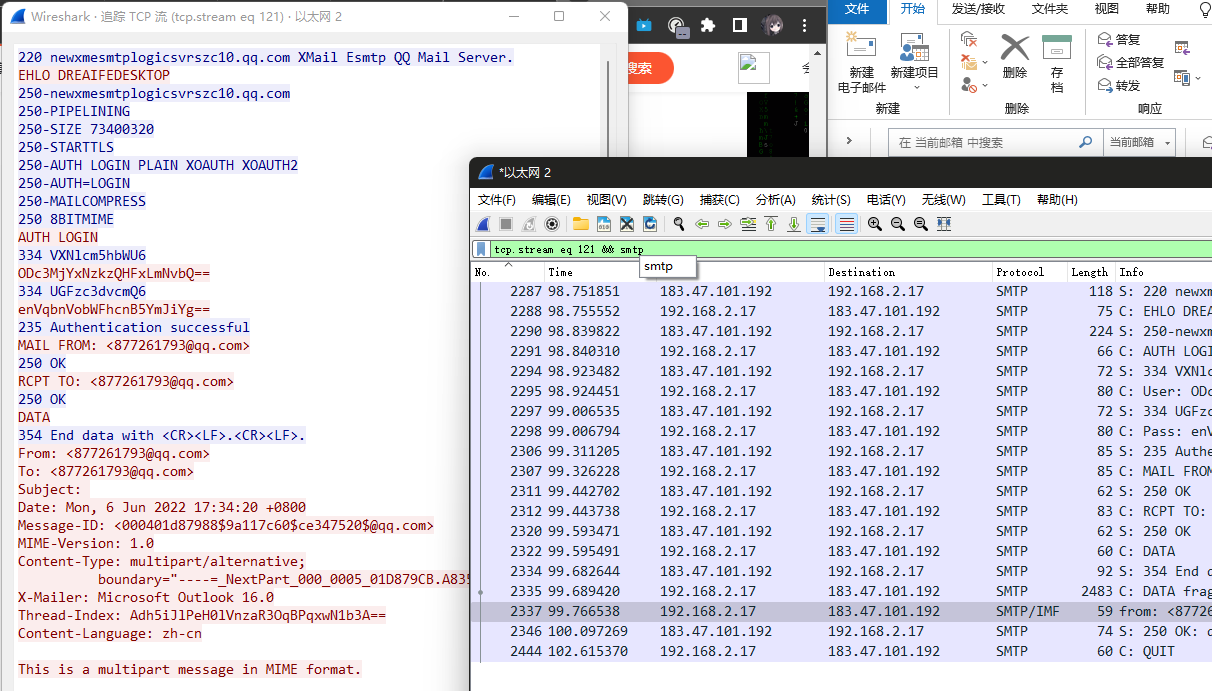
- 分析通讯过程及通讯协议
C: telnet imap.qq.com 25 //以telnet方式连接qq邮件服务器S: 220 newxmesmtplogicsvrszc10.qq.com XMail Esmtp QQ Mail Server. //连接成功,220为响应数字,后面为欢迎信息C: EHLO DREAIFEDESKTOP //向服务器表明身份S: 250-newxmesmtplogicsvrszc10.qq.com | PIPELINING | SIZE 73400320 | STARTTLS | AUTH LOGIN PLAIN XOAUTH XOAUTH2 | AUTH=LOGIN | MAILCOMPRESS | 8BITMIME //成功C: AUTH LOGIN //登录账号S: 334 VXNlcm5hbWU6C: User: ODc3MjYxNzkzQHFxLmNvbQ== //输入账号与授权码的base64编码S: 334 UGFzc3dvcmQ6C: Pass: enVqbnVobWFhcnB5YmJiYg==S: 235 Authentication successfulC: MAIL FROM: <[email protected]> //发送人邮箱S: 250 OKC: RCPT TO: <[email protected]> //收信人邮箱S: 250 OKC: DATA //邮件内容S: 354 End data with <CR><LF>.<CR><LF>.C: DATA fragment, 2429 bytesfrom: <[email protected]>, subject: , (text/plain) (text/html)S: 250 OK: queued as.C: QUIT //发送完成并退出S:221 Bye4.3 web邮件
- 使用
wireshark对WLAN进行抓包,并发送邮件

- 使用
wireshark对tls/ssl进行追踪
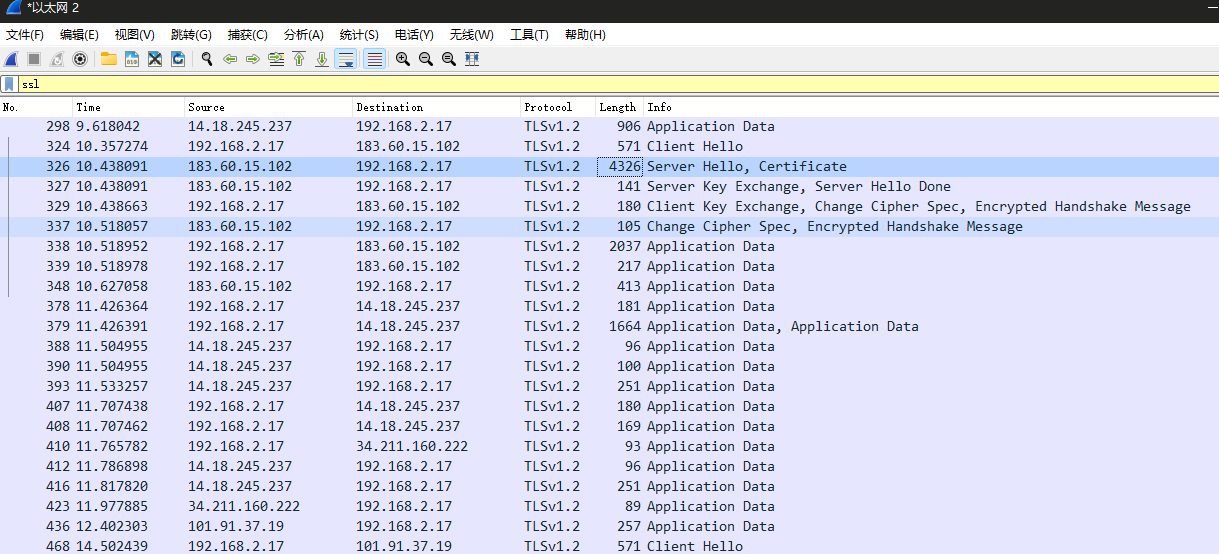
- 分析通讯过程及通讯协议
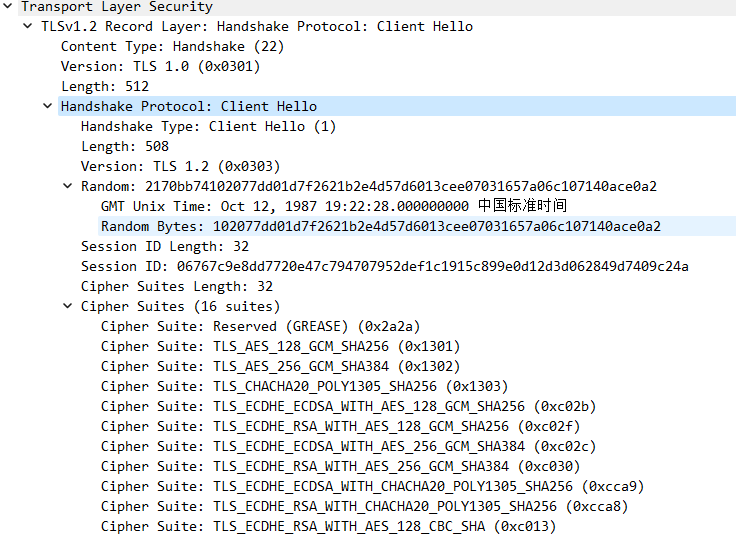
Client Hello
TLS握手过程的第一步就是客户端发起请求,主要包括了客户端生成的随机字符串(session key),还包含了客户端所支持所支持的加密套件列表、随机数等信息。
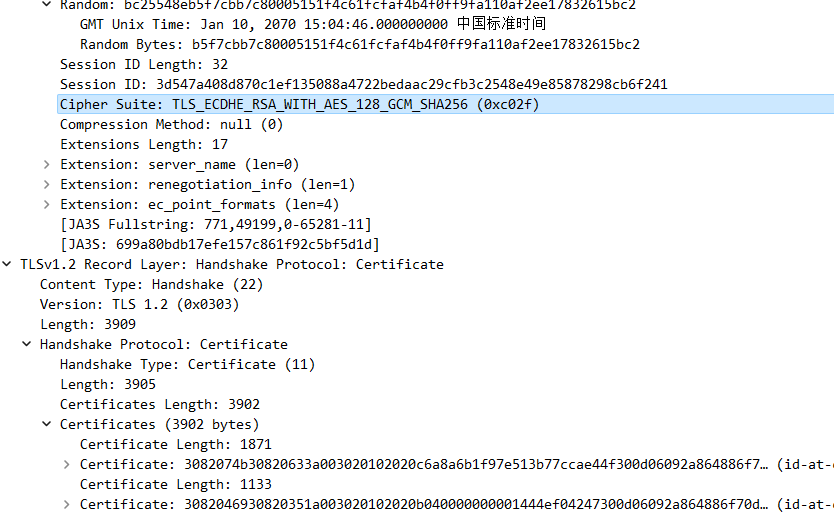
- Server Hello && Certificate
服务器收到客户端的Client Hello数据包之后,根据客户端发来的加密套件列表,选择一个加密套件,也生成一个随机字符串返回给客户端。密钥交换算法选择的是使用ECDHE_RSA,对称加密算法使用AES_128_GCM_SHA256:同时还有返回的服务器的证书信息。
- Server Key Exchange & Server Hello Done
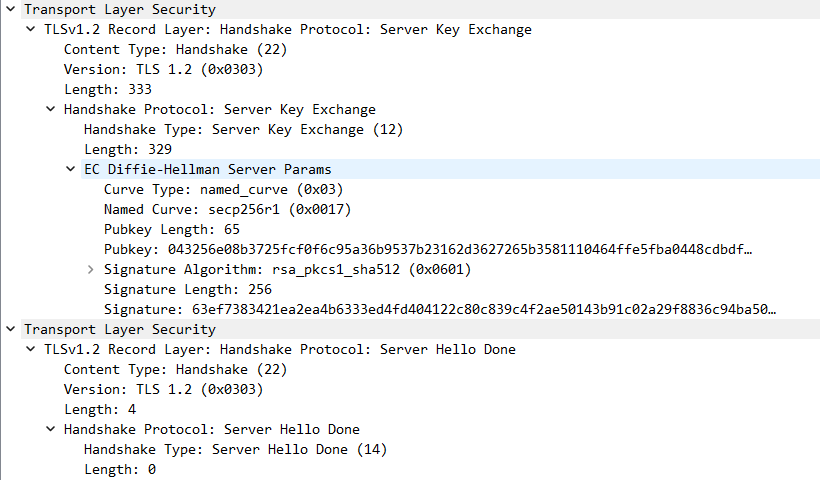
服务器返回Server Key Exchange数据包,用于和客户端交换用于数据加密的密钥,Server Hello Done用于通知客户端已经发送用于密钥交换的数据等待客户端响应。
- Client Key Change & Change Cipher Spec & Encrypted HandShake Message
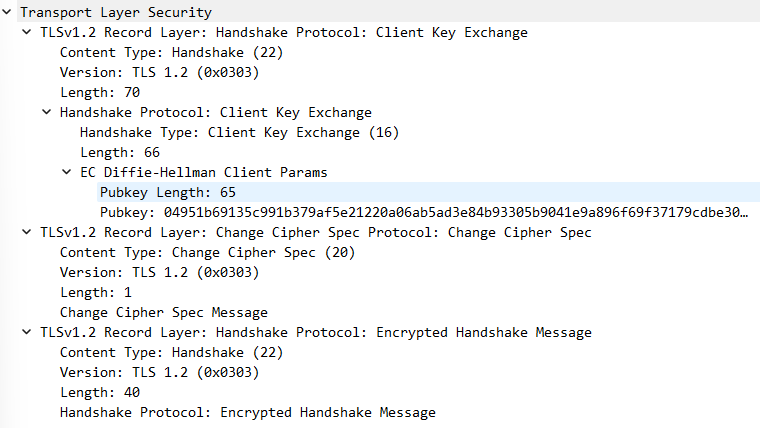
客户端根据服务器返回的DH数据生成DH数据发给服务器,用来生成最终的pre-master-secret。如图:
- Application Data
- Change Cipher Spec & Encrypted HandShake Message
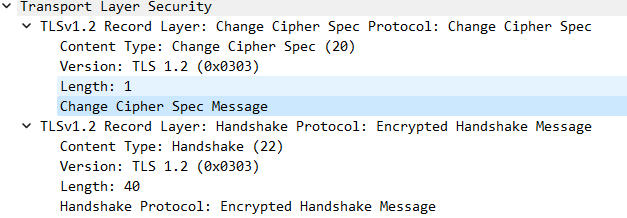
每隔一段时间就要更新一次会话密钥






4.4 telnet收发邮件
- 开启电脑
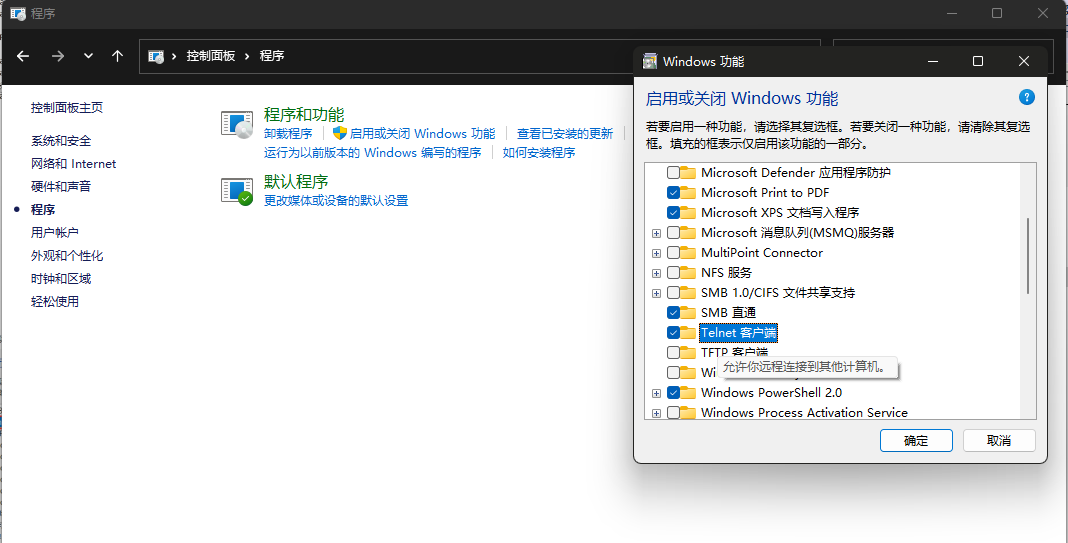
Telnet并使用wireshark抓包
- 打开
cmd进行操作
输入telnet imap.qq.com 25连接服务器后输入代码如下
- 邮件发送完成
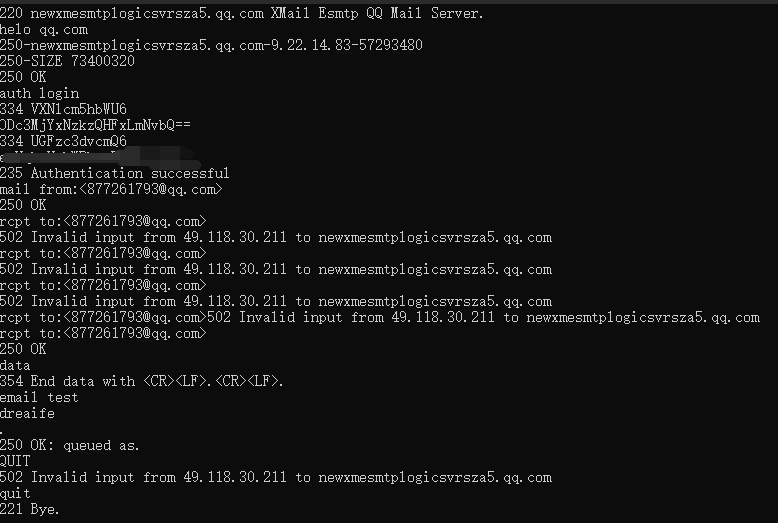
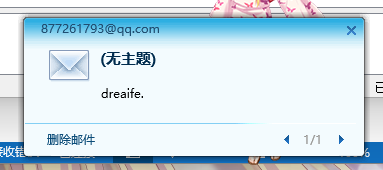
- 分析通讯过程及通讯协议
C: telnet imap.qq.com 25 //以telnet方式连接qq邮件服务器S: 220 newxmesmtplogicsvrszc10.qq.com XMail Esmtp QQ Mail Server. //连接成功,220为响应数字,后面为欢迎信息C: helo qq.com //向服务器表明身份S: 250-newxmesmtplogicsvrsza5.qq.com-9.22.14.83-57293480S: 250-SIZE 73400320S: 250 OK //成功C: auth login //登录账号S: 334 VXNlcm5hbWU6C: User: ODc3MjYxNzkzQHFxLmNvbQ== //输入账号与授权码的base64编码S: 334 UGFzc3dvcmQ6C: Pass: enVqbnVobWFhcnB5YmJiYg==S: 235 Authentication successfulC: MAIL FROM: <[email protected]> //发送人邮箱S: 250 OKC: RCPT TO: <[email protected]> //收信人邮箱S: 250 OKC: DATA //邮件内容S: 354 End data with <CR><LF>.<CR><LF>.C: DATA fragment, 2429 bytesfrom: <[email protected]>, subject: , (text/plain) (text/html)S: 250 OK: queued as.C: QUIT //发送完成并退出S:221 Bye5、实验小结
5.1 问题与解决办法
问题使用Xftp连接服务器时,出现连接错误的情况解决方法使用校园网连接后恢复正常,排查后发现为服务器防火墙原因
5.2 心得体会
- 本次实验报告熟系了对SMTP协议分析过程中代码及软件的操作,以及对SMTP报文的分析与提取,实现对课上知识的印证。通过这次实验,我掌握了telnet发送邮件的具体流程与步骤,了解了常用SMTP协议分析软件的基本用法,提高了自身编程能力。
- 通过这些常用的SMTP协议分析命令操作,对SMTP协议使用时的跟踪分析,SMTP报文的结构分析,让我印证了上课所学的知识。
1. Objectives
- Understand the basic structure of email systems
- Understand the client and server sides, and the communication between servers
- Analyze and understand the SMTP and POP3 protocols
2. Experimental Environment
- Hardware requirements: One Alibaba Cloud ECS instance
- Software requirements: Linux/Windows operating systems
3. Experimental Content
3.1 Using a Mail Client to Send/Receive Mail
Configure a mail user agent (for example, Windows, Outlook, Express, Thunderbird on Linux, etc.; you can use the one that comes with the system or download it yourself), to compose locally and receive your QQ Mail.
3.2 Local Email Sending/Receiving
Use a local client to compose and send QQ emails. At the same time, use Wireshark to capture packets and analyze its communication process and protocols.
3.3 Web Mail
Use a browser to log in to QQ Mail, compose and send QQ emails. Also use Wireshark to capture packets and analyze the communication process and protocols.
3.4 Telnet Email Sending/Receiving
Use the telnet command to log in to the QQ Mail server and send emails. Also use Wireshark to capture packets to analyze the communication process and protocols.
Refer to online resources for the exact commands and port queries.
4. Results and Analysis
4.1 Using a Mail Client to Send/Receive Mail
- Open QQ Mail, enable POP3/SMTP services, and obtain an authorization code.
- Follow the instructions provided by QQ Mail to bind Outlook to QQ Mail
4.2 Local Email Sending/Receiving
- Disable account SSL
- Use Wireshark to capture packets on the WLAN and send emails
- Use Wireshark to trace SMTP
- Analyze the communication process and protocols
C: telnet imap.qq.com 25 //Connect to QQ mail server via telnetS: 220 newxmesmtplogicsvrszc10.qq.com XMail Esmtp QQ Mail Server. //Connection successful, 220 is the status code, followed by welcome messageC: EHLO DREAIFEDESKTOP //Identify to the serverS: 250-newxmesmtplogicsvrszc10.qq.com | PIPELINING | SIZE 73400320 | STARTTLS | AUTH LOGIN PLAIN XOAUTH XOAUTH2 | AUTH=LOGIN | MAILCOMPRESS | 8BITMIME //SuccessC: AUTH LOGIN //LoginS: 334 VXNlcm5hbWU6C: User: ODc3MjYxNzkzQHFxLmNvbQ== //Base64 of username and authorization codeS: 334 UGFzc3dvcmQ6C: Pass: enVqbnVobWFhcnB5YmJiYg==S: 235 Authentication successfulC: MAIL FROM: <[email protected]> //Sender emailS: 250 OKC: RCPT TO: <[email protected]> //Recipient emailS: 250 OKC: DATA //Email contentS: 354 End data with <CR><LF>.<CR><LF>.C: DATA fragment, 2429 bytesfrom: <[email protected]>, subject: , (text/plain) (text/html)S: 250 OK: queued as.C: QUIT //Send complete and exitS:221 Bye4.3 Web Mail
- Use Wireshark to capture packets on the WLAN and send email
- Use Wireshark to trace TLS/SSL
- Analyze the communication process and protocols
Client Hello
The first step of the TLS handshake is the client initiating the request, mainly including the random string generated by the client (session key), as well as the list of cipher suites supported by the client, random numbers, and other information.
- Server Hello && Certificate
After receiving the Client Hello data from the client, the server selects a cipher suite from the client’s list and generates a random string to return to the client. The key exchange algorithm chosen is ECDHE_RSA, the symmetric encryption algorithm uses AES_128_GCM_SHA256, and the server’s certificate information is also returned.
- Server Key Exchange & Server Hello Done
The server returns a Server Key Exchange packet to exchange the keys used for data encryption with the client, and Server Hello Done to notify the client that the data for key exchange has been sent and to wait for the client’s response.
- Client Key Change & Change Cipher Spec & Encrypted HandShake Message
The client uses the server-provided DH data to generate DH data and send it to the server to generate the final pre-master secret. As shown:
- Application Data
- Change Cipher Spec & Encrypted HandShake Message
Session keys should be refreshed periodically
4.4 Telnet Email Sending/Receiving
- Enable Telnet on the computer and use Wireshark to capture packets
- Open cmd to operate
Enter telnet imap.qq.com 25 to connect to the server and input the following commands
- Email sending completed
- Analyze the communication process and protocols
C: telnet imap.qq.com 25 //Connect to QQ mail server via telnetS: 220 newxmesmtplogicsvrszc10.qq.com XMail Esmtp QQ Mail Server. //Connection successful, 220 is the status code, followed by welcome messageC: helo qq.com //Identify to the serverS: 250-newxmesmtplogicsvrsza5.qq.com-9.22.14.83-57293480S: 250-SIZE 73400320S: 250 OK //SuccessC: auth login //LoginS: 334 VXNlcm5hbWU6C: User: ODc3MjYxNzkzQHFxLmNvbQ== //Base64 of username and authorization codeS: 334 UGFzc3dvcmQ6C: Pass: enVqbnVobWFhcnB5YmJiYg==S: 235 Authentication successfulC: MAIL FROM: <[email protected]> //Sender emailS: 250 OKC: RCPT TO: <[email protected]> //Recipient emailS: 250 OKC: DATA //Email contentS: 354 End data with <CR><LF>.<CR><LF>.C: DATA fragment, 2429 bytesfrom: <[email protected]>, subject: , (text/plain) (text/html)S: 250 OK: queued as.C: QUIT //Send complete and exitS:221 Bye5. Conclusions
5.1 Problems and Solutions
The issue when using Xftp to connect to the server: connection errors; the solution was to switch to campus network, after which it returned to normal. Investigation showed it was due to the server firewall.
5.2 Reflections
- This lab report familiarizes the actions of code and software involved in SMTP protocol analysis, as well as the analysis and extraction of SMTP messages, validating the knowledge learned in class. Through this experiment, I mastered the concrete process and steps of sending emails via Telnet, understood the basic usage of common SMTP protocol analysis tools, and improved my programming ability.
- Through these common SMTP protocol analysis commands, tracking SMTP usage, and analyzing the structure of SMTP messages, I reinforced the knowledge taught in class.
1.実験目的
- メールシステムの基本構造を理解する
- クライアントとサーバー、およびサーバー間の通信を理解する
- SMTPおよびPOP3プロトコルを分析・理解する
2.実験環境
- ハードウェア要件:Alibaba Cloud ECSを1台。
- ソフトウェア要件:Linux/Windows オペレーティングシステム
3.実験内容
3.1 使用メール代理受送信
メールクライアント(例:windows Outlook Express、linux の Thunderbird など;OS に付属のものを使用するか、または自分でダウンロードして使用することができます。)、ローカルでメールを作成し、自分のQQメールを受信します。
3.2 ローカルでの受送信
ローカルクライアントを使用してQQメールを作成・送信します。同時にWiresharkを使用して通信の過程と通信プロトコルをキャプチャして分析します。
3.3 ウェブメール
ブラウザを使ってQQメールにログインし、QQメールを作成・送信します。同時にWiresharkを使用して通信の過程と通信プロトコルをキャプチャして分析します。
3.4 telnetでの受送信
telnetコマンドを使用してQQメールサーバへログインし、メールを送信します。同時にWiresharkを使用して通信の過程と通信プロトコルをキャプチャして分析します。
具体的な操作コマンドとポートの照会はネット情報を参照して自分で解決してください。
4.実験結果と分析
4.1 使用メール代理受送信
- QQメールにアクセスし、POP3/SMTPサービスを有効化し、認証コードを取得する。
- QQメールの案内に従ってOutlookをQQメールに紐づける。
4.2 ローカルでの受送信
- アカウントのSSLを無効にする
- Wiresharkを使用してWLANをキャプチャし、メールを送信する
- Wiresharkを使用してSMTPをトレースする
- 通信の過程および通信プロトコルを分析する
C: telnet imap.qq.com 25 //以telnet方式连接qq邮件服务器S: 220 newxmesmtplogicsvrszc10.qq.com XMail Esmtp QQ Mail Server. //连接成功,220为响应数字,后面为欢迎信息C: EHLO DREAIFEDESKTOP //向服务器表明身份S: 250-newxmesmtplogicsvrszc10.qq.com | PIPELINING | SIZE 73400320 | STARTTLS | AUTH LOGIN PLAIN XOAUTH XOAUTH2 | AUTH=LOGIN | MAILCOMPRESS | 8BITMIME //成功C: AUTH LOGIN //登录账号S: 334 VXNlcm5hbWU6C: User: ODc3MjYxNzkzQHFxLmNvbQ== //输入账号与授权码的base64编码S: 334 UGFzc3dvcmQ6C: Pass: enVqbnVobWFhcnB5YmJiYg==S: 235 Authentication successfulC: MAIL FROM: <[email protected]> //发送人邮箱S: 250 OKC: RCPT TO: <[email protected]> //收信人邮箱S: 250 OKC: DATA //邮件内容S: 354 End data with <CR><LF>.<CR><LF>.C: DATA fragment, 2429 bytesfrom: <[email protected]>, subject: , (text/plain) (text/html)S: 250 OK: queued as.C: QUIT //发送完成并退出S:221 Bye4.3 ウェブメール
- Wiresharkを使用してWLANをキャプチャし、メールを送信する
- TLS/SSLを追跡するためにWiresharkを使用する
- 通信の過程および通信プロトコルを分析する
Client Hello
TLSハンドシェイクの最初のステップはクライアントがリクエストを開始することで、クライアントが生成したランダム文字列(セッションキー)やクライアントがサポートする暗号スイートのリスト、乱数などの情報を含みます。
- Server Hello && Certificate
サーバーはクライアントのClient Helloデータを受信後、クライアントが送信した暗号スイートリストに基づいて暗号スイートを選択し、クライアントに返すランダム文字列を生成します。鍵交換アルゴリズムはECDHE_RSAを使用し、対称暗号はAES_128_GCM_SHA256を使用します。サーバ証明書情報も返されます。
- Server Key Exchange & Server Hello Done
サーバーはクライアントへデータを交換するための鍵を渡すためのServer Key Exchangeデータ包を返し、Server Hello Doneは鍵交換のデータがクライアントの応答を待っていることを通知します。
- Client Key Change & Change Cipher Spec & Encrypted HandShake Message
クライアントはサーバーが返したDHデータを基にDHデータをサーバへ送信し、最終的なpre-master-secretを生成します。図のとおり:
- Application Data
- Change Cipher Spec & Encrypted HandShake Message
定期的にセッション鍵を更新します
4.4 Telnetでの受送信
- PC上でTelnetを有効化し、Wiresharkでパケットをキャプチャする
- コマンドプロンプトを開いて操作を行う
テキスト入力:telnet imap.qq.com 25でサーバへ接続した後、以下のコードを入力
- メール送信完了
- 通信の過程および通信プロトコルを分析する
C: telnet imap.qq.com 25 //以telnet方式连接qq邮件服务器S: 220 newxmesmtplogicsvrszc10.qq.com XMail Esmtp QQ Mail Server. //连接成功,220为响应数字,后面为欢迎信息C: helo qq.com //向服务器表明身份S: 250-newxmesmtplogicsvrsza5.qq.com-9.22.14.83-57293480S: 250-SIZE 73400320S: 250 OK //成功C: auth login //登录账号S: 334 VXNlcm5hbWU6C: User: ODc3MjYxNzkzQHFxLmNvbQ== //输入账号与授权码的base64编码S: 334 UGFzc3dvcmQ6C: Pass: enVqbnVobWFhcnB5YmJiYg==S: 235 Authentication successfulC: MAIL FROM: <[email protected]> //发送人邮箱S: 250 OKC: RCPT TO: <[email protected]> //收信人邮箱S: 250 OKC: DATA //邮件内容S: 354 End data with <CR><LF>.<CR><LF>.C: DATA fragment, 2429 bytesfrom: <[email protected]>, subject: , (text/plain) (text/html)S: 250 OK: queued as.C: QUIT //发送完成并退出S:221 Bye5、実験のまとめ
5.1 問題と解決策
問題はXftpでサーバーに接続する際に接続エラーが発生しました。解決策としてキャンパスネットワークに接続した後に正常に戻りました。調査の結果、原因はサーバーのファイアウォールによるものでした。
5.2 感想
- 本実験レポートではSMTPプロトコルの分析過程でのコードとソフトウェアの操作、SMTPメッセージの分析と抽出を習得し、授業で学んだ知識を実証しました。この実験を通じてtelnetを使ったメール送信の具体的な手順を身につけ、一般的なSMTPプロトコル分析ツールの基本的な使い方を理解し、自己のプログラミング能力を高めました。
- これらの一般的なSMTPプロトコル分析コマンドの操作を通じて、SMTPプロトコルの使用時の追跡分析と、SMTPメッセージの構造分析を実践的に検証し、授業で学んだ知識を裏付けることができました。
部分信息可能已经过时