ArrayList 采用数组存储,所以插入和删除元素的时间复杂度受元素位置的影响。 比如:执行add(E e)方法的时候, ArrayList 会默认在将指定的元素追加到此列表的末尾,这种情况时间复杂度就是 O(1)。但是如果要在指定位置 i 插入和删除元素的话(add(int index, E element)),时间复杂度就为 O(n)。因为在进行上述操作的时候集合中第 i 和第 i 个元素之后的(n-i)个元素都要执行向后位/向前移一位的操作。
LinkedList 采用链表存储,所以在头尾插入或者删除元素不受元素位置的影响(add(E e)、addFirst(E e)、addLast(E e)、removeFirst()、 removeLast()),时间复杂度为 O(1),如果是要在指定位置 i 插入和删除元素的话(add(int index, E element),remove(Object o),remove(int index)), 时间复杂度为 O(n) ,因为需要先移动到指定位置再插入和删除。
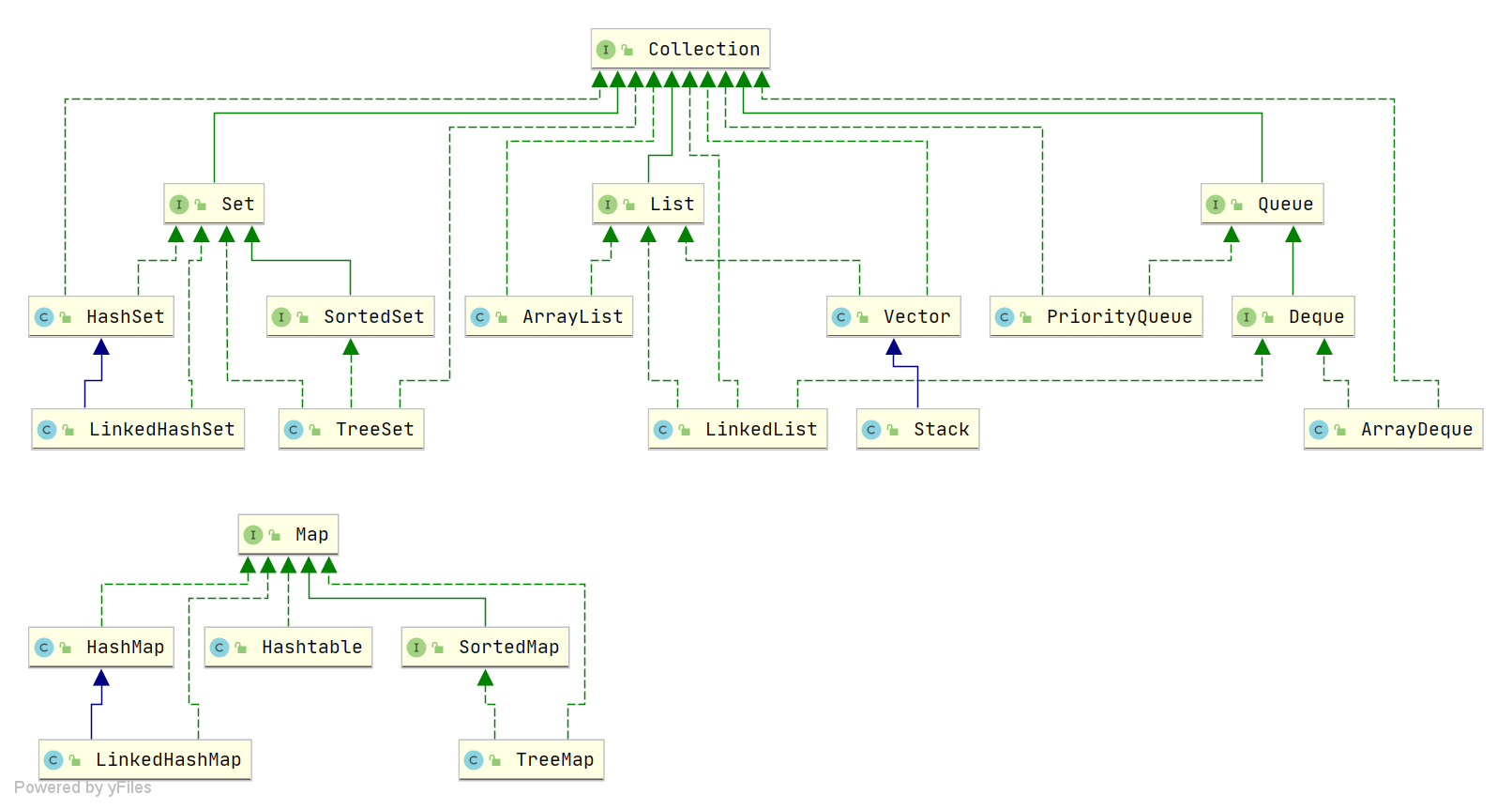
Java collections, also called containers, are mainly derived from two core interfaces: one is the Collection interface, mainly used to store a single element; the other is the Map interface, mainly used to store key-value pairs. For the Collection interface, there are three main subinterfaces: List, Set, and Queue.
List (a great helper for preserving order): stored elements are ordered and can be duplicated.
Set (emphasizing uniqueness): stored elements are not allowed to be duplicates.
Queue (implements queuing functionality): determines the order according to a specific queuing rule; stored elements are ordered and can be duplicated.
Map (expert at searching by key): stores data as key-value pairs, similar to the mathematical function y=f(x), where “x” represents the key and “y” the value. Keys are unordered and non-duplicated, values are unordered and can be duplicated; each key maps to at most one value.
Summary of underlying data structures in the Collection Framework#
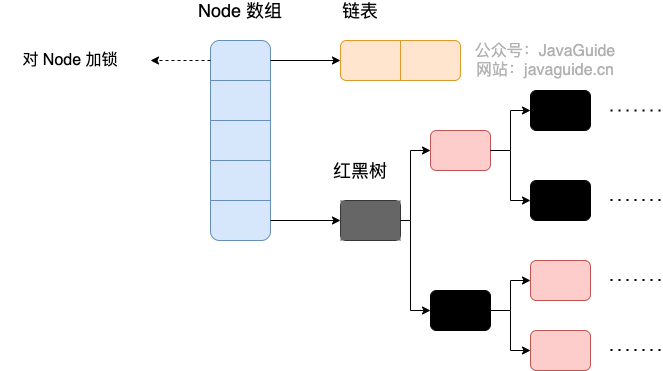
HashMap: before JDK 1.8, HashMap was implemented as a combination of an array and linked lists; the array is the main structure, lists resolve hash collisions (chaining). After JDK 1.8, collisions are handled with significant changes: when a chain length exceeds a threshold (default 8), the chain is converted to a red-black tree to reduce search time (if the current array length is less than 64, it may grow first instead of converting to a tree).
LinkedHashMap: LinkedHashMap inherits from HashMap, so its underlying structure remains a chained hash structure composed of an array and lists or trees. Additionally, LinkedHashMap adds a doubly linked list on top to preserve the insertion order of key-value pairs, and also implements access-order logic by manipulating the linked list.
Hashtable: array + linked list; the array forms the main body, the linked list resolves hash collisions.
TreeMap: red-black tree (self-balancing binary search tree).
We mainly select a suitable collection based on its characteristics.
If you need to access elements by keys, choose the Map interface; for sorting, use TreeMap; if you don’t need sorting, use HashMap; for thread-safety, use ConcurrentHashMap.
If you only need to store element values, choose a collection implementing the Collection interface; for uniqueness, choose a Set implementation such as TreeSet or HashSet; if not, choose a List implementation such as ArrayList or LinkedList, and then pick based on the characteristics of those implementations.
When we need to store a set of data of the same type, arrays are one of the most common and basic containers. However, using arrays to store objects has drawbacks because in real development, data types can be diverse and the quantity may be unknown. This is where Java collections come in. Compared to arrays, Java collections provide more flexible and efficient ways to store multiple data objects. The various collection classes and interfaces in the Java Collections Framework can store objects of different types and quantities, and offer a variety of operations. Compared with arrays, the advantages of Java collections include variable size, generic support, and built-in algorithms. In short, Java collections enhance the flexibility of data storage and processing, better meeting the diverse data needs in modern software development, and supporting high-quality code.
ArrayList is implemented on top of a dynamic array, and is more flexible than a static Array:
ArrayList grows or shrinks dynamically based on the actual elements stored, while an Array cannot change its length once created.
ArrayList allows you to use generics to ensure type safety; arrays do not.
ArrayList can store only objects. Primitive types require their wrapper classes (e.g., Integer, Double). Arrays can store primitive types directly as well as objects.
ArrayList supports insertion, deletion, traversal, and other common operations, with a rich API such as add(), remove(), etc. Arrays are fixed-length and can only be accessed by index; they do not support dynamic addition or removal of elements.
Creating an ArrayList does not require specifying a size, while arrays require a size at creation.
Vector and Stack are both thread-safe, using synchronized for synchronization.
Stack inherits from Vector and is a LIFO stack, while Vector is a list.
As Java concurrency programming evolved, Vector and Stack have been deprecated. It is recommended to use concurrent collection classes (e.g., ConcurrentHashMap, CopyOnWriteArrayList, etc.) or manually implement thread-safe approaches to provide safe multithreaded operations.
ArrayList can store any type of object, including null values. However, it is not recommended to add null values, as null is meaningless and can make code harder to maintain; for example, forgetting to perform null checks can lead to NullPointerException.
Time complexity of inserting and deleting elements in ArrayList?#
For insertion
Insertion at the head: requires shifting all elements one position to the right, so O(n).
Insertion at the tail: when capacity is not reached, O(1); when capacity is full and growth is needed, an O(n) operation copies the old array to a larger one, then O(1) to insert.
Insertion at a given index: shifts all elements after the target position one place to the right, so O(n) (average n/2 moves).
For deletion
Deletion at the head: shifts all elements one position to the left, so O(n).
Deletion at the tail: O(1) when removing the last element.
Deletion at a given index: shifts elements after the target position to fill the gap, so O(n) (average n/2 moves).
Time complexity of inserting and deleting elements in LinkedList?#
Insertion/deletion at the head: O(1).
Insertion/deletion at the tail: O(1).
Insertion/deletion at a given position: O(n) because you must traverse to the position first.
Here is a simple example: if we want to delete node 9, we need to traverse the list to locate the node, then adjust the relevant pointers accordingly.
RandomAccess is a marker interface indicating that a class supports fast random access (i.e., constant-time indexed access). Since LinkedList is based on a linked list, with non-contiguous memory and traversal needed to reach a given position, it does not support fast random access and thus cannot implement RandomAccess.
Thread-safety: Both ArrayList and LinkedList are not synchronized; neither is thread-safe.
Underlying data structure: ArrayList uses a plain Object[] array; LinkedList uses a doubly linked list (JDK 1.6 had circular lists, JDK 1.7 removed them. Note the difference between doubly linked list and doubly circular list).
Insert/delete time depending on position:
ArrayList stores data in an array, so insertion and deletion times depend on position. For example, add(E e) appends to the end by default with O(1). If inserting or deleting at a specific position i (add(int index, E element)), the time is O(n) since elements after i must be shifted.
LinkedList stores data in a linked list, so head/tail insertions or deletions do not depend on element position (add(E e), addFirst(E e), addLast(E e), removeFirst(), removeLast()) with O(1). If inserting or deleting at a specific position i (add(int index, E element), remove(Object o), remove(int index)), time is O(n) because you must traverse to the position first.
Fast random access support: LinkedList does not support efficient random access, while ArrayList (which implements RandomAccess) does. Fast random access means quickly retrieving elements by index (get(int index)).
Memory usage: ArrayList wastes space by preallocating capacity at the list end, while LinkedList’s memory usage is tied to the extra room needed for each node (to store next/prev links plus data).
In practice, we typically do not use LinkedList; in scenarios where LinkedList would be used, ArrayList can usually replace it with better performance.
Additionally, do not assume that LinkedList is universally best for insertion/deletion scenarios simply because it is a linked list. As noted above, LinkedList only achieves near O(1) time for head/tail insertions/deletions; for other cases, the average time is O(n).
Supplement: Doubly Linked List and Doubly Circular Linked List
Doubly Linked List: contains two pointers, a prev pointing to the previous node, and a next pointing to the next node.
Doubly Circular Linked List: the last node’s next points to the head, and the head’s prev points to the last node, forming a loop.
Supplement: RandomAccess Interface
1
publicinterfaceRandomAccess {}
Looking at the source, RandomAccess is essentially empty. So, in my view, RandomAccess is just a marker. What does it mark? It marks that the implementing class supports random access.
In the binarySearch() method, it checks whether the input list is an instance of RandomAccess; if so, it calls indexedBinarySearch(), otherwise it calls iteratorBinarySearch().
1
publicstatic<T>
2
intbinarySearch(List<? extends Comparable<?super T>> list, T key) {
3
if (list instanceof RandomAccess || list.size()<BINARYSEARCH_THRESHOLD)
ArrayList implements RandomAccess, while LinkedList does not. Why? It relates to the underlying data structure. ArrayList is backed by an array, and arrays naturally support random access with O(1) time, hence fast random access. Lists backed by linked lists require traversal, so they do not support fast random access. ArrayList implements RandomAccess to indicate it offers fast random access.
The RandomAccess interface is merely a marker and does not by itself guarantee fast random access!
Creating an ArrayList with the no-arg constructor actually initializes with an empty array. Only when elements are added does it allocate capacity. That is, adding the first element expands the capacity to 10.
Supplement: In old JDK6, new ArrayList() directly created an Object[] array of length 10.
When we add the first element, elementData.length is 0 (still an empty list). Because ensureCapacityInternal() is called, minCapacity is 10. Now minCapacity - elementData.length > 0 is true, so it enters grow(minCapacity).
When adding the second element, minCapacity is 2; at this time, after adding the first element, the capacity has expanded to 10. Now minCapacity - elementData.length > 0 is false, so grow(minCapacity) is not called.
Only when adding the 11th element will minCapacity (11) be greater than elementData.length (10); it then enters the grow method to expand.
int newCapacity = oldCapacity + (oldCapacity >> 1), so ArrayList expands to about 1.5x capacity each time (even oldCapacity yields exactly 1.5x, odd yields around 1.5x).
Now with examples:
When adding the first element, oldCapacity is 0; after comparison, first if is true, newCapacity = minCapacity (10). But the second if does not trigger; capacity becomes 10; size becomes 1.
When adding the 11th element, newCapacity is 15, which is greater than minCapacity (11); first if not triggered. New capacity is not greater than the max size; thus hugeCapacity is not invoked. Capacity becomes 15; size becomes 11.
A few important notes, easy to miss:
In Java, the length attribute is for arrays; for a declared array, to know its length you use length.
In Java, the length() method is for strings; to know the length of a string, use length().
In Java, the size() method is for generic collections; to see how many elements a collection has, call size()!
hugeCapacity() method
From grow() we know: if the new capacity exceeds MAX_ARRAY_SIZE, hugeCapacity() compares minCapacity and MAX_ARRAY_SIZE; if minCapacity is greater than the maximum, new capacity becomes Integer.MAX_VALUE; otherwise, new capacity becomes MAX_ARRAY_SIZE (Integer.MAX_VALUE - 8).
Comparable and Comparator are both sorting interfaces in Java; they play important roles in comparing and sorting objects:
Comparable interface comes from java.lang and has a compareTo(Object obj) method used for sorting.
Comparator interface comes from java.util and has a compare(Object obj1, Object obj2) method used for sorting.
Typically, when you want to sort a collection with a custom order, you override compareTo() or compare(). If you need two different sorts for a collection—such as sorting by a song’s title and by the artist’s name—then you can override compareTo() and/or use custom Comparator methods, or use two Comparators to achieve title-based and artist-based sorting; the latter implies using the two-argument version of Collections.sort().
Unorderedness is not the same as randomness; unordered means the data in the underlying array is not added in the order of the array indices but is determined by the hash value of the data.
Non-duplication means that when adding elements, equals() determines whether they are duplicates; you should override both equals() and hashCode() to ensure proper behavior.
HashSet, LinkedHashSet, and TreeSet are all implementations of the Set interface; they guarantee element uniqueness and are not thread-safe.
The main differences lie in their underlying data structures. HashSet uses a hash table (based on HashMap). LinkedHashSet uses a combination of a linked list and a hash table, with insertion and retrieval order following FIFO. TreeSet uses a red-black tree; elements are ordered, with either natural ordering or custom ordering.
The different data structures lead to different usage scenarios: HashSet for when you don’t need to preserve insertion/removal order, LinkedHashSet for maintaining insertion/removal order, and TreeSet when you need custom element ordering rules.
Queue is a single-ended queue that can only insert at one end and remove from the other, generally following First-In-First-Out (FIFO).
Queue extends Collection; due to behavior on failure from capacity issues, it can be categorized into two types of methods: one that throws an exception on failure, and another that returns a special value.
Queue interface
Throws exception
Returns special value
Insert at tail
add(E e)
offer(E e)
Delete head
remove()
poll()
Peek head
element()
peek()
Deque is a double-ended queue; elements can be inserted or removed from both ends.
Deque extends the Queue interface, adding methods to operate at both the head and the tail, and these too are categorized by failure handling into two types:
Deque interface
Throws exception
Returns special value
Insert at head
addFirst(E e)
offerFirst(E e)
Insert at tail
addLast(E e)
offerLast(E e)
Delete head
removeFirst()
pollFirst()
Delete tail
removeLast()
pollLast()
Peek head
getFirst()
peekFirst()
Peek tail
getLast()
peekLast()
In fact, Deque also provides push() and pop() and can be used to simulate a stack.
ArrayDeque and LinkedList both implement the Deque interface and both can behave as a queue, but they differ:
ArrayDeque is implemented using a resizable array with a pair of pointers; LinkedList uses a linked list.
ArrayDeque does not support storing null values, but LinkedList does.
ArrayDeque was introduced in JDK 1.6, while LinkedList has existed since JDK 1.2.
Insertion in ArrayDeque may incur resizing, but the amortized insertion time remains O(1). Although LinkedList does not require resizing, each insertion allocates new heap space, so its amortized performance is typically slower.
From a performance standpoint, using ArrayDeque for queues is better than LinkedList. Additionally, ArrayDeque can also be used to implement a stack.
PriorityQueue was introduced in JDK 1.5; its difference from Queue is that its dequeue order depends on priority, i.e., the highest-priority element is dequeued first.
PriorityQueue is implemented using a binary heap data structure, backed by a resizable array.
PriorityQueue uses heap-up and heap-down operations to achieve O(log n) time for inserting elements and removing the top element.
PriorityQueue is not thread-safe, and it does not support storing null or non-comparable objects.
PriorityQueue defaults to a min-heap, but you can pass a Comparator in the constructor to customize the priority order.
PriorityQueue is often encountered in interviews in problems such as heap sort, finding the K-th largest number, and graph traversals with weights; thus, you should be proficient in using it.
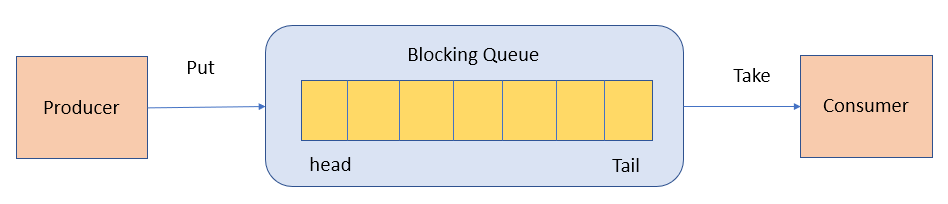
BlockingQueue (blocking queue) is an interface that extends Queue. It blocks when the queue is empty (waiting for elements) or when the queue is full (waiting for space), depending on the operation.
1
publicinterfaceBlockingQueue<E> extendsQueue<E> {
2
// ...
3
}
BlockingQueue is commonly used in producer-consumer patterns, where producers add data to the queue and consumers take data from the queue for processing.
Common blocking queue implementations in Java include:
ArrayBlockingQueue: a bounded blocking queue backed by an array. Capacity must be specified at creation and it supports fair and non-fair locking modes.
LinkedBlockingQueue: a optionally bounded blocking queue backed by a singly linked list. Capacity can be specified at creation; if not, it defaults to Integer.MAX_VALUE. Unlike ArrayBlockingQueue, it only supports non-fair locking.
PriorityBlockingQueue: an unbounded blocking queue that orders by priority. Elements must implement Comparable or a Comparator can be provided; null elements are not allowed.
SynchronousQueue: a queue that does not store elements. Each insert must wait for a corresponding removal, and vice versa; typically used for direct handoffs between threads.
DelayQueue: a delayed queue where elements can only be taken after their specified delay.
Differences between ArrayBlockingQueue and LinkedBlockingQueue#
ArrayBlockingQueue and LinkedBlockingQueue are common blocking queue implementations in Java’s concurrency package; both are thread-safe.
Underlying implementation: ArrayBlockingQueue is based on an array; LinkedBlockingQueue is based on a linked list.
Boundedness: ArrayBlockingQueue is bounded and requires a capacity at creation. LinkedBlockingQueue can be created with or without a capacity bound; by default it is unbounded (Integer.MAX_VALUE), but you can specify a bound to make it bounded.
Lock separation: ArrayBlockingQueue uses a single lock for producers and consumers; LinkedBlockingQueue uses separate locks for put and take, which reduces lock contention between producers and consumers.
Memory usage: ArrayBlockingQueue allocates a fixed array upfront; LinkedBlockingQueue dynamically allocates linked-list nodes as elements are added. This means ArrayBlockingQueue uses a fixed amount of memory at creation, and may allocate more memory than is actually used, whereas LinkedBlockingQueue grows with the number of elements.
Thread safety: HashMap is non-thread-safe; Hashtable is thread-safe because most of its methods are synchronized. (If you need thread-safety, use ConcurrentHashMap.)
Efficiency: Because of synchronization overhead, Hashtable is less efficient than HashMap; Hashtable has largely fallen out of use and should generally be avoided.
Support for null keys and values: HashMap can store null keys and values, but a null key is allowed only once; null values can be multiple. Hashtable does not allow null keys or values (NullPointerException if attempted).
Initial capacity and rehash behavior: If no initial capacity is specified, Hashtable defaults to an initial size of 11 and grows to 2n+1 on expansion. HashMap defaults to an initial size of 16 and grows to double on expansion. If an initial capacity is provided, Hashtable uses that size directly, while HashMap expands to the next power of two.
Underlying data structure: In JDK 8 and later, HashMap handles hash collisions with significant improvements: when the chain length exceeds a threshold (default 8), the chain is converted to a red-black tree to reduce search time (if the array length is less than 64, it grows first rather than converting to a tree). Hashtable does not have this mechanism.
If you’ve looked at the HashSet source, you’ll know: HashSet is implemented on top of HashMap. (HashSet’s source is very small because, aside from clone(), writeObject(), and readObject(), every other method delegates to HashMap.)
HashMap
HashSet
Implements Map interface
Implements Set interface
Stores key-value pairs
Stores only objects
Uses put() to add elements to the map
Uses add() to add elements to the Set
HashMap uses the key (Key) to compute hashCode
HashSet uses the member object to compute hashCode; two objects may have the same hashCode, so equals() determines equality
TreeMap and HashMap both extend AbstractMap, but TreeMap also implements NavigableMap and SortedMap.
Implementing NavigableMap gives TreeMap the ability to search within the map.
Implementing SortedMap gives TreeMap the ability to sort elements by key. By default, it sorts by key in ascending order, but you can specify a comparator.
In short, compared to HashMap, TreeMap mainly adds the ability to sort elements by keys and to search within the map.
When you add an object to a HashSet, the set first computes the object’s hashCode to determine the insertion location and compares hashCodes with other elements. If there is no matching hashCode, the set assumes there is no duplicate. If there are objects with matching hashCodes, equals() is used to determine if they are truly the same. If they are the same, the addition fails.
In JDK 8, HashSet’s add() simply calls HashMap’s put() and checks the return value to determine if a duplicate was present. See HashSet’s source:
1
// Returns: true if this set did not already contain the specified element
2
// 返回值:当 set 中没有包含 add 的元素时返回真
3
publicbooleanadd(E e) {
4
return map.put(e, PRESENT)==null;
5
}
That is, in JDK 8, HashSet will insert the element regardless of whether it already exists; the add() return value simply indicates whether the element was already present before insertion.
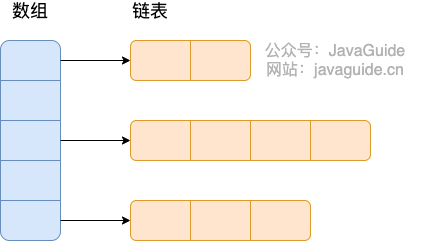
Before JDK 8, HashMap’s underlying structure was a combination of an array and linked lists — chaining. HashMap computes a hash from the key’s hashCode, uses a perturbation function to get a hash value, then uses (n - 1) & hash to determine the position (n is the array length). If there is an element at that position, it compares the stored key and hash with the new key’s, and if matching, it overwrites; otherwise, it uses chaining to resolve collisions.
The perturbation function is HashMap’s hash method, designed to reduce collisions from poorly implemented hashCode() methods.
1
staticinthash(int h) {
2
// This function ensures that hashCodes that differ only by
3
// constant multiples at each bit position have a bounded
4
// number of collisions (approximately 8 at default load factor).
Compared with the JDK 8 hash method, the JDK 7 hash method is a bit slower due to more perturbations.
“Chaining” means: combining a linked list with an array. You create an array of lists; each slot in the array is a list. When collisions occur, you add the colliding value to the list.
HashMap’s collision handling changed significantly: when the linked list length exceeds the threshold (default 8) and the array length is at least 64, the list is converted into a red-black tree to reduce search time (before converting, if the array length is less than 64, it expands first rather than converting).
TreeMap, TreeSet, and HashMap implementations after JDK 8 all use red-black trees in some form. A red-black tree resolves the drawbacks of plain binary search trees, which can degenerate into a linear structure.
We’ll analyze the HashMap’s conversion from linked list to red-black tree with code:
The putVal method determines when to convert a list to a red-black tree. If the linked list length exceeds 8, it triggers treeifyBin (convert to a red-black tree).
In treeifyBin, it checks whether the conversion is necessary. If the array length is less than 64, it will resize rather than convert to a red-black tree.
To maximize lookup efficiency and minimize collisions, HashMap uses hashing. The resulting index is computed as (n - 1) & hash, where n is the array length. This works best when n is a power of two, which is why the array length is kept as a power of two.
This design leverages bitwise operations to speed up index calculation compared to modulo operations.
In versions of HashMap before JDK 8, resizing in a multithreaded environment could cause a dead loop. This happened when multiple threads resized a bucket and used head insertion, causing the list to loop.
To fix this, JDK 8 uses tail insertion to avoid listing inversions, ensuring inserted nodes go to the end of the list, preventing circular structures. Nevertheless, HashMap remains unsafe under concurrent access; use ConcurrentHashMap in multi-threaded contexts.
In JDK 7 and earlier, concurrent resizing of HashMap could lead to dead loops and data loss.
Data loss can occur in HashMap 1.8 as well. In 1.8, several key-value pairs may fall into the same bucket and be stored as a list or a tree; concurrent put operations can cause data races and overwrites.
Example:
Two threads attempt to put at the same bucket with a hash collision.
Depending on thread scheduling, one thread may be paused after determining a collision, while the other thread inserts.
When the first thread resumes, it inserts again, potentially overwriting the other’s data.
There is also a risk that size increments may be inconsistent when multiple threads perform puts simultaneously.
If you truly need null in a ConcurrentHashMap, you can use a special static empty object as a stand-in for null:
1
publicstaticfinal Object NULL =newObject();
Can ConcurrentHashMap guarantee atomicity of composite operations?#
ConcurrentHashMap is thread-safe, meaning it guarantees consistency for concurrent reads and writes and avoids the dead-loop issues seen in older HashMaps. However, it does not guarantee atomicity for all composite operations.
Composite operations are those formed by multiple basic operations (put, get, remove, containsKey, etc.), for example: containsKey(key) followed by put(key, value). Such sequences can be interrupted by other threads, leading to unexpected results.
To guarantee atomicity for composite operations, ConcurrentHashMap provides several atomic operations like putIfAbsent, compute, computeIfAbsent, computeIfPresent, merge, etc. These methods accept a function to compute a new value and update the map accordingly. While these can be implemented with locking, it is not recommended to lock manually; instead, use these atomic operations to ensure atomicity.
voidsort(List list)// sort by natural order (ascending)
4
voidsort(List list, Comparator c)// custom sort controlled by Comparator
5
voidswap(List list, int i , int j)// swap elements at two indices
6
voidrotate(List list, int distance)// rotate. If distance is positive, move the last distance elements to the front; if negative, move the first -distance elements to the back
intbinarySearch(List list, Object key)// binary search on List; list must be sorted
2
intmax(Collection coll)// return the maximum element by natural order. Comparable to int min(Collection coll)
3
intmax(Collection coll, Comparator c)// return the maximum element by a custom order; comparator controls the rule. Comparable to int min(Collection coll, Comparator c)
4
voidfill(List list, Object obj)// replace all elements in the list with the specified object
5
intfrequency(Collection c, Object o)// count occurrences of an element
6
intindexOfSubList(List list, List target)// find the first index of target in list; -1 if not found
7
booleanreplaceAll(List list, Object oldVal, Object newVal)// replace all occurrences of oldVal with newVal
Collections provides several synchronizedXxx() methods to wrap a given collection as a thread-safe collection.
We know HashSet, TreeSet, ArrayList, LinkedList, HashMap, TreeMap are not thread-safe. Collections provides several static methods to wrap them into thread-synchronized collections.
Prefer to avoid using these methods in performance-critical contexts. For thread-safe collections, consider using the concurrent collections in the JUC package.
1
synchronizedCollection(Collection<T> c) // returns a thread-safe synchronized collection backed by the specified collection
2
synchronizedList(List<T> list)// returns a synchronized List backed by the specified list
3
synchronizedMap(Map<K,V> m) // returns a synchronized Map backed by the specified map
4
synchronizedSet(Set<T> s) // returns a synchronized Set backed by the specified set