多核时代: 多核时代多线程主要是为了提高进程利用多核 CPU 的能力。举个例子:假如我们要计算一个复杂的任务,我们只用一个线程的话,不论系统有几个 CPU 核心,都只会有一个 CPU 核心被利用到。而创建多个线程,这些线程可以被映射到底层多个 CPU 上执行,在任务中的多个线程没有资源竞争的情况下,任务执行的效率会有显著性的提高,约等于(单核时执行时间/CPU 核心数)。
单核 CPU 同时运行多个线程的效率是否会高,取决于线程的类型和任务的性质。一般来说,有两种类型的线程:CPU 密集型和 IO 密集型。CPU 密集型的线程主要进行计算和逻辑处理,需要占用大量的 CPU 资源。IO 密集型的线程主要进行输入输出操作,如读写文件、网络通信等,需要等待 IO 设备的响应,而不占用太多的 CPU 资源。
在单核 CPU 上,同一时刻只能有一个线程在运行,其他线程需要等待 CPU 的时间片分配。如果线程是 CPU 密集型的,那么多个线程同时运行会导致频繁的线程切换,增加了系统的开销,降低了效率。如果线程是 IO 密集型的,那么多个线程同时运行可以利用 CPU 在等待 IO 时的空闲时间,提高了效率。
因此,对于单核 CPU 来说,如果任务是 CPU 密集型的,那么开很多线程会影响效率;如果任务是 IO 密集型的,那么开很多线程会提高效率。当然,这里的“很多”也要适度,不能超过系统能够承受的上限。
一般是在数据表中加上一个数据版本号 version 字段,表示数据被修改的次数。当数据被修改时,version 值会加一。当线程 A 要更新数据值时,在读取数据的同时也会读取 version 值,在提交更新时,若刚才读取到的 version 值为当前数据库中的 version 值相等时才更新,否则重试更新操作,直到更新成功。
举一个简单的例子:假设数据库中帐户信息表中有一个 version 字段,当前值为 1 ;而当前帐户余额字段( balance )为 $100 。
操作员 A 此时将其读出( version=1 ),并从其帐户余额中扣除 50(100-$50 )。
在操作员 A 操作的过程中,操作员 B 也读入此用户信息( version=1 ),并从其帐户余额中扣除 20(100-$20 )。
操作员 A 完成了修改工作,将数据版本号( version=1 ),连同帐户扣除后余额( balance=$50 ),提交至数据库更新,此时由于提交数据版本等于数据库记录当前版本,数据被更新,数据库记录 version 更新为 2 。
操作员 B 完成了操作,也将版本号( version=1 )试图向数据库提交数据( balance=$80 ),但此时比对数据库记录版本时发现,操作员 B 提交的数据版本号为 1 ,数据库记录当前版本也为 2 ,不满足 “ 提交版本必须等于当前版本才能执行更新 “ 的乐观锁策略,因此,操作员 B 的提交被驳回。
这样就避免了操作员 B 用基于 version=1 的旧数据修改的结果覆盖操作员 A 的操作结果的可能。
如果一个变量 V 初次读取的时候是 A 值,并且在准备赋值的时候检查到它仍然是 A 值,那我们就能说明它的值没有被其他线程修改过了吗?很明显是不能的,因为在这段时间它的值可能被改为其他值,然后又改回 A,那 CAS 操作就会误认为它从来没有被修改过。这个问题被称为 CAS 操作的 “ABA”问题。
ABA 问题的解决思路是在变量前面追加上版本号或者时间戳。JDK 1.5 以后的 AtomicStampedReference 类就是用来解决 ABA 问题的,其中的 compareAndSet() 方法就是首先检查当前引用是否等于预期引用,并且当前标志是否等于预期标志,如果全部相等,则以原子方式将该引用和该标志的值设置为给定的更新值。
CAS 只对单个共享变量有效,当操作涉及跨多个共享变量时 CAS 无效。但是从 JDK 1.5 开始,提供了AtomicReference类来保证引用对象之间的原子性,你可以把多个变量放在一个对象里来进行 CAS 操作.所以我们可以使用锁或者利用AtomicReference类把多个共享变量合并成一个共享变量来操作。
如果我们设置线程数量太大,大量线程可能会同时在争取 CPU 资源,这样会导致大量的上下文切换,从而增加线程的执行时间,影响了整体执行效率。
有一个简单并且适用面比较广的公式:
CPU 密集型任务(N+1): 这种任务消耗的主要是 CPU 资源,可以将线程数设置为 N(CPU 核心数)+1。比 CPU 核心数多出来的一个线程是为了防止线程偶发的缺页中断,或者其它原因导致的任务暂停而带来的影响。一旦任务暂停,CPU 就会处于空闲状态,而在这种情况下多出来的一个线程就可以充分利用 CPU 的空闲时间。
I/O 密集型任务(2N): 这种任务应用起来,系统会用大部分的时间来处理 I/O 交互,而线程在处理 I/O 的时间段内不会占用 CPU 来处理,这时就可以将 CPU 交出给其它线程使用。因此在 I/O 密集型任务的应用中,我们可以多配置一些线程,具体的计算方法是 2N。
如何判断是 CPU 密集任务还是 IO 密集任务?
CPU 密集型简单理解就是利用 CPU 计算能力的任务比如你在内存中对大量数据进行排序。但凡涉及到网络读取,文件读取这类都是 IO 密集型,这类任务的特点是 CPU 计算耗费时间相比于等待 IO 操作完成的时间来说很少,大部分时间都花在了等待 IO 操作完成上。
Semaphore 是共享锁的一种实现,它默认构造 AQS 的 state 值为 permits,你可以将 permits 的值理解为许可证的数量,只有拿到许可证的线程才能执行。
调用semaphore.acquire() ,线程尝试获取许可证,如果 state >= 0 的话,则表示可以获取成功。如果获取成功的话,使用 CAS 操作去修改 state 的值 state=state-1。如果 state<0 的话,则表示许可证数量不足。此时会创建一个 Node 节点加入阻塞队列,挂起当前线程。
调用semaphore.release(); ,线程尝试释放许可证,并使用 CAS 操作去修改 state 的值 state=state+1。释放许可证成功之后,同时会唤醒同步队列中的一个线程。被唤醒的线程会重新尝试去修改 state 的值 state=state-1 ,如果 state>=0 则获取令牌成功,否则重新进入阻塞队列,挂起线程。
A process is an instance of program execution; it is the basic unit for running programs in the system, so a process is dynamic. When the system runs a program, that is a process from creation, running, to demise.
In Java, when we start the main function, we actually start a JVM process, and the thread containing the main function is a thread within this process, also called the main thread.
Threads are similar to processes, but a thread is a smaller execution unit than a process. A process can spawn multiple threads during its execution. Unlike processes, multiple threads of the same kind share the process’s heap and method area resources, but each thread has its own program counter, JVM stack, and native method stack. Therefore, the burden of creating a thread or switching between threads is much lighter than for processes, which is why threads are also called lightweight processes.
Java programs are inherently multi-threaded, and we can use JMX to see what threads exist in a normal Java program. The code is as follows.
The above program output is as follows (the output contents may differ; don’t worry too much about what each thread does below—just know that the main thread runs the main method):
1
[5] Attach Listener // Add event
2
[4] Signal Dispatcher // Thread that dispatches JVM signals
3
[3] Finalizer // Thread that calls object finalize methods
4
[2] Reference Handler // Thread that clears references
5
[1] main // main thread, program entry
From the above output you can see: a Java program runs with the main thread and multiple other threads concurrently.
What is the difference between Java threads and operating system threads?#
Before JDK 1.2, Java threads were implemented as Green Threads (user-level threads), i.e., the JVM simulated multi-threading itself without relying on the OS. Because green threads have limitations (e.g., they cannot directly use OS-provided features like asynchronous I/O, and they can only run on a single kernel thread, preventing multi-core utilization), starting with JDK 1.2, Java threads were implemented on native threads. That means the JVM directly uses the OS native kernel threads (kernel threads) to implement Java threads, with the OS kernel performing thread scheduling and management.
We mentioned user threads and kernel threads above. For readers who aren’t familiar with their differences, a brief introduction:
User threads: managed and scheduled by user-space programs, running in user space (exclusively for applications).
Kernel threads: managed and scheduled by the operating system kernel, running in kernel space (accessible only to kernel programs).
In short, user threads have lower creation and switching costs, but cannot utilize multi-core; kernel threads have higher creation and switching costs, but can utilize multi-core.
A single sentence summary of the relationship: the essence of modern Java threads is that they are basically operating system threads.
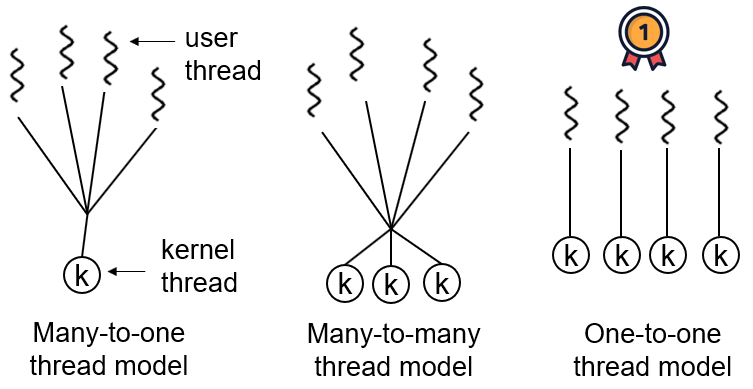
Thread models describe how user threads map to kernel threads. The common thread models are:
One-to-one (one user thread per kernel thread)
Many-to-one (multiple user threads map to one kernel thread)
Many-to-many (multiple user threads map to multiple kernel threads)
In Windows and Linux, Java threads adopt a one-to-one thread model, i.e., one Java thread corresponds to a system kernel thread. Solaris is a special case (Solaris itself supports a many-to-many thread model); HotSpot VM on Solaris supports both many-to-many and one-to-one.
Please briefly describe the relationship between threads and processes, their differences, and advantages and disadvantages?#
From the JVM perspective, the relationship between processes and threads.
Diagram of the relationship between processes and threads#
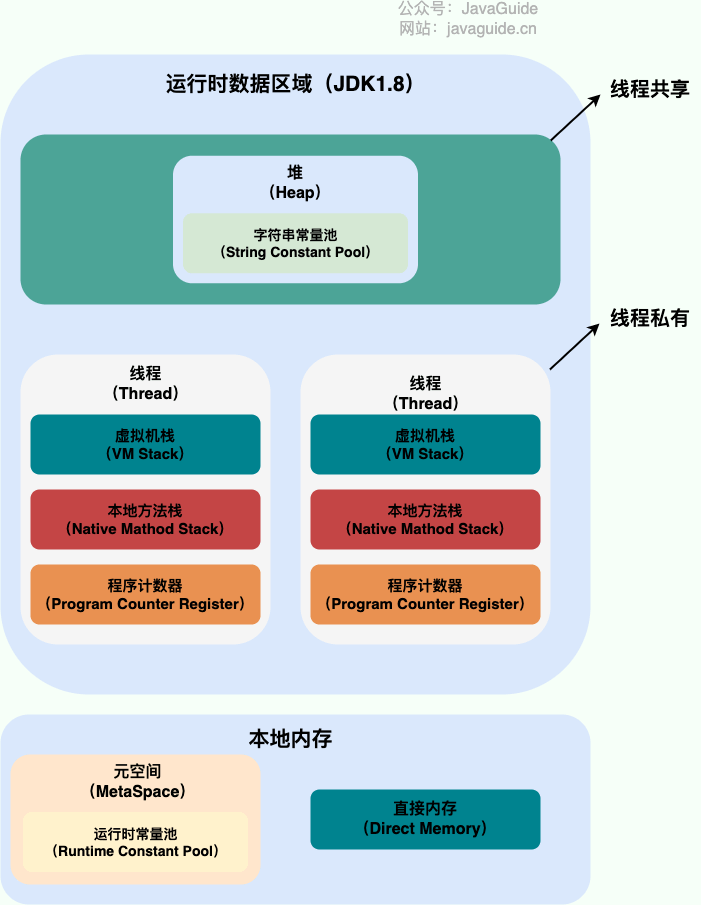
The following image shows the Java memory areas; from the JVM perspective, here is the relationship between threads and processes.
From the figure above you can see: a process can have multiple threads; multiple threads share the process’s heap and method area (metaspace after JDK 1.8), but each thread has its own program counter, virtual machine stack, and native method stack.
Summary: Threads are smaller running units divided from a process. The biggest difference between threads and processes is that processes are largely independent, while threads in the same process can affect each other. Threads have low execution overhead but are harder to manage and protect resources; processes are the opposite.
Here is some additional extended content about this knowledge point!
Think about this question: why is the program counter, the VM stack, and the native method stack thread-private? Why are the heap and the method area shared among threads?
The bytecode interpreter uses the program counter to read instructions in sequence, enabling code flow control such as sequential execution, branching, looping, and exception handling.
In a multi-threaded scenario, the program counter records the current thread’s execution position, so when the thread is switched back in, it knows where it left off.
Note that if a native method is being executed, the program counter holds an undefined address; only when executing Java code does it hold the address of the next instruction.
Thus, making the program counter private primarily ensures that after a thread switch, execution resumes at the correct position.
Why are the VM stack and the native method stack private?#
VM stack: Each Java method, before execution, creates a stack frame to store local variables, operand stacks, constant pool references, etc. As the method is invoked and returns, stack frames are pushed onto and popped off the Java VM stack.
Native method stack: Similar in function to the VM stack, but the VM stack serves Java methods (bytecode), whereas the native method stack serves Native methods used by the VM. In HotSpot, the native method stack is merged with the Java VM stack.
Therefore, to guarantee that local variables in a thread are not accessible by other threads, the VM stack and native method stack are thread-private.
A quick one-sentence explanation of the heap and the method area#
The heap and the method area are shared resources among all threads. The heap is the largest memory region in the process, mainly used for storing newly created objects (almost all objects are allocated here). The method area is mainly used to store loaded class information, constants, static variables, and code generated by the just-in-time compiler, among other data.
From the computer’s bottom layer: threads can be seen as lightweight processes, the smallest unit of program execution; thread context switching and scheduling costs are far less than processes. Also, in the era of multi-core CPUs, multiple threads can run at the same time, reducing thread context switching overhead.
From the development trend of the Internet: modern systems often demand millions or even tens of millions of concurrent requests, and multithreaded concurrent programming is the foundation for building high-concurrency systems; using many-thread mechanisms can greatly improve overall system concurrency and performance.
Delving to the computer’s bottom layer:
Single-core era: multithreading mainly aimed to improve CPU and I/O resource utilization within a single process. Suppose only one Java process runs; if we perform I/O and the process has a single thread that thread blocks on I/O, the entire process is blocked. The CPU and I/O devices run as if there’s only one core; the overall system efficiency is around 50%. With multiple threads, while one thread blocks on I/O, others can use the CPU, increasing the process’s efficiency.
Multi-core era: in multi-core, multithreading mainly improves a process’s ability to utilize multiple CPU cores. For example, if a task is to be computed, using one thread will only utilize one core regardless of how many cores exist. By creating multiple threads, these threads can be mapped to underlying CPUs; when there’s no resource contention, the task’s execution efficiency increases significantly, roughly equal to (execution time on a single core) divided by the number of cores.
The goal of concurrent programming is to improve the program’s execution efficiency and speed, but concurrency does not always increase speed, and it can introduce problems such as memory leaks, deadlocks, and thread safety issues.
Thread safety and unsafety describe whether access to the same data in a multi-threaded environment can guarantee correctness and consistency.
Thread-safe means that in a multi-threaded environment, regardless of how many threads access the same data concurrently, the data remains correct and consistent.
Thread-unsafe means that in a multi-threaded environment, concurrent access to the same data may lead to data corruption, errors, or loss.
Will running multiple threads on a single-core CPU necessarily be faster?#
Whether running multiple threads on a single-core CPU increases efficiency depends on the thread type and the task nature. There are two types of threads: CPU-intensive and IO-intensive. CPU-intensive threads perform computations and logic and require substantial CPU resources. IO-intensive threads perform input/output operations like reading/writing files or network communication, waiting for IO devices.
On a single-core CPU, only one thread can run at a time; other threads wait for CPU time slices. If the task is CPU-intensive, many threads will cause frequent context switches and reduce efficiency. If the task is IO-intensive, multiple threads can utilize the CPU’s idle time while waiting for IO, improving efficiency.
Therefore, on a single-core CPU, if the task is CPU-intensive, too many threads will harm efficiency; if IO-intensive, more threads can improve efficiency. Of course, “many” should be moderate and not exceed what the system can handle.
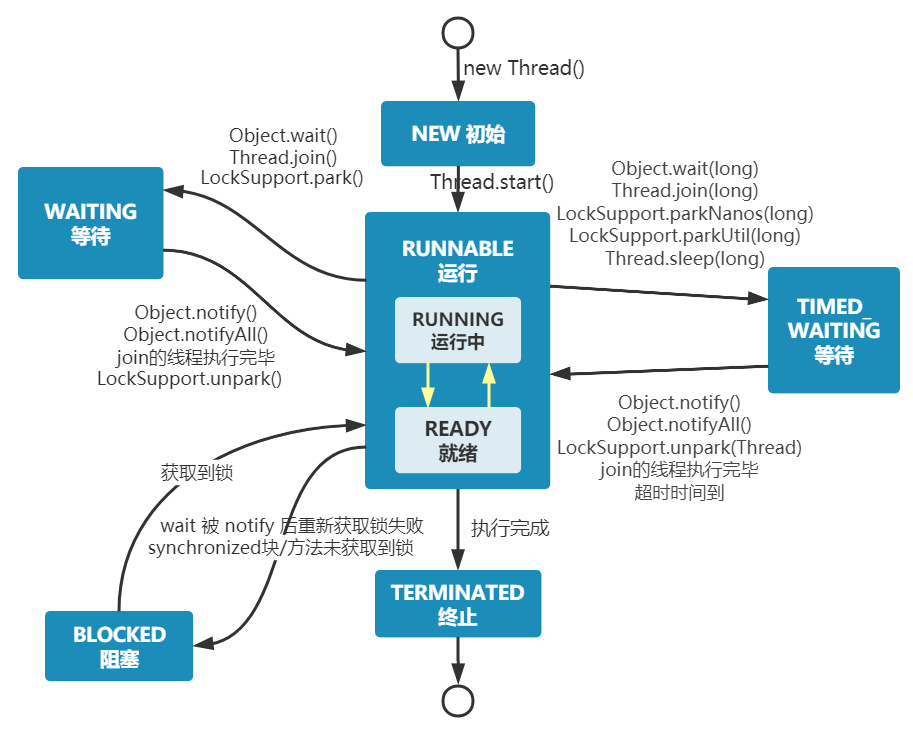
A Java thread can be in one of six states at specified moments in its lifecycle:
NEW: initial state; the thread is created but start() hasn’t been called.
RUNNABLE: running state; the thread is started and waiting to run.
BLOCKED: blocked state; waiting for a lock.
WAITING: waiting state; the thread needs other threads to perform certain actions (notification or interruption).
TIME_WAITING: timed waiting state; can return after a specified time instead of waiting indefinitely.
TERMINATED: terminated state; the thread has finished running.
Threads can switch between these states as the code executes.
From the above figure: after creation the thread is in NEW state; after calling start() it begins to run, and the thread is in READY (runnable) state. A runnable thread that obtains a CPU time slice then enters RUNNING.
When a thread executes wait(), it enters WAITING. A thread in waiting state must rely on other threads’ notifications to return to running.
TIMED_WAITING is like WAITING with a timeout; for example, sleep(long millis) or wait(long millis) can place a thread into TIMED_WAITING. When the timeout expires, the thread returns to RUNNABLE.
If a thread enters a synchronized method/block or re-enters a synchronized method/block after wait (notify), but the lock is held by another thread, the thread will enter BLOCKED.
After a thread completes the run() method, it will enter TERMINATED.
During execution, a thread has its own running conditions and state (also called context), such as the program counter and stack information mentioned above. A thread leaves the CPU due to:
Actively yielding the CPU, e.g., sleep(), wait(), etc.
Time slice exhaustion, to prevent a thread or process from hogging the CPU and starving others.
Blocking type system interrupts, e.g., IO requests; the thread is blocked.
Termination or end of execution.
The first three cause thread switches; a thread switch requires saving the current thread’s context and restoring the context for the next thread that will use the CPU. This is called a context switch.
Context switching is a fundamental feature of modern operating systems. Because it requires saving and restoring state, it consumes CPU and memory resources, leading to some overhead; frequent switching reduces overall efficiency.
What is a thread deadlock? How to avoid deadlock?#
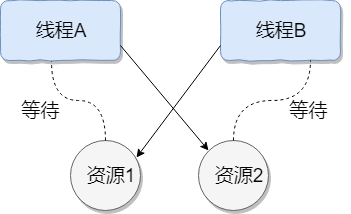
Thread deadlock describes a situation where several threads are blocked, one or more of which are waiting for resources to be released. Since threads are blocked indefinitely, the program cannot terminate normally.
As shown below, Thread A holds resource 2 and Thread B holds resource 1; they both attempt to acquire each other’s resource, so they wait for one another and enter a deadlock state.
Four necessary conditions for deadlock:
Mutual exclusion: A resource is held by only one thread at any moment.
Hold and wait: A thread is blocked while requesting a resource and does not release resources it already holds.
No preemption: Resources held by a thread are not forcibly taken away until the thread releases them.
Circular wait: A set of threads forms a cycle in which each thread holds a resource the next thread needs.
How to prevent deadlock? Break the necessary conditions for deadlock:
Break the hold-and-wait condition: Acquire all required resources at once.
Break the no-preemption condition: If a thread holds some resources and cannot obtain more, it can release its current resources.
Break the circular-wait condition: Acquire resources in a fixed order; release in the reverse order. Break the circular waiting condition.
How to avoid deadlocks?
Avoiding deadlock means using an algorithm (e.g., Banker’s algorithm) to compute and evaluate resource distribution so that the system enters a safe state.
A safe state means the system can allocate resources to each thread in some sequence (P1, P2, P3, … Pn) so that every thread can complete. The sequence <P1, P2, P3, … Pn> is called a safe sequence.
We can modify the code for Thread 2 as follows to avoid deadlock.
We can analyze why the above code avoids deadlock:
Thread 1 first obtains the monitor lock on resource1; Thread 2 cannot obtain it. Then Thread 1 proceeds to obtain the monitor lock on resource2. After completing, Thread 1 releases the locks on resource1 and resource2, allowing Thread 2 to proceed. This breaks the circular wait condition and thereby avoids deadlock.
sleep() does not release the lock, whereas wait() releases the lock.
wait() is typically used for inter-thread communication; sleep() is typically used to pause execution.
After wait() is called, the thread does not wake up automatically; other threads must call notify() or notifyAll() on the same object. After sleep() completes, the thread automatically wakes up, or you can use wait(long timeout) to wake automatically.
sleep() is a static native method of the Thread class; wait() is a native method of the Object class.
wait() makes the thread that owns the object’s lock wait and automatically releases the object’s lock. Each object (Object) has its own lock; since you need to release the current thread’s lock on the object and put it into WAITING state, you must operate on the corresponding object (Object) rather than the current thread (Thread).
Similar question: Why is the sleep() method defined in Thread?
Because sleep() pauses the current thread’s execution and does not involve an object class or require acquiring an object lock.
Can you directly call the Thread class’s run method?#
Creating a new Thread puts it into the NEW state. Calling start() starts a thread and puts the thread into the READY state; when allocated a time slice, it can begin to run. start() performs the thread’s necessary preparation and then automatically executes the contents of the run() method, which is the actual multi-threaded work. However, directly executing the run() method will treat run() as a normal method on the main thread and will not run in a new thread, so this is not multi-threaded work.
Summary: Only by calling start() can you start the thread and have it enter the ready state; directly invoking run() will not run in a multi-threaded way.
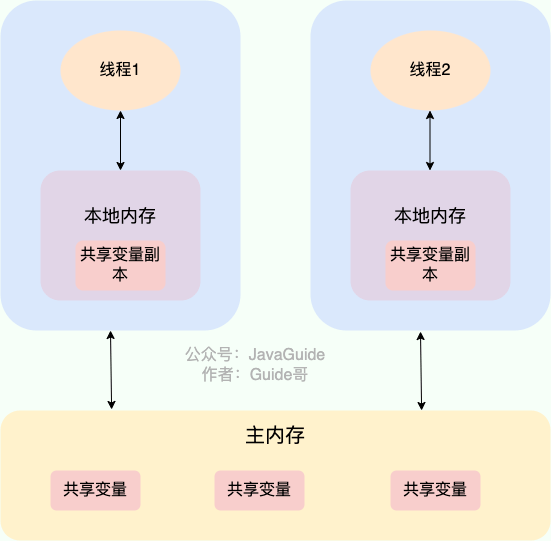
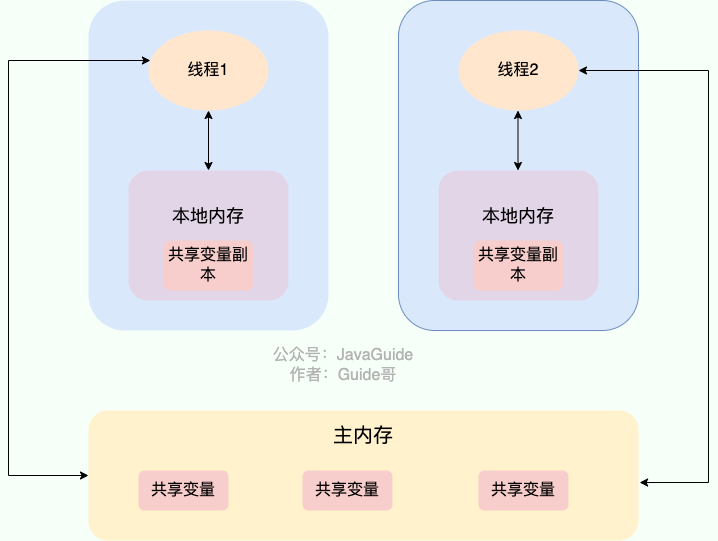
In Java, the volatile keyword guarantees visibility. If a variable is declared volatile, it indicates to the JVM that this variable is shared and may change; every use of it reads from the main memory.
JMM (Java Memory Model)
JMM (Java Memory Model) forces reads from main memory
The volatile keyword is not unique to Java; in C it exists as well. Its original meaning is to disable CPU caching. If a variable is marked volatile, it tells the compiler that the variable is shared and may change, so every use reads from main memory.
Volatile guarantees visibility but does not guarantee atomicity. The synchronized keyword guarantees both.
In Java, the volatile keyword not only guarantees visibility but also prevents the JVM from reordering instructions. If a variable is declared volatile, reads and writes to this variable insert specific memory barriers to prevent instruction reordering.
In Java, the Unsafe class provides three out-of-the-box memory barrier methods, abstracting OS-level differences:
1
publicnativevoidloadFence();
2
publicnativevoidstoreFence();
3
publicnativevoidfullFence();
Theoretically, you could achieve the same effect as volatile’s reordering prevention with these three methods, but it’s more cumbersome.
Now I’ll use a common interview question to illustrate how volatile prevents instruction reordering.
Interviewers often say: “Do you know the singleton pattern? Please hand-write it for me! Explain the principle of the double-checked locking approach to implement a singleton.”
Double-checked locking to implement a thread-safe singleton:
1
publicclassSingleton {
2
3
privatevolatilestatic Singleton uniqueInstance;
4
5
privateSingleton() {
6
}
7
8
publicstatic Singleton getUniqueInstance() {
9
// First check if the object is already instantiated; if not, enter synchronized code
10
if (uniqueInstance ==null) {
11
// Lock the class object
12
synchronized (Singleton.class) {
13
if (uniqueInstance ==null) {
14
uniqueInstance =newSingleton();
15
}
16
}
17
}
18
return uniqueInstance;
19
}
20
}
Using the volatile keyword for uniqueInstance is very important. The statement uniqueInstance = new Singleton(); is actually executed in three steps:
Allocate memory for uniqueInstance
Initialize uniqueInstance
Set the uniqueInstance reference to the allocated memory address
But due to the JVM’s instruction reordering, the execution order may become 1-3-2. In a single-threaded environment this is not a problem, but in a multi-threaded context it can cause a thread to obtain an instance that has not yet been initialized. For example, Thread T1 executes 1 and 3; then Thread T2 calls getUniqueInstance() and finds uniqueInstance is not null, returns it, but it hasn’t been initialized yet.
Normally, this should print 2500. But in practice, you’ll find the output is always less than 2500.
Why does this happen? Didn’t volatile guarantee visibility?
In other words, if volatile could guarantee atomicity of inc++, then after each thread increments inc, other threads could see the updated value immediately. If five threads each perform 500 increments, inc should be 5 * 500 = 2500.
Many people mistakenly think the increment operation inc++ is atomic. In fact, inc++ is a composite operation with three steps:
Read the value of inc
Add 1 to it
Write the value back to memory
Volatile cannot guarantee that these three steps are atomic; this can lead to the following situation:
Thread 1 reads inc and is not yet modifying it. Thread 2 reads inc, increments it (+1), and writes back.
Thread 1 then updates inc (+1) and writes back.
This results in both threads performing one increment, but inc only increases by 1 overall.
In fact, if you want to ensure correctness of the above code, you can easily do so with synchronized, Lock, or AtomicInteger.
A pessimistic lock always assumes the worst case: that a shared resource will be modified when accessed. So each time a resource is acquired, it is locked; other threads attempting to access the resource will be blocked until the lock is released by the current holder. In other words, a shared resource is used by only one thread at a time, and others wait.
In Java, exclusive locks like synchronized and ReentrantLock embody the pessimistic locking mindset.
1
publicvoidperformSynchronisedTask() {
2
synchronized (this) {
3
// synchronized operations
4
}
5
}
6
7
private Lock lock =newReentrantLock();
8
lock.lock();
9
try {
10
// synchronized operations
11
} finally {
12
lock.unlock();
13
}
In high-concurrency scenarios, heavy lock contention can lead to thread blocking, many blocked threads cause context switches, and increase system overhead. Pessimistic locks may also lead to deadlocks, affecting code execution.
Optimistic locking assumes the best case: shared resources are not expected to be modified during access; threads proceed without locking or waiting, and only verify, when committing updates, whether the resource has been modified by another thread (the typical methods use versioning or CAS).
In Java, atomic variables under java.util.concurrent.atomic (for example AtomicInteger, LongAdder) implement optimistic locking using CAS.
1
// LongAdder can outperform AtomicInteger and AtomicLong under high concurrency
2
// The cost is higher memory usage (space-for-time trade-off)
3
LongAdder sum =newLongAdder();
4
sum.increment();
Under high concurrency, optimistic locking avoids lock contention and thread blocking and often outperforms pessimistic locking. However, if conflicts occur frequently (e.g., write-heavy scenarios), there will be frequent failures and retries, which can also degrade performance and raise CPU usage.
Nevertheless, many failures and retries can be mitigated; as mentioned above, LongAdder uses a space-for-time approach to solve this problem.
In theory:
Optimistic locking is typically used where writes are relatively rare (read-heavy scenarios, low contention); this avoids frequent locking and improves performance. But optimistic locking mainly targets a single shared variable (see atomic variable classes under java.util.concurrent.atomic).
Pessimistic locking is typically used where writes are frequent (high contention), to avoid frequent failures and retries; its overhead is fixed. If optimistic locking solves frequent failures and retries (as with LongAdder), it can be considered, depending on the situation.
Typically add a version column named version in the data table to indicate how many times the data has been modified. When data is modified, the version value is incremented. When thread A wants to update data, it reads the data and the version value; when submitting the update, if the version read equals the current version in the database, update; otherwise retry the update until success.
A simple example: suppose an accounts table has a version field with current value 1, and the account balance (balance) is $100.
Operator A reads it (version = 1) and deducts 50fromthebalance(100 - $50).
Operator B reads this user’s info (version = 1) and deducts 20fromthebalance(100 - $20).
Operator A completes the update, submitting version = 1 along with the updated balance ($50). The database sees the submitted version equals the current version and updates the balance; the database version becomes 2.
Operator B attempts to submit with version = 1 and balance = $80, but the database current version is 2, so the optimistic lock policy fails and the submission is rejected.
This avoids Operator B’s update from overwriting Operator A’s results using old data.
CAS stands for Compare And Swap; used to implement optimistic locking and widely applied in frameworks. The idea is to compare the current value with an expected value and, if equal, swap to a new value atomically.
CAS is atomic and relies on a CPU instruction.
An atomic operation is the smallest indivisible operation, which, once started, cannot be interrupted until it completes.
CAS involves three operands:
V: value to be updated (Var)
E: expected value (Expected)
N: new value intended to be written (New)
Only when V equals E will CAS atomically update V to N. If not equal, another thread updated V, so the current thread gives up.
An example: Thread A wants to change i to 6, with i initially 1 (V = 1, E = 1, N = 6, ABA not considered).
Compare i with 1; if equal, set to 6.
If not equal, another thread changed i; CAS fails.
When multiple threads use CAS on a single variable, only one will win; the others fail, but failed threads are not blocked; they are informed of the failure and may retry, or give up.
Java does not provide a direct CAS implementation; CAS related implementations are achieved via C++ inline assembly (JNI). Therefore, CAS implementation depends on the OS and CPU.
Unsafe in sun.misc provides compareAndSwapObject, compareAndSwapInt, compareAndSwapLong to perform CAS on Object, int, long.
1
/**
2
* CAS
3
* @paramo the object containing the field to modify
4
* @paramoffset the offset of the field within the object
5
* @paramexpected the expected value
6
* @paramupdate the update value
7
* @return true | false
8
*/
9
publicfinalnativebooleancompareAndSwapObject(Object o, long offset, Object expected, Object update);
10
11
publicfinalnativebooleancompareAndSwapInt(Object o, long offset, int expected,int update);
12
13
publicfinalnativebooleancompareAndSwapLong(Object o, long offset, long expected, long update);
If a variable V is first read as A, and while we prepare to update it we see it’s still A, can we guarantee it hasn’t been changed by other threads? Obviously not, because in the meantime it might have been changed to some other value and then changed back to A, causing a CAS operation to falsely believe it has never been modified. This is called the CAS “ABA” problem.
The solution is to attach a version number or timestamp in front of the variable. After 1.5, AtomicStampedReference solves ABA via a stamp that CAS checks with the current reference.
CAS often retries via spinning, which can waste CPU cycles if retries take long.
If the processor supports a pause instruction, it can improve efficiency:
Delay the pipeline and prevent the CPU from wasting resources.
Prevent memory-ordering hazards from clearing the CPU pipeline.
CAS can also be aided by library support (e.g., with Unsafe or Atomic classes).
CAS can only guarantee atomicity for a single shared variable#
CAS is only effective for a single shared variable. If you need to operate on multiple shared variables, CAS alone is not enough. However, from Java 1.5 onward, AtomicReference allows atomic operations on references, enabling you to combine multiple variables into one shared variable for CAS, or use locks to achieve the same.
Synchronized is a Java keyword that expresses synchronization for access to resources across threads. It ensures that a method or a block annotated with synchronized can be executed by only one thread at a time.
In early Java versions, synchronized was a heavyweight lock and less efficient because the monitor lock relied on the OS’s Mutex Lock, and thread context-switching involved user-to-kernel mode transitions, which took time.
Since Java 6, synchronized has been optimized with spin locks, adaptive spin, lock elimination, lock coarsening, biased locking, lightweight locks, etc., improving its performance. Therefore, synchronized is still commonly used in real projects; the JDK source and many frameworks use it extensively.
About biased locking: biased locking adds complexity; it does not always benefit all applications. In JDK 15 biased locking is disabled by default (though you can enable with -XX:+UseBiasedLocking). In JDK 18 biased locking has been deprecated and is no longer available.
This locks the current class and affects all instances of the class; entering synchronized code requires the lock for the class.
1
synchronizedstaticvoidmethod() {
2
// business code
3
}
Static synchronized methods and non-static synchronized methods do not mutually exclude each other. If one thread A calls a non-static synchronized method of an instance, and thread B calls a static synchronized method of the class, they won’t block each other because the locks are on the class (static synchronized) and on the instance (non-static) respectively.
Modifying a code block
synchronized(object): acquire the lock of the given object before entering the synchronized code.
synchronized(Class.class): acquire the lock of the given Class before entering the synchronized code.
1
synchronized(this) {
2
// business code
3
}
Summary:
Putting synchronized on static methods and synchronized(class) blocks locks the Class object.
Putting synchronized on instance methods locks the object instance.
Avoid using synchronized(String a) because the JVM’s string constant pool is cached and can lead to contention or other issues.
Conclusion: Constructors cannot be annotated with synchronized.
Constructors are inherently thread-safe; there is no such thing as a synchronized constructor.
Do you understand the underlying mechanism of synchronized?#
The underlying mechanism of synchronized is at the JVM level.
Synchronized block:
1
publicclassSynchronizedDemo {
2
publicvoidmethod() {
3
synchronized (this) {
4
System.out.println("synchronized code block");
5
}
6
}
7
}
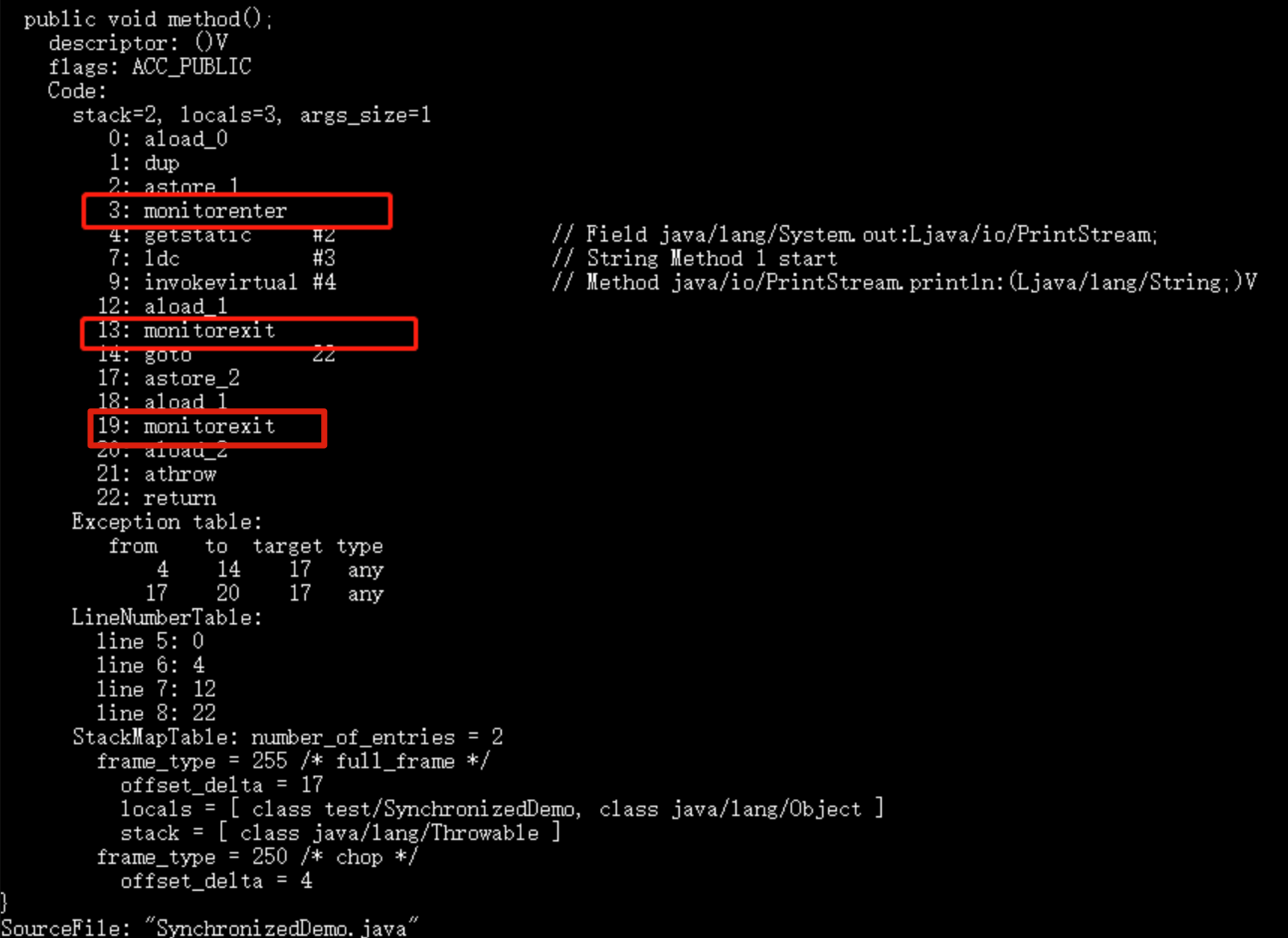
Using javap (JDK’s tool) to inspect the bytecode for SynchronizedDemo: compile with javac SynchronizedDemo.java and then run javap -c -s -v -l SynchronizedDemo.class.
[Images showing monitorenter and monitorexit and their usage]
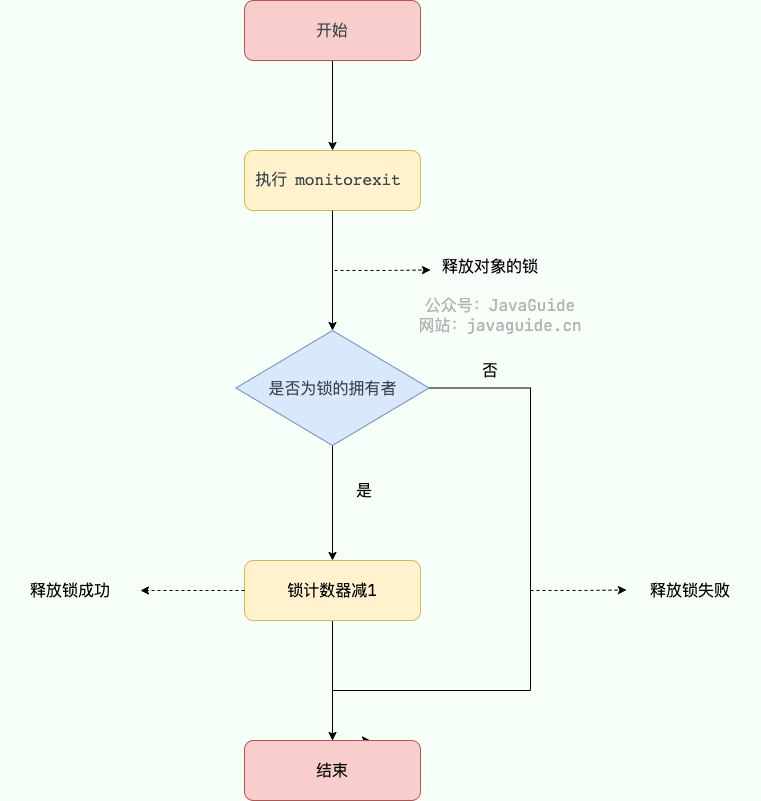
When monitorenter executes, the thread attempts to acquire the object’s lock (monitor). In HotSpot, the monitor is realized in C++ as ObjectMonitor. If the lock acquisition fails, the thread blocks until the lock is released by another thread.
For synchronized method:
1
publicclassSynchronizedDemo2 {
2
publicsynchronizedvoidmethod() {
3
System.out.println("synchronized method");
4
}
5
}
[Image showing ACC_SYNCHRONIZED flag]
A synchronized method does not use monitorenter/monitorexit for entry/exit; instead, the JVM uses ACC_SYNCHRONIZED to indicate that the method is synchronized, and it handles the synchronization accordingly.
In summary:
The implementation of synchronized blocks uses monitorenter and monitorexit.
Synchronized methods use the ACC_SYNCHRONIZED flag to indicate a synchronized method.
Either way, both approaches ultimately obtain the object’s monitor.
What optimizations were done to synchronized after Java 1.6? Do you understand lock upgrading?#
Since Java 6, synchronized has seen many optimizations such as spin locks, adaptive spin locks, lock elimination, lock coarsening, biased locking, and lightweight locking to reduce synchronization overhead. Locks can be upgraded to higher forms as contention increases; however, biasing has been deprecated in recent versions (as noted earlier).
What’s the difference between synchronized and volatile?#
synchronized and volatile are complementary; not opposing.
volatile provides a lightweight form of synchronization, so it generally has better performance than synchronized. However, volatile can be used only on variables, not on methods or blocks.
volatile ensures visibility but not atomicity; synchronized ensures both.
ReentrantLock implements the Lock interface, is reentrant and exclusive, similar to the synchronized keyword. However, ReentrantLock is more flexible and powerful, adding features such as polling, timeouts, interruption, fair and non-fair locking, etc.
ReentrantLock contains an inner class Sync; Sync extends AQS (AbstractQueuedSynchronizer), and most lock/unlock operations are implemented in Sync. Sync has two subclasses: FairSync and NonfairSync.
ReentrantLock by default uses a non-fair lock, but you can explicitly specify a FairLock via the constructor.
1
// Pass a boolean, true for fair lock, false for non-fair
2
publicReentrantLock(boolean fair) {
3
sync = fair ?newFairSync() :newNonfairSync();
4
}
From the above, you can see that ReentrantLock’s implementation is based on AQS.
What’s the difference between fair and non-fair locks?#
Fair lock: the thread that requests the lock first gets it after the lock is released. Performance is slightly worse because fair locks require more context switches to maintain strict ordering.
Non-fair lock: after a lock is released, a thread that arrives later may acquire the lock in a non-deterministic order, usually offering better performance but potentially starving some threads.
What’s the difference between synchronized and ReentrantLock?#
Both are reentrant locks.
Synchronized is implemented by the JVM; ReentrantLock is implemented at the API level.
ReentrantLock provides higher-level features like interruptible lock acquisition, fairness, and multiple conditions, which synchronized cannot directly provide.
If you want to use the features of ReentrantLock (lock interrupts, fairness, allow multiple conditions), pick ReentrantLock; otherwise, synchronized is simpler and typically sufficient.
ReentrantReadWriteLock implements ReadWriteLock, a reentrant read-write lock that allows multiple readers to hold the lock simultaneously, but only one writer to hold the lock, and writers have exclusive access when present.
1
publicclassReentrantReadWriteLock
2
implementsReadWriteLock, java.io.Serializable{
3
}
4
publicinterfaceReadWriteLock {
5
Lock readLock();
6
Lock writeLock();
7
}
Read locks are shared; write locks are exclusive. Read locks can be held by multiple threads simultaneously, while a write lock can be held by only one thread at a time.
Like ReentrantLock, ReentrantReadWriteLock is also based on AQS.
ReentrantReadWriteLock also supports fair and non-fair locking, with non-fair as default; you can specify fairness in the constructor.
1
// Pass a boolean, true for fair lock, false for non-fair lock
Because it provides both read and write locks, and read locks are shareable while writes are exclusive, it can significantly improve performance in read-mostly workloads.
What’s the difference between shared locks and exclusive locks?#
Shared lock: one lock can be held by multiple threads simultaneously (reads).
Exclusive lock: the lock can be held by only one thread at a time (writes).
Can a thread holding a read lock obtain a write lock?#
If a thread holds a read lock, it cannot obtain a write lock (if the write lock is needed and currently held by another thread, the attempt to acquire the write lock will fail unless the current thread releases the read lock first).
If a thread holds a write lock, it can acquire a read lock (a scenario that allows read locks even when a write is in progress, but this is subject to the implementation and configuration).
Why can’t a read lock be upgraded to a write lock?#
Write locks can be downgraded to read locks, but read locks cannot be upgraded to write locks. Upgrading would cause threads to compete for the write lock, which is exclusive, potentially harming performance. There can also be deadlocks if two threads with read locks try to upgrade to write locks.
Typically, a variable is accessible by any thread. If you want each thread to have its own local copy of a variable, how can you do that?
ThreadLocal is designed to solve exactly this: it binds a value to each thread independently. ThreadLocal can be imagined as a small box to store data local to each thread. If you create a ThreadLocal variable, each thread that accesses it will have its own local copy, avoiding thread-safety issues.
From the output you can see that although Thread-0 has changed the value of formatter, Thread-1’s default formatting value remains the same as the initialize value, and the same for the other threads.
The code above uses Java 8 knowledge: it is equivalent to the following, which IDEA would suggest converting to Java 8 style. ThreadLocal’s class was extended in Java 8 with the withInitial() method that takes a Supplier:
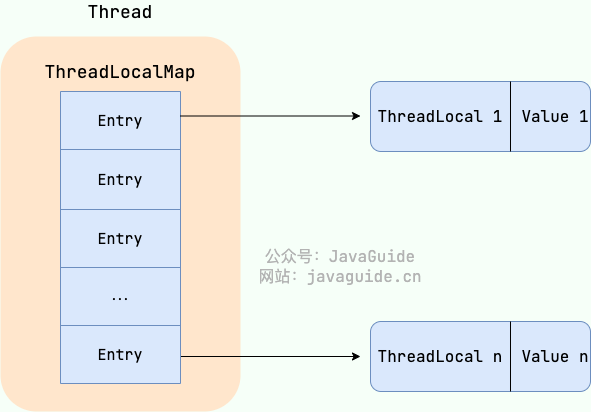
From the Thread class source, you can see that the Thread class has a threadLocals and an inheritableThreadLocals, both of type ThreadLocalMap. You can think of ThreadLocalMap as a specialized HashMap implemented by ThreadLocal. By default, these two variables are null and are created only when the current thread calls the ThreadLocal set or get methods. When these methods are called, you’re actually operating on the mapping within ThreadLocalMap.
ThreadLocal stores key-value pairs where the key is a ThreadLocal and the value is the object set via ThreadLocal’s set method.
For example, if you declare two ThreadLocal objects in the same thread, the ThreadLocalMap inside the Thread stores data for both ThreadLocals; the key is the ThreadLocal instance, and the value is what was set via the ThreadLocal’s set call.
The ThreadLocal data structure is shown here:
ThreadLocalMap is a static inner class of ThreadLocal.
ThreadLocalMap uses a weak reference for the key (ThreadLocal), but a strong reference for the value. If a ThreadLocal is not strongly referenced elsewhere, the key is collected by GC but its value may not be collected, leading to a memory leak.
Thus, ThreadLocalMap can contain entries whose keys are null. If you don’t clean up, the values may never be GC’d. The implementation of ThreadLocalMap already handles this by cleaning up entries with null keys when calling set(), get(), or remove(). It’s best to call remove() after using ThreadLocal.
/** The value associated with this ThreadLocal. */
3
Object value;
4
5
Entry(ThreadLocal<?> k, Object v) {
6
super(k);
7
value = v;
8
}
9
}
Weak references:
If an object only has weak references, it is like a disposable item. Weak references differ from soft references in that an object with only weak references has a shorter lifetime. When the garbage collector scans the memory region it controls and finds objects with only weak references, it will immediately reclaim their memory, regardless of current memory pressure.
Weak references can be used with a ReferenceQueue; if the object referenced by a weak reference is garbage collected, the VM will enqueue the weak reference into the associated reference queue.
A thread pool is a resource pool that manages a set of threads. When there is a task to process, you take a thread from the pool; after the task finishes, the thread is not destroyed immediately but waits for the next task.
Pooling reduces the overhead of creating and destroying threads and improves resource utilization. A thread pool also provides centralized management, tuning, and monitoring of threads.
Create via the ThreadPoolExecutor constructor (recommended).
Create via the Executor framework’s utility class Executors.
We can create several types of ThreadPoolExecutor:
FixedThreadPool: Returns a thread pool with a fixed number of threads. The number of threads remains constant. When a new task is submitted, if there are idle threads, they execute immediately; otherwise, the task is queued until a thread becomes available.
SingleThreadExecutor: Returns a thread pool with only one thread. If more than one task is submitted, tasks are queued and executed in FIFO order when the single thread is available.
CachedThreadPool: Returns a thread pool that can adjust the number of threads based on demand. Initial size is 0. If a new task arrives and there are no available threads, it creates a new thread. If there is no new task for a while (default 60 seconds), core threads time out and are terminated, shrinking the pool.
ScheduledThreadPool: Returns a thread pool for executing tasks after a given delay or periodically.
Why not recommended to use built-in thread pools?#
Alibaba Java Development Manual’s concurrency chapter explicitly states that thread resources must be provided by thread pools; applications should not create threads directly.
The benefit of thread pools is to reduce the cost of creating/destroying threads and resource usage, and to avoid resource exhaustion. If you don’t use a thread pool, the system may create a large number of similar threads, consuming memory or causing excessive context switching.
The manual also enforces using ThreadPoolExecutor constructors (instead of Executors wrappers) to clearly convey pool behavior.
The downsides of Executors wrappers:
FixedThreadPool and SingleThreadExecutor use an unbounded LinkedBlockingQueue; the queue can grow to Integer.MAX_VALUE, potentially causing OOM with many requests.
CachedThreadPool uses SynchronousQueue; the maximum threads can reach Integer.MAX_VALUE, potentially causing OOM if tasks are numerous and slow.
ScheduledThreadPool and SingleThreadScheduledExecutor use an unbounded DelayedWorkQueue; the queue can grow to Integer.MAX_VALUE, potentially causing OOM.
if (workQueue ==null|| threadFactory ==null|| handler ==null)
18
thrownewNullPointerException();
19
this.corePoolSize = corePoolSize;
20
this.maximumPoolSize = maximumPoolSize;
21
this.workQueue = workQueue;
22
this.keepAliveTime = unit.toNanos(keepAliveTime);
23
this.threadFactory = threadFactory;
24
this.handler = handler;
25
}
Three most important parameters of ThreadPoolExecutor:
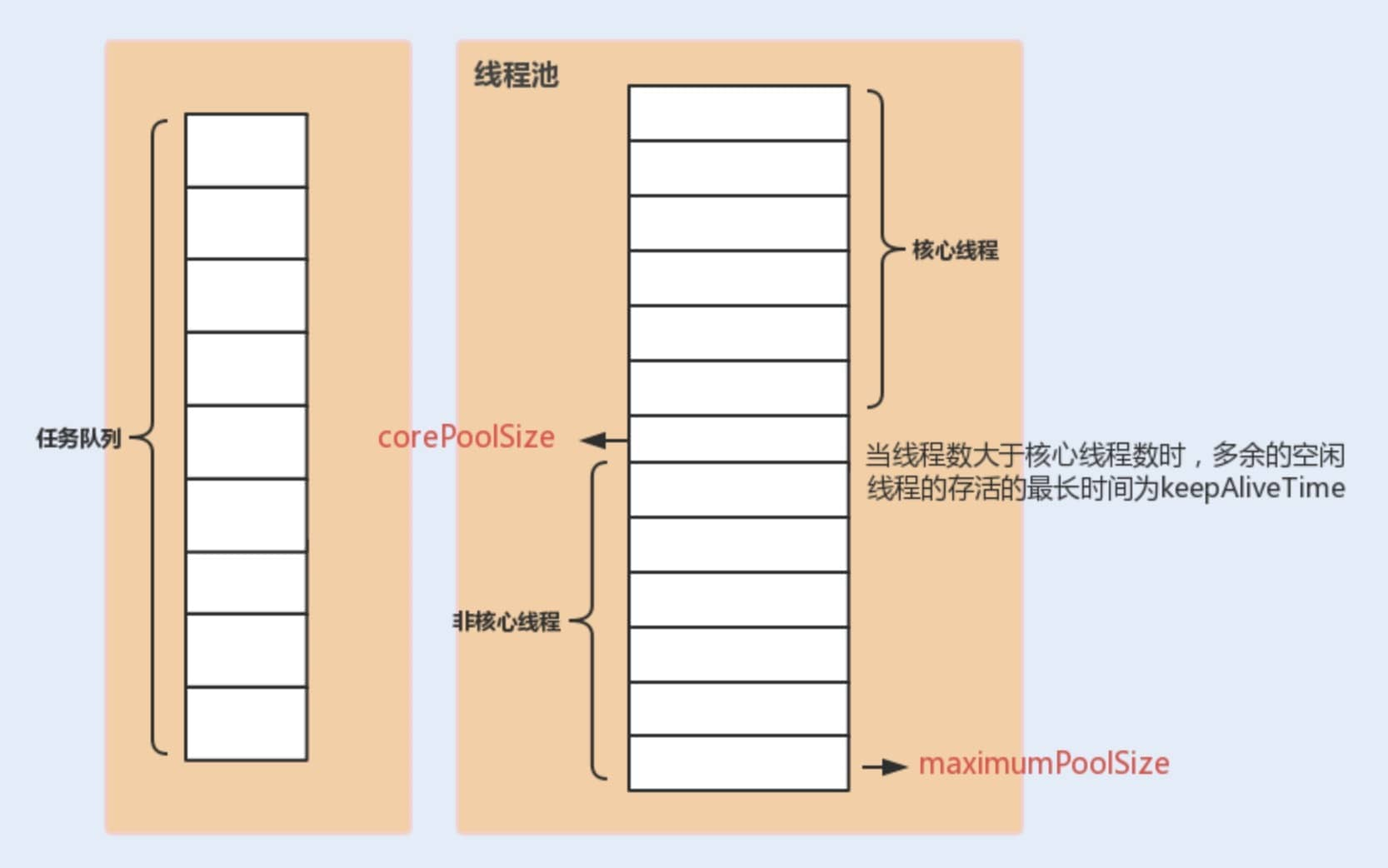
corePoolSize: When the task queue has not reached capacity, the maximum number of threads that can run concurrently.
maximumPoolSize: When the queue has reached capacity, the number of concurrently running threads is capped at this maximum.
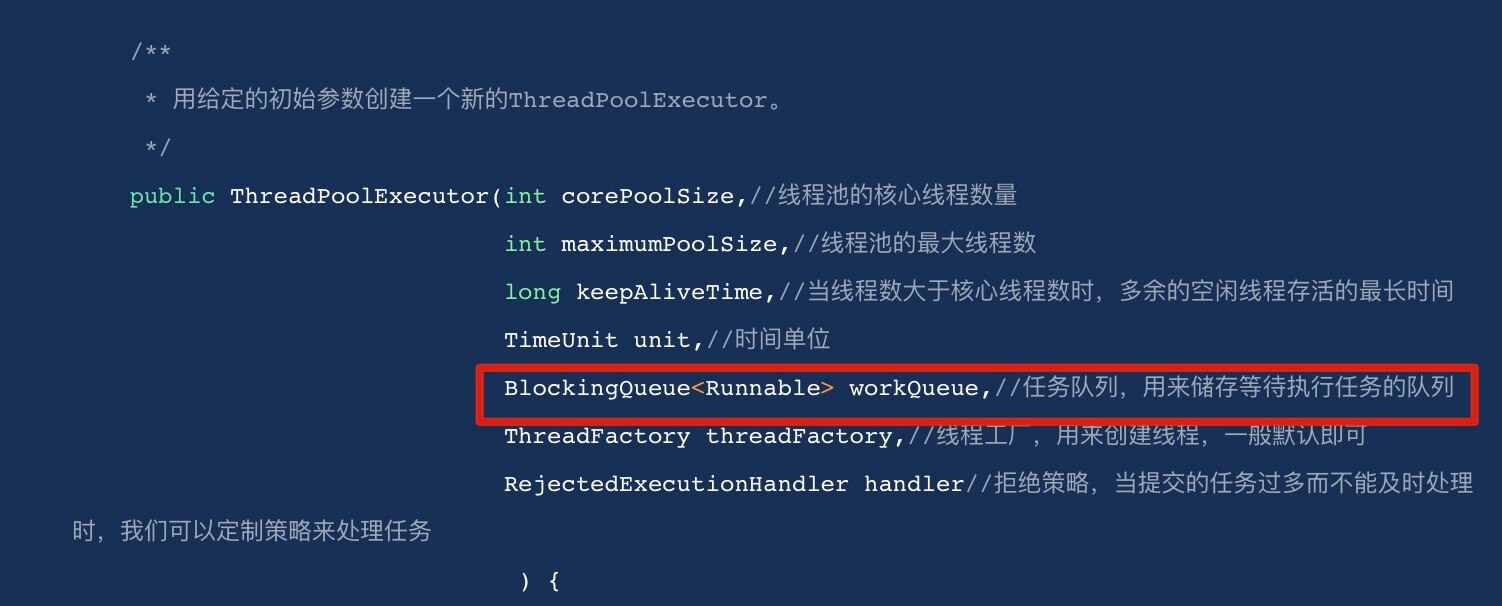
workQueue: When a new task arrives, the pool first checks whether the number of running threads has reached corePoolSize; if so, the task is stored in the queue.
Other common parameters:
keepAliveTime: When the number of threads is greater than corePoolSize and there are no new tasks, the extra idle threads will wait for keepAliveTime and then be terminated; the pool will reduce to corePoolSize. Both core and non-core threads are treated the same during cleanup.
unit: Time unit for keepAliveTime.
threadFactory: Used to create new threads for the executor.
handler: RejectedExecutionHandler when the pool is saturated.
[Diagram showing the relationships between thread pool parameters]
If the number of running threads reaches maximum and the queue is full, ThreadPoolExecutor defines several policies:
ThreadPoolExecutor.AbortPolicy: throws a RejectedExecutionException to reject the new task.
ThreadPoolExecutor.CallerRunsPolicy: the task is run by the thread that invoked execute; if the executor has shut down, the task is discarded. This policy reduces the rate of new task submissions and can affect overall performance. If your application can tolerate this delay and you want to ensure every task is executed, you can choose this policy.
ThreadPoolExecutor.DiscardPolicy: discards the new task.
ThreadPoolExecutor.DiscardOldestPolicy: discards the oldest unprocessed request.
For example, when Spring creates a thread pool via ThreadPoolTaskExecutor or by directly using ThreadPoolExecutor constructors, the default saturation policy is AbortPolicy. In this saturation policy, if the queue is full, ThreadPoolExecutor throws a RejectedExecutionException to reject the new task, meaning you will lose the ability to process that task. If you don’t want to discard tasks, you can use CallerRunsPolicy. CallerRunsPolicy, unlike the other policies, does not throw or drop tasks; instead, it returns the task to the caller and executes it in the caller’s thread.
// Directly execute in the main thread, not in the thread pool
8
r.run();
9
}
10
}
11
}
Which common blocking queues are used with thread pools?#
When a new task arrives, the pool first checks if the number of running threads has reached the core pool size, and if so, the task is placed into the queue.
Different thread pools use different blocking queues:
A LinkedBlockingQueue with capacity Integer.MAX_VALUE (unbounded): FixedThreadPool and SingleThreadExecutor. The pool’s thread count never exceeds the core pool size (as the queue will never be full).
A SynchronousQueue: CachedThreadPool. No capacity; it ensures a new thread is created if there is no idle thread. The pool can grow to Integer.MAX_VALUE.
DelayedWorkQueue (delayed blocking queue): ScheduledThreadPool and SingleThreadScheduledExecutor. The internal elements are ordered by delay; the queue uses a heap to keep the earliest-execution-time task at the head. The queue grows but never blocks; maximum growth can reach Integer.MAX_VALUE, thus at most the pool’s core size is limited.
Do you understand the flow of processing tasks in a thread pool?#
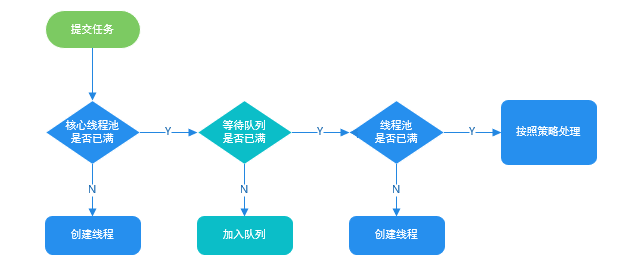
If the current number of running threads is less than the core pool size, a new thread is created to execute the task.
If the current running threads are at least the core pool size but less than the maximum, the task is placed into the queue for later execution.
If the task cannot be queued (the queue is full) but the current number of running threads is less than the maximum, a new thread is created to execute the task.
If the current number of running threads has reached the maximum, a new thread would exceed the maximum; the task is rejected and the saturation policy handles it.
Many people think increasing the thread pool size is better, but too many threads in a multi-threaded scenario increases context-switching costs.
If the pool size is too small, a large number of tasks/requests may queue up, potentially leading to queue fullness or memory pressure (OOM). The CPU might not be fully utilized.
If the pool size is too large, too many threads compete for CPU resources, causing heavy context switching and slowing down overall execution.
A simple, widely applicable rule:
CPU-bound tasks (N+1): set the number of threads to N (CPU cores) + 1. The extra thread helps cover occasional page misses or other pauses; when a task pauses, other threads can use the CPU, making better use of CPU idle time.
IO-bound tasks (2N): you can configure more threads because they wait on IO most of the time; set roughly to 2N.
How to determine CPU-bound vs IO-bound tasks?
CPU-bound means tasks that primarily use CPU, e.g., sorting large data in memory. IO-bound tasks include network I/O or file I/O; these tasks spend more time waiting for IO than performing CPU work.
A more precise formula: optimum threads = N * (1 + WT/ST), where WT = total time spent waiting; ST = time spent computing. The ratio WT/ST guides how many threads you need: higher WT/ST suggests more threads.
We can use VisualVM (a JDK tool) to observe WT/ST.
For CPU-bound tasks, WT/ST is near 0, so the number of threads can be set to N (CPU cores) * (1 + 0) = N, close to the N in earlier notes. For IO-bound tasks, WT is large; you might set 2N.
The formula is only a guideline; adjust dynamically based on production experience.
How to dynamically modify thread pool parameters?#
Meituan’s technical team documented in “Java Thread Pool Implementation Principles and Meituan’s Practice” ideas and methods for configurable thread pool parameters.
Meituan’s approach focuses on making core thread pool parameters configurable. The three core parameters are:
corePoolSize: Core thread count; defines the minimum simultaneous running threads.
maximumPoolSize: When the queue reaches capacity, the maximum number of threads that can run.
workQueue: When a new task arrives, the pool first checks if the number of running threads has reached the core pool size; if so, the task is enqueued.
Why these three parameters?
These are the most important parameters for ThreadPoolExecutor; they largely determine how the pool handles tasks.
Note: corePoolSize can be changed at runtime via setCorePoolSize(); if the current number of worker threads is greater than corePoolSize, the pool will shrink by reducing workers.
Additionally, there is no dynamic method to adjust queue length in the standard API. Meituan’s approach uses a custom queue called ResizableCapacityLinkedBlockingQueue (which removes the final modifier on the LinkedBlockingQueue’s capacity field, allowing dynamic resizing).
If your project also wants to achieve this, you can leverage these open-source projects:
Hippo4j: asynchronous thread pool framework; supports dynamic changes, monitoring, and alerting; easy to use without code changes. Supports multiple usage modes and aims to improve system reliability.
Dynamic TP: lightweight dynamic thread pool; built-in monitoring and alarm; integrates with middleware thread pool management; based on mainstream config centers (Nacos, Apollo, Zookeeper, etc., SPI extendable).
This is a common interview question, essentially testing the candidate’s grasp of thread pools and blocking queues.
Different thread pools use different blocking queues for task queues. For example, FixedThreadPool uses LinkedBlockingQueue (unbounded), so the queue will never be full, and the pool can only create core pool size threads.
If you need to implement a priority task thread pool, you can consider using PriorityBlockingQueue (priority blocking queue) as the task queue (ThreadPoolExecutor’s constructor accepts a workQueue parameter).
PriorityBlockingQueue is a priority-based unbounded blocking queue; it is effectively a thread-safe PriorityQueue, both backed by a min-heap. Note that PriorityQueue does not support blocking operations.
To enable PriorityBlockingQueue to sort tasks, the tasks placed in it must be comparable, in one of two ways:
The tasks submitted to the thread pool implement Comparable and override compareTo to define the priority.
Provide a Comparator when constructing the PriorityBlockingQueue to define the priority rules (recommended).
There are some risks and drawbacks:
PriorityBlockingQueue is unbounded, which can lead to a large backlog of requests and possible OOM.
It can cause starvation for low-priority tasks.
Since it sorts elements and ensures thread safety (via locks), performance can degrade.
A simple mitigation for OOM is to subclass PriorityBlockingQueue and override the offer method to bound the queue; when the number of elements exceeds a limit, return false.
Starvation can be mitigated with design choices (e.g., removing long-waiting tasks and re-adding with higher priority). Performance impact from sorting is unavoidable; for most business scenarios, this cost is acceptable.
Future is a typical application of the asynchronous paradigm, used in scenarios where long-running tasks must be executed, avoiding blocking the program while waiting for results. Specifically, when we perform a time-consuming task, we can hand it off to a child thread for asynchronous execution and do other work in the meantime. Later, we can retrieve the result via Future.
This is the classic Future pattern in multi-threading. It is a design pattern, with asynchronous invocation as the core idea; it is widely used in multi-threading and not language-specific to Java.
In Java, Future is just a generic interface in java.util.concurrent, with five methods (the key capabilities include cancel, isCancelled, isDone, get, and get with timeout).
1
// V represents the return type of the Future task
2
publicinterfaceFuture<V> {
3
booleancancel(booleanmayInterruptIfRunning);
4
booleanisCancelled();
5
booleanisDone();
6
V get() throws InterruptedException, ExecutionException;
Simply put: I have a task submitted to a Future to handle. While the task runs, I can do anything else. I can also cancel the task or check its status. After some time, I can retrieve the task’s result from the Future.
What is the relationship between Callable and Future?#
We can understand the relationship through FutureTask.
FutureTask provides a basic implementation of Future, often used to wrap Callable and Runnable, and includes the ability to cancel tasks, check completion, and obtain results. ExecutorService.submit() actually returns a Future implementation, which is FutureTask.
FutureTask not only implements Future but also Runnable, so it can be executed by a thread directly.
FutureTask has two constructors: one takes a Callable, the other takes a Runnable. In fact, passing a Runnable internally converts it to a Callable.
1
publicFutureTask(Callable<V> callable) {
2
if (callable ==null)
3
thrownewNullPointerException();
4
this.callable = callable;
5
this.state = NEW;
6
}
7
publicFutureTask(Runnable runnable, V result) {
8
// Convert Runnable to Callable via RunnableAdapter
Future has some limitations in practice, such as not supporting asynchronous composition or non-blocking get() methods. Java 8 introduced CompletableFuture to address these limitations. In addition to better Future capabilities, CompletableFuture provides functional programming styles and asynchronous task orchestration (you can chain multiple asynchronous tasks to form a complete pipeline).
As you can see, CompletableFuture implements both Future and CompletionStage.
CompletionStage describes a stage of an asynchronous computation. Many computations can be broken into multiple stages; you can compose all the steps using this interface to form an asynchronous computation pipeline.
The methods in CompletionStage are numerous; CompletableFuture inherits and uses a lot of Java 8’s functional programming features.
AQS provides a set of reusable features for building locks and synchronizers, enabling the construction of a large number of synchronization primitives, such as ReentrantLock, Semaphore, ReentrantReadWriteLock, SynchronousQueue, etc.
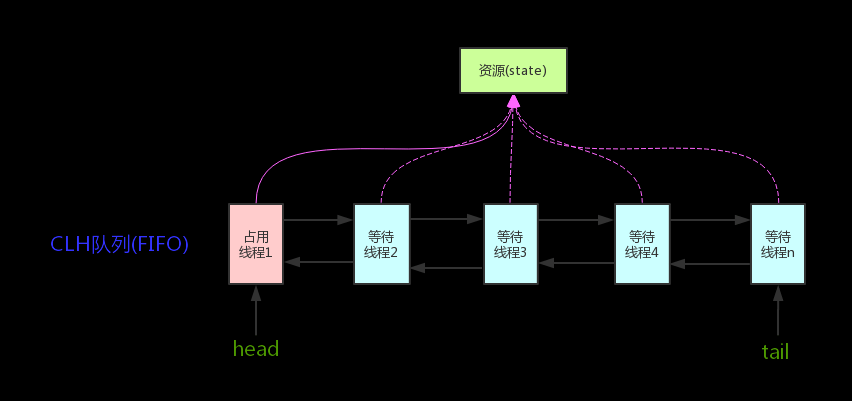
The core idea is: if the requested shared resource is free, set the current thread as a valid worker thread and mark the resource as locked. If the resource is in use, a waiting mechanism and a wake-up mechanism, implemented via a CLH queue lock, are used to manage threads that temporarily cannot get the lock.
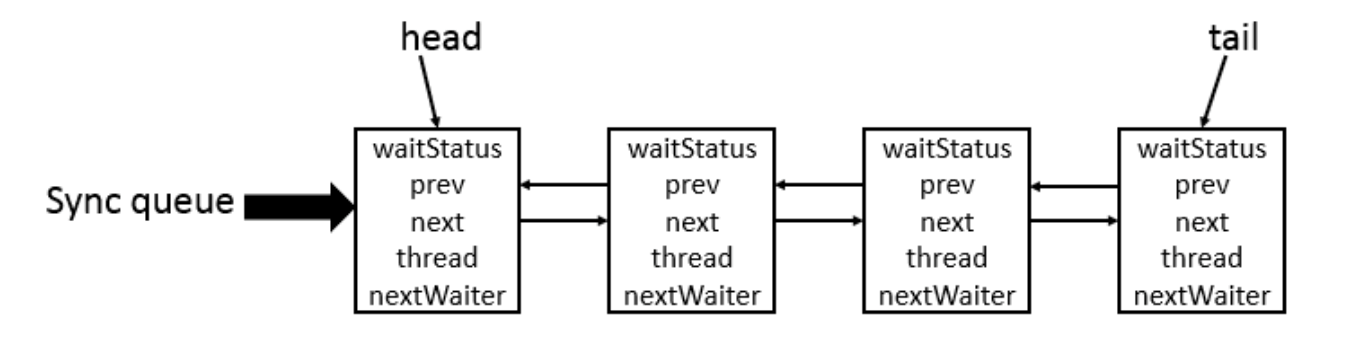
CLH (Craig, Landin, and Hagersten) queue is a virtual doubly-linked queue. AQS encapsulates each waiting thread as a Node in a CLH lock queue to manage lock distribution. In CLH, each node represents a thread and stores the thread reference, the node’s waitStatus, and pointers to prev/next.
CLH queue structure is shown here:
[image]
AQS core diagram:
[image]
AQS uses an int member variable state to represent the synchronization state, and a built-in thread wait queue to handle waiting threads.
The state variable is declared volatile to reflect the current lock status.
1
// Shared variable, volatile to ensure visibility
2
privatevolatileint state;
Additionally, the state can be read/written via protected methods getState(), setState(), and compareAndSetState(), all of which are final and cannot be overridden.
1
// Return the current synchronization state
2
protectedfinalintgetState() {
3
return state;
4
}
5
// Set the synchronization state
6
protectedfinalvoidsetState(int newState) {
7
state = newState;
8
}
9
// Atomically set the synchronization state to update if it currently equals the expected value
10
protectedfinalbooleancompareAndSetState(int expect, int update) {
Taking ReentrantLock as an example, the initial state is 0 (unlocked). When A thread calls lock(), it uses tryAcquire() to seize the lock and increments state by 1. Other threads attempting to acquire the lock fail until the A thread unlock()s and state returns to 0; only then can others acquire the lock. Of course, the same thread can acquire the lock multiple times (state accumulates), which is the concept of reentrancy. But you must release as many times as you acquire.
As another example, CountDownLatch uses state to keep track of the number of remaining tasks. The initial state is set to N (the number of threads). Each thread calls countDown(), which CAS-decrements the state by 1. When all N threads have finished (state reaches 0), the main thread is unparked and continues from await().
Synchronized and ReentrantLock allow one thread at a time to access a resource, whereas Semaphore can control how many threads concurrently access a particular resource.
Semaphore usage is straightforward:
1
// Initial number of resources
2
final Semaphore semaphore =newSemaphore(5);
3
// Acquire one permit
4
semaphore.acquire();
5
// Release one permit
6
semaphore.release();
When the initial resource count is 1, Semaphore degrades to an exclusive lock.
Semaphore has two modes:
Fair mode: the order of acquire() is the order of permit acquisition (FIFO).
Non-fair mode: permit acquisition may be opportunistic.
Both constructors require the number of permits; the second constructor can specify fair or non-fair mode (default non-fair).
Semaphore is typically used in scenarios where there are clear limits on how many threads can access a resource, e.g., rate limiting (for distributed limits, Redis + Lua is often recommended).
Semaphore is a form of a shared lock; its internal state (state) is initialized to permits. You can interpret permits as the number of available tokens; only threads that hold a permit can proceed.
Calling semaphore.acquire() makes a thread try to obtain a permit. If state >= 0, it can acquire; the state is then decremented by one via CAS (state = state - 1). If state < 0, a node is added to the blocking queue and the thread is blocked.
1
/**
2
* Get a permit
3
*/
4
publicvoidacquire() throws InterruptedException {
5
sync.acquireSharedInterruptibly(1);
6
}
7
/**
8
* In shared mode, get a permit; success returns; failure adds to the blocked queue and blocks
Calling semaphore.release() attempts to release a permit and, via CAS, increments state. After a successful release, one waiting thread in the sync queue is awakened and will attempt to decrement state again; if state >= 0, the next thread can acquire; otherwise it will re-enter the blocked queue.
1
// Release a permit
2
publicvoidrelease() {
3
sync.releaseShared(1);
4
}
5
6
// Release a shared lock and wake up a thread waiting in the sync queue.
CountDownLatch uses a shared lock that initializes the AQS state to count. When a thread calls countDown(), it decrements the state via CAS. If state is not zero, await() blocks; when the count reaches zero, awaiting threads proceed.
CountDownLatch is used to allow count threads to wait at a barrier until all tasks finish. For example, reading and processing six files in parallel, and once all six are done, aggregate results and proceed.
final CountDownLatch countDownLatch =newCountDownLatch(threadCount);
9
for (int i =0; i < threadCount; i++) {
10
finalint threadnum = i;
11
threadPool.execute(() -> {
12
try {
13
// File processing logic
14
//......
15
} catch (InterruptedException e) {
16
e.printStackTrace();
17
} finally {
18
// One file finished
19
countDownLatch.countDown();
20
}
21
22
});
23
}
24
countDownLatch.await();
25
threadPool.shutdown();
26
System.out.println("finish");
27
}
28
}
Improvements?
You can use CompletableFuture for more elegant asynchronous programming. Java 8’s CompletableFuture offers many multithreading-friendly methods to compose asynchronous tasks (asynchronous, serial, parallel, or waiting for all tasks to finish) conveniently.
CyclicBarrier is very similar to CountDownLatch; it can also implement barrier-like waiting among threads but is more complex and powerful. Its main use is similar to CountDownLatch.
CountDownLatch is based on AQS; CyclicBarrier is based on ReentrantLock (which also belongs to AQS synchronizers) and Condition.
CyclicBarrier means a barrier that can be reused (cyclic). It ensures a group of threads arriving at the barrier are blocked until the last thread arrives, at which point the barrier opens and all waiting threads proceed.
Internally, CyclicBarrier uses a count variable initialized to parties. Each thread arriving at the barrier decrements the count. When the count reaches 0, it means the last thread has arrived and it can execute the barrier action provided in the constructor (if any).
The default constructor CyclicBarrier(int parties) means the barrier intercepts the number of threads; each thread calls await(), indicating it has arrived at the barrier, and the current thread is blocked. The parties value represents how many threads must arrive before the barrier opens.
When await() is called on the CyclicBarrier object, it actually calls dowait(false, 0L). The await() method blocks the thread until the barrier opens once the number of waiting threads reaches parties.
This completes the translation of the provided Markdown body into English, preserving the original structure, headings, lists, links, and code blocks.
多核時代:多核時代の主眼は、プロセスが複数の CPU コアを活用する能力を高めることです。複雑なタスクを計算する場合、1つのスレッドだけだと CPU コアの数だけしか活用できません。複数のスレッドを作成して下位の複数の CPU に割り当てて実行すれば、リソース競合がない場合にはタスクの実行効率は顕著に向上します。理論的には(単核時の実行時間)/(CPU コア数)程度の改善です。
データベースのテーブルに version フィールドを追加して、データが変更されるたびに version が増えます。スレッド A がデータを更新する際、読み取り時に version を読み取り、更新の際に読み取った version が現在のデータの version と等しければ更新します。そうでなければ再試行します。
簡単な例:口座情報テーブルに version、現在の残高が $100 の場合
オペレーター A が読み取り、version=1、口座残高から 50を引く(100-$50)。
オペレーター B も読み取り、version=1、口座残高から 20を引く(100-$20)。
A が更新を提出し、version=1 のままで更新が成功、version が 2 に更新。
B が更新を提出するも、データベースの現在の version は 2 に対し B の提出は 1 のため拒否。
CAS は「現在の値が期待値と一致する場合のみ、新しい値で更新する」原子的な操作です。3つのオペランドが関与します:
V:更新対象となる変数
E:期待される値(Expected)
N:新しい値(New)
V が E と等しい場合のみ、原子的に V を N に更新します。等しくなければ更新は失敗します。
CAS は原子操作で、CPU の原子命令に依存します。Java には直接の CAS 実装はなく、C++ のインライン・アセンブリ(JNI)経由で実装されます。sun.misc.Unsafe クラスには compareAndSwapObject、compareAndSwapInt、compareAndSwapLong などの CAS 操作が提供されます。
1
publicfinalnativebooleancompareAndSwapObject(Object o, long offset, Object expected, Object update);
2
3
publicfinalnativebooleancompareAndSwapInt(Object o, long offset, int expected,int update);
4
5
publicfinalnativebooleancompareAndSwapLong(Object o, long offset, long expected, long update);