



java学习&复习,本文主要参照《Java核心技术卷》作为学习对象。
第四章 对象与类
1. 类
面向对象程序设计OOP
类:封装实例字段+方法
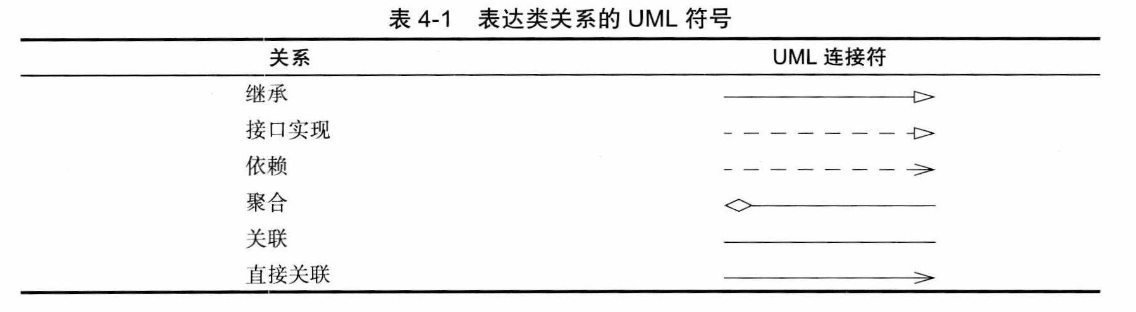
类>==继承(is a)/依赖(uses a)/聚合(has a)==>类
2. 预定义类
// Math
// DateDate date = null; //类似于cpp的对象指针date = new Date();System.out.println(date.toString());localDate
// LocalDateSystem.out.println(LocalDate.now());LocalDate date = LocalDate.now(); //构造当前日期date = LocalDate.of("year","month","day"); //构造指定日期int today = date.getDayOfMonth();int getYear();int getMonthValue();int getDayofMonth();int getDayofWeek(); //1~7
// 先前n天,向后n天date = date.minusDays(n);date = date.plusDays(n);
// is闰年date.isLeapYear();
// 当前年的天数和当前月的天数date.lengthOfYear();date.lengthOfMonth();- 使用
localDate输出当月日历
public class chapter04main { public static void main(String[] args) { LocalDate date = LocalDate.now(); int month = date.getMonthValue(); int today = date.getDayOfMonth(); date = date.minusDays(today-1); //当月第一天 DayOfWeek week = date.getDayOfWeek(); System.out.println("Mon Tue Wed Thu Fri Sat Sun"); for(int i=0;i<week.getValue();i++) System.out.printf(" "); while (date.getMonthValue() == month){ int now = date.getDayOfMonth(); System.out.printf("%3d",now); //输出日期 if(now == today) System.out.printf("*"); else System.out.printf(" "); date = date.plusDays(1); //下一天 if(date.getDayOfWeek().getValue() == 1) System.out.println(); } }}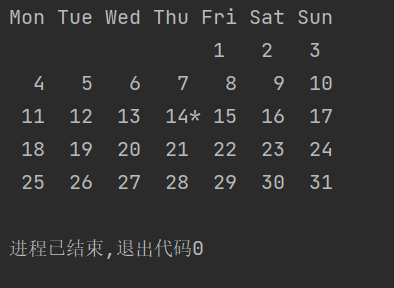
3. 自定义类
class Test{ //field private int t;
//constructor public Test(/*...*/){ //... }
// method public void test(int n){ System.out.println("just test"); }}- 运行多个源程序
javac Test*.java- 实例化
// 使用构造函数Test test1 = new Test();var test2 = new Test();
// 发现nullt = Objects.requireNonNullElse(n,"unknown"); //报警但接收Objects.requireNonNull(n,"not to be null"); //直接拒绝- 显式参数、隐式参数
test1.test(3)中test1即为隐式参数,方法中的3即为显式参数。
- 封装性
不要返回类的私有对象
- 访问权限
public:共有
private:私有
- final
必须初始化,且无法修改指针指向,不过指向的对象可以改变。
private final StringBuilder eva;eva = new StringBuilder(); //必须初始化eva.append("ok!\\n"); //合法4. 静态方法和静态字段
static int number = 1; //静态字段,被类共享
static final double PI = 3.141592653589; //静态常量- 静态方法
static int getNum(){...}
没有隐式函数,直接使用类来调用。eg.Test.getNum()
不用对象状态只需访问类的静态字段
- 工厂方法
类似于LocalDate,NumberFormat的构造。
- main
main方法也是静态方法。
5. 方法参数
- 按值调用(java使用)
- 按引用调用
- 按名调用(Algol使用)
按值调用,参数为副本(基本数据类型)。
对象引用,让参数为对象引用,但仍为按值传递。eg.不能swap交换两个类。
6. 对象构造
- 重载
相同名字不同参数(不包括返回类型)
- 无参构造
初始化为默认值。
P.S. 当存在自定义时,需自己写一个无参。
- 显式字段初始化
private String name = "";直接在class中初始化。
- 调用this来构造
public Test(double s){ this("Test "+Double.toString(s));}- 初始化块
class Test{ private static int Aid = 1;
private int id; // 初始化块 // static 如果有,在类第一次加载时运行。 { id = Aid; Aid ++; }
//...}只要构造对象,初始化块就会执行。先运行初始化块。
- 析构
Java可以自动垃圾回收
7. 包
package
- 包名
- 类的导入
直接使用包内的所有类。
使用其他包公共类。
完全限定名
java.time.LocalDate today = java.time.LocalDate.now();
- import导入
import java.time.*; | import java.time.LocalDate;只能使用
*来导入包,
- 静态导入
import static java.lang.System.*;
可以直接使用out.println();
- 包
package cc.dreaife.chapter04;
没有package语句的话,该文件中的类属于无名包。
- 包访问
未指定public或private,可以被同一个包访问。
- 类路径
类可以存储于JAR文件中,可以包含多个类文件和子目录。
JAR使用ZIP格式组织文件和子目录。
# 设置类路径java -classpath ${PATH(JAR)} ${className};export CLASSPATH=${PATH};set CLASSPATH=${PATH}8. JAR文件
- 创建jar文件
jar cvf jarFileName file1 file2 ...
- 清单文件
META-INF/MANIFEST.MF
jar cfm jarName manifestName ...
- 可执行jar文件
java -jar jarName
- 多版本jar文件
9. 文档注释
javadoc=>HTML文件
- 注释位置
模块包公共类和接口公共的、受保护的字段公共的、受保护的构造器和方法
/**...*/ 注释
@ param 标记 + 自由格式文本(第一句概要,可以使用HTML修饰符)
- 类注释
import后,类定义前
- 方法注释
@param
参数,可以占多行,可以使用HTML修饰符
- @return
返回值,可以占多行,可以使用HTML修饰符
- @throws
抛出异常
/** * testA * @param s * @param num * @return string */ public String testA(String s,int num){ return s + Integer.toString(num); }- 字段注释
- 通用解释
@author name@since text@version text@see | @link (使用超链接 #包隔类和方法)
- 包注释
在包目录中添加单独文件。
package-info.javapackage.html 抽取…之间的文本
- 注释抽取
javadoc -encoding UTF-8 -d ../doc Chapter04 #抽取包javadoc -encoding UTF-8 -d docTest test.java #抽取类10. 类设计技巧
- 保证数据私有
- 数据初始化
- 不要使用过多基本类型
- 不是所有都需要
get()和set() - 分解过多责任的类
- 类名和方法名可以体现职责
- 优先使用不可变类
Java study & review; this article mainly references Java Core Technologies Volume as the learning reference.
Chapter 4: Objects and Classes
1. Class
Object-Oriented Programming (OOP)
Class: encapsulates instance fields + methods
Class >== Inheritance (is-a)/ Dependency (uses-a)/ Aggregation (has-a) ==> Class
2. Built-in Classes
// Math
// DateDate date = null; //类似于cpp的对象指针date = new Date();System.out.println(date.toString());LocalDate
// LocalDateSystem.out.println(LocalDate.now());LocalDate date = LocalDate.now(); //construct current datedate = LocalDate.of("year","month","day"); //construct specified dateint today = date.getDayOfMonth();int getYear();int getMonthValue();int getDayofMonth();int getDayofWeek(); //1~7
// n days earlier, n days laterdate = date.minusDays(n);date = date.plusDays(n);
// is leap yeardate.isLeapYear();
// number of days in the current year and in the current monthdate.lengthOfYear();date.lengthOfMonth();- Use
LocalDateto print the current month’s calendar
public class chapter04main { public static void main(String[] args) { LocalDate date = LocalDate.now(); int month = date.getMonthValue(); int today = date.getDayOfMonth(); date = date.minusDays(today-1); // first day of the month DayOfWeek week = date.getDayOfWeek(); System.out.println("Mon Tue Wed Thu Fri Sat Sun"); for(int i=0;i<week.getValue();i++) System.out.printf(" "); while (date.getMonthValue() == month){ int now = date.getDayOfMonth(); System.out.printf("%3d",now); // print date if(now == today) System.out.printf("*"); else System.out.printf(" "); date = date.plusDays(1); // next day if(date.getDayOfWeek().getValue() == 1) System.out.println(); } }}
3. Custom Classes
class Test{ //field private int t;
//constructor public Test(/*...*/){ //... }
// method public void test(int n){ System.out.println("just test"); }}- Run multiple source files
javac Test*.java- Instantiation
// Using the constructorTest test1 = new Test();var test2 = new Test();
// detect nullt = Objects.requireNonNullElse(n,"unknown"); //warn but acceptObjects.requireNonNull(n,"not to be null"); //reject directly- Explicit parameter, implicit parameter
In test1.test(3), test1 is the implicit parameter, and 3 is the explicit parameter.
- Encapsulation
Do not return private objects of the class
- Access modifiers
public: public
private: private
- final
Must be initialized, and the reference cannot be changed to point to another object, though the object it points to can be modified.
private final StringBuilder eva;eva = new StringBuilder(); //must be initializedeva.append("ok!\\n"); //legal4. Static Methods and Static Fields
static int number = 1; //static field, shared by the class
static final double PI = 3.141592653589; //static constant- Static methods
static int getNum(){...}
There are no implicit instances; call directly on the class. e.g. Test.getNum()
No object state required; just access the class’s static fields
- Factory methods
Similar to the constructors of LocalDate and NumberFormat.
- main
The main method is also a static method.
5. Method Parameters
- Call by value (Java default)
- Call by reference
- Call by name (used by Algol)
Call by value: parameters are copies (primitive data types).
Object references allow the parameter to refer to the object, but it is still passed by value. e.g., you cannot swap two objects.
6. Object Construction
- Overloading
Same name, different parameter lists (not including return type)
- No-arg constructor
Initialize to default values.
P.S. When there is custom construction, you must provide a no-arg constructor yourself.
- Explicit field initialization
private String name = ""; initialize directly in the class.
- Using this to delegate to another constructor
public Test(double s){ this("Test "+Double.toString(s));}- Initialization blocks
class Test{ private static int Aid = 1;
private int id; // initialization block // static, if present, runs when the class is loaded for the first time. { id = Aid; Aid ++; }
//...}As long as you construct an object, the initialization block will run. It runs before the constructor.
- Destruction
Java can perform automatic garbage collection
7. Packages
package
- Package name
- Importing classes
Directly use all classes within the package.
Use public classes from other packages.
Fully qualified name
java.time.LocalDate today = java.time.LocalDate.now();
- import
import java.time.*; | import java.time.LocalDate;You can only use
*to import a package,
- Static imports
import static java.lang.System.*;
You can directly use out.println();
- Packages
package cc.dreaife.chapter04;
If there is no package statement, the classes in the file belong to the unnamed package.
- Package access
If neither public nor private is specified, it can be accessed within the same package.
- Class path
Classes can be stored in JAR files, which can contain multiple class files and subdirectories.
JARs organize files and subdirectories using ZIP format.
# Set the classpathjava -classpath ${PATH(JAR)} ${className};export CLASSPATH=${PATH};set CLASSPATH=${PATH}8. JAR Files
- Creating a jar file
jar cvf jarFileName file1 file2 ...
- Manifest file
META-INF/MANIFEST.MF
jar cfm jarName manifestName ...
- Executable jar file
java -jar jarName
- Multi-version jar files
9. Documentation Comments
javadoc => HTML files
- Comment placement
Public classes and interfaces at the module/package level, public or protected fields, public or protected constructors and methods
/**...*/ comments
@ param tag + free-form text (the first sentence should be a brief summary; HTML modifiers may be used)
- Class comments
After imports, before the class definition
- Method comments
@param
Parameter description, can span multiple lines, HTML modifiers may be used
- @return
Return value, can span multiple lines, HTML modifiers may be used
- @throws
Thrown exceptions
/** * testA * @param s * @param num * @return string */ public String testA(String s,int num){ return s + Integer.toString(num); }- Field comments
- General notes
@author name@since text@version text@see | @link (use hyperlinks to packages, classes, and methods)
- Package comments
Add a separate file within the package directory.
package-info.javapackage.html extract the text between …
- Comment extraction
javadoc -encoding UTF-8 -d ../doc Chapter04 #extract packagejavadoc -encoding UTF-8 -d docTest test.java #extract class10. Class Design Tips
- Ensure data is private
- Data initialization
- Don’t use too many primitive types
- Not everything needs get() and set()
- Avoid classes with too many responsibilities
- Class names and method names should reflect their responsibilities
- Prefer immutable classes
javaの学習と復習、本文は主に『Javaコア技術巻』を学習対象として参照します。
第4章 オブジェクトとクラス
1. クラス
オブジェクト指向プログラミング OOP
クラス:インスタンスフィールドとメソッドをカプセル化する
クラス >== 継承(is a)/依存(uses a)/集約(has a)==>クラス
2. 事前定義済みクラス
// Math
// DateDate date = null; //CPPのオブジェクトポインタに似ているdate = new Date();System.out.println(date.toString());localDate
// LocalDateSystem.out.println(LocalDate.now());LocalDate date = LocalDate.now(); //現在日付を構築date = LocalDate.of("year","month","day"); //指定日を構築int today = date.getDayOfMonth();int getYear();int getMonthValue();int getDayofMonth();int getDayofWeek(); //1~7
// 先日(n日)前, を含めてn日後date = date.minusDays(n);date = date.plusDays(n);
// is闰年date.isLeapYear();
// 現在の年の日数と現在の月の日数date.lengthOfYear();date.lengthOfMonth();localDateを使用して今月のカレンダーを出力する
public class chapter04main { public static void main(String[] args) { LocalDate date = LocalDate.now(); int month = date.getMonthValue(); int today = date.getDayOfMonth(); date = date.minusDays(today-1); //今月の初日 DayOfWeek week = date.getDayOfWeek(); System.out.println("Mon Tue Wed Thu Fri Sat Sun"); for(int i=0;i<week.getValue();i++) System.out.printf(" "); while (date.getMonthValue() == month){ int now = date.getDayOfMonth(); System.out.printf("%3d",now); //日付を出力 if(now == today) System.out.printf("*"); else System.out.printf(" "); date = date.plusDays(1); //次の日 if(date.getDayOfWeek().getValue() == 1) System.out.println(); } }}
3. 自作クラス
class Test{ //field private int t;
//constructor public Test(/*...*/){ //... }
// method public void test(int n){ System.out.println("just test"); }}- 複数のソースファイルをコンパイルする
javac Test*.java- インスタンス化
// コンストラクトを使用Test test1 = new Test();var test2 = new Test();
// nullになる場合t = Objects.requireNonNullElse(n,"unknown"); //警告を出し受け取るObjects.requireNonNull(n,"not to be null"); //直接拒否- 明示的引数、暗黙的引数
test1.test(3)の中でtest1が暗黙的引数、メソッド内の3が明示的引数。
- カプセル化
クラスのプライベートオブジェクトを返してはいけない
- アクセス権限
public:公開
private:非公開
- final
初期化が必要で、参照先を変更できないが、参照先のオブジェクト自体は変更可能。
private final StringBuilder eva;eva = new StringBuilder(); //初期化が必須eva.append("ok!\\n"); //合法4. 静的メソッドと静的フィールド
static int number = 1; //静的フィールド、クラスで共有される
static final double PI = 3.141592653589; //静的定数- 静的メソッド
static int getNum(){...}
暗黙的な関数はなく、クラスを直接呼び出して使用します。例:Test.getNum()
オブジェクト状態を使わず、クラスの静的フィールドにアクセスするだけ
- ファクトリメソッド
LocalDate、NumberFormatのようなコンストラクタ。
- main
mainメソッドも静的メソッドです。
5. メソッドの引数
- 値渡し(Javaで使用)
- 参照渡し
- 名前渡し(Algolで使用)
値渡しでは、引数はコピー(基本データ型)。
オブジェクト参照を渡す場合、引数はオブジェクト参照そのものになるが、依然として値渡しである。例:2つのクラスのオブジェクトを入れ替えることはできない。
6. オブジェクトの構築
- オーバーロード
同じ名前で異なるパラメータ(戻り値は含まない)
- 引数なし構造
デフォルト値で初期化される。
P.S. 自作が存在する場合、引数なしのコンストラクタを自分で用意する必要がある。
- 明示的フィールド初期化
private String name = ""; をクラス内で直接初期化。
- thisを使って構築
public Test(double s){ this("Test "+Double.toString(s));}- 初期化ブロック
class Test{ private static int Aid = 1;
private int id; // 初期化ブロック // static がある場合、クラスが初めてロードされる時に実行される。 { id = Aid; Aid ++; }
//...}オブジェクトを構築すると、初期化ブロックは実行される。先に初期化ブロックが実行される。
- デストラクション
Javaは自動的にガベージコレクションを行う。
7. パッケージ
package
- パッケージ名
- クラスのインポート
パッケージ内のすべてのクラスを直接使用する。
他のパッケージの公開クラスを使用する。
完全修飾名
java.time.LocalDate today = java.time.LocalDate.now();
- import のインポート
import java.time.*; | import java.time.LocalDate;パッケージをインポートするには、
*のみを使用することができる。
- 静的インポート
import static java.lang.System.*;
直接 out.println(); を使用できる
- パッケージ
package cc.dreaife.chapter04;
ファイルに package 文がない場合、そのファイル内のクラスは無名パッケージに属する。
- パッケージアクセス
public か private を指定していない場合、同一パッケージからアクセス可能。
- クラスパス
クラスは JAR ファイルに格納でき、複数のクラスファイルやサブディレクトリを含むことができる。
JAR は ZIP 形式でファイルとサブディレクトリを整理する。
# クラスパスを設定java -classpath ${PATH(JAR)} ${className};export CLASSPATH=${PATH};set CLASSPATH=${PATH}8. JARファイル
- JARファイルを作成
jar cvf jarFileName file1 file2 ...
- マニフェストファイル
META-INF/MANIFEST.MF
jar cfm jarName manifestName ...
- 実行可能なJARファイル
java -jar jarName
- 複数バージョンのJARファイル
9. ドキュメントコメント
javadoc => HTMLファイル
- コメントの位置
モジュール・パッケージ・公開クラスと公開のインターフェース、保護されたフィールドを公開する、保護されたコンストラクタとメソッド
/**...*/ コメント
@ param タグ + 自由形式テキスト(最初の一文の概要、HTML修飾を使用可能)
- クラスコメント
importの後、クラス定義の前
- メソッドコメント
@param
パラメータは複数行になることがあり、HTML修飾を使用できる
- @return
戻り値は複数行になることがあり、HTML修飾を使用できる
- @throws
スローされる例外
/** * testA * @param s * @param num * @return string */ public String testA(String s,int num){ return s + Integer.toString(num); }- フィールドのコメント
- 一般的な説明
@author name@since text@version text@see | @link (ハイパーリンクを使用 #パッケージとクラス・メソッド)
- パッケージ注釈
パッケージディレクトリに別ファイルを追加します。
package-info.javapackage.html … のテキストを抽出
- コメントの抽出
javadoc -encoding UTF-8 -d ../doc Chapter04 #パッケージを抽出javadoc -encoding UTF-8 -d docTest test.java #クラスを抽出10. クラス設計のコツ
- データをプライベートに保つ
- データの初期化
- 過度な基本データ型の使用を避ける
- すべてに
get()とset()が必要なわけではない - 責任を過度に分解したクラスの分離を避ける
- クラス名とメソッド名は責務を表現できる
- 不変クラスを優先して使用する
部分信息可能已经过时