在面向对象的设计原则中,一般推荐模块之间基于接口编程,通常情况下调用方模块是不会感知到被调用方模块的内部具体实现。一旦代码里面涉及具体实现类,就违反了开闭原则。如果需要替换一种实现,就需要修改代码。为了实现在模块装配的时候不用在程序里面动态指明,这就需要一种服务发现机制。Java SPI 就是提供了这样一个机制:为某个接口寻找服务实现的机制。这有点类似 IoC 的思想,将装配的控制权移交到了程序之外。
Support for multithreading (C++ has no built-in multithreading, so you must use OS-level threading features to design multithreaded programs, whereas Java provides multithreading support)
Reliability (has exception handling and automatic memory management)
Security (the language design itself provides multiple security mechanisms such as access modifiers and restricting direct access to OS resources)
Efficiency (with optimizations like Just In Time compilation, Java’s runtime performance is still very good)
Easy to support network programming
Compilation and interpretation coexist
Dynamism (Java is both an interpreted and compiled language, because at runtime many uncertain situations can only be determined during execution, requiring an interpreter to interpret and translate dynamic code into machine language line by line and run it. However, Java is also a compiled language, since Java programs must be compiled into bytecode before run, and this bytecode is not machine code for a specific machine. Therefore, Java programs also require a runtime interpreter to interpret the bytecode during execution.)
Java SE(Java Platform, Standard Edition): Java Platform Standard Edition, the foundation of the Java programming language. It includes the core libraries and the virtual machine that support Java application development and runtime. Java SE can be used to build desktop applications or simple server applications.
Java EE(Java Platform, Enterprise Edition): Java Platform Enterprise Edition, built on top of Java SE, includes standards and specifications that support enterprise application development and deployment (such as Servlet, JSP, EJB, JDBC, JPA, JTA, JavaMail, JMS). Java EE can be used to build distributed, portable, robust, scalable, and secure server-side Java applications, for example Web applications.
In short, Java SE is the basic version of Java, and Java EE is the advanced version. Java SE is more suitable for desktop applications or simple server applications, while Java EE is more suitable for developing complex enterprise-grade applications or Web applications.
Besides Java SE and Java EE, there is also Java ME(Java Platform, Micro Edition). Java ME is the micro version of Java, mainly for developing applications for embedded consumer electronics devices such as mobile phones, PDAs, set-top boxes, refrigerators, air conditioners, etc. Java ME does not require close attention anymore; just knowing it exists is enough, but it is now largely unused.
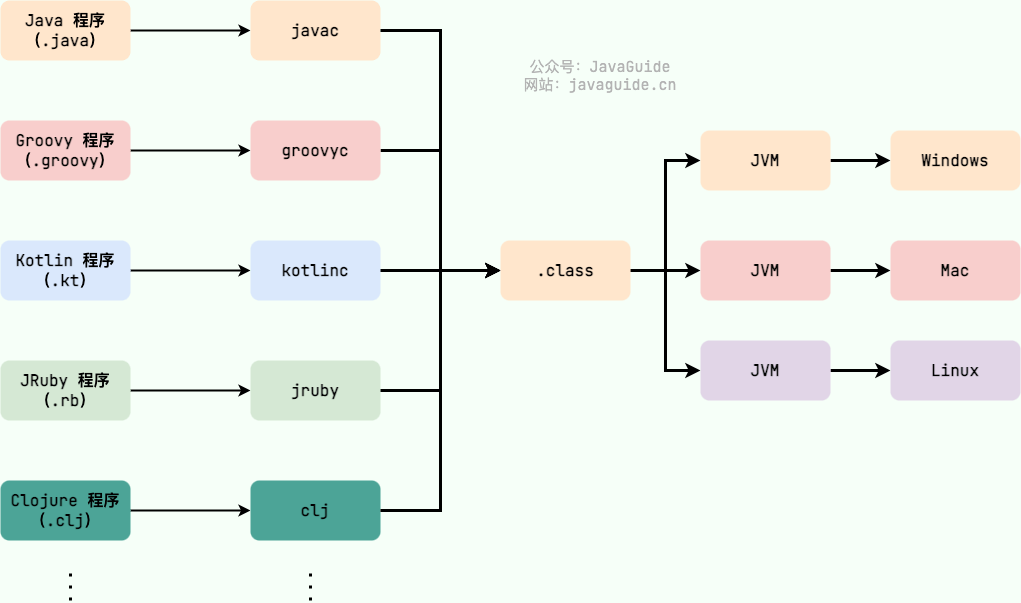
The Java Virtual Machine (JVM) is a virtual machine that runs Java bytecode. There are JVM implementations tailored for different systems (Windows, Linux, macOS) with the same bytecode producing the same results. Bytecode and the different system JVM implementations are the key to Java’s “write once, run anywhere.”
There isn’t just one JVM! As long as a JVM specification is met, any company, organization, or individual can develop their own JVM. That means the HotSpot VM we commonly encounter is just one implementation of the JVM specification.
Besides the HotSpot VM that we typically use, there are also other JVMs such as J9 VM, Zing VM, JRockit VM, etc. A common comparison of JVM implementations can be found on Wikipedia: Comparison of Java virtual machines
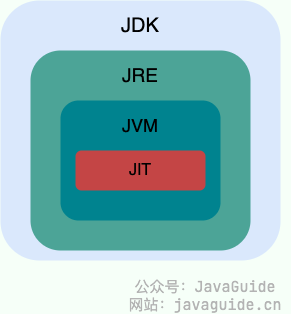
JDK(Java Development Kit) is a full-featured Java SDK, a development kit for developers that enables creating and compiling Java programs. It includes the JRE, as well as the javac compiler for compiling Java source code and other tools such as javadoc (documentation tool), jdb (debugger), jconsole (JMX-based visual monitoring tool), javap (decompiler), etc.
JRE(Java Runtime Environment) is the Java Runtime Environment. It contains everything needed to run already-compiled Java programs, primarily the Java Virtual Machine (JVM) and the standard class library.
In short, JRE is Java’s runtime environment, containing runtime and essential libraries for Java applications. The JDK includes the JRE, plus tools like javac, javadoc, jdb, jconsole, javap, etc., for Java development and debugging. If you plan to do Java programming, you need the JDK. Some applications that use Java features (such as JSP compilation to Java Servlets, or reflective operations) may also require the JDK to compile and run Java code. Therefore, even if you don’t plan to develop Java applications, you might still need the JDK.
Starting with JDK 9, the distinction between JDK and JRE was removed in favor of a modular system (the JDK is organized into 94 modules) plus the jlink tool (a new command-line tool released with Java 9 to build a custom Java runtime image that contains only the modules your application needs). And since JDK 11, Oracle no longer provides a standalone JRE download.
What is bytecode? What are the benefits of using bytecode?#
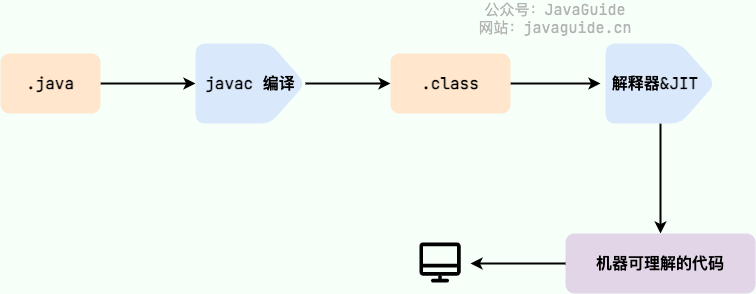
In Java, the code that the JVM can understand is bytecode (class files with .class extension). It is platform-neutral and targets the virtual machine. Java uses bytecode to address the efficiency concerns of traditional interpreters while preserving the portability characteristic of interpreted languages. Therefore, Java programs run efficiently (though still somewhat behind languages like C, C++, Rust, and Go), and because the bytecode is not tied to a specific machine, Java programs do not need to be recompiled to run on different operating systems.
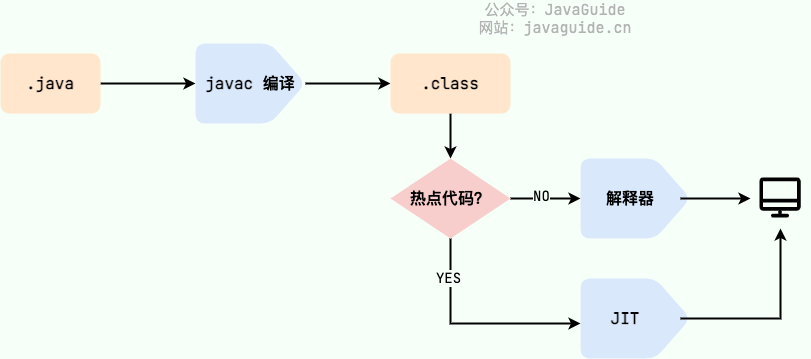
We must pay particular attention to the step from .class to machine code. At this step, the JVM class loader first loads the bytecode file, and then the interpreter executes it line by line, which can be relatively slow. Some methods and code blocks are frequently invoked (hot code), so JIT (Just In Time Compilation) was introduced. JIT is a runtime compilation.
After the JIT compiler completes the first compilation, it stores the machine code corresponding to the bytecode, so the next time it can be used directly. And we know that machine code runs faster than a Java interpreter. This explains why we often say Java is a language with both compilation and interpretation.
HotSpot uses a lazy evaluation approach: according to the 80/20 rule, only a small portion of the code (hot code) consumes most of the system resources, and this is the part that needs to be compiled by the JIT. The JVM collects information about how many times code is executed and applies optimizations accordingly, so the more a piece of code runs, the faster it becomes.
Why is Java described as “compilation and interpretation coexist”?#
In fact, as mentioned when discussing bytecode, this is quite important, so we’ll mention it again.
We can classify programming languages by their execution mode:
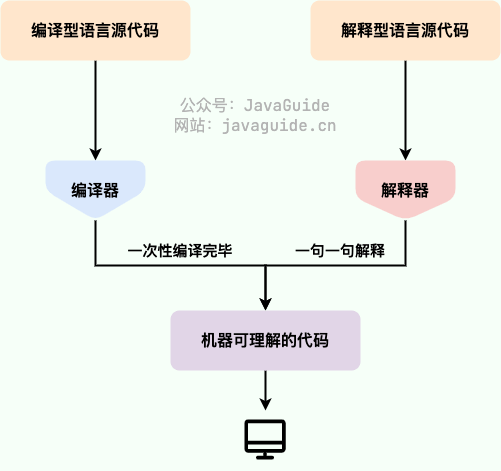
Compiled: A compiled language translates source code into machine code for the target platform in one go using a compiler. Generally fast at runtime but slower to develop. Common compiled languages include C, C++, Go, Rust, etc.
Interpreted: An interpreted language uses an interpreter to translate code into machine code line by line at runtime. Development is usually faster, but runtime performance is slower. Common interpreted languages include Python, JavaScript, PHP, etc.
The advent of just-in-time compilation to improve the performance of compiled languages has reduced the gap between these two types. This technology mixes the advantages of compiled and interpreted languages: it first compiles the program source to bytecode, then interprets the bytecode at runtime and executes it. Java and LLVM are representatives of this technology.
What are the advantages of AOT? Why not use AOT everywhere?#
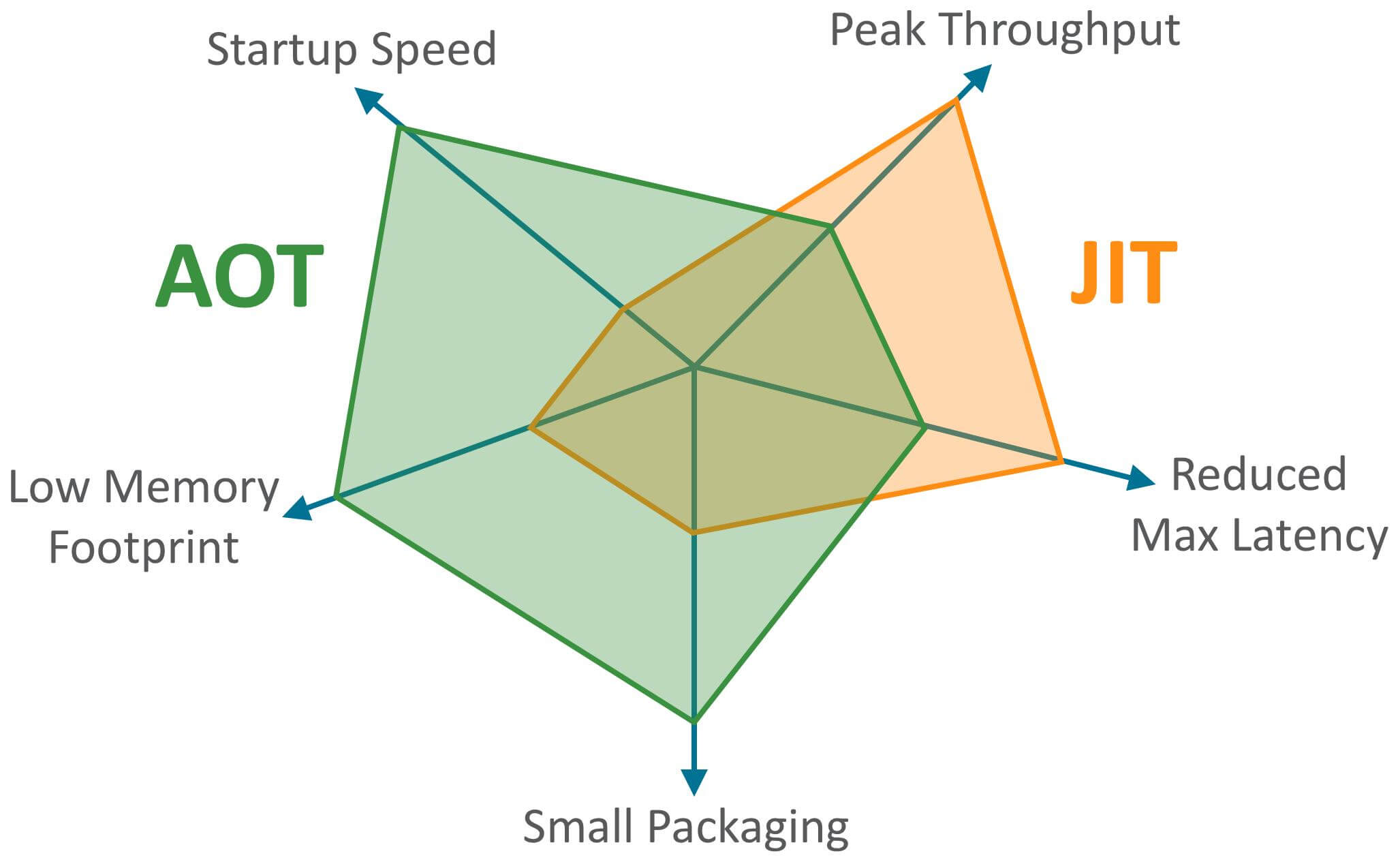
JDK 9 introduced a new compilation mode called AOT (Ahead Of Time Compilation). Unlike JIT, this mode compiles the program to machine code before it runs, i.e., static compilation (languages like C, C++, Rust, Go are static compilation). AOT avoids JIT warm-up overhead and can improve startup time, reducing warm-up time. It can also reduce memory usage and improve Java program security (AOT-compiled code is harder to decompile or modify), which is especially suitable for cloud-native scenarios.
As you can see, AOT’s main advantages are startup time, memory usage, and package size. JIT’s main advantages are higher peak processing power and the ability to reduce maximum request latency.
Speaking of AOT, GraalVM is worth mentioning! GraalVM is a high-performance JDK (a complete JDK distribution) that can run Java and other JVM languages, as well as non-JVM languages like JavaScript, Python, etc. GraalVM can provide both AOT and JIT compilation. If you’re interested, you can check GraalVM’s official documentation: https://www.graalvm.org/latest/docs/.
Since AOT has so many advantages, why not use this compilation method exclusively?
We have compared JIT and AOT; each has its own advantages. AOT is more suitable for current cloud-native scenarios and has friendly support for microservice architectures. In addition, AOT compilation cannot support some of Java’s dynamic features, such as reflection, dynamic proxies, dynamic loading, JNI (Java Native Interface), etc. However, many frameworks and libraries (such as Spring, CGLIB) rely on these features. If you only use AOT compilation, you cannot use these frameworks and libraries, or you would have to adapt and optimize specifically. For example, CGLIB dynamic proxies use ASM technology, which, in general, generates and loads modified bytecode files (.class) at runtime. If you compile everything ahead of time with AOT, you can’t use ASM technology. To support such dynamic features, JIT compilers are used.
Before reading this, many people, including me, may not have engaged with OpenJDK. Are there significant differences between Oracle JDK and OpenJDK?
First, in 2006 SUN open-sourced Java, giving birth to OpenJDK. In 2009 Oracle acquired Sun, and on the basis of OpenJDK, Oracle JDK was created. Oracle JDK is not open source, and in the initial versions (Java 8 to Java 11) it added some proprietary features and tools compared with OpenJDK.
Secondly, for Java 7, OpenJDK and Oracle JDK are very close. Oracle JDK is built on OpenJDK 7, adding a few small features and maintained by Oracle engineers.
Here’s a simple summary of the differences:
Open source vs not: OpenJDK is a fully open-source reference implementation, while Oracle JDK is based on OpenJDK and not fully open source. OpenJDK open-source project: https://github.com/openjdk/jdk
Free of charge: Oracle JDK offers a free version but typically with time limits. Up to Java 8u221 you could use it for free forever if you didn’t upgrade. OpenJDK is completely free.
Functionality: Oracle JDK adds some proprietary features and tools on top of OpenJDK, such as Java Flight Recorder (JFR) and Java Mission Control (JMC). After Java 11, OracleJDK and OpenJDK’s features are largely equivalent.
Stability: OpenJDK does not provide long-term support (LTS) in the same way, while OracleJDK typically releases an LTS version every few years for long-term support.
Licensing: Oracle JDK uses the BCL/OTN license, while OpenJDK is licensed under GPL v2.
If Oracle JDK is so good, why have OpenJDK?
OpenJDK is open source, which means you can modify and optimize it for your needs (e.g., Alibaba’s Dragonwell8 based on OpenJDK).
OpenJDK is commercially free.
OpenJDK updates more frequently: Oracle JDK typically releases every 6 months, while OpenJDK generally releases every 3 months.
Oracle JDK vs OpenJDK: which to choose?
It is recommended to choose OpenJDK or a distribution based on OpenJDK, such as AWS’s Amazon Corretto or Alibaba’s Dragonwell.
Further details:
BCL (Oracle Binary Code License) allows use of JDK for commercial purposes but not modification.
OTN (Oracle Technology Network License Agreement): New JDK versions from 11 onward use this license; you can use it privately, but commercial use may require payment.
Java does not provide pointers to directly access memory, making memory access safer
Java classes are single-inheritance, C++ supports multiple inheritance
Although Java classes cannot inherit multiple times, interfaces can extend multiple interfaces
Java has automatic memory management via garbage collection; programmers don’t need to manually free memory
C++ supports both method and operator overloading, but Java only supports method overloading (operator overloading would add complexity and is not aligned with Java’s original design principles)
Single-line comments: start with // and extend to end of line
Multi-line comments: start with /* and end with */, content in between is a comment
Documentation comments: start with /** and end with */, content in between is a comment, but documentation comments can be generated into formatted docs using the javadoc tool
The most commonly used are single-line and documentation comments; multi-line comments are used less in practice.
When we write code, if the codebase is small, we or other team members can understand it easily, but as the project structure grows complex, comments become necessary. Comments do not execute (the compiler removes them before compiling, and they are not kept in the bytecode); they are written for developers to read. Comments are your code’s instruction manual, helping readers quickly understand the relationships between parts of the code. Therefore, adding comments as you write is a very good habit.
Comments are not better the more detailed they are. In fact, good code is its own best documentation, so strive to write clean, readable code to minimize unnecessary comments.
If the programming language is expressive enough, there is no need for many comments; let the code speak for itself.
What is the difference between identifiers and keywords?#
When writing programs, we need to name many things like programs, classes, variables, methods, etc., so we have identifiers. In short, an identifier is a name.
Some identifiers have special meaning in Java and can only be used in particular places. These special identifiers are keywords. In short, keywords are identifiers with special meaning.
Kind of keyword: access control
private/protected/public
Modifiers for classes, methods, and variables
abstract/class/extends/final/implements/interface/native/new/static/strictfp/synchronized/transient/volatile/enum
Program control
break/continue/return/do/while/if/else/for/instanceof/switch/case/default/assert
Tips: All keywords are lowercase; in IDEs they appear in special colors.
default is a special keyword; it belongs to program control as well as class/method/field modifiers and access control.
In program control, default can be used to specify the default case in a switch statement.
In class, method, and field modifiers, from JDK 8 onward, default methods can be defined with the default keyword.
In access control, if a method has no modifier, a default access modifier is implied, but if you add this modifier explicitly, it causes a compilation error.
Note: although true, false, and null look like keywords, they are literals, and you cannot use them as identifiers.
When writing code, a common scenario is to increment or decrement a numeric variable by 1. Java provides a special operator for this expression: the increment (++) and decrement (—) operators.
The ++ and — operators can be placed before the variable (prefix) or after the variable (postfix). When the operator is before the variable (prefix), the value is incremented/decremented first, then assigned; when the operator is after the variable (postfix), the value is assigned first, then incremented/decremented.
Shift operators are among the most basic operators; almost every programming language includes this operator. In shift operations, the data being operated on is treated as binary, and shifting moves it left or right by a number of bits. Shift operators are widely used in various frameworks and in the source code of the JDK itself; for example, the hash method in HashMap (JDK 1.8) uses shift operators.
1
staticfinalinthash(Object key) {
2
int h;
3
// key.hashCode(): returns the hash value
4
// ^: bitwise XOR
5
// >>>: unsigned right shift, ignores the sign bit, fill with 0s
<<: left shift operator, num << 1 is equivalent to num * 2
: right shift operator, num >> 1 is equivalent to num / 2
: unsigned right shift, ignore sign bit, fill with 0s
Using <<, >>, and >>> in Java code can yield more efficient instruction codes. It’s necessary to master the basic shift operators; it helps not only in using them in code but also in understanding code that involves shifting.
Because double and float have special representations in binary, you cannot perform shift operations on them. The shift operators actually support only int and long; before shifting, the compiler converts short, byte, and char to int.
What happens if the shift count exceeds the bit width? For int, if the shift amount is greater than or equal to 32, the count is taken modulo 32 before shifting. So shifting left/right by 32 bits is equivalent to no shift (32%32=0), shifting by 42 bits is equivalent to shifting by 10 bits (42%32=10). For long, the modulus base is 64.
What’s the difference between continue, break, and return?#
In loops, when the loop condition is not met or the iteration limit is reached, the loop ends normally. But sometimes you may want to terminate the loop early when a certain condition occurs, using these keywords:
continue: skip the current iteration and proceed to the next iteration
break: exit the entire loop body and continue with statements after the loop
return: exit the method containing this statement, ending the method’s execution
You can see that the maximum positive values of byte, short, int, and long are all maxed out minus 1. This is because in two’s complement binary representation, the most significant bit is used for the sign, and the remaining bits represent the magnitude. If we want to represent the largest positive number, we set all bits except the sign bit to 1. If we add 1, it overflows to a negative value.
For boolean, the official documentation does not strictly define it; it depends on the specific JVM implementation. Logically it is 1 bit, but in practice it is influenced by storage efficiency considerations.
Also, the size of each primitive type is not going to vary with the machine architecture in Java, unlike many other languages. This immutability in storage size is one reason Java programs are more portable.
Note:
When using the long type in Java, you must suffix the value with L; otherwise it will be parsed as an int.
char a = ‘h’ is a character literal; String a = “hello” uses double quotes.
All eight primitive types have corresponding wrapper classes: Byte, Short, Integer, Long, Float, Double, Character, Boolean.
What’s the difference between primitive types and wrapper types?#
Usage: Apart from declaring constants and local variables, we rarely define variables as primitive types in other placeslike method parameters and object properties. Also, wrapper types can be used in generics, while primitive types cannot.
Storage: Local variables of primitive types reside in the JVM stack; member variables of primitive types (non-static) reside in the JVM heap. Wrapper types are object types, which mostly live on the heap.
Space: Wrapper objects take more space than primitive types.
Default values: For member variables, wrapper types default to null if not assigned; primitive types have default values and are not null.
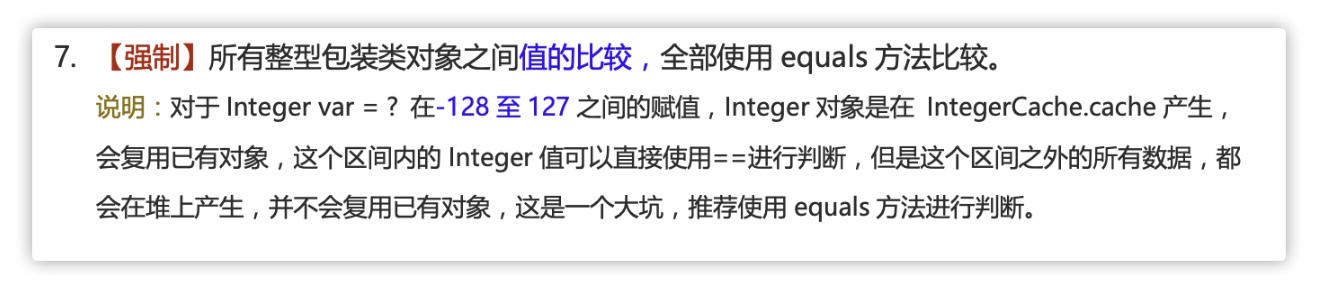
Comparison: For primitive types, == compares values. For wrapper types, == compares object references. All comparisons of values between wrapper objects should use equals().
Why do almost all object instances reside on the heap? Because after HotSpot introduces JIT optimizations, the VM may perform escape analysis to determine if an object escapes beyond the method; if not, scalar replacement may allocate it on the stack instead of on the heap.
Note: It is a common misconception that primitive types are stored on the stack. Their storage location depends on their scope and declaration. If they are local variables, they are on the stack; if they are member variables, they are on the heap.
Do you know about the wrapper type caching mechanism?#
Most of the Java primitive wrapper types use a caching mechanism to improve performance.
The wrappers Byte, Short, Integer, and Long cache values in the range [-128, 127] by default; Character caches values in [0, 127]; Boolean simply returns true or false.
If the value falls outside the cached range, new objects are created; the size of the cache range is a trade-off between performance and resources.
The wrappers for floating-point types Float and Double do not implement a caching mechanism.
Remember: all comparisons of values between integer wrapper objects should use equals().
Do you know autoboxing and unboxing? How does it work?#
What is autoboxing and unboxing?
Boxing: wrap primitive types into their corresponding wrapper type
Unboxing: convert wrapper types back to primitive types
1
Integer i =10; // boxing
2
int n = i; // unboxing
From the bytecode perspective, boxing is implemented by calling the wrapper class’s valueOf(), and unboxing by calling xxxValue() methods. Thus,
Integer i = 10 is equivalent to Integer i = Integer.valueOf(10)
int n = i is equivalent to int n = i.intValue()
Note: Frequent boxing/unboxing can significantly affect performance. Try to avoid unnecessary boxing/unboxing operations.
How to resolve precision loss in floating-point computations?#
BigDecimal can perform floating-point operations without precision loss. In most scenarios where precise decimal values are required (for example, money calculations), BigDecimal is used.
What’s the difference between instance variables and local variables?#
Syntax: Instance variables belong to a class; local variables are defined within a block or a method, or are method parameters. Instance variables can be modified with access modifiers like public, private, static; local variables cannot. Both can be marked final.
Storage: If an instance variable is declared static, it belongs to the class; otherwise it belongs to the instance. Objects live on the heap, local variables on the stack.
Lifetime: Instance variables are part of the object and exist with the object; local variables are created when a method is invoked and disappear after the method completes.
Default values: Instance variables get default values if not initialized (except final instance variables, which must be explicitly initialized); local variables do not get default values.
Why do instance variables have default values?
If there are no default values, uninitialized variables would hold random memory addresses, leading to unpredictable behavior.
Default values can be set manually or automatically. Since instance fields can be assigned later via reflection, but local variables cannot, automatic default initialization helps prevent confusion.
For the compiler (javac), local variables not assigned a value cause a compile error, while instance variables may be assigned at runtime; this reduces false positives and improves user experience, so default initialization is used.
Static variables are those declared with the static keyword. They are shared among all instances of a class. Regardless of how many objects are created from a class, they all share the same static variable. In other words, static variables are allocated only once, saving memory.
Static variables are accessed via the class name, for example StaticVariableExample.staticVar (if declared private, this access is not possible).
1
publicclassStaticVariableExample {
2
// static variable
3
publicstaticint staticVar =0;
4
}
Typically, static variables are declared final to become constants.
What is the difference between character literals and string literals?#
Form: character constants are enclosed in single quotes; string constants are enclosed in double quotes and can contain zero or more characters.
Meaning: character constants are essentially integer values (ASCII codes), and can participate in expressions; string constants represent an address value (the memory location of the string).
Memory usage: a character constant takes 2 bytes; a string constant occupies several bytes.
What is a method’s return value? What kinds of methods are there?#
A method’s return value is the result produced by executing the code inside the method body (assuming the method returns a value). The return value is used to receive the result so it can be used in other operations.
We can classify methods by their return value and parameter types as follows:
No parameters, no return value
1
publicvoidf1() {
2
//......
3
}
4
// The following method also has no return value, even though it uses return
5
publicvoidf(int a) {
6
if (...) {
7
// Ends the method’s execution; the statements below won’t run
8
return;
9
}
10
System.out.println(a);
11
}
With parameters, no return value
1
publicvoidf2(Parameter 1, ..., Parameter n) {
2
//......
3
}
No parameters with a return value
1
publicintf3() {
2
//......
3
return x;
4
}
With both parameters and a return value
1
publicintf4(int a, int b) {
2
return a * b;
3
}
Why can static methods not call non-static members?#
This combines JVM knowledge. The main reasons are:
Static methods belong to the class and are allocated when the class is loaded; they can be accessed via the class name. Non-static members belong to instances created at runtime, so they require an object instance to access.
If non-static members do not exist when the class is loaded, static methods already exist, so calling non-static members that do not yet exist in memory is illegal.
How do static methods differ from instance methods?#
1. How to call
When calling a static method from outside, you can use ClassName.methodName or Object.methodName; an instance method uses only the latter. In other words, you can call a static method without creating an object.
However, it’s generally discouraged to call static methods via an instance. This can be confusing because static methods do not belong to a particular object of the class but to the class itself.
Therefore, it is usually recommended to call static methods using ClassName.methodName.
1
publicclassPerson {
2
publicvoidmethod() {
3
//......
4
}
5
6
publicstaticvoidstaicMethod(){
7
//......
8
}
9
publicstaticvoidmain(String[] args) {
10
Person person =newPerson();
11
// Call instance method
12
person.method();
13
// Call static method
14
Person.staicMethod()
15
}
16
}
2. Whether there are restrictions on accessing class members
Static methods can only access static members (i.e., static variables and static methods) of the class; they cannot access instance members (i.e., instance variables and instance methods). Instance methods do not have this restriction.
What is the difference between overloading and overriding?#
Overloading means the same method can handle different input data in different ways.
Overriding means a subclass provides a different implementation of a method with the same name and parameter list as in the parent class.
Happens within the same class (or between a superclass and subclass); the method name must be the same, but parameter types, numbers, or orders differ; return type and access modifiers can differ.
A classic description from Java Core Technologies:
If several methods (for example, StringBuilder’s constructors) have the same name but different parameters, overloading occurs.
The compiler must pick exactly which method to call by matching the argument types given with each method’s parameters. If no match is found, a compile-time error occurs (no matching method, or none better than others — this is called overloading resolution).
Java allows overloading any method, not only constructors.
In short: overloading is the same class containing multiple methods with the same name but different parameters.
Overriding occurs at runtime; it’s the subclass’s reimplementation of a method from its parent class, with identical name and parameter list.
The method name and parameter list must be the same; the return type of the subclass method should be the same or a subtype (covariant return type); the thrown exceptions should be within the parent’s declared exceptions; the access modifier should be the same or more permissive.
If the parent method’s access is private, final, or static, the subclass cannot override it; however, a static method can be redeclared.
Constructors cannot be overridden.
Summary: Overriding is the subclass’s reimplementation of a parent method; the external interface remains the same, but the internal behavior can change.
Difference
Overloaded methods
Overridden methods
Scope
Within the same class
In a subclass
Parameters
Must differ
Must be the same
Return type
Can vary
Should be the same or a subtype
Exceptions
Can vary
Declared exceptions should be the same or a subset
Access modifiers
Can vary
Should be the same or less restrictive (may be less restrictive)
Occurrence
Compile-time
Run-time
Method overriding follows the “two matches, two small, one big” rule
Two matches: method name and parameter list are the same
Two small: the return type should be the same or a subtype; the declared exception should be the same or a subtype
One big: the access modifier should be at least as permissive as the parent
Since Java 5, Java supports variadic parameters, which allows passing an arbitrary number of arguments to a method. For example, the following method can accept 0 or more arguments.
1
publicstaticvoidmethod1(String... args) {
2
//......}
Also, variadic parameters must be the last parameter in the method signature, though there may be zero or more parameters before it.
The difference between object-oriented and procedure-oriented programming#
The main difference lies in how problems are approached:
Procedural programming breaks the solution into a sequence of procedures and solves the problem by executing those procedures.
Object-oriented programming first abstracts objects, then solves problems by invoking methods on objects.
Additionally, object-oriented development generally leads to easier maintenance, reuse, and extension.
How do you create an object? What is the difference between an object instance and an object reference?#
using the new operator. The new operator creates an object instance (which lives on the heap), while an object reference points to the object instance (the reference itself lives on the stack).
One object reference can point to zero or one object;
An object can have many references pointing to it.
The difference between object equality and reference equality#
Object equality generally compares whether the contents stored in memory are equal.
Reference equality generally compares whether the memory addresses they point to are the same.
If a class does not declare a constructor, can the program still run correctly?#
A constructor is a special method that initializes objects.
If a class does not declare a constructor, the program can still run because every class automatically has a default no-argument constructor unless you explicitly add a constructor. If you do add a constructor (with or without parameters), Java will not create the default no-argument constructor.
What are the characteristics of constructors? Can they be overridden?#
Constructors have the following characteristics:
They have the same name as the class.
They have no return type (and you cannot declare a constructor with void).
They execute automatically when an object is created.
Constructors cannot be overridden, but they can be overloaded, so you may see multiple constructors in a class.
Encapsulation hides an object’s state information (i.e., its attributes) inside the object; external objects cannot directly access internal data. However, you can provide methods to operate on the attributes. If you don’t want external access to certain attributes, you simply don’t provide access methods. But if you don’t provide any access methods, the class has little use.
Inheritance
Different types of objects often share common attributes and behaviors. Inheritance uses an existing class as the basis to build a new class. The new class can add new data or functionality, and it can also reuse the parent class’s features, without selectively inheriting from the parent. Inheritance enables rapid creation of new classes, improves code reuse, increases maintainability, and saves time.
Subclasses inherit all attributes and methods of the parent (including private ones) but private members are not accessible directly by the subclass.
Subclasses can have their own attributes and methods, i.e., they can extend the parent class.
Subclasses can implement the parent class’s methods in their own way (to be introduced later).
Polymorphism
Polymorphism means an object can take on multiple forms; concretely, a parent class reference can point to a subclass instance.
Features:
There is an inheritance/implementation relationship between the object’s type and its reference type;
The actual method invoked is determined at runtime;
Polymorphism cannot call methods that exist only in the subclass and not in the parent;
If a subclass overrides a parent method, the overridden method executes; if not, the parent’s method executes.
Interfaces and abstract classes: similarities and differences?#
Similarities:
Neither can be instantiated.
Both can contain abstract methods.
Both can have default methods (Java 8 introduced default methods in interfaces).
Differences:
Interfaces constrain the class’s behavior; implementing an interface confers the corresponding behavior. Abstract classes promote code reuse and emphasize “is-a” relationships.
A class can inherit from only one class but can implement multiple interfaces.
Members in interfaces must be public static final by default and must have initial values, while abstract class members are default (not private) and can be redefined or reassigned in subclasses.
Shallow copy vs deep copy? What is reference copy?#
Shallow copy creates a new object on the heap, but if the original object contains references to other objects, the shallow copy shares those referenced objects.
Deep copy entirely copies the original object, including any internal objects it contains.
* Returns a string in hexadecimal form of the object's hash code. It is recommended that all subclasses override this.
19
*/
20
public String toString()
21
/**
22
* native method and cannot be overridden. Wakes up a thread waiting on this object's monitor. If multiple threads are waiting, only one will be awakened.
23
*/
24
publicfinalnativevoidnotify()
25
/**
26
* native method and cannot be overridden. Wakes up all threads waiting on this object's monitor.
27
*/
28
publicfinalnativevoidnotifyAll()
29
/**
30
* native method, suspends the execution of the thread. Note: sleep does not release the lock, while wait releases the lock; timeout is the waiting time.
== behaves differently for primitive types and reference types:
For primitive types, == compares values.
For reference types, == compares memory addresses.
Because Java uses pass-by-value, for both primitive and reference variables, the essence of == is comparing values; in the case of reference types, the value is the object’s address.
equals() cannot be used to compare primitive type variables; it can only be used to compare objects. The equals() method is defined in the Object class, and since Object is the direct or indirect parent of all classes, all classes have an equals() method.
Object class equals() method:
1
publicbooleanequals(Object obj) {
2
return (this== obj);
3
}
equals() has two typical uses:
If a class does not override equals(), comparing two objects of that class with equals() is equivalent to using == with the default behavior from Object’s equals().
If a class overrides equals(), we typically compare the class’s fields to determine equality; if their fields are equal, return true.
When creating a String object, the JVM checks the constant pool to see if an existing object with the same value already exists; if so, it reuses that reference. If not, it creates a new String object in the pool.
hashCode() returns a hash code (an int) and is used to determine an object’s index in a hash table.
hashCode() is defined in Object, so every class in Java has hashCode(). Note that Object’s hashCode() is a native method, implemented in C or C++.
Note: In Oracle OpenJDK 8 the default implementation uses thread-local state to implement Marsaglia’s xor-shift random number generation, not the address or a transformation of the address. There are several ways to generate hash codes across JDK/VM; you can enable a specific method by VM argument: -XX=4.
Hash tables store key-value pairs; they rely on hash codes to quickly locate values by key.
To explain why hashCode is needed, consider how HashSet checks for duplicates.
When you add an object to a HashSet, HashSet first computes the object’s hashCode to determine the insertion location, and then compares hashCode values with those of other objects already in the set. If there is no matching hashCode, HashSet assumes there is no duplicate. If there are objects with the same hashCode, equals() is used to check whether they are truly the same. If they are the same, the addition is not performed; if not, the object is rehashed to another location.
Thus, hashCode greatly reduces the number of times equals() needs to be invoked, improving performance.
In fact, hashCode() and equals() are both used to determine object equality.
Why does the JDK provide both?
Because in some containers (e.g., HashMap, HashSet), having hashCode() enables faster checks for membership. When collisions occur (same hashCode), equals() is used to confirm actual equality.
Why not provide only hashCode()?
Because two objects with the same hashCode are not necessarily equal (hash collisions).
Why can two objects have the same hashCode but not be equal?
Because the hash function may produce the same hash value for different objects. The worse the hash function, the more collisions; but collisions also depend on the data value distribution.
If two objects have equal hashCode, they are not necessarily equal (hash collision).
If two objects have equal hashCode and equals() returns true, they are equal.
If two objects have different hashCode, they are not equal.
Differences between String, StringBuffer, and StringBuilder?#
Mutability
String is immutable (further analysis later).
StringBuilder and StringBuffer both extend AbstractStringBuilder; AbstractStringBuilder stores strings in a char[] array and provides many methods such as append.
Thread safety
String objects are immutable and thread-safe. AbstractStringBuilder is the shared parent of StringBuilder and StringBuffer; StringBuffer adds synchronization, making it thread-safe; StringBuilder does not, so it is not thread-safe.
Performance
When modifying a String, a new String object is created each time. StringBuffer modifies the object itself; StringBuilder also modifies the object itself. In the same conditions, StringBuilder offers about 10%–15% better performance than StringBuffer, but with the risk of thread-unsafe behavior.
Summary:
For a small amount of data, use String
For large data in a single-threaded context, use StringBuilder
For large data in a multi-threaded context, use StringBuffer
String stores its characters in a field declared with final, and the class is final to prevent subclassing; if the underlying storage is changed by a subclass, immutability could be broken.
The array storing the string is final and private; String does not expose a method to modify it.
The String class is final to prevent subclassing and thus avoid altering immutability.
From Java 9 onward, Strings, StringBuilder, and StringBuffer implementations use byte arrays.
Newer String implementations support two encodings: Latin-1 and UTF-16. If the string contains only characters representable in Latin-1, Latin-1 is used as the encoding. In Latin-1, a byte uses 8 bits, while a char uses 16 bits, so Latin-1 saves memory. If the string contains characters outside Latin-1, both byte and char storage are used.
Should you use “+” or StringBuilder for string concatenation?#
Java does not support operator overloading; the + and += operators are overloaded for String by the language. A String concatenation using + is compiled to use StringBuilder’s append() and then toString() to create the final String.
However, using + inside loops has a noticeable drawback: the compiler will not reuse a single StringBuilder, leading to many unnecessary StringBuilder objects being created.
This issue was addressed in JDK 9, where string concatenation with + is optimized: the compiler uses a dynamic method makeConcatWithConstants() to implement the concatenation rather than many StringBuilder instances.
What is the difference between String#equals() and Object#equals()?#
String’s equals() is overridden to compare the actual string values; Object’s equals() compares memory addresses.
The string intern pool is a JVM optimization to avoid duplicate String objects in memory. When you assign a string literal, the JVM checks the pool and reuses an existing instance if present; otherwise, it creates a new one.
1
// Create a String object "ab" in the heap
2
// The reference to "ab" is stored in the string intern pool
3
String aa ="ab";
4
// Retrieve the reference to the "ab" in the string intern pool
5
String bb ="ab";
6
System.out.println(aa==bb); // true
How many String objects are created by String s1 = new String(“abc”);?#
1 or 2 strings are created.
If the literal “abc” is not already in the string const pool, two strings will be created on the heap: one will be stored in the pool.
If the pool already contains “abc”, only one String object is created on the heap.
String.intern() is a native method whose purpose is to store the string in the string intern pool and to return a reference to the interned string. There are two main cases:
If the pool already contains a string equal to the one in question, return the reference from the pool.
If not, create and return a reference in the pool to the string.
1
// Create a string object "Java" on the heap
2
// Save a reference to the string "Java" in the intern pool
3
String s1 ="Java";
4
// Return the reference to "Java" from the intern pool
5
String s2 = s1.intern();
6
// Create another string object on the heap
7
String s3 =newString("Java");
8
// Return the reference to the interned pool
9
String s4 = s3.intern();
10
// s1 and s2 point to the same heap object
11
System.out.println(s1 == s2); // true
12
// s3 and s4 point to different heap objects
13
System.out.println(s3 == s4); // false
14
// s1 and s4 point to the same interned object
15
System.out.println(s1 == s4); // true
What happens when you concatenate String literals or variables with “+”?#
For compile-time constant strings, the compiler can fold constants at compile time and place them in the constant pool. Example: “str” + “ing” can be optimized to “string” by the compiler.
Not all constants are folded, only those whose values can be determined during compilation:
Strings formed by concatenating string literals or using arithmetic on primitives, and bitwise operations on primitive types
References’ values cannot be known at compile time, so cannot be optimized.
Concatenation of object references and strings via + is implemented by the compiler using StringBuilder’s append(), and then toString().
When a String is declared as final, the compiler can treat it as a constant, allowing the value to be known at compile time, effectively making it a constant.
If the compiler cannot know the exact value until runtime, it cannot optimize.
What’s the difference between Exception and Error?#
In Java, all exceptions derive from the Throwable class in the java.lang package. Throwable has two important subclasses:
Exception: exceptions that the program can handle, can be caught with catch. Exception can be further divided into Checked Exceptions (must be handled) and Unchecked Exceptions (can be ignored).
Error: errors that the program cannot handle; catching is not advised (e.g., VirtualMachineError, OutOfMemoryError, NoClassDefFoundError). When such errors occur, the JVM typically terminates the thread.
What’s the difference between Checked Exception and Unchecked Exception?#
Checked exceptions — in Java, during compilation, if the checked exception is not caught or declared with throws, the code will not compile.
Besides RuntimeException and its subclasses, all other Exception types are checked exceptions. Common checked exceptions include IO-related exceptions, ClassNotFoundException, SQLException, etc.
Unchecked exceptions — in Java, you can compile without handling unchecked exceptions (they are not required to be declared or caught).
RuntimeException and its subclasses are the non-checked exceptions, such as:
String getMessage(): returns a brief description of the exception
String toString(): returns detailed information about the exception
String getLocalizedMessage(): returns a localized message for the exception. Subclasses can override to provide localization; if not overridden, returns the same as getMessage()
void printStackTrace(): prints the exception’s stack trace
try block: used to catch exceptions. It can be followed by zero or more catch blocks; if there are no catch blocks, a finally block must follow.
catch block: used to handle the exception captured by try.
finally block: regardless of whether an exception was caught or handled, the statements in finally will be executed. If a return statement is encountered in the try or catch block, the finally block executes before the method returns.
Note: do not use return in finally!
When both try and finally blocks contain return statements, the return in the try block is ignored. This is because the return value from the try block is temporarily stored in a local variable; when the finally block executes and returns, that local variable’s value becomes the finally block’s return value.
Not always. In some cases, the JVM may terminate before finally executes.
Additionally, finally may not execute in two exceptional cases:
The thread running the program dies.
The CPU is shut down.
How to use try-with-resources instead of try-catch-finally?#
Scope of resources: any object that implements java.lang.AutoCloseable or java.io.Closeable
The order of closing resources and execution of finally: in a try-with-resources statement, any catch or finally blocks run after the resources declared in the try-with-resources have been closed
In Java, resources such as InputStream, OutputStream, Scanner, PrintWriter, etc., typically require you to call close() manually, usually done with a try-catch-finally approach.
Of course, when multiple resources must be closed, try-with-resources is much simpler and avoids many problems that can arise with try-catch-finally.
You can declare multiple resources in a try-with-resources block by separating them with semicolons.
Do not declare exceptions as static variables, as this can corrupt exception stacks. Each time you throw an exception, you should create a new exception object.
Exception messages should be meaningful.
Prefer more specific exceptions; for example, NumberFormatException rather than the parent IllegalArgumentException when a string cannot be parsed as a number.
After logging an exception, you should not rethrow it (avoid keeping both in one code path).
Java Generics were introduced in JDK 5 to improve code readability and safety. Use generic parameters to specify type constraints, which helps the compiler detect type errors.
For example, ArrayList persons = new ArrayList() indicates that this ArrayList can only contain Person objects; attempting to add other types would cause a compile-time error.
1
ArrayList<E> extends AbstractList<E>
Also, the raw List return type is Object and requires manual casting; with generics, the compiler handles casting automatically.
Generics are generally used in three ways: generic classes, generic interfaces, and generic methods.
Generic class
1
// T can be any identifier; commonly T, E, K, V, etc.
2
// When instantiating a generic class, you must specify T’s concrete type
3
publicclassGeneric<T>{
4
5
private T key;
6
7
publicGeneric(T key) {
8
this.key = key;
9
}
10
11
public T getKey(){
12
return key;
13
}
14
}
Generic interface
1
publicinterfaceGenerator<T> {
2
public T next();
3
}
Generic method
1
publicstatic< E >voidprintArray( E[] inputArray ) {
2
for ( E element : inputArray ){
3
System.out.printf( "%s ", element );
4
}
5
System.out.println();
6
}
Note: public static < E > void printArray( E[] inputArray ) is commonly called a static generic method; in Java, generics are placeholders and must be bound by a type argument before use. A class’s type parameters are not available to static methods since static members belong to the class, not to any instance. Therefore, static generic methods cannot use the class’s type parameters and must declare their own type parameter like .
If you’ve studied the framework internals or written frameworks yourself, you’ll be familiar with the concept of reflection. Reflection is the brain of many frameworks: it enables runtime analysis of classes and invocation of methods, allowing you to inspect a class’s fields and methods at runtime and to invoke them.
Reflection makes code more flexible and simplifies supporting various frameworks. However, it can introduce security risks (e.g., bypassing generic type checks) and can have performance overhead.
Most of the time, typical application logic doesn’t directly use reflection, but many frameworks rely on reflection to function. Frameworks like Spring/Spring Boot and MyBatis heavily use reflection. Reflection is also used in dynamic proxies.
For example, here is a sample of dynamic proxy implemented with the JDK which calls a Method reflectively:
Additionally, reflection is used to implement annotations, a powerful mechanism in Java.
Why does Spring read a class as a Spring Bean with @Component? How does @Value read values from configuration? These are implemented using reflection to analyze classes and read annotations on classes, fields, methods, and method parameters, enabling further processing.
Annotation is a feature introduced in Java 5 that can be treated as a special type of comment and is used to annotate classes, methods, or variables to provide information to be used by the compiler or at runtime.
An annotation is a special interface that extends Annotation:
1
@Target(ElementType.METHOD)
2
@Retention(RetentionPolicy.SOURCE)
3
public @interfaceOverride {
4
5
}
6
7
publicinterfaceOverrideextendsAnnotation{
8
9
}
JDK provides many built-in annotations (e.g., @Override, @Deprecated), and you can also define custom annotations.
Annotations only take effect after they are processed. Common processing approaches are twofold:
Compile-time scanning: the compiler processes the annotations when compiling Java code (e.g., a method annotated with @Override is checked to ensure it actually overrides a method in the parent class).
Runtime processing via reflection: frameworks like Spring’s @Value or @Component are processed via reflection.
In object-oriented design, it is generally recommended that modules communicate via interfaces. Typically, the caller module should not be aware of the concrete implementation of the callee module, which would violate the Open/Closed Principle. To enable replacing an implementation without modifying the code, a service discovery mechanism is needed. Java SPI provides such a mechanism: it looks for service implementations of a given interface. This aligns with IoC ideas, moving assembly control outside the program.
SPI stands for Service Provider Interface: an interface that is meant to be implemented by service providers or extension frameworks.
SPI decouples the service interface from its concrete implementation, enabling the service caller and the service provider to be decoupled, increasing extensibility and maintainability. Changing or replacing the service implementation does not require changes to the caller.
Many frameworks use Java’s SPI mechanism, such as Spring, database drivers, logging interfaces, and Dubbo’s extension mechanism.
SPI and API both refer to interfaces, and it’s easy to confuse them.
Typically modules communicate through interfaces; we introduce an interface between the service caller and the provider (service provider). When the provider offers the interface and its implementation, callers can invoke the provider’s interface to obtain the provider’s capabilities. This is API: the interface and implementation are both provided by the provider.
When the interface exists on the caller’s side, it is SPI: the interface caller defines the interface rules, and different providers implement the interface to provide services.
Java’s SPI mechanism loads implementations by inspecting META-INF/services files in each jar. All files under the services directory are loaded into memory, and then the interface’s concrete implementations are discovered by the file contents. A reflection-based approach is used to create instances, and they are stored in a list for further use.
Thus, the SPI mechanism relies on reflection at its core. You declare the concrete implementations of a given interface in META-INF/services/ with the interface’s fully qualified name, and each line contains an implementation’s fully qualified name.
SPI is used in many frameworks as well: Spring’s core principles are similar; Dubbo provides an SPI extension mechanism with slightly different implementations, but the overall principle remains the same.
Serialization is the process of converting data structures or objects into a binary byte stream for storage or network transmission. Deserialization is the reverse process, reconstructing data structures or objects from the byte stream.
In object-oriented languages like Java, we serialize objects (instances of classes). In C++, structs are data structures, while classes are object types.
Typical use cases:
When an object is transmitted over the network (e.g., in RPC), it must be serialized; on the receiving end, it must be deserialized.
When storing objects in a file, serialization is used; deserialization reads the file back into objects.
When storing objects in a database (e.g., Redis), serialization is used; deserialization reads the cached data back.
When storing objects in memory, serialization can be used and deserialization is used again when reading back.
The main purpose of serialization is to transfer objects over the network or to store them in files, databases, or memory.
Which layer of the TCP/IP four-layer model does a serialization protocol belong to?#
We know that network protocols have to align. The TCP/IP four-layer model is as follows, and serialization protocols belong to which layer?
As shown in the figure, in the OSI seven-layer model, the presentation and session layers are responsible for processing and converting application-layer data to a binary stream and vice versa. This corresponds to serialization and deserialization, respectively. Since the presentation layer is part of the application layer in the OSI model, the serialization protocol belongs to the application layer of the TCP/IP model.
For fields that you don’t want to serialize, use the transient keyword.
The transient keyword’s role is to prevent those fields marked with transient from being serialized; after deserialization, transient fields will revert to their default values.
Some notes about transient:
transient can only be applied to variables, not to classes or methods.
After deserialization, a transient field’s value is set to the type’s default value. For example, an int becomes 0.
static variables don’t belong to any instance (Object), so whether or not they are marked transient, they are not serialized.
JDK’s built-in serialization is usually not used due to poor efficiency and security concerns. Common serialization protocols include Hessian, Kryo, Protobuf, ProtoStuff, which are binary-based. Text-like JSON and XML are easier to read but have poorer performance, so they are not typically chosen for serialization in performance-sensitive scenarios.
We rarely use JDK’s built-in serialization directly for several reasons:
It doesn’t support cross-language calls: it cannot serialize/deserialize data to be consumed by services written in other languages.
Performance is poor: the serialized payload is large, increasing transmission costs.
Security concerns: serialization/deserialization itself is not problematic, but if user-controlled input influences what gets deserialized, attackers can craft malicious inputs to create unintended objects and execute code during deserialization.
I/O means Input/Output. Input is data entering memory; output is data leaving to external storage (database, file, remote host). Data transfer can be thought of as a flow of water; hence the term IO streams. In Java, IO streams are divided into input streams and output streams, and they are categorized as byte streams or character streams according to how data is processed.
Java’s IO streams are derived from four main abstract base classes:
InputStream/Reader: base classes for all input streams; the former is a byte input stream, the latter is a character input stream.
OutputStream/Writer: base classes for all output streams; the former is a byte output stream, the latter is a character output stream.
Why are I/O streams split into byte streams and character streams?#
The essential question is: since information is stored in bytes, why are there two categories for streams? The reasons are:
Character streams are created from bytes by the JVM, a relatively costly operation.
If you don’t know the encoding, using byte streams can lead to garbled text.
Decorator pattern can extend an object’s functionality without changing the original object.
The pattern uses composition instead of inheritance to extend the original class functionality; it is especially useful in scenarios with complex inheritance trees (IO is such a scenario with many related classes). For byte streams, FilterInputStream (input stream) and FilterOutputStream (output stream) are the core decorators used to enhance InputStream and OutputStream subclasses.
A key feature of the decorator pattern is that you can nest multiple decorators around the original class.
To achieve this, decorator classes must extend the same abstract class or implement the same interface as the original class. The IO-related decorators and the original classes share a common base: InputStream and OutputStream.
Adapter pattern coordinates classes whose interfaces do not match; think of it as how you connect devices with adapters in daily life.
In the IO streams, the interfaces of byte streams and character streams differ, but they can coordinate using the adapter pattern — more precisely, the object adapter pattern. By adapters, you can adapt a byte stream to a character stream, so you can read or write characters directly from a byte stream.
InputStreamReader and OutputStreamWriter are two adapters; they act as a bridge between byte streams and character streams. InputStreamReader uses a StreamDecoder to decode bytes to characters; OutputStreamWriter uses a StreamEncoder to encode characters to bytes.
The subclasses of InputStream and OutputStream are the adaptees, while InputStreamReader and OutputStreamWriter are the adapters.
How do decorator and adapter differ?
Decorator
Focuses on dynamically extending the functionality of the original class. The decorator class must extend the same abstract class or implement the same interface as the original class. It also supports nesting multiple decorators around the original class.
Adapter
Focuses on enabling interaction for otherwise incompatible interfaces. When you call the adapter’s methods, the adapter internally calls the adaptee’s methods (or related methods) transparently, for example, the StreamDecoder and StreamEncoder work with InputStream and OutputStream to obtain FileChannel objects and call corresponding read and write methods for byte data.
Factory pattern is used to create objects; the NIO package makes heavy use of it. For example, Files.newInputStream creates an InputStream (static factory); Paths.get creates a Path; ZipFileSystem’s getPath similarly acts as a simple factory.
NIO’s file directory watching service uses the observer pattern.
NIO’s file watching service is based on the WatchService interface and the Watchable interface. WatchService is the observable, while Watchable is the observable instance.
Registering a Watchable object to the WatchService ties the events to be observed.
WatchService monitors file directory changes; a single WatchService can observe multiple directories.
The register method returns a WatchKey object, through which you can obtain specific information like whether a file was created, deleted, or modified, and the specific name.
WatchService internally uses a daemon thread to periodically poll for changes.
Syntactic sugar refers to language constructs that make programming easier to read or express but do not introduce new functionality. In many cases, the same functionality can be achieved without sugar, but the sugar makes code cleaner and more readable.
For example, the for-each loop in Java is a common syntactic sugar that is implemented based on a regular for loop and an iterator.
However, the JVM itself does not understand syntactic sugar directly. Java’s syntax sugar must be desugared by the compiler — i.e., converted into the basic syntax that the JVM recognizes during compilation. This also shows that the Java compiler (not the JVM) is what supports syntactic sugar. If you look at the source of com.sun.tools.javac.main.JavaCompiler, you’ll see a desugar() step in the compile() method, which is responsible for desugaring.
The most common syntactic sugars in Java include generics, autoboxing/unboxing, varargs, enums, inner classes, enhanced for loops, try-with-resources, and lambda expressions.
Java SE(Java Platform, Standard Edition): Java プラットフォーム標準版。Java 言語の基礎で、Java アプリケーションの開発と実行を支えるコアライブラリと仮想機械などの核心コンポーネントを含む。Java SE はデスクトップアプリケーションや簡易的なサーバーアプリケーションの構築にも利用できる。
Java EE(Java Platform, Enterprise Edition): Java プラットフォームのエンタープライズ版。Java SE を基盤として、企業向けアプリケーションの開発とデプロイを支援する標準と仕様(例えば Servlet、JSP、EJB、JDBC、JPA、JTA、JavaMail、JMS など)を含む。Java EE は分散型で移植性が高く、堅牢でスケーラブルかつ安全なサーバーサイドの Java アプリケーション(例:Web アプリケーション)の構築に利用できる。
簡単に言えば、Java SE は Java の基礎版、Java EE は Java の上位版。Java SE はデスクトップアプリや簡易的なサーバーアプリの開発に、Java EE は複雑なエンタープライズアプリケーションや Web アプリの開発に適している。
Java SE と Java EE の他に、Java ME(Java Platform, Micro Edition)もある。Java ME は Java のマイクロ版で、組み込み対応の家電機器向けアプリケーションの開発などに用いられる。Java ME は特に注目する必要はなく、存在を知っておけば十分。現在はあまり使われていない。
なぜ Spring を使うと @Component アノテーションだけでクラスを Spring Bean に宣言できるのか?@Value アノテーションで設定ファイルの値を取得できるのか?どう機能しているのか?なども、リフレクションを用いてクラス、属性、メソッド、パラメータのアノテーションを解析し、処理を施すことで実現しています。