



正确声明线程池
线程池必须手动通过 ThreadPoolExecutor 的构造函数来声明,避免使用**Executors** 类创建线程池,会有 OOM 风险。
Executors 返回线程池对象的弊端如下:
FixedThreadPool和SingleThreadExecutor:使用的是无界的LinkedBlockingQueue,任务队列最大长度为Integer.MAX_VALUE,可能堆积大量的请求,从而导致 OOM。CachedThreadPool:使用的是同步队列SynchronousQueue, 允许创建的线程数量为Integer.MAX_VALUE,可能会创建大量线程,从而导致 OOM。ScheduledThreadPool和SingleThreadScheduledExecutor: 使用的无界的延迟阻塞队列DelayedWorkQueue,任务队列最大长度为Integer.MAX_VALUE,可能堆积大量的请求,从而导致 OOM。
说白了就是:使用有界队列,控制线程创建数量。
除了避免 OOM 的原因之外,不推荐使用 Executors提供的两种快捷的线程池的原因还有:
- 实际使用中需要根据自己机器的性能、业务场景来手动配置线程池的参数比如核心线程数、使用的任务队列、饱和策略等等。
- 我们应该显示地给我们的线程池命名,这样有助于我们定位问题。
监测线程池运行状态
你可以通过一些手段来检测线程池的运行状态比如 SpringBoot 中的 Actuator 组件。
除此之外,还可以利用 ThreadPoolExecutor 的相关 API 做一个简陋的监控。ThreadPoolExecutor提供了获取线程池当前的线程数和活跃线程数、已经执行完成的任务数、正在排队中的任务数等等。
下面是一个简单的 Demo。printThreadPoolStatus()会每隔一秒打印出线程池的线程数、活跃线程数、完成的任务数、以及队列中的任务数。
/** * 打印线程池的状态 * * @param threadPool 线程池对象 */public static void printThreadPoolStatus(ThreadPoolExecutor threadPool) { ScheduledExecutorService scheduledExecutorService = new ScheduledThreadPoolExecutor(1, createThreadFactory("print-images/thread-pool-status", false)); scheduledExecutorService.scheduleAtFixedRate(() -> { log.info("========================="); log.info("ThreadPool Size: [{}]", threadPool.getPoolSize()); log.info("Active Threads: {}", threadPool.getActiveCount()); log.info("Number of Tasks : {}", threadPool.getCompletedTaskCount()); log.info("Number of Tasks in Queue: {}", threadPool.getQueue().size()); log.info("========================="); }, 0, 1, TimeUnit.SECONDS);}建议不同类别的业务用不同的线程池
很多人在实际项目中都会有类似这样的问题:我的项目中多个业务需要用到线程池,是为每个线程池都定义一个还是说定义一个公共的线程池呢?
一般建议是不同的业务使用不同的线程池,配置线程池的时候根据当前业务的情况对当前线程池进行配置,因为不同的业务的并发以及对资源的使用情况都不同,重心优化系统性能瓶颈相关的业务。
我们再来看一个真实的事故案例
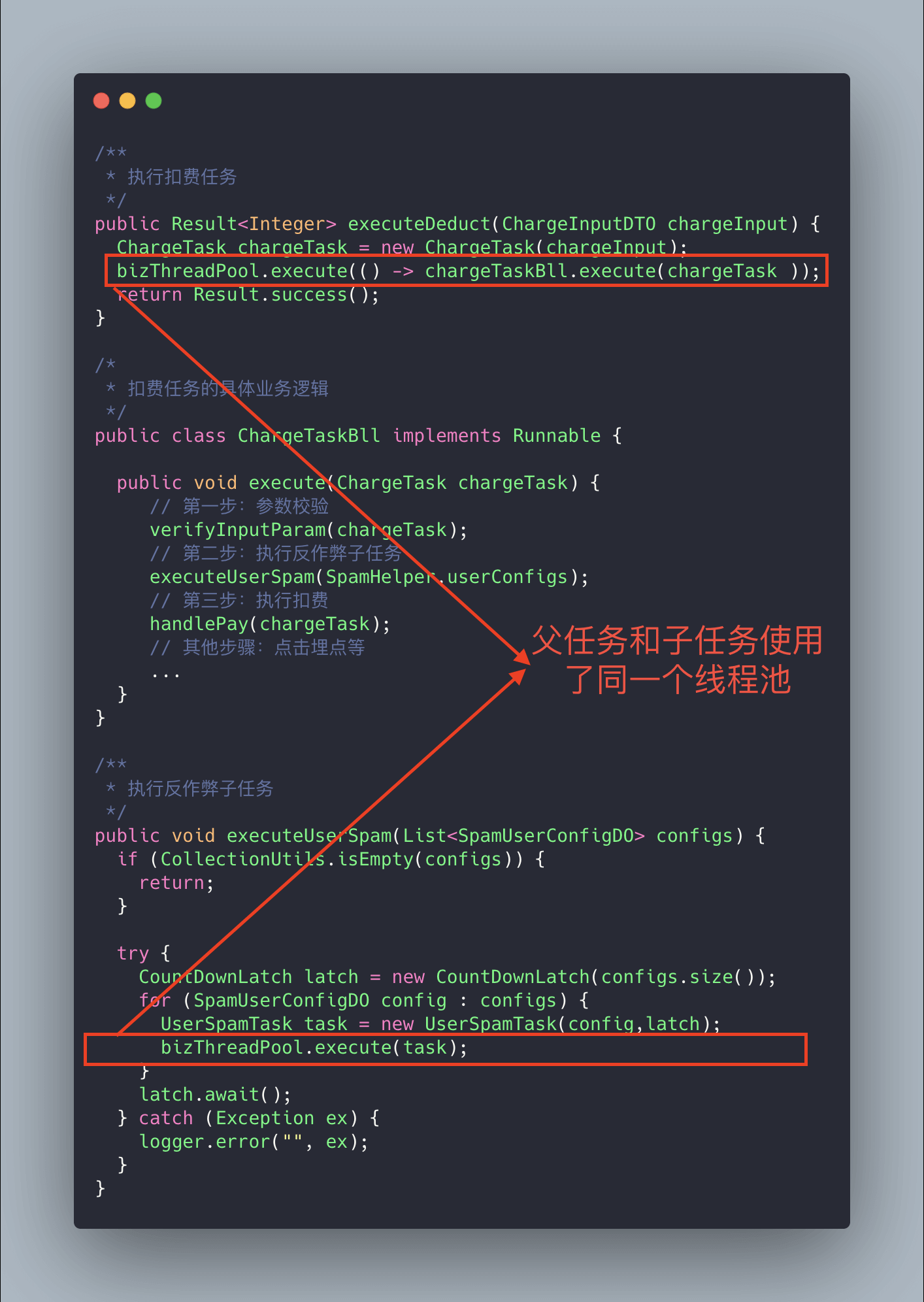
上面的代码可能会存在死锁的情况,为什么呢?
试想这样一种极端情况:假如我们线程池的核心线程数为 n,父任务(扣费任务)数量为 n,父任务下面有两个子任务(扣费任务下的子任务),其中一个已经执行完成,另外一个被放在了任务队列中。由于父任务把线程池核心线程资源用完,所以子任务因为无法获取到线程资源无法正常执行,一直被阻塞在队列中。父任务等待子任务执行完成,而子任务等待父任务释放线程池资源,这也就造成了 “死锁” 。
解决方法也很简单,就是新增加一个用于执行子任务的线程池专门为其服务。
别忘记给线程池命名
初始化线程池的时候需要显示命名(设置线程池名称前缀),有利于定位问题。
默认情况下创建的线程名字类似 pool-1-thread-n 这样的,没有业务含义,不利于我们定位问题。
给线程池里的线程命名通常有下面两种方式:
-
利用 guava 的
ThreadFactoryBuilderThreadFactory threadFactory = new ThreadFactoryBuilder().setNameFormat(threadNamePrefix + "-%d").setDaemon(true).build();ExecutorService threadPool = new ThreadPoolExecutor(corePoolSize, maximumPoolSize, keepAliveTime, TimeUnit.MINUTES, workQueue, threadFactory) -
自己实现
ThreadFactory****。import java.util.concurrent.ThreadFactory;import java.util.concurrent.atomic.AtomicInteger;/*** 线程工厂,它设置线程名称,有利于我们定位问题。*/public final class NamingThreadFactory implements ThreadFactory {private final AtomicInteger threadNum = new AtomicInteger();private final String name;/*** 创建一个带名字的线程池生产工厂*/public NamingThreadFactory(String name) {this.name = name;}@Overridepublic Thread newThread(Runnable r) {Thread t = new Thread(r);t.setName(name + " [#" + threadNum.incrementAndGet() + "]");return t;}}
正确配置线程池参数
我们先来看一下各种书籍和博客上一般推荐的配置线程池参数的方式,可以作为参考。
常规操作
线程数量过多的影响和我们分配多少人做事情一样,对于多线程这个场景来说主要是增加了上下文切换 成本。
- 如果我们设置的线程池数量太小的话,如果同一时间有大量任务/请求需要处理,可能会导致大量的请求/任务在任务队列中排队等待执行,甚至会出现任务队列满了之后任务/请求无法处理的情况,或者大量任务堆积在任务队列导致 OOM。这样很明显是有问题的,CPU 根本没有得到充分利用。
- 如果我们设置线程数量太大,大量线程可能会同时在争取 CPU 资源,这样会导致大量的上下文切换,从而增加线程的执行时间,影响了整体执行效率。
有一个简单并且适用面比较广的公式:
- CPU 密集型任务(N+1): 这种任务消耗的主要是 CPU 资源,可以将线程数设置为 N(CPU 核心数)+1。比 CPU 核心数多出来的一个线程是为了防止线程偶发的缺页中断,或者其它原因导致的任务暂停而带来的影响。一旦任务暂停,CPU 就会处于空闲状态,而在这种情况下多出来的一个线程就可以充分利用 CPU 的空闲时间。
- I/O 密集型任务(2N): 这种任务应用起来,系统会用大部分的时间来处理 I/O 交互,而线程在处理 I/O 的时间段内不会占用 CPU 来处理,这时就可以将 CPU 交出给其它线程使用。因此在 I/O 密集型任务的应用中,我们可以多配置一些线程,具体的计算方法是 2N。
如何判断是 CPU 密集任务还是 IO 密集任务?
CPU 密集型简单理解就是利用 CPU 计算能力的任务比如你在内存中对大量数据进行排序。但凡涉及到网络读取,文件读取这类都是 IO 密集型,这类任务的特点是 CPU 计算耗费时间相比于等待 IO 操作完成的时间来说很少,大部分时间都花在了等待 IO 操作完成上。
线程数更严谨的计算的方法应该是:最佳线程数 = N(CPU 核心数)∗(1+WT(线程等待时间)/ST(线程计算时间)),其中 WT(线程等待时间)=线程运行总时间 - ST(线程计算时间)。
线程等待时间所占比例越高,需要越多线程。线程计算时间所占比例越高,需要越少线程。
我们可以通过 JDK 自带的工具 VisualVM 来查看 WT/ST 比例。
CPU 密集型任务的 WT/ST 接近或者等于 0,因此, 线程数可以设置为 N(CPU 核心数)∗(1+0)= N,和我们上面说的 N(CPU 核心数)+1 差不多。
IO 密集型任务下,几乎全是线程等待时间,从理论上来说,你就可以将线程数设置为 2N(按道理来说,WT/ST 的结果应该比较大,这里选择 2N 的原因应该是为了避免创建过多线程吧)。
注意:上面提到的公示也只是参考,实际项目不太可能直接按照公式来设置线程池参数,毕竟不同的业务场景对应的需求不同,具体还是要根据项目实际线上运行情况来动态调整。
美团的优化操作
美团技术团队在《Java 线程池实现原理及其在美团业务中的实践》这篇文章中介绍到对线程池参数实现可自定义配置的思路和方法。
美团技术团队的思路是主要对线程池的核心参数实现自定义可配置。这三个核心参数是:
corePoolSize: 核心线程数线程数定义了最小可以同时运行的线程数量。maximumPoolSize: 当队列中存放的任务达到队列容量的时候,当前可以同时运行的线程数量变为最大线程数。workQueue****: 当新任务来的时候会先判断当前运行的线程数量是否达到核心线程数,如果达到的话,新任务就会被存放在队列中。
为什么是这三个参数?
这三个参数是 ThreadPoolExecutor 最重要的参数,它们基本决定了线程池对于任务的处理策略。
格外需要注意的是corePoolSize, 程序运行期间的时候,我们调用 setCorePoolSize()这个方法的话,线程池会首先判断当前工作线程数是否大于corePoolSize,如果大于的话就会回收工作线程。
另外,你也发现上面并没有动态指定队列长度的方法,美团的方式是自定义了一个叫做 ResizableCapacityLinkedBlockIngQueue 的队列(主要就是把LinkedBlockingQueue的 capacity 字段的 final 关键字修饰给去掉了,让它变为可变的)。
如果我们的项目也想要实现这种效果的话,可以借助现成的开源项目:
- Hippo4j:异步线程池框架,支持线程池动态变更&监控&报警,无需修改代码轻松引入。支持多种使用模式,轻松引入,致力于提高系统运行保障能力。
- Dynamic TP:轻量级动态线程池,内置监控告警功能,集成三方中间件线程池管理,基于主流配置中心(已支持 Nacos、Apollo,Zookeeper、Consul、Etcd,可通过 SPI 自定义实现)。
别忘记关闭线程池
当线程池不再需要使用时,应该显式地关闭线程池,释放线程资源。
线程池提供了两个关闭方法:
shutdown():关闭线程池,线程池的状态变为SHUTDOWN。线程池不再接受新任务了,但是队列里的任务得执行完毕。shutdownNow():关闭线程池,线程池的状态变为STOP。线程池会终止当前正在运行的任务,停止处理排队的任务并返回正在等待执行的 List。
调用完 shutdownNow 和 shuwdown 方法后,并不代表线程池已经完成关闭操作,它只是异步的通知线程池进行关闭处理。如果要同步等待线程池彻底关闭后才继续往下执行,需要调用awaitTermination方法进行同步等待。
在调用 awaitTermination() 方法时,应该设置合理的超时时间,以避免程序长时间阻塞而导致性能问题。另外。由于线程池中的任务可能会被取消或抛出异常,因此在使用 awaitTermination() 方法时还需要进行异常处理。awaitTermination() 方法会抛出 InterruptedException 异常,需要捕获并处理该异常,以避免程序崩溃或者无法正常退出。
// ...// 关闭线程池executor.shutdown();try { // 等待线程池关闭,最多等待5分钟 if (!executor.awaitTermination(5, TimeUnit.MINUTES)) { // 如果等待超时,则打印日志 System.err.println("线程池未能在5分钟内完全关闭"); }} catch (InterruptedException e) { // 异常处理}线程池尽量不要放耗时任务
线程池本身的目的是为了提高任务执行效率,避免因频繁创建和销毁线程而带来的性能开销。如果将耗时任务提交到线程池中执行,可能会导致线程池中的线程被长时间占用,无法及时响应其他任务,甚至会导致线程池崩溃或者程序假死。
因此,在使用线程池时,我们应该尽量避免将耗时任务提交到线程池中执行。对于一些比较耗时的操作,如网络请求、文件读写等,可以采用异步操作的方式来处理,以避免阻塞线程池中的线程。
线程池使用的一些小坑
重复创建线程池的坑
线程池是可以复用的,一定不要频繁创建线程池比如一个用户请求到了就单独创建一个线程池。
@GetMapping("wrong")public String wrong() throws InterruptedException { // 自定义线程池 ThreadPoolExecutor executor = new ThreadPoolExecutor(5,10,1L,TimeUnit.SECONDS,new ArrayBlockingQueue<>(100),new ThreadPoolExecutor.CallerRunsPolicy());
// 处理任务 executor.execute(() -> { // ...... } return "OK";}出现这种问题的原因还是对于线程池认识不够,需要加强线程池的基础知识。
Spring 内部线程池的坑
使用 Spring 内部线程池时,一定要手动自定义线程池,配置合理的参数,不然会出现生产问题(一个请求创建一个线程)。
@Configuration@EnableAsyncpublic class ThreadPoolExecutorConfig {
@Bean(name="threadPoolExecutor") public Executor threadPoolExecutor(){ ThreadPoolTaskExecutor threadPoolExecutor = new ThreadPoolTaskExecutor(); int processNum = Runtime.getRuntime().availableProcessors(); // 返回可用处理器的Java虚拟机的数量 int corePoolSize = (int) (processNum / (1 - 0.2)); int maxPoolSize = (int) (processNum / (1 - 0.5)); threadPoolExecutor.setCorePoolSize(corePoolSize); // 核心池大小 threadPoolExecutor.setMaxPoolSize(maxPoolSize); // 最大线程数 threadPoolExecutor.setQueueCapacity(maxPoolSize * 1000); // 队列程度 threadPoolExecutor.setThreadPriority(Thread.MAX_PRIORITY); threadPoolExecutor.setDaemon(false); threadPoolExecutor.setKeepAliveSeconds(300);// 线程空闲时间 threadPoolExecutor.setThreadNamePrefix("test-Executor-"); // 线程名字前缀 return threadPoolExecutor; }}线程池和 ThreadLocal 共用的坑
线程池和 ThreadLocal共用,可能会导致线程从ThreadLocal获取到的是旧值/脏数据。这是因为线程池会复用线程对象,与线程对象绑定的类的静态属性 ThreadLocal 变量也会被重用,这就导致一个线程可能获取到其他线程的ThreadLocal 值。
不要以为代码中没有显示使用线程池就不存在线程池了,像常用的 Web 服务器 Tomcat 处理任务为了提高并发量,就使用到了线程池,并且使用的是基于原生 Java 线程池改进完善得到的自定义线程池。
当然了,你可以将 Tomcat 设置为单线程处理任务。不过,这并不合适,会严重影响其处理任务的速度。
server.tomcat.max-threads=1解决上述问题比较建议的办法是使用阿里巴巴开源的 TransmittableThreadLocal(TTL)。TransmittableThreadLocal类继承并加强了 JDK 内置的InheritableThreadLocal类,在使用线程池等会池化复用线程的执行组件情况下,提供ThreadLocal值的传递功能,解决异步执行时上下文传递的问题。
TransmittableThreadLocal 项目地址:https://github.com/alibaba/transmittable-thread-local 。
Correct declaration of thread pools
Thread pools must be declared manually through ThreadPoolExecutor ‘s constructor; avoid using the Executors class to create thread pools, which can lead to OOM.
Executors returning thread pool objects has the following drawbacks:
FixedThreadPoolandSingleThreadExecutor: use an unboundedLinkedBlockingQueue; the task queue can reach a maximum length ofInteger.MAX_VALUE, which may accumulate a large number of requests and lead to OOM.CachedThreadPool: uses the synchronous queueSynchronousQueue, allowing up toInteger.MAX_VALUEthreads, which may create a large number of threads and cause OOM.ScheduledThreadPoolandSingleThreadScheduledExecutor: use the unbounded delaying queueDelayedWorkQueue, the task queue maximum length isInteger.MAX_VALUE, which may accumulate a large number of requests and lead to OOM.
In short: use bounded queues and control the number of threads created.
Besides avoiding OOM, there are other reasons not to use the two quick-thread-pool options provided by Executors:
- In practice you need to manually configure thread pool parameters according to your machine’s performance and your business scenario, such as core pool size, the task queue to use, saturation policies, etc.
- We should explicitly name our thread pools, which helps us locate problems.
Monitoring thread pool status
You can monitor the running state of a thread pool through various means, such as Spring Boot’s Actuator component.
In addition, you can use the APIs of ThreadPoolExecutor to build a simple monitor. ThreadPoolExecutor provides methods to obtain the current pool size, the number of active threads, the number of completed tasks, the number of tasks in the queue, and so on.
Here is a simple Demo. printThreadPoolStatus() prints the thread pool size, active count, completed task count, and the number of tasks in the queue every second.
/** * Print the status of a thread pool * * @param threadPool the thread pool object */public static void printThreadPoolStatus(ThreadPoolExecutor threadPool) { ScheduledExecutorService scheduledExecutorService = new ScheduledThreadPoolExecutor(1, createThreadFactory("print-images/thread-pool-status", false)); scheduledExecutorService.scheduleAtFixedRate(() -> { log.info("========================="); log.info("ThreadPool Size: [{}]", threadPool.getPoolSize()); log.info("Active Threads: {}", threadPool.getActiveCount()); log.info("Number of Tasks : {}", threadPool.getCompletedTaskCount()); log.info("Number of Tasks in Queue: {}", threadPool.getQueue().size()); log.info("========================="); }, 0, 1, TimeUnit.SECONDS);}Use different thread pools for different types of work
Many people encounter this question in real projects: My project has multiple business areas that require thread pools—should I define a separate pool for each area, or should I define a single shared pool?
The usual recommendation is to use different thread pools for different businesses, configuring each pool according to the current business scenario, because different businesses have different concurrency levels and resource usage, and the optimization should focus on the system’s bottlenecks.
Let’s look at a real incident case
The code above may have a deadlock situation. Why?
Imagine an extreme scenario: suppose the core pool size of our thread pool is n, the number of parent tasks (charge deduction tasks) is n, and under each parent task there are two sub-tasks (sub-tasks under the deduction task), one of which has already completed while the other is queued. Because the parent task has exhausted the core thread resources, the sub-task cannot obtain a thread resource and cannot proceed, so it remains blocked in the queue. The parent task waits for the sub-task to complete, while the sub-task waits for the parent task to release the thread pool resources, which leads to a “deadlock”.
The solution is simple: add a new thread pool dedicated to executing the sub-tasks.
Don’t forget to name your thread pools
When initializing a thread pool, you should explicitly name it (set a thread pool name prefix); this helps with debugging.
By default, created thread names look like pool-1-thread-n, which lacks business meaning and makes it harder to locate problems.
There are usually two ways to name the threads in a thread pool:
- Using Guava’s
ThreadFactoryBuilder
ThreadFactory threadFactory = new ThreadFactoryBuilder() .setNameFormat(threadNamePrefix + "-%d") .setDaemon(true).build();ExecutorService threadPool = new ThreadPoolExecutor(corePoolSize, maximumPoolSize, keepAliveTime, TimeUnit.MINUTES, workQueue, threadFactory)- Implementing your own
ThreadFactory.
import java.util.concurrent.ThreadFactory;import java.util.concurrent.atomic.AtomicInteger;
/** * Thread factory that sets thread names to help locate issues. */public final class NamingThreadFactory implements ThreadFactory {
private final AtomicInteger threadNum = new AtomicInteger(); private final String name;
/** * Create a thread factory with a name prefix. */ public NamingThreadFactory(String name) { this.name = name; }
@Override public Thread newThread(Runnable r) { Thread t = new Thread(r); t.setName(name + " [#" + threadNum.incrementAndGet() + "]"); return t; }}Correctly configure thread pool parameters
Let’s first review the common ways books and blogs recommend configuring thread pool parameters, which can serve as a reference.
General practices
The impact of having too many threads is similar to how many people you allocate to do the work. In multithreaded scenarios, the main effect is to increase the cost of context switching.
- If the thread pool size is too small, when many tasks/requests arrive at once, many will queue up waiting to execute, or the queue may fill up and prevent new tasks from being processed, or a large number of tasks may accumulate in the queue causing OOM. This is clearly problematic, as the CPU is not utilized efficiently.
- If the thread count is too large, many threads may compete for CPU resources, causing a lot of context switching and increasing the execution time for each thread, reducing overall efficiency.
A simple, widely applicable formula:
- CPU-bound tasks (N+1): These tasks primarily consume CPU resources; you can set the thread count to N (CPU cores) + 1. The extra thread helps prevent the impact of occasional page faults or other reasons for task pauses. When a task pauses, the CPU would be idle; the extra thread can make better use of that idle time.
- I/O-bound tasks (2N): In practice, these tasks spend most of their time waiting for I/O; while waiting, the threads don’t use CPU, so you can give CPU time to other threads. For I/O-bound workloads, you can configure more threads, with a rule of thumb of 2N.
How to determine CPU-bound vs IO-bound tasks?
CPU-bound tasks are those that use CPU compute, such as sorting large data in memory. Any operation involving network reads or file reads tends to be I/O-bound. These tasks typically spend little time on CPU calculations compared to waiting for I/O.
A more rigorous calculation for the optimal thread count is: bestThreadCount = N (CPU cores) * (1 + WT/ST), where WT = total running time - ST.
The higher the proportion of waiting time, the more threads you need. The higher the proportion of compute time, the fewer threads you need.
You can use VisualVM, a tool included with the JDK, to view the WT/ST ratio.
For CPU-bound tasks, WT/ST is close to 0, so set the number of threads to N * (1 + 0) = N, which is similar to the N cores case discussed above.
For IO-bound tasks, WT is almost entirely waiting time; theoretically you could set the thread count to 2N (in practice WT/ST would be large; the choice of 2N helps avoid creating an excessive number of threads).
Note: the formulas above are only references; in real projects you rarely set thread pool parameters strictly by formulas, since different scenarios require different needs. Dynamic tuning based on actual runtime conditions is advisable.
Meituan’s optimization approach
Meituan’s technical team, in the article Java Thread Pool Implementation Principles and Practices in Meituan, discusses ideas and methods for making thread pool parameters configurable.
Their approach focuses on making core thread pool parameters customizable. The three core parameters are:
corePoolSize: core thread count; defines the minimum number of threads that can run simultaneously.maximumPoolSize: when the queue is full, the maximum number of threads that can run concurrently.workQueue: when a new task arrives, the pool first checks whether the current number of running threads has reached the core pool size; if so, the new task is stored in the queue.
Why these three parameters?
These are the most important parameters for ThreadPoolExecutor; they largely determine the pool’s handling strategy for tasks.
Note that corePoolSize is special: during runtime, if you call setCorePoolSize(), the pool will first check if the current number of worker threads is greater than corePoolSize; if so, it will shrink the workers.
Also, you’ll notice there’s no dynamic way to set the queue length above; Meituan’s approach customizes a queue called ResizableCapacityLinkedBlockingQueue (essentially removing the final modifier on the capacity field of LinkedBlockingQueue, making it mutable).
If your project also wants to achieve this, you can leverage existing open-source projects:
- Hippo4j: asynchronous thread pool framework, supports dynamic changes, monitoring, and alerting with no code changes required. Supports multiple usage modes; aims to improve system reliability.
- Dynamic TP: lightweight dynamic thread pool with built-in monitoring and alerting; integrates with third-party middleware thread pool management; based on mainstream configuration centers (Nacos, Apollo, Zookeeper, Consul, Etcd; SPI extension available).
Don’t forget to shut down thread pools
When a thread pool is no longer needed, you should explicitly shut it down to release resources.
Thread pools offer two shutdown methods:
shutdown(): shuts down the thread pool; its state becomesSHUTDOWN. It will not accept new tasks, but tasks in the queue will be completed.shutdownNow(): shuts down the thread pool; its state becomesSTOP. It will attempt to stop currently executing tasks, halt processing of queued tasks, and return a list of tasks that are awaiting execution.
Calling shutdownNow and shutdown does not mean the shutdown is complete; it merely asynchronously requests the pool to stop. If you need to wait synchronously for the pool to fully shut down before proceeding, you should call awaitTermination to wait.
// ...// Shutdown the thread poolexecutor.shutdown();try { // Wait for shutdown, up to 5 minutes if (!executor.awaitTermination(5, TimeUnit.MINUTES)) { // If waiting times out, log System.err.println("Thread pool did not terminate within 5 minutes"); }} catch (InterruptedException e) { // Exception handling}Try to avoid submitting long-running tasks to the thread pool
The purpose of a thread pool is to improve task execution efficiency and avoid the overhead of repeatedly creating and destroying threads. If you submit long-running tasks to the pool, threads may be occupied for a long time, preventing timely responses to other tasks, and could even cause the pool to crash or the program to hang.
Therefore, when using a thread pool, try to avoid submitting time-consuming tasks to it. For long-running operations such as network requests or file I/O, consider asynchronous processing to avoid blocking threads in the pool.
Some gotchas when using thread pools
Pitfall of repeatedly creating thread pools
Thread pools are reusable; do not create a new thread pool for every request, for example:
@GetMapping("wrong")public String wrong() throws InterruptedException { // Custom thread pool ThreadPoolExecutor executor = new ThreadPoolExecutor(5,10,1L,TimeUnit.SECONDS,new ArrayBlockingQueue<>(100),new ThreadPoolExecutor.CallerRunsPolicy());
// Process tasks executor.execute(() -> { // ...... } return "OK";}The problem stems from insufficient understanding of thread pools; improve your knowledge of thread pools.
Pitfalls of Spring’s internal thread pools
When using Spring’s internal thread pools, you must manually customize the pool with reasonable parameters, otherwise you may encounter production issues (one thread per request).
@Configuration@EnableAsyncpublic class ThreadPoolExecutorConfig {
@Bean(name="threadPoolExecutor") public Executor threadPoolExecutor(){ ThreadPoolTaskExecutor threadPoolExecutor = new ThreadPoolTaskExecutor(); int processNum = Runtime.getRuntime().availableProcessors(); int corePoolSize = (int) (processNum / (1 - 0.2)); int maxPoolSize = (int) (processNum / (1 - 0.5)); threadPoolExecutor.setCorePoolSize(corePoolSize); threadPoolExecutor.setMaxPoolSize(maxPoolSize); threadPoolExecutor.setQueueCapacity(maxPoolSize * 1000); threadPoolExecutor.setThreadPriority(Thread.MAX_PRIORITY); threadPoolExecutor.setDaemon(false); threadPoolExecutor.setKeepAliveSeconds(300); threadPoolExecutor.setThreadNamePrefix("test-Executor-"); return threadPoolExecutor; }}Pitfalls where ThreadLocal and thread pools collide
Using a thread pool with ThreadLocal can cause a thread to read stale or dirty values. This happens because the pool reuses worker threads, and the ThreadLocal variables bound to the thread’s class are reused as well, so a thread might read another thread’s ThreadLocal value.
Don’t assume that not explicitly using a thread pool in your code means there’s no thread pool involved; web servers like Tomcat use thread pools to handle requests and concurrency, often using custom thread pools built on top of native Java thread pools.
Of course, you could configure Tomcat to handle requests with a single thread, but this is not advisable as it would severely limit throughput.
server.tomcat.max-threads=1A recommended solution to the above issue is Alibaba’s open-source TransmittableThreadLocal (TTL). The TransmittableThreadLocal class extends and enhances the JDK’s built-in InheritableThreadLocal. In components that pool and reuse threads, TTL provides propagation of ThreadLocal values to solve context transmission problems in asynchronous execution.
TransmittableThreadLocal project page: https://github.com/alibaba/transmittable-thread-local.
正しいスレッドプールの宣言
スレッドプールは必ず手動で ThreadPoolExecutor **のコンストラクタを介して宣言する必要があります。Executors クラスを使ってスレッドプールを作成するのは避けてください。OOM のリスクがあります。
Executors が返すスレッドプールオブジェクトのデメリットは以下のとおりです:
FixedThreadPoolとSingleThreadExecutor:無界のLinkedBlockingQueueを使用しており、タスクキューの最大長はInteger.MAX_VALUE、大量のリクエストが蓄積されて OOM になる可能性があります。CachedThreadPool:SynchronousQueue を使用し、作成可能なスレッド数がInteger.MAX_VALUEで、大量のスレッドを作成して OOM になる可能性があります。ScheduledThreadPoolとSingleThreadScheduledExecutor: 無界の遅延ブロックキュー DelayedWorkQueue を使用しており、タスクキューの最大長はInteger.MAX_VALUE、大量のリクエストが蓄積されて OOM になる可能性があります。
要するに:有界キューを使用して、スレッド作成数を制御する。
実際の OOM を避ける以外にも、Executors が提供する2つの快捷なスレッドプールを推奨しない理由は以下のとおりです:
- 実際の運用では、マシンの性能やビジネスシナリオに応じて、コアスレッド数、使用するタスクキュー、飽和時の策略などを手動で設定する必要があります。
- また、スレッドプールを命名することは重要です。名前を付けることで問題の特定が容易になります。
スレッドプールの実行状態の監視
SpringBoot の Actuator など、スレッドプールの実行状態を検知する手段を利用できます。
それに加えて、ThreadPoolExecutor の関連 API を用いて簡易的な監視を行うことも可能です。ThreadPoolExecutor は現在のスレッド数やアクティブスレッド数、完了したタスク数、待機中のタスク数などを取得できます。
以下は簡易 Demo です。printThreadPoolStatus() は1秒ごとにスレッドプールの総数、アクティブなスレッド数、完了したタスク数、キュー内のタスク数を表示します。
/** * 打印线程池的状态 * * @param threadPool 线程池对象 */public static void printThreadPoolStatus(ThreadPoolExecutor threadPool) { ScheduledExecutorService scheduledExecutorService = new ScheduledThreadPoolExecutor(1, createThreadFactory("print-images/thread-pool-status", false)); scheduledExecutorService.scheduleAtFixedRate(() -> { log.info("========================="); log.info("ThreadPool Size: [{}]", threadPool.getPoolSize()); log.info("Active Threads: {}", threadPool.getActiveCount()); log.info("Number of Tasks : {}", threadPool.getCompletedTaskCount()); log.info("Number of Tasks in Queue: {}", threadPool.getQueue().size()); log.info("========================="); }, 0, 1, TimeUnit.SECONDS);}異なるカテゴリのビジネスには別々のスレッドプールを推奨
多くの人が実務で以下のような問題に直面します:私のプロジェクトには複数のビジネスでスレッドプールを使う必要があります。各スレッドプールを定義すべきか、それとも共用のスレッドプールを使うべきか?
一般的には、異なるビジネスには別々のスレッドプールを使用し、現在のビジネスの状況に応じてそのスレッドプールを設定します。なぜなら、ビジネスごとに並行性やリソースの使用状況が異なるため、システムの性能ボトルネックに焦点を合わせたビジネスを最適化する必要があるからです。
実際の事故ケースを見てみましょう
上記のコードは死結が発生する可能性があります。なぜでしょうか?
極端なケースを想像してみましょう:スレッドプールのコアスレッド数を n、親タスク(課金タスク)の数を n、親タスクの下に2つのサブタスク(課金タスク下のサブタスク)があり、そのうち1つがすでに実行完了し、もう1つがタスクキューに入っています。親タスクがスレッドプールのコアスレッド資源を使い切っているため、子タスクはスレッド資源を取得できず正常に実行できず、キューで待機し続けます。親タスクは子タスクの実行完了を待ち、子タスクは親タスクがスレッドプール資源を開放するのを待つことになり、これが「デッドロック」を引き起こします。
解決方法は非常に単純で、子タスクを実行する専用の別のスレッドプールを新たに追加して、それを子タスク専用にします。
スレッドプールに名前を付けるのを忘れずに
スレッドプールを初期化する際には明示的に名前を付ける(スレッドプール名のプレフィックスを設定する)と、問題の特定に役立ちます。
デフォルトで作成されるスレッド名は pool-1-thread-n のようなもので、業務の意味を持たず、問題の特定には不便です。
スレッドプール内のスレッドに名前を付けるには、通常次の2つの方法があります:
-
Guava の
ThreadFactoryBuilderThreadFactory threadFactory = new ThreadFactoryBuilder().setNameFormat(threadNamePrefix + "-%d").setDaemon(true).build();ExecutorService threadPool = new ThreadPoolExecutor(corePoolSize, maximumPoolSize, keepAliveTime, TimeUnit.MINUTES, workQueue, threadFactory) -
自分で実装する
ThreadFactory。import java.util.concurrent.ThreadFactory;import java.util.concurrent.atomic.AtomicInteger;/*** 线程工厂,它设置线程名称,有利于我们定位问题。*/public final class NamingThreadFactory implements ThreadFactory {private final AtomicInteger threadNum = new AtomicInteger();private final String name;/*** 创建一个带名字的线程池生产工厂*/public NamingThreadFactory(String name) {this.name = name;}@Overridepublic Thread newThread(Runnable r) {Thread t = new Thread(r);t.setName(name + " [#" + threadNum.incrementAndGet() + "]");return t;}}
正しいスレッドプールのパラメータ設定
まず、さまざまな書籍とブログで一般的に推奨されるスレッドプールのパラメータ設定方法を見てみましょう。参考として。
一般的な操作
スレッド数が多すぎる影響は、私たちが仕事を割り当てる人数と同様に、マルチスレッドのこの状況では主にコンテキストスイッチングのコストを増加させます。
- スレッドプールの数が小さすぎる場合、一度に大量のタスク/リクエストを処理する必要があると、タスク/リクエストがキューで待機して実行される、キューが満杯になって待機できなくなる、またはキューに大量のタスクが堆積してOOM になるなどの問題が生じ、CPU が十分に活用されません。
- スレッド数を大きくすると、多数のスレッドが同時に CPU 資源を奪い合い、多くのコンテキストスイッチが発生して、スレッドの実行時間が長くなり、全体の実行効率が低下します。
一般的で広く適用できる式があります:
- CPU 集中型タスク(N+1):このタイプのタスクは主に CPU リソースを消費するため、スレッド数を N(CPU コア数)+1 に設定します。余分な1つのスレッドは、突発的なページフォールトなど、タスクが一時停止する原因を補うためです。タスクが一時停止すると CPU は空闲になり、この追加スレッドが CPU の空き時間を有効活用します。
- I/O 集中型タスク(2N):このタイプのタスクは、I/O との対話に多くの時間を要し、I/O を待っている間は CPU を占有しません。従って CPU を他のスレッドに割り当てることができます。I/O 集中型のアプリケーションでは、スレッドを多めに設定します。具体的な計算方法は 2N。
どうやってCPU密集型かIO密集型かを判断しますか?
CPU密集型の簡単な理解は、CPUの計算能力を利用するタスク、例えば大量データのソートなどです。ネットワーク読み取り、ファイル読み取りなどはすべて IO 密集型であり、これらのタスクはCPU の計算に要する時間が IO 操作待ちの時間よりも少なく、待機時間の方が長いのが特徴です。
スレッド数をより厳密に計算する方法は次のとおりです:最佳线程数 = N(CPU 核心数)∗(1+WT(线程等待时间)/ST(线程计算时间))、ここで WT(线程等待时间)=线程运行总时间 - ST(线程计算时间)。
WT が大きいほど、より多くのスレッドが必要になります。ST が大きいほど、より少ないスレッドが必要になります。
私たちは JDK に付属するツール VisualVM を使って WT/ST の比率を確認できます。
CPU 密集型タスクの WT/ST は 0 に近い、あるいは等しいため、スレッド数は N(CPU コア数)∗(1+0)= N に設定でき、上記の N(CPU コア数)+1 とほぼ同じです。
IO 密集型タスクでは、ほとんど全てが待機時間です。原理的にはスレッド数を 2N に設定してよいです(WT/ST の結果が大きくなるはずですが、過度なスレッド作成を避ける意味で 2N を選ぶことが多いです)。
注意:上記の式はあくまで参考であり、実際のプロジェクトでは式に従って直接パラメータを設定することはあまりなく、ビジネス環境ごとに要件が異なるため、実稼働状況に応じて動的に調整する必要があります。
美団の最適化操作
美団の技術チームは「Java 线程池实现原理及其在美团业务中的实践」という記事の中で、スレッドプールのパラメータをカスタマイズ可能にするアプローチを紹介しています。
美団のアプローチは、主にスレッドプールの核心パラメータをカスタム可能にすることです。3つのコアパラメータは:
corePoolSize:コアスレッド数。同時に動作可能な最小スレッド数を定義します。maximumPoolSize:キューの容量に達した場合、同時実行可能なスレッド数が最大値になります。workQueue:新しいタスクが来たとき、現在の実行スレッド数がコアスレッド数に達しているかを判断し、達していればタスクをキューに格納します。
なぜこの3つのパラメータですか?
この3つのパラメータは ThreadPoolExecutor の最も重要なパラメータであり、タスクの処理戦略をほぼ決定します。
特に corePoolSize には注意が必要です。プログラムの実行中に setCorePoolSize() を呼ぶと、現在の作業スレッド数が corePoolSize を超えている場合、スレッドを回収します。
また、上記には動的にキュー長を指定する方法がないことにも気づきます。美団の方法は ResizableCapacityLinkedBlockIngQueue というキューを自作することでした(主に LinkedBlockingQueue の capacity フィールドの final 修飾子を外して可変にする、という点です)。
もし私たちのプロジェクトでもこの効果を実現したい場合は、すでに用意されているオープンソースプロジェクトを活用するのが良いでしょう:
- Hippo4j:非同期スレッドプールフレームワーク。スレッドプールの動的変更、監視、アラートをサポート。コード変更なしで導入可能。複数の使用モードをサポートし、システムの運用保証能力の向上を目指します。
- Dynamic TP:軽量な動的スレッドプール。内蔵監視・警告機能を備え、サードパーティのミドルウェアと連携したスレッドプール管理を提供。主流の設定センターに対応(Nacos、Apollo、Zookeeper、Consul、Etcd、SPI での自作実装も可能)。
スレッドプールを閉じるのを忘れないでください
スレッドプールが不要になったときには、明示的にスレッドプールを閉じ、スレッド資源を解放すべきです。
スレッドプールには2つのシャットダウン方法があります:
shutdown(): スレッドプールをシャットダウンします。スレッドプールの状態はSHUTDOWNとなり、新しいタスクは受け付けられなくなりますが、キュー内のタスクは完了します。shutdownNow(): スレッドプールを強制的にシャットダウンします。状態はSTOPとなり、現在実行中のタスクを強制終了し、待機中のタスクの処理を停止して、実行待ちの List を返します。
shutdownNow と shutdown を呼び出した後も、直ちにスレッドプールが完全に閉じるわけではなく、非同期で閉じ処理が通知されているだけです。完全に閉じるまで待つ必要がある場合は、awaitTermination を呼んで同期的に待機します。
// ...// 关闭线程池executor.shutdown();try { // 等待线程池关闭,最多等待5分钟 if (!executor.awaitTermination(5, TimeUnit.MINUTES)) { // 如果等待超时,则打印日志 System.err.println("线程池未能在5分钟内完全关闭"); }} catch (InterruptedException e) { // 异常处理}スレッドプールには長時間実行タスクを入れない
スレッドプール自体の目的は、タスクの実行効率を高めることと、頻繁なスレッド作成・破棄によるパフォーマンスコストを避けることです。長時間実行されるタスクをスレッドプールに投入すると、スレッドが長時間占有され、他のタスクへ迅速に応答できなくなり、最悪の場合スレッドプールが崩壊したり、プログラムがフリーズしたりする可能性があります。
したがって、スレッドプールを使う際には、長時間実行タスクをスレッドプールに投入することをできるだけ避けるべきです。ネットワーク要求、ファイルの読み書きなど、時間のかかる操作には非同期処理を用意して処理することで、スレッドプール内のスレッドのブロックを回避します。
スレッドプールの使用時の小さな落とし穴
繰り返しスレッドプールを作成する落とし穴
スレッドプールは再利用可能です。ユーザーのリクエストごとに新しいスレッドプールを作成するなど、頻繁に作成してはいけません。
@GetMapping("wrong")public String wrong() throws InterruptedException { // 自作のスレッドプール ThreadPoolExecutor executor = new ThreadPoolExecutor(5,10,1L,TimeUnit.SECONDS,new ArrayBlockingQueue<>(100),new ThreadPoolExecutor.CallerRunsPolicy());
// 处理任务 executor.execute(() -> { // ...... } return "OK";}この問題が起こる原因は、スレッドプールの理解が十分でないことにあります。スレッドプールの基礎知識を高める必要があります。
Spring 内部スレッドプールの落とし穴
Spring の内部スレッドプールを使用する場合は、必ず手動でスレッドプールを定義し、合理的なパラメータを設定してください。そうしないと生産上の問題(1つのリクエストにつき1つのスレッドが作成される等)が発生します。
@Configuration@EnableAsyncpublic class ThreadPoolExecutorConfig {
@Bean(name="threadPoolExecutor") public Executor threadPoolExecutor(){ ThreadPoolTaskExecutor threadPoolExecutor = new ThreadPoolTaskExecutor(); int processNum = Runtime.getRuntime().availableProcessors(); // 利用可能なCPUコア数を返す int corePoolSize = (int) (processNum / (1 - 0.2)); int maxPoolSize = (int) (processNum / (1 - 0.5)); threadPoolExecutor.setCorePoolSize(corePoolSize); // コアプールサイズ threadPoolExecutor.setMaxPoolSize(maxPoolSize); // 最大スレッド数 threadPoolExecutor.setQueueCapacity(maxPoolSize * 1000); // キューの容量 threadPoolExecutor.setThreadPriority(Thread.MAX_PRIORITY); threadPoolExecutor.setDaemon(false); threadPoolExecutor.setKeepAliveSeconds(300);// スレッドのアイドル時間 threadPoolExecutor.setThreadNamePrefix("test-Executor-"); // スレッド名のプレフィックス return threadPoolExecutor; }}スレッドプールと ThreadLocal の共用の落とし穴
スレッドプールと ThreadLocal の共用は、スレッドプールがスレッドオブジェクトを再利用するため、スレッドオブジェクトに結びつくクラスの静的属性である ThreadLocal 変数も再利用され、別のスレッドの ThreadLocal 値を取得してしまう可能性があります。
コード上でスレッドプールを明示的に使用していないからといって、スレッドプールが存在しないわけではありません。例えば、一般的な Web サーバー Tomcat は高い同時処理を実現するためにスレッドプールを使用しており、原生 Java のスレッドプールを改善して得られた自作のスレッドプールを利用しています。
もちろん Tomcat を単一スレッドで処理するように設定することもできますが、それは適切ではなく、タスク処理速度に重大な影響を与えます。
server.tomcat.max-threads=1この問題を解決するのに比較的推奨される方法は、Alibaba のオープンソースである TransmittableThreadLocal(TTL)を使用することです。TransmittableThreadLocal クラスは JDK 内蔵の InheritableThreadLocal を継承・拡張しており、スレッドプールなどのプーリング再利用されるスレッドを使用する場合に、ThreadLocal の値を伝搬させる機能を提供し、非同期実行時のコンテキスト伝搬の問題を解決します。
TransmittableThreadLocal プロジェクトのURL:https://github.com/alibaba/transmittable-thread-local。
部分信息可能已经过时