



实验1 常用网络命令
1、实验目的
- 了解Linux命令终端和Windows命令行使用
- 熟悉常用网络命令基本用法
- 掌握基于
ping、ifconfig、traceroute、arp、netstat网络状态分析和测量技术
2、实验环境
- 硬件要求:阿里云云主机ECS 一台。
- 软件要求:Linux/ Windows 操作系统
3、实验内容
3.1 ping基本用法
使用ping命令测试网络连通性。这对确定网络是否正确连接,以及网络连接的状况十分有用。如果ping运行正确,大体上就可以排除网络访问层、网卡、Modem的输入输出线路、电缆和路由器等存在的故障,从而缩小问题的范围。
ping -c 4 www.baidu.comping -c 4 166.111.4.1003.2 ifconfig/ipconfig(Windows)基本用法
使用ifconfig实用程序可用于显示当前的TCP/IP配置的设置值。这些信息一般用来检验人工配置的TCP/IP设置是否正确。
ifconfigifconfig eth03.3 traceroute基本用法
使用traceroute命令测量路由情况,即用来显示数据包到达目的主机所经过的路径。
traceroute www.sohu.comtraceroute 166.111.4.1003.4 arp基本用法
ARP是TCP/IP协议族中的一个重要协议,用于确定对应IP地址的网卡物理地址。使用arp命令,能够查看本地计算机或另一台计算机的ARP高速缓存中的当前内容。
arp –aarp -i eth03.5 netstat基本用法
netstat命令能够显示活动的TCP连接、计算机侦听的端口、以太网统计信息。netstat显示活动的TCP连接。
netstat –anetstat -t4、实验结果与分析
4.1 ping基本用法
ping -c 4 www.baidu.comping -c 4 166.111.4.100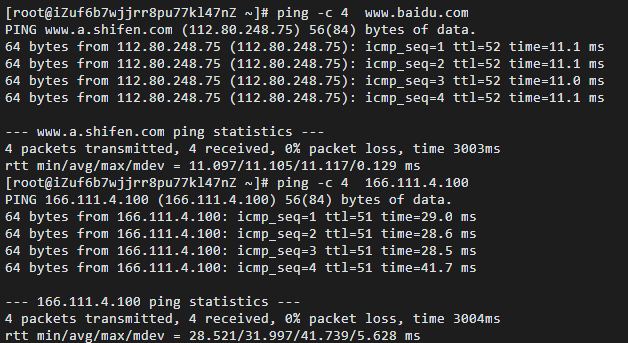
image-20220409224423767
Ping 是工作在 TCP/IP 网络体系结构中应用层的一个服务命令, 主要是向特定的目的主机发送 ICMP(Internet Control Message Protocol 因特网报文控制协议)Echo 请求报文,测试目的站是否可达及了解其有关状态。在网络可达性测试中命令 ping 能产生 ICMP 回送请求和应答报文。目的主机收到 ICMP 回送请求报文后立刻回送应答报文,若源主机能收到 ICMP 回送应答报文,则说明到达该主机的网络正常。
在 Linux 下可以使用的参数 c 可以指定要被发送(或接收)的回送信号请求的数目。这里测试 www.baidu.com 与166.111.4.100是否可连通。截图显示,4个数据包均已成功接收,没有丢失,表明网络通,主机 www.baidu.com 、166.111.4.100可达,平均往返时延分别为 10.105ms和31.997ms。
4.2 ifconfig/ipconfig(Windows)基本用法
ifconfigifconfig eth0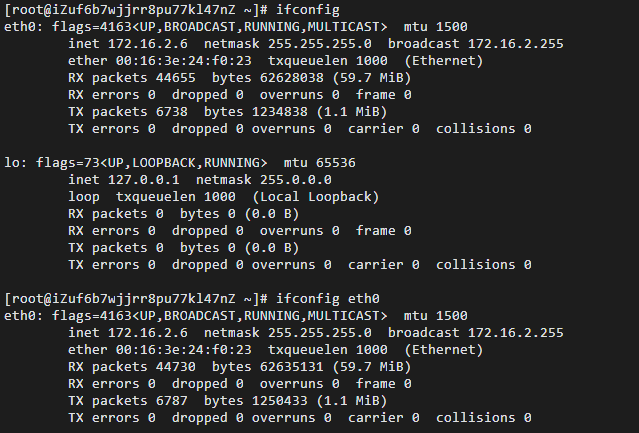
image-20220409230049094
ipconfig是windows系统中用于查看网络配置信息的命令。Windows中的ipconfig实用程序可用于显示当前的TCP/IP配置的设置值。这些信息一般用来检验人工配置的TCP/IP设置是否正确。
ifconfig是Linux系统中用于显示或设置网络配置信息的命令。ifconfig可以用来查看、配置、启用或禁用位于内核中的网络接口,这个工具极为常用,在系统引导时它被用来设置必要的网络接口参数。可以用这个工具来临时性的配置网卡的IP地址、掩码、广播地址、网关等。也可以把它写入一个文件中(比如/etc/rc.d/rc.local),这样系统引导后,会读取这个文件,为网卡设置IP地址。
ifconfig可以显示网络设备信息,而ifconfig eth0可以只显示eth0第一块网卡的信息。这里我们查看了主机的网络设备信息,可以看到该主机最大传输单元为1500,还有网卡的Ip地址(172.16.2.6)、广播地址(172.16.2.255)、掩码地址(255.255.255.0)。
而lo 是表示主机的回坏地址,这个一般是用来测试一个网络程序,但又不想让局域网或外网的用户能够查看,只能在此台主机上运行和查看所用的网络接口。比如把 HTTPD服务器的指定到回坏地址,在浏览器输入 127.0.0.1 就能看到你所架WEB网站了。但只是您能看得到,局域网的其它主机或用户无从知道。
4.3 traceroute基本用法
traceroute www.sohu.comtraceroute 166.111.4.100traceroute www.xju.edu.cntraceroute www.xju.edu.cn -T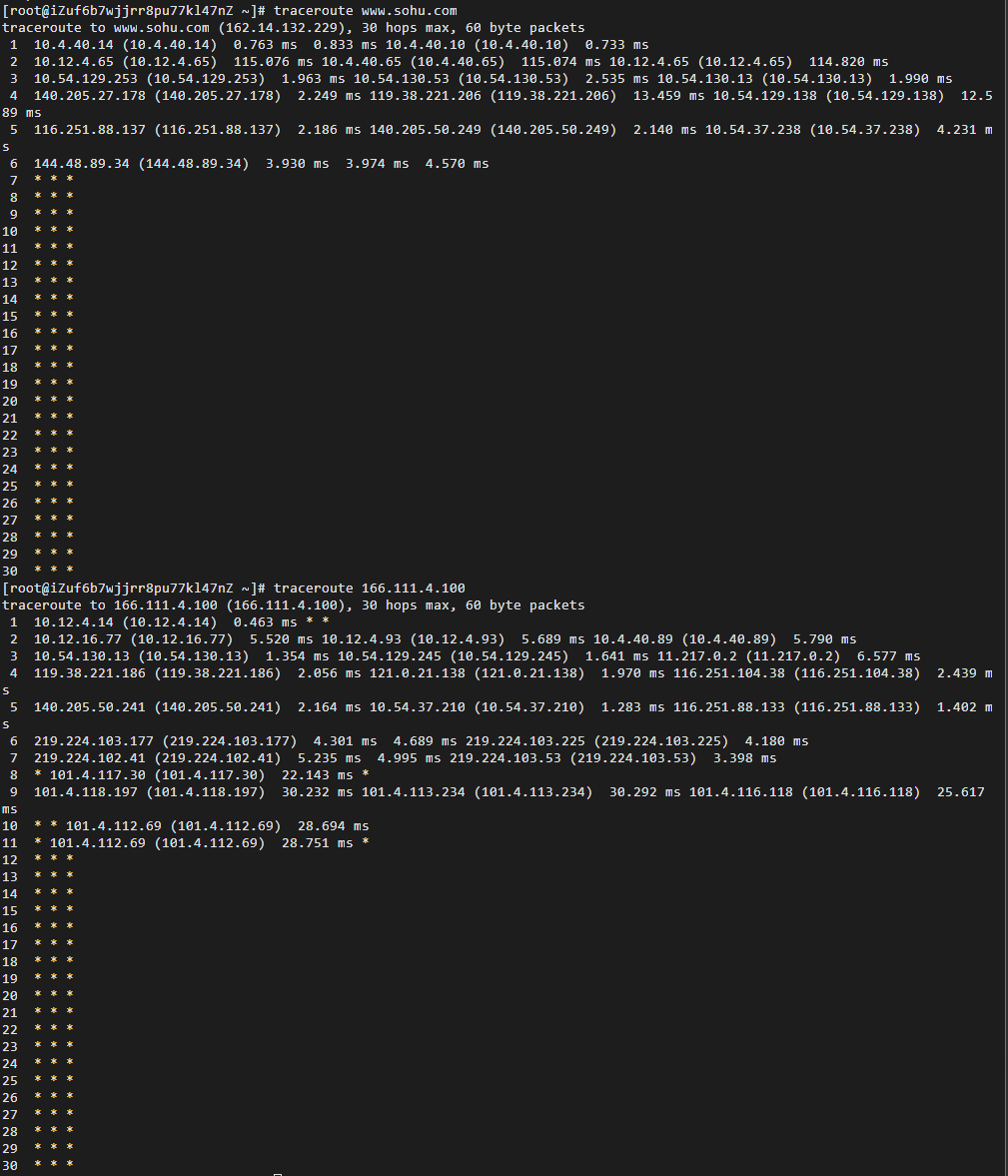
image-20220409232055284
Linux中的traceroute命令用于显示数据包到主机间的路径。traceroute指令让你追踪网络数据包的路由途径,预设数据包大小是40Bytes,用户可另行设置。
Traceroute程序的设计是利用ICMP及IP header的TTL(Time To Live)栏位(field)。首先,traceroute送出一个TTL是1的IP datagram到目的地,当路径上的第一个路由器(router)收到这个datagram时,它将TTL减1。此时,TTL变为0了,所以该路由器会将此datagram丢掉,并送回一个ICMP time exceeded消息,traceroute 收到这个消息后,便知道这个路由器存在于这个路径上,接着traceroute 再送出另一个TTL是2 的datagram,发现第2 个路由器……traceroute 每次将送出的datagram的TTL 加1来发现另一个路由器,这个重复的动作一直持续到某个datagram 抵达目的地。
当Traceroute在送出UDP datagrams到目的地时,它所选择送达的port number 是一个一般应用程序都不会用的号码(30000 以上),所以当此UDP datagram 到达目的地后该主机会送回一个ICMP port unreachable的消息,而当traceroute 收到这个消息时,便知道目的地已经到达了。所以traceroute 在Server端也是没有所谓的Daemon 程式。
Traceroute提取发 ICMP TTL到期消息设备的IP地址并作域名解析。每次 ,Traceroute都打印出一系列数据,包括所经过的路由设备的域名及 IP地址,三个包每次来回所花时间。
这里我们使用traceroute最简单常用的方法traceroute hostname测量主机到www.baidu.com 与166.111.4.100的路由情况,即用来显示数据包到达目的主机所经过的路径。在图中,我们可以看到记录按序列号从1开始,每个纪录就是一跳 ,其中每跳表示一个网关,每行的三个时间,单位是 ms,代表探测数据包向每个网关发送三个数据包后,网关响应后返回的时间。此外,我们可以看到后面多行是以星号表示的。出现这样的情况,可能是防火墙封掉了ICMP的返回信息,所以我们得不到什么相关的数据包返回数据。而-T命令则是代表使用TCP SYN进行探测。
4.4 arp基本用法
arp –aarp -i eth0
image-20220409233845980
ARP是TCP/IP协议族中的一个重要协议,用于确定对应IP地址的网卡物理地址。使用arp命令可以显示和修改“地址解析协议(ARP)”缓存表,ARP缓存中包含一个或多个表 ,它们用于存储IP地址及其经过解析的以太网或令牌环物理地址。 本质上是,一个ip和mac地址相对应的表
arp命令在 Linux 下使用的参数a可以显示所有接口的ARP缓存表(计算机上安装的每一个以太网或令牌环网络适配器都有自己单独的表),arp -i eth0 可以 显示指定设备的arp缓冲区(即eth0的arp缓冲区)。HWaddress可以看到当前eth0(第一块网卡)的物理地址为ee:ff:ff:ff:ff:ff。
4.5 netstat基本用法
netstat命令能够显示活动的TCP连接、计算机侦听的端口、以太网统计信息。netstat显示活动的TCP连接。
netstat –anetstat -t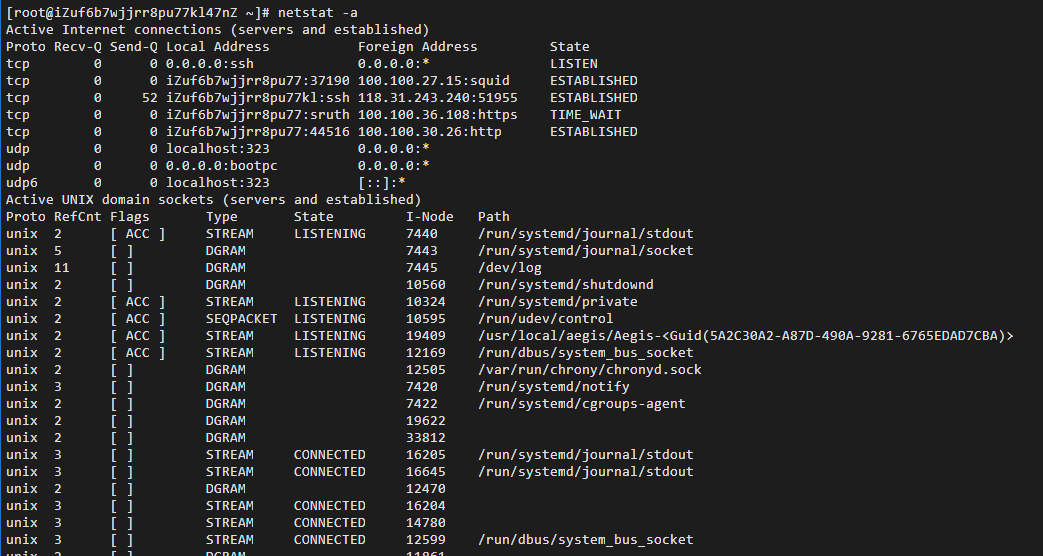
image-20220410000001138

image-20220410000017070
Netstat是控制台命令,是一个监控TCP/IP网络的非常有用的工具,它可以显示路由表、实际的网络连接以及每一个网络接口设备的状态信息。Netstat用于显示与IP、TCP、UDP和ICMP协议相关的统计数据,一般用于检验本机各端口的网络连接情况。
netstat命令在 Linux 下使用的参数a可以列出所有当前的连接。在上图我们可以看到上述命令列出了 tcp, udp 和 unix 协议下所有套接字的所有连接且默认不显示LISTEN相关。而通过metstat -t我们可以让主机仅显示tcp相关选项。
5、实验小结
5.1 问题与解决办法
问题在使用traceroute命令时,出现-bash: traceroute: command not found错误解决方法使用yum install traceroute命令,首先安装traceroute 问题在windows10下使用ping -c 4 www.baidu.com命令报错解决方法使用ping /?命令查询ping命令使用帮助,发现需要通过设置-n使请求数被设置。
5.2 心得体会
- 本次实验报告完成了对常用网络命令的熟系,实现对课上知识的印证。通过这次实验,我掌握了Linux终端的命令行使用,了解了常用网络命令的基本用法,提高了自身编程能力。
- 认识到在 Linux 和 windows 环境下,同样功能软件,参数可能存在不同。在进行测量时要查看帮助来正确设置参数选项。
- 通过这些常用的网络命令操作,对网络不同层的硬件软件的不同方面进行了各项操作,让我印证了上课所学的知识。
Experiment 1 Common Network Commands
1. Objectives
- Understand the use of Linux command terminals and Windows command line
- Familiarize with the basic usage of common network commands
- Master network status analysis and measurement techniques based on
ping,ifconfig,traceroute,arp,netstat
2. Experimental Environment
- Hardware requirement: one Alibaba Cloud ECS instance.
- Software requirement: Linux/Windows operating system
3. Experiment Content
3.1 Basic ping usage
Using the ping command to test network connectivity. This is very useful for determining whether the network is correctly connected and the state of the connection. If ping runs correctly, you can generally rule out faults in the network access layer, network card, modem input/output lines, cables, and routers, thus narrowing down the problem scope.
ping -c 4 www.baidu.comping -c 4 166.111.4.1003.2 Basic usage of ifconfig/ipconfig (Windows)
The ifconfig utility can be used to display the current TCP/IP configuration settings. This information is generally used to verify whether manually configured TCP/IP settings are correct.
ifconfigifconfig eth03.3 Basic traceroute usage
Using the traceroute command to measure the routing, i.e., to display the path that a data packet takes to reach the destination host.
traceroute www.sohu.comtraceroute 166.111.4.1003.4 Basic arp usage
ARP is an important protocol in the TCP/IP protocol suite, used to determine the physical address of a network interface card corresponding to an IP address. Using the arp command, you can view the current contents of the ARP cache on the local computer or another computer.
arp –aarp -i eth03.5 Basic netstat usage
The netstat command can display active TCP connections, ports the computer is listening on, and Ethernet statistics. Netstat shows active TCP connections.
netstat –anetstat -t4. Experimental Results and Analysis
4.1 Basic ping usage
ping -c 4 www.baidu.comping -c 4 166.111.4.100
image-20220409224423767
Ping is a service command operating at the application layer within the TCP/IP network architecture. It primarily sends ICMP (Internet Control Message Protocol) Echo Request messages to a specific destination host to test reachability and understand its status. In network reachability testing, the ping command generates ICMP Echo Request and Echo Reply messages. When the destination host receives the ICMP Echo Request, it immediately replies with an ICMP Echo Reply; if the source host receives the ICMP Echo Reply, it indicates that the network to reach that host is normal.
On Linux, the option -c can specify the number of Echo Request messages to send (or receive). Here we test whether www.baidu.com and 166.111.4.100 are reachable. The screenshot shows all four packets were received successfully with no loss, indicating the network is reachable; the hosts www.baidu.com and 166.111.4.100 are reachable, with average round-trip times of 10.105 ms and 31.997 ms, respectively.
4.2 Basic usage of ifconfig/ipconfig (Windows)
ifconfigifconfig eth0
image-20220409230049094
ipconfig is the command in Windows systems used to view network configuration information. The ipconfig utility in Windows is used to display the current TCP/IP configuration settings. This information is generally used to verify whether manually configured TCP/IP settings are correct.
ifconfig is the command in Linux systems used to display or configure network configuration information. ifconfig can be used to view, configure, enable, or disable network interfaces located in the kernel. This tool is very commonly used, and during system boot it is used to set essential network interface parameters. It can be used to temporarily configure the IP address, subnet mask, broadcast address, gateway, etc., of a network interface. It can also be written to a file (for example, /etc/rc.d/rc.local), so after system boot, the file is read and the IP addresses are set for the network interfaces.
ifconfig can display network device information, while ifconfig eth0 can display only the information for the first network card (eth0). Here we view the host’s network device information; we can see that the MTU is 1500, the NIC IP address (172.16.2.6), broadcast address (172.16.2.255), and subnet mask (255.255.255.0).
Lo (lo) represents the host’s loopback address, which is generally used to test a network program, but you don’t want other machines on the LAN or Internet to access it; it only runs and is viewable on this host. For example, binding the HTTPD server to the loopback address, entering 127.0.0.1 in a browser will display the website you are hosting. But only you can see it; other machines on the LAN or on the Internet won’t know.
4.3 Basic traceroute usage
traceroute www.sohu.comtraceroute 166.111.4.100traceroute www.xju.edu.cntraceroute www.xju.edu.cn -T
image-20220409232055284
In Linux, the traceroute command is used to display the path between the packet and the host. Traceroute lets you trace the routing path of network data packets; the default packet size is 40 bytes, but it can be adjusted.
The Traceroute program is designed to use ICMP and the IP header TTL (Time To Live) field. First, traceroute sends an IP datagram with TTL equal to 1 to the destination. When the first router on the path receives it, it decrements TTL by 1. At that point, TTL becomes 0, so the router drops the datagram and sends back an ICMP time-exceeded message. When traceroute receives this message, it knows that this router exists on the path, and then traceroute sends another datagram with TTL 2 to discover the second router, and so on. Traceroute repeats this process until a datagram reaches the destination.
WhenTraceroute sends UDP datagrams to the destination, it selects a port number that no ordinary application uses (above 30000). Therefore, when this UDP datagram reaches the destination, that host will send back an ICMP port-unreachable message; when traceroute receives this message, it knows the destination has been reached. So on the server side, there is no daemon required for traceroute.
Traceroute extracts the IP addresses from ICMP TTL expiry messages and performs reverse DNS. Each time, traceroute prints a sequence of data, including the domain name and IP address of each hop, and the round-trip time for the three probes.
Here we use the simplest and most common method, traceroute hostname, to measure the route from the host to www.baidu.com and 166.111.4.100—i.e., to display the path packets take to reach the destination host. In the figure, records start at 1, and each record represents a hop (a gateway). Each line shows three times in milliseconds, representing the time to probe three packets to each gateway and the gateway’s responses. In addition, later lines show asterisks; this can happen if a firewall blocks ICMP return messages, so we have limited data. The -T option indicates TCP SYN probing.
4.4 Basic arp usage
arp –aarp -i eth0
image-20220409233845980
ARP is an important protocol in the TCP/IP suite, used to determine the MAC address corresponding to an IP address. Using the arp command you can display and modify the Address Resolution Protocol (ARP) cache. The ARP cache contains one or more tables that store IP addresses and their corresponding Ethernet or Token Ring addresses. Essentially, it is a table mapping an ip to a mac address.
On Linux, the -a option for the arp command displays ARP tables for all interfaces (each Ethernet or Token Ring network adapter has its own table). arp -i eth0 displays the ARP cache for a specific device (i.e., eth0). The HWaddress shows that the current Ethereum (eth0) physical address is ee:ff:ff:ff:ff:ff.
4.5 Basic netstat usage
netstat can display active TCP connections, the ports the computer is listening on, and Ethernet statistics. Netstat shows active TCP connections.
netstat –anetstat -t
image-20220410000001138
image-20220410000017070
Netstat is a console command and a very useful tool for monitoring TCP/IP networks. It can display the routing table, actual network connections, and the status information of each network interface device. Netstat is used to display statistics related to IP, TCP, UDP, and ICMP protocols, and is generally used to check the network connections of the machine across its ports.
The netstat command on Linux uses the -a option to list all current connections. In the figure above, the command lists all sockets under the tcp, udp, and unix protocols, with LISTEN-related entries not shown by default. By using netstat -t, we can show only tcp related options.
5. Experimental Summary
5.1 Problems and Solutions
The problem when using the traceroute command: -bash: traceroute: command not found. Solution: first install traceroute using yum install traceroute. The problem when using ping -c 4 www.baidu.com on Windows 10 yields an error. Solution: use the command ping /? to view the help for the ping command and find that you need to set the number of requests with -n.
5.2 Reflections
- This experiment report completes the familiarization with common network commands and confirms the knowledge learned in class. Through this experiment, I mastered using the Linux terminal command line, understood the basic usage of common network commands, and improved my programming abilities.
- It is important to realize that, in Linux and Windows environments, the same functionality software may have different parameters. When conducting measurements, refer to the help to correctly set parameter options.
- Through these common network command operations, I performed various tasks across different layers of network hardware and software, reinforcing the knowledge learned in class.
実験1 よく使われるネットワークコマンド
1、実験の目的
- LinuxのコマンドラインとWindowsのコマンドラインの使用を理解する
- よく使われるネットワークコマンドの基本的な使い方に慣れる
- 基づく
ping、ifconfig、traceroute、arp、netstatネットワーク状態分析と測定技術を習得する
2、実験環境
- ハードウェア要件:Alibaba Cloud の ECS を1台。
- ソフトウェア要件:Linux/ Windows OS
3、実験内容
3.1 pingの基本的な使い方
pingコマンドを使用してネットワークの到達性をテストします。これにより、ネットワークが正しく接続されているか、ネットワーク接続の状況を確認するのに非常に役立ちます。pingが正しく動作している場合、大まかに言ってネットワークアクセス層、NIC、モデムの入出力線、ケーブル、ルータなどの故障を排除でき、問題の範囲を絞り込むことができます。
ping -c 4 www.baidu.comping -c 4 166.111.4.1003.2 ifconfig/ipconfig(Windows)の基本的な使い方
ifconfig実用プログラムは、現在のTCP/IP設定値を表示するために使用されます。これらの情報は、手動で設定したTCP/IP設定が正しいかどうかを検証するのに一般的に用いられます。
ifconfigifconfig eth03.3 tracerouteの基本的な使い方
tracerouteコマンドを使用してルーティング状況を測定します。つまり、データパケットが目的のホストに到達するまでに経由する経路を表示するためのものです。
traceroute www.sohu.comtraceroute 166.111.4.1003.4 ARPの基本的な使い方
ARPはTCP/IPプロトコル群の重要なプロトコルで、対応するIPアドレスのネットワークカード物理アドレスを特定するために使用されます。arpコマンドを使用すると、ローカルコンピュータまたは別のコンピュータのARPキャッシュの現在の内容を表示できます。
arp –aarp -i eth03.5 netstatの基本的な使い方
netstatコマンドは、アクティブなTCP接続、コンピュータがリッスンしているポート、Ethernetの統計情報を表示できます。netstatはアクティブなTCP接続を表示します。
netstat –anetstat -t4、実験結果と分析
4.1 pingの基本的な使い方
ping -c 4 www.baidu.comping -c 4 166.111.4.100
image-20220409224423767
Ping は TCP/IP ネットワーク階層のアプリケーション層のサービスコマンドで、主に特定の宛先ホストへ ICMP(Internet Control Message Protocol / インターネット制御メッセージプロトコル)Echo 要求パケットを送信し、宛先が到達可能かどうかと関連状態を把握するために使用されます。ネットワークの到達性テストでは、ping は ICMP のエコー要求とエコー応答を生成します。宛先ホストが ICMP のエコー要求パケットを受信すると直ちに応答パケットを返します。送信元ホストが ICMP のエコー応答を受け取れる場合、宛先ホストへ到達したネットワークは正常であることを示します。
Linux で使用できるオプション -c は、送信(または受信)されるエコー要求の数を指定します。ここでは www.baidu.com と 166.111.4.100 が到達可能かどうかをテストします。スクリーンショットには、4つのデータパケットがすべて正常に受信され、損失がないことが示され、ネットワークが通り、ホスト www.baidu.com および 166.111.4.100 は到達可能で、平均往復時間はそれぞれ 10.105 ms と 31.997 ms です。
4.2 ifconfig/ipconfig(Windows)の基本的な使い方
ifconfigifconfig eth0
image-20220409230049094
ipconfig は Windows 系統でネットワーク設定情報を表示するコマンドです。Windows の ipconfig ユーティリティは、現在の TCP/IP 設定を表示するために使用できます。これらの情報は、手動で設定した TCP/IP 設定が正しいかどうかを検証するために一般的に用いられます。
ifconfig は Linux 系統でネットワーク設定情報を表示または設定するためのコマンドです。ifconfig はネットワークインタフェースを表示、設定、有効化または無効化するために使用される非常に一般的なツールで、システム起動時に必要なネットワークインタフェースパラメータを設定するために用いられます。このツールを使って NIC の IP アドレス、サブネットマスク、ブロードキャストアドレス、ゲートウェイなどを一時的に設定することができます。また、それをファイルに書き込むこともできます(例えば /etc/rc.d/rc.local)、そうすればシステム起動後にそのファイルを読み込み、NIC に IP アドレスを設定します。
ifconfig はネットワークデバイス情報を表示でき、ifconfig eth0 は最初のネットワークカードである eth0 のみの情報を表示します。ここではホストのネットワークデバイス情報を確認したところ、最大転送単位は 1500、NIC の IP アドレスは 172.16.2.6、ブロードキャストアドレスは 172.16.2.255、マスクは 255.255.255.0 が見えます。
一方、lo はホストのループバックアドレスを表します。通常はネットワークプログラムのテストに用い、LAN 内部または外部のユーザーには閲覧させず、このホスト上でのみ実行・確認します。例えば HTTPD サーバをループバックに割り当て、ブラウザに 127.0.0.1 と入力すると、構築した Web サイトを閲覧できます。ただし、閲覧できるのは自分だけで、LAN 内の他のホストやユーザーには分かりません。
4.3 tracerouteの基本的な使い方
traceroute www.sohu.comtraceroute 166.111.4.100traceroute www.xju.edu.cntraceroute www.xju.edu.cn -T
image-20220409232055284
Linux の traceroute コマンドは、データパケットがホスト間を通る経路を表示します。traceroute コマンドはネットワークデータパケットのルーティング経路を追跡します。デフォルトのパケットサイズは 40Bytes、ユーザーは別途設定できます。
Traceroute の設計は ICMP および IP ヘッダの TTL(Time To Live)フィールドを利用します。まず、traceroute は TTL が 1 の IP データグラムを目的地へ送信します。経路上の最初のルータがこのデータグラムを受信すると TTL を1減らします。TTL が 0 になるため、そのルータはこのデータグラムを破棄し、ICMP time exceeded メッセージを返します。traceroute がこのメッセージを受け取ると、このルータがこの経路上に存在することを知り、次に TTL が 2 のデータグラムを送信して 2 番目のルータを発見します……traceroute は送信するデータグラムの TTL を毎回 1 増やして次のルータを発見します。この繰り返しは、データグラムが目的地に到達するまで続きます。
当Tracerouteが UDP データグラムを目的地へ送信する際、宛先ポート番号は一般的なアプリケーションが使用しない番号(30000 以上)を選択します。したがって、この UDP データグラムが目的地に到達すると、そのホストは ICMP Port Unreachable のメッセージを返します。Traceroute がこのメッセージを受け取ると、目的地へ到達したことを知ることになります。したがって、Traceroute はサーバ側にも Daemon プログラムが存在しません。
Traceroute は ICMP TTL 到達メッセージを送信先の IP アドレスを抽出してドメイン名解決を行います。毎回、Traceroute は一連のデータを表示し、経由したルータのドメイン名と IP アドレス、3 パケットの往復に要する時間を表示します。
ここでは traceroute の最も基本的で一般的な方法 traceroute hostname を使用して、ホストから www.baidu.com および 166.111.4.100 への経路を測定します。図では、レコードがシリアル番号1から開始され、各レコードは1跳を表します。各跳は1つのゲートウェイを表し、各行の3つの時間は ms 単位で、各ゲートウェイへデータパケットを3つ送信して応答を受け取るのに要した時間を示します。さらに、後半の行が星印で表示されることがあります。このような場合、ファイアウォールが ICMP の返答情報をブロックしている可能性があり、関連するデータパケットの返却データを得られません。-T オプションは TCP SYN による探査を意味します。
4.4 ARPの基本的な使い方
arp –aarp -i eth0
image-20220409233845980
ARPは TCP/IP プロトコル群の重要なプロトコルで、対応する IP アドレスのネットワークカード物理アドレスを特定するために使用されます。arp コマンドを使用すると、ARP キャッシュ表を表示・変更できます。ARP キャッシュには、IP アドレスとその解決済みのEthernet または Token Ring 物理アドレスを格納した1つ以上の表が含まれます。本質的には、IP アドレスと MAC アドレスが対応する表です。
arp コマンドは Linux で使用されるオプション -a は、すべてのインタフェースの ARP キャッシュ表を表示します(コンピュータに搭載された各 Ethernet または Token Ring ネットワークアダプタには、それぞれ独立したテーブルがあります)。arp -i eth0 は、指定デバイスの ARP キャッシュを表示できます(つまり eth0 の ARP キャッシュです)。HWaddress は現在の eth0(1 番目のネットワークカード)の物理アドレスが ee:ff:ff:ff:ff:ff であることを示します。
4.5 netstatの基本的な使い方
netstatコマンドは、アクティブなTCP接続、コンピュータがリッスンしているポート、Ethernetの統計情報を表示できます。netstatはアクティブなTCP接続を表示します。
netstat –anetstat -t
image-20220410000001138
image-20220410000017070
Netstatはコマンドラインのツールで、TCP/IP ネットワークを監視するのに非常に有用です。ルーティングテーブル、実際のネットワーク接続、および各ネットワークインタフェースデバイスの状態情報を表示します。Netstatは IP、TCP、UDP、ICMP プロトコルに関連する統計データを表示するために用いられ、一般的にはローカルマシンの各ポートのネットワーク接続状況を検証するのに用いられます。
netstatコマンドは Linux で使用されるオプション -a により、現在のすべての接続をリストします。上図では、前述のコマンドが tcp、udp、unix プロトコルのすべてのソケット接続を列挙し、デフォルトでは LISTEN 関連を表示しません。一方、netstat -t ではホストは tcp 関連のみを表示できます。
5、実験のまとめ
5.1 問題と解決策
traceroute コマンドを使用するとき、-bash: traceroute: command not found というエラーが発生する。解決方法は yum install traceroute コマンドを実行して traceroute をインストールします。 Windows 10 で ping -c 4 www.baidu.com コマンドを実行するとエラーになる。解決方法は ping /? コマンドで ping コマンドの使い方を参照し、-n オプションでリクエスト数を設定する必要があることが分かりました。
5.2 感想
- 本実験レポートは、よく使われるネットワークコマンドの習熟を完成させ、授業で学んだ知識の検証を実現しました。今回の実験を通じて、私は Linux のターミナルのコマンドラインの使用法を身につけ、よく使われるネットワークコマンドの基本的な使い方を理解し、自己のプログラミング能力を向上させました。
- Linux と Windows 環境では、同じ機能のソフトウェアでも、パラメータが異なる場合があることを認識しました。測定を行う際には、ヘルプを参照して正しくパラメータオプションを設定してください。
- これらのよく使われるネットワークコマンドの操作を通じて、ネットワークの異なる層のハードウェア・ソフトウェアのさまざまな側面を操作し、授業で学んだ知識を裏付けることができました。
部分信息可能已经过时