



1.实验目的
- 了解运输层TCP协议基本概念、报文结构
- 分析TCP报文头部
- 分析TCP连接建立过程、TCP连接释放
- 掌握利用
tcpdump和wireshark进行tcp协议分析技术。
2.实验环境
- 硬件要求:阿里云云主机ECS 一台。
- 软件要求:Linux/ Windows 操作系统
3.实验内容
TCP是面向连接的、在不可靠的互联网络上提供可靠的端到端通信。它是TCP/IP协议集的核心协议。
TCP为了保证报文传输的可靠,就给每个包一个序号,同时序号也保证了传送到接收端实体的包的按序接收。然后接收端实体对已成功收到的字节发回一个相应的确认(ACK);如果发送端实体在合理的往返时延(RTT)内未收到确认,那么对应的数据(假设丢失了)将会被重传。
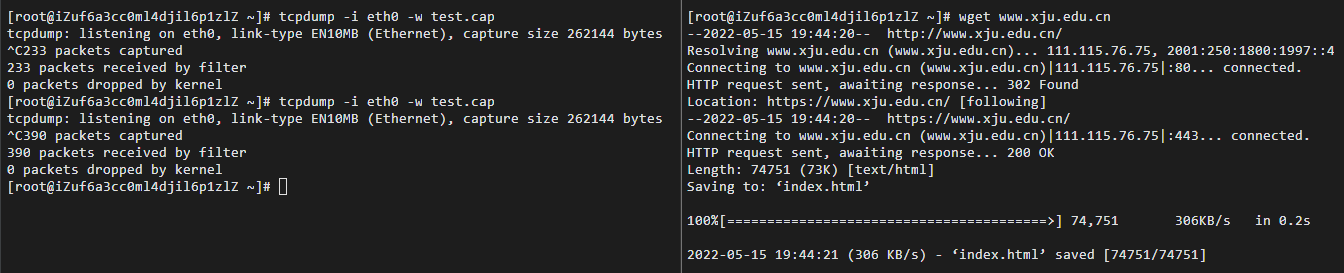
利用wget下载新疆大学主页www.xju.edu.cn,与此同时使用tcpdump抓包。使用wireshark分析TCP数据报文头部,分析建立连接三次握手和分析释放连接的四次挥手。
4.实验结果与分析
4.1 填写表格
- 首先抓取wget下载 时的数据,操作如下:
- 利用wareshark打开分析cap文件,筛选TCP协议,结果如下:
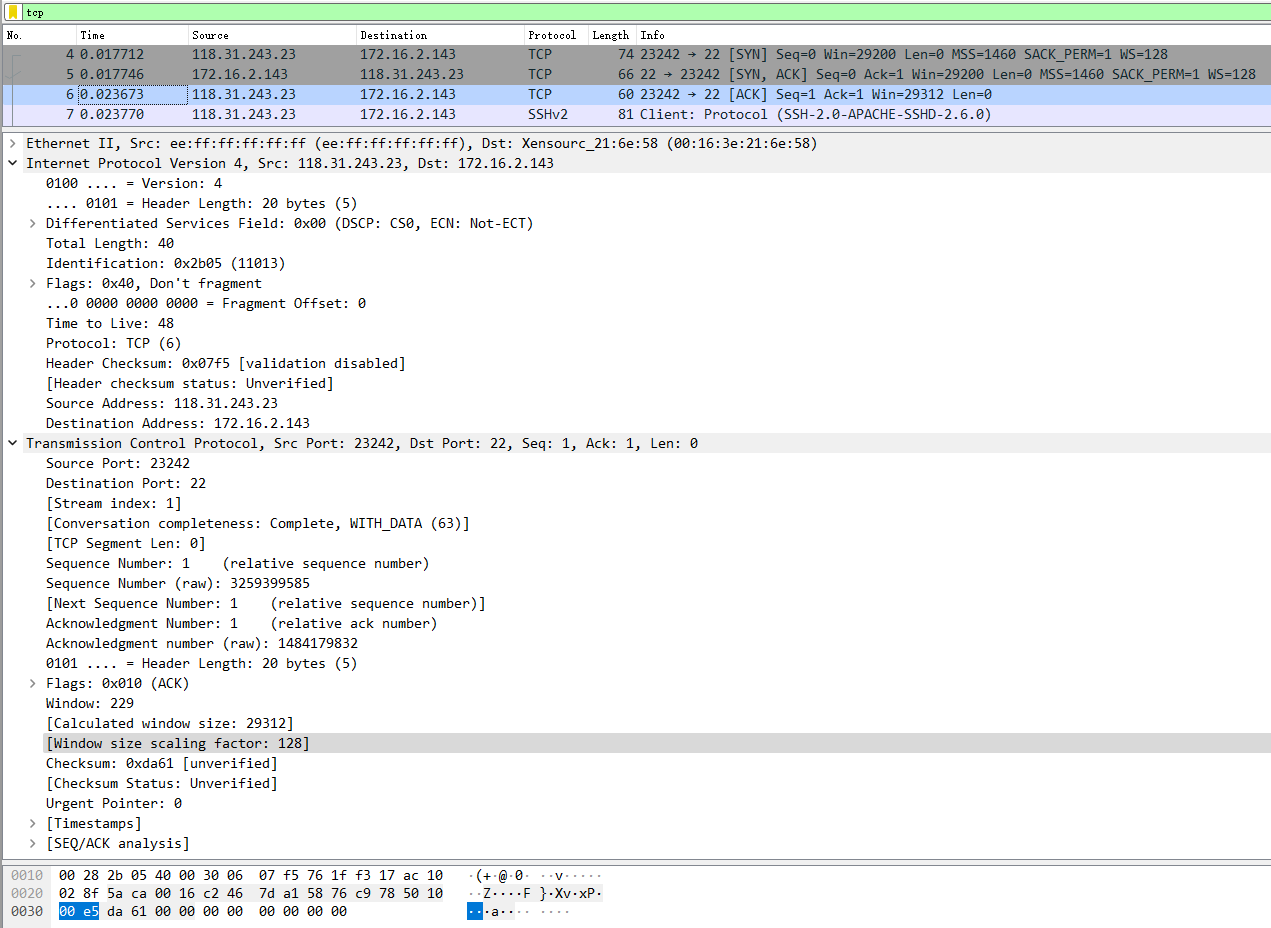
- 根据捕获的数据包,分析TCP的报文结构,将TCP协议中个字段名,字段长度,字段值,字段含义填入下表:
| 字段名 | 字段长度 | 字段值 | 字段含义 |
|---|---|---|---|
| Source Port | 2bit | 23242 | Source Port: 23242 |
| Destination Port | 2bit | 22 | Destination Port: 22 |
| TCP Segment Len | 1bit | 0 | [TCP Segment Len: 0] |
| relative Sequence Number | 4bit | 1 | Sequence Number: 1 (relative sequence number) |
| Sequence Number | 4bit | 3259399585 | Sequence Number (raw): 3259399585 |
| relative Acknowledgment Number | 4bit | 1 | Acknowledgment Number: 1 (relative ack number) |
| Acknowledgment number (raw) | 4bit | 1484179832 | Acknowledgment number (raw): 1484179832 |
| Header Length | 4bit | 20 | 0101 … = Header Length: 20 bytes (5) |
| Reserved | 1bit | 0 | 000. … … = Reserved: Not set |
| Nonce | 1bit | 0 | …0 … … = Nonce: Not set |
| Congestion Window Reduced (CWR) | 1bit | 0 | … 0… … = Congestion Window Reduced (CWR): Not set |
| ECN-Echo | 1bit | 0 | … .0.. … = ECN-Echo: Not set |
| Urgent | 1bit | 0 | … ..0. … = Urgent: Not set |
| Acknowledgment | 1bit | 1 | … …1 … = Acknowledgment: Set |
| Push | 1bit | 0 | … … 0… = Push: Not set |
| Reset | 1bit | 0 | … … .0.. = Reset: Not set |
| Syn | 1bit | 0 | … … ..0. = Syn: Not set |
| Fin | 1bit | 0 | … … …0 = Fin: Not set |
| Window | 2bit | 229 | Window: 229 |
| Calculated window size | 2bit | 29312 | [Calculated window size: 29312] |
| Window size scaling factor | 2bit | 128 | [Window size scaling factor: 128] |
| Checksum | 2bit | 0xda61 | Checksum: 0xda61 [unverified] |
| Urgent Pointer | 2bit | 0 | Urgent Pointer: 0 |
- 通过分析实验结果,TCP报文结构由哪几部分组成,其功能是什么?
TCP报文一般可以分为:
- 端口号:用来标识同一台计算机的不同的应用进程。
1.1 源端口:源端口和IP地址的作用是标识报文的返回地址。
1.2 目的端口:端口指明接收方计算机上的应用程序接口。
TCP报头中的源端口号和目的端口号同IP数据报中的源IP与目的IP唯一确定一条TCP连接。
- 序号和确认号:是TCP可靠传输的关键部分。序号是本报文段发送的数据组的第一个字节的序号,确保了TCP传输的有序性。确认号,即ACK,指明下一个期待收到的字节序号,表明该序号之前的所有数据已经正确无误的收到。
- 数据偏移/首部长度:4bits。由于首部可能含有可选项内容,因此TCP报头的长度是不确定的,其实际上指示了数据区在报文段中的起始偏移值。
- 保留:为将来定义新的用途保留,现在一般置0。
- 控制位:URG ACK PSH RST SYN FIN,共6个,每一个标志位表示一个控制功能。
5.1 URG:紧急指针标志,为1时表示紧急指针有效,为0则忽略紧急指针。
5.2 ACK:确认序号标志,为1时表示确认号有效,为0表示报文中不含确认信息,忽略确认号字段。
5.3 PSH:push标志,为1表示是带有push标志的数据,指示接收方在接收到该报文段以后,应尽快将这个报文段交给应用程序,而不是在缓冲区排队。
5.4 RST:重置连接标志,用于重置由于主机崩溃或其他原因而出现错误的连接。或者用于拒绝非法的报文段和拒绝连接请求。
5.5 SYN:同步序号,用于建立连接过程,在连接请求中,SYN=1和ACK=0表示该数据段没有使用捎带的确认域,而连接应答捎带一个确认,即SYN=1和ACK=1。
5.6 FIN:finish标志,用于释放连接,为1时表示发送方已经没有数据发送了,即关闭本方数据流。
- 窗口:滑动窗口大小,用来告知发送端接受端的缓存大小,以此控制发送端发送数据的速率,从而达到流量控制。
- 校验和:奇偶校验,此校验和是对整个的 TCP 报文段,包括 TCP 头部和 TCP 数据,以 16 位字进行计算所得。由发送端计算和存储,并由接收端进行验证。
- 紧急指针:只有当 URG 标志置 1 时紧急指针才有效。TCP 的紧急方式是发送端向另一端发送紧急数据的一种方式。
- 数据部分:传输的信息。
4.2 分析建立连接三次握手
- 分析三次握手的标志位和序号

第一次握手:客户端向服务器发送了标志位为SYN,并设置Seq=0(x),请求与服务器建立连接
第二次握手:服务器向客户端回应了SYN,标志位为SYN和ACK,并设置Seq=0(y),ACK=1(x+1)
第三次握手:客户端收到服务器的SYN报文,回应一个ACK=1(y+1),标志位为ACK
4.3 分析释放连接的四次挥手
- 分析四次挥手的报文标志和序号

第一次挥手:客户端向服务器发送FIN,Seq=166,Ack=7725
第二次挥手:服务器回发了ACK,Seq=7725,Ack=167
第三次挥手:服务器发送FIN,Seq=7725,Ack=167
第四次挥手:客户端向服务器回复了ACK,Seq=167,Ack=7726
- wireshark只抓取了四段报文的原因
据图,我们可以发现此时四次挥手只有三次挥手,是因为TCP是全双工通信,Cliet在自己已经不会在有新的数据要发送给Server后,可以发送FIN信号告知Server,这边已经终止Client到对端Server那边的数据传输。但是,这个时候对端Server可以继续往Client这边发送数据包。于是,两端数据传输的终止在时序上是独立并且可能会相隔比较长的时间,这个时候就必须最少需要2+2=4次挥手来完全终止这个连接。但是,如果Server在收到Client的FIN包后,在也没数据需要发送给Client了,那么对Client的ACK包和Server自己的FIN包就可以合并成为一个包发送过去,这样四次挥手就可以变成三次了
5、实验小结
5.1 问题与解决办法
问题使用Xftp连接服务器时,出现连接错误的情况解决方法使用校园网连接后恢复正常,排查后发现为服务器防火墙原因
5.2 心得体会
- 本次实验报告熟系了对IP协议分析过程中代码及软件的操作,以及对TCP报文的分析与提取,实现对课上知识的印证。通过这次实验,我掌握了wget命令使用中的具体流程,了解了常用IP协议分析软件的基本用法,提高了自身编程能力。
- 通过这些常用的IP协议分析命令操作,对IP协议使用时的跟踪分析,TCP报文的结构分析,让我印证了上课所学的知识。
1. Objectives
- Understand the basic concepts of the transport layer TCP protocol and the structure of its messages
- Analyze the TCP header
- Analyze the TCP connection establishment process and connection termination
- Master the use of
tcpdumpandwiresharkfor TCP protocol analysis
2. Experimental Environment
- Hardware requirements: One Alibaba Cloud ECS instance
- Software requirements: Linux/ Windows operating systems
3. Experimental Content
TCP is a connection-oriented protocol that provides reliable end-to-end communication over unreliable interconnected networks. It is the core protocol of the TCP/IP protocol suite.
To ensure reliable transmission, TCP assigns a sequence number to each packet, and the sequence numbers also ensure in-order delivery to the receiving entity. The receiving entity sends back an acknowledgment (ACK) for bytes that have been successfully received; if the sender does not receive an ACK within a reasonable round-trip time (RTT), the corresponding data (assuming it was lost) will be retransmitted.
Use wget to download the Xinjiang University homepage www.xju.edu.cn, while capturing packets with tcpdump. Use wireshark to analyze the TCP data report headers, analyze the three-way handshake for establishing a connection, and analyze the four-way handshake for releasing a connection.
4. Experimental Results and Analysis
4.1 Fill in the Table
- First, capture the data during the wget download. The operation is as follows:
- Open the cap file with Wireshark and filter for the TCP protocol. The result is as follows:
- Based on the captured packets, analyze the TCP segment structure and fill the table with the field names, field lengths, field values, and meanings in the TCP protocol:
| Field name | Field length | Field value | Field meaning |
|---|---|---|---|
| Source Port | 2bit | 23242 | Source Port: 23242 |
| Destination Port | 2bit | 22 | Destination Port: 22 |
| TCP Segment Len | 1bit | 0 | [TCP Segment Len: 0] |
| relative Sequence Number | 4bit | 1 | Sequence Number: 1 (relative sequence number) |
| Sequence Number | 4bit | 3259399585 | Sequence Number (raw): 3259399585 |
| relative Acknowledgment Number | 4bit | 1 | Acknowledgment Number: 1 (relative ack number) |
| Acknowledgment number (raw) | 4bit | 1484179832 | Acknowledgment number (raw): 1484179832 |
| Header Length | 4bit | 20 | 0101 … = Header Length: 20 bytes (5) |
| Reserved | 1bit | 0 | 000. … … = Reserved: Not set |
| Nonce | 1bit | 0 | …0 … … = Nonce: Not set |
| Congestion Window Reduced (CWR) | 1bit | 0 | … 0… … = Congestion Window Reduced (CWR): Not set |
| ECN-Echo | 1bit | 0 | … .0.. … = ECN-Echo: Not set |
| Urgent | 1bit | 0 | … ..0. … = Urgent: Not set |
| Acknowledgment | 1bit | 1 | … …1 … = Acknowledgment: Set |
| Push | 1bit | 0 | … … 0… = Push: Not set |
| Reset | 1bit | 0 | … … .0.. = Reset: Not set |
| Syn | 1bit | 0 | … … ..0. = Syn: Not set |
| Fin | 1bit | 0 | … … …0 = Fin: Not set |
| Window | 2bit | 229 | Window: 229 |
| Calculated window size | 2bit | 29312 | [Calculated window size: 29312] |
| Window size scaling factor | 2bit | 128 | [Window size scaling factor: 128] |
| Checksum | 2bit | 0xda61 | Checksum: 0xda61 [unverified] |
| Urgent Pointer | 2bit | 0 | Urgent Pointer: 0 |
- Based on the analysis results, what parts does the TCP segment structure consist of and what are their functions?
TCP segments can generally be divided into:
- Port numbers: used to identify different application processes on the same computer.
1.1 Source port: The source port, together with the IP address, serves to identify the return address of the packet.
1.2 Destination port: The port specifies the application program interface on the receiving computer.
The source port and destination port in the TCP header, together with the source IP and destination IP in the IP datagram, uniquely determine a TCP connection.
-
Sequence number and acknowledgment number: They are key parts of TCP’s reliable transmission. The sequence number is the sequence number of the first byte of data in this segment, ensuring the ordered delivery of TCP transmission. The acknowledgment number, i.e., ACK, indicates the next byte sequence number expected to be received, showing that all data prior to that sequence has been correctly received.
-
Data offset/header length: 4 bits. Since the header may contain optional content, the length of the TCP header is not fixed; it actually indicates the starting offset of the data region within the segment.
-
Reserved: Reserved for future use, currently set to 0.
-
Flags: URG ACK PSH RST SYN FIN, six in total, each flag represents a control function.
5.1 URG: Urgent pointer flag; when 1, the urgent pointer is valid; when 0, the urgent pointer is ignored.
5.2 ACK: Acknowledgment flag; when 1, the acknowledge number is valid; when 0, the segment does not contain acknowledgment information, and the acknowledgment number field is ignored.
5.3 PSH: Push flag; when 1, this indicates data to be pushed to the receiving application immediately, rather than queued in the buffer.
5.4 RST: Reset connection flag; used to reset a connection that has encountered errors due to host crashes or other reasons, or to reject illegal segments and connection requests.
5.5 SYN: Synchronization sequence; used to establish a connection. In a connection request, SYN=1 and ACK=0 indicate that the segment does not carry a bundled acknowledgment, and the connection response carries an acknowledgment, i.e., SYN=1 and ACK=1.
5.6 FIN: Finish flag; used to release the connection. When 1, it indicates the sender has no more data to send, i.e., the sender’s data stream is closed.
- Window: Sliding window size, used to inform the sender of the receiver’s buffer size, thereby controlling the rate at which the sender transmits data and achieving flow control.
- Checksum: Parity-like checksum; this checksum is computed over the entire TCP segment, including the TCP header and data, using 16-bit words. It is calculated and stored by the sender and verified by the receiver.
- Urgent pointer: Only valid when the URG flag is set to 1. The TCP urgent mechanism is a way for the sender to transmit urgent data to the other end.
- Data portion: The transmitted information.
4.2 Analyze the Three-Way Handshake
- Analyze the flags and sequence numbers of the handshake
First handshake: The client sends to the server a segment with the SYN flag set and Seq=0 (x), requesting to establish a connection with the server.
Second handshake: The server responds to the client with SYN and ACK, Seq=0 (y), ACK=1 (x+1).
Third handshake: The client, upon receiving the server’s SYN segment, responds with ACK=1 (y+1) and the ACK flag set.
4.3 Analyze the Four-Way Handshake for Releasing a Connection
- Analyze the message flags and sequence numbers
First handshake: The client sends FIN to the server, Seq=166, Ack=7725
Second handshake: The server responds with ACK, Seq=7725, Ack=167
Third handshake: The server sends FIN, Seq=7725, Ack=167
Fourth handshake: The client responds with ACK to the server, Seq=167, Ack=7726
- Why Wireshark captured only four segments
From the figure, we can see that at this time there are only three FIN/ACK sequences. This is because TCP is a full-duplex communication, and when the client has no more data to send to the server, it can send a FIN signal to inform the server that its data transmission has ended. However, at this moment the server may still send data to the client. Therefore, the termination of data transfer on both ends may occur independently and may be separated by a relatively long time, requiring at least 2+2=4 uses of the handshake to completely terminate the connection. But if the server, after receiving the client’s FIN, has no more data to send to the client, then the client’s ACK and the server’s own FIN can be combined into a single packet, allowing the four-way handshake to reduce to three.
5. Experimental Summary
5.1 Problems and Solutions
The problem: When using Xftp to connect to the server, a connection error occurred. The solution: After switching to the campus network, the connection returned to normal. Troubleshooting revealed that the cause was the server firewall.
5.2 Reflections
- This experiment familiarized me with the operation of code and software during IP protocol analysis, as well as the analysis and extraction of TCP segments, providing evidence for the knowledge learned in class. Through this experiment, I mastered the concrete workflow of using the wget command, learned the basic usage of commonly used IP protocol analysis software, and improved my programming ability.
- Through these common IP protocol analysis commands, tracking and analyzing IP protocol usage, and analyzing the structure of TCP segments, I have reinforced the knowledge taught in class.
1.実験目的
- 运输层TCP协议基本概念、报文结构 を日本語に翻訳
- TCP报文头部 を分析
- TCP连接建立过程、TCP连接释放 を分析
tcpdumpとwiresharkを用いたtcpプロトコル分析技術を習得する。
2.実験環境
- ハードウェア要件:阿里雲クラウドホストECSを1台。
- ソフトウェア要件:Linux/Windowsオペレーティングシステム
3.実験内容
TCPは接続指向で、不安定なインターネット上で信頼性の高いエンドツーエンド通信を提供します。TCPはTCP/IPプロトコル群の中核となるプロトコルです。
TCPがパケット伝送の信頼性を保証するために、各パケットにシーケンス番号を付与します。同時にこの番号は受信側エンティティへ到達するパケットの順序受信を保証します。次に受信側エンティティは正常に受信したバイトに対して適切な確認(ACK)を返します。送信側が適切な往復時延(RTT)内に確認を受け取らない場合、該当データ(喪失したと推定される)は再送されます。
wgetを用いて新疆大学のトップページwww.xju.edu.cnをダウンロードし、同時にtcpdumpでパケットをキャプチャします。wiresharkを用いてTCPデータグラムヘッダを分析し、接続確立の三者ハンドシェイクと接続解放の四者ハンドシェイクを分析します。
4.実験結果と分析
4.1 表の記入
- まず
wgetダウンロード時のデータを取得します。操作は以下のとおりです:
- wiresharkを用いてcapファイルを開き、TCPプロトコルをフィルタリングします。結果は以下のとおりです:
- 捕捉したパケットに基づき、TCPのセグメント構造を分析し、TCPプロトコルの各フィールド名、フィールド長、フィールド値、フィールドの意味を下表に記入します:
| フィールド名 | フィールド長 | フィールド値 | フィールドの意味 |
|---|---|---|---|
| Source Port | 2bit | 23242 | Source Port: 23242 |
| Destination Port | 2bit | 22 | Destination Port: 22 |
| TCP Segment Len | 1bit | 0 | [TCP Segment Len: 0] |
| relative Sequence Number | 4bit | 1 | Sequence Number: 1 (relative sequence number) |
| Sequence Number | 4bit | 3259399585 | Sequence Number (raw): 3259399585 |
| relative Acknowledgment Number | 4bit | 1 | Acknowledgment Number: 1 (relative ack number) |
| Acknowledgment number (raw) | 4bit | 1484179832 | Acknowledgment number (raw): 1484179832 |
| Header Length | 4bit | 20 | 0101 … = Header Length: 20 bytes (5) |
| Reserved | 1bit | 0 | 000. … … = Reserved: Not set |
| Nonce | 1bit | 0 | …0 … … = Nonce: Not set |
| Congestion Window Reduced (CWR) | 1bit | 0 | … 0… … = Congestion Window Reduced (CWR): Not set |
| ECN-Echo | 1bit | 0 | … .0.. … = ECN-Echo: Not set |
| Urgent | 1bit | 0 | … ..0. … = Urgent: Not set |
| Acknowledgment | 1bit | 1 | … …1 … = Acknowledgment: Set |
| Push | 1bit | 0 | … … 0… = Push: Not set |
| Reset | 1bit | 0 | … … .0.. = Reset: Not set |
| Syn | 1bit | 0 | … … ..0. = Syn: Not set |
| Fin | 1bit | 0 | … … …0 = Fin: Not set |
| Window | 2bit | 229 | Window: 229 |
| Calculated window size | 2bit | 29312 | [Calculated window size: 29312] |
| Window size scaling factor | 2bit | 128 | [Window size scaling factor: 128] |
| Checksum | 2bit | 0xda61 | Checksum: 0xda61 [unverified] |
| Urgent Pointer | 2bit | 0 | Urgent Pointer: 0 |
- 解析結果から、TCPセグメントの構造はどの部分で構成され、それぞれの機能は何か?
TCPセグメントは一般に以下の部分から構成されます。
- ポート番号:同一のコンピュータ上の異なるアプリケーションプロセスを識別するためのもの。
1.1 ソースポート:ソースポートとIPアドレスの役割は、報文の戻り先アドレスを識別すること。
1.2 宛先ポート:宛先ポートは受信側コンピュータ上のアプリケーションインターフェースを指し示す。
TCPヘッダのソースポートと宛先ポートは、IPデータグラム中のソースIPと宛先IPと共に、1つのTCP接続を一意に特定します。
-
序列番号と確認番号:TCPの信頼性のある転送の鍵となる部分です。序列番号はこのセグメントが送信するデータ群の最初のバイトの番号で、TCP転送の有序性を保証します。確認番号、すなわちACKは、次に受信を期待するバイト序号を示し、それ以前のすべてのデータが正しく受信されたことを表します。
-
データオフセット/ヘッダ長:4ビット。ヘッダにはオプションが含まれる場合があるため、TCPヘッダの長さは不定であり、データ領域がセグメント内の開始オフセットを実際に示します。
-
RESERVED:将来の新しい用途の定義のために予約されています。現在は通常0です。
-
コントロールビット:URG, ACK, PSH, RST, SYN, FINの6つ。各フラグは1つの制御機能を表します。
5.1 URG:緊急ポインタフラグ。1のとき緊急ポインタが有効、0のときは無視します。
5.2 ACK:確認番号フラグ。1のとき確認番号が有効、0のときはパケットに確認情報が含まれず、確認番号フィールドを無視します。
5.3 PSH:Pushフラグ。1のときPushフラグを持つデータであり、受信側はこのセグメントを受信後できるだけ早くアプリケーションに渡すべきで、バッファに待機させません。
5.4 RST:リセット接続フラグ。ホストのクラッシュなど原因でエラーが生じた接続をリセットするため、または不正なセグメントや接続要求を拒否するために使用されます。
5.5 SYN:同期番号。接続の確立過程で使用され、接続要求ではSYN=1かつACK=0はこのセグメントに確認域を帯びていないことを意味し、接続応答は確認を帯びる、すなわちSYN=1かつACK=1です。
5.6 FIN:終了フラグ。接続を解放するために使用され、1のとき送信側はデータの送信を終了したことを意味し、ローカルのデータフローを閉じます。
-
ウィンドウ:スライディングウィンドウのサイズ。送信側と受信側のキャッシュサイズを知らせ、データ送信速度を制御してフロー制御を行います。
-
チェックサム:偶奇検査。TCPセグメント全体(ヘッダとデータを含む)に対して、16ビットワードで計算した検査和です。送信側が計算・格納し、受信側が検証します。
-
緊急ポインタ:URGフラグが1のときのみ有効です。TCPの緊急モードは、送信側が相手側へ緊急データを送る方法です。
-
データ部分:伝送される情報。
4.2 分析建立连接三次握手
- 三次握手のフラグとシーケンス番号を分析する
第一次握手:クライアントがサーバへSYNフラグを送信し、Seq=0(x)を設定して、サーバとの接続を要求します。
第二次握手:サーバがクライアントへSYNとACKのフラグで応答し、Seq=0(y)を設定、ACK=1(x+1)
第三次握手:クライアントがサーバのSYNを受信し、ACK=1(y+1)で応答し、フラグはACK
4.3 分析释放连接的四次挥手
- 四次挥手のパケットフラグとシーケンス番号を分析する
第一次挥手:クライアントがサーバへFINを送信、Seq=166、Ack=7725
第二次挥手:サーバがACKを返す、Seq=7725、Ack=167
第三次挥手:サーバがFINを送信、Seq=7725、Ack=167
第四次挥手:クライアントがサーバへACKを返す、Seq=167、Ack=7726
- wiresharkが4つのセグメントだけをキャプチャした理由
図から、この時点で4つのハンドシェイクは実際には3回であることが分かります。TCPは全二重通信であり、クライアントがサーバへ新たなデータを送る必要がなくなった時点でFIN信号を発し、サーバへ通知します。しかしこの時点で相手サーバはクライアントへデータを送信し続けることができます。したがって、両端のデータ伝送の終了は時系列上独立しており、かなり長い時間差が生じる可能性があるため、接続を完全に終了するには最低でも2+2=4回のハンドシェイクが必要です。しかし、サーバがクライアントのFINパケットを受信した後、クライアントへ送信するデータがもうない場合、クライアントのACKパケットとサーバ自身のFINパケットは1つのパケットにまとめて送ることができ、結果として四回のハンドシェイクは三回に短縮されます。
5、実験のまとめ
5.1 問題と解決方法
Xftpを使ってサーバへ接続した際に接続エラーが発生しました。解決方法はキャンパスネットワークに接続後正常となりました。原因を調査した結果、サーバのファイアウォールが原因でした。
5.2 感想
- 本実験レポートは、IPプロトコル分析の過程でのコードとソフトウェアの操作、およびTCPパケットの分析・抽出を通じて、授業で学んだ知識の検証を実現しました。今回の実験を通じて、
wgetコマンドの使用手順を具体的に習得し、一般的なIPプロトコル分析ソフトウェアの基本的な使い方を理解し、自己のプログラミング能力を向上させました。 - これらの一般的なIPプロトコル分析コマンドの操作を通じて、IPプロトコルの追跡分析やTCPパケットの構造分析を行い、授業で学んだ知識を裏付けることができました。
部分信息可能已经过时