



1. Experiment Objectives
- Understand the concepts of symmetric and asymmetric encryption systems
- Understand the concepts and theory of hash functions, digital signatures, and digital certificates
- Master symmetric encryption, key-pair creation, and application based on
Openssl - Master the creation and application of digital signatures and digital certificates based on
Openssl
2. Experimental Environment
- Hardware requirements: One Alibaba Cloud ECS instance.
- Software requirements: Linux or Windows operating system
3. Experiment Content
OpenSSL is an open-source software library that applications can use to perform secure communications, prevent eavesdropping, and verify the identity of the other connected party. This package is widely used on Internet web servers.
References:
https://gitee.com/mirrors/openssl?utm_source=alading&utm_campaign=repo#download
https://www.jianshu.com/p/fb2ae3dc7986
https://www.yisu.com/zixun/21796.html
3.1 Symmetric Encryption
Install Openssl, and prepare a plaintext document lx.txt with arbitrary content. Use a symmetric encryption algorithm to encrypt and decrypt lx.txt.
Requirements: There should be descriptive process text, explanations of the current operation and parameter meanings, and provide corresponding operation screenshots
3.2 Hash Functions
Compute the MD5 and SHA-256 hash values of lx.txt
3.3 Asymmetric Encryption
Create a 2048-bit RSA key pair (public-key cryptosystem). Use the created public key to encrypt lx.txt, and decrypt with the private key
OpenSSL> genrsa -out RsaPrivateKey.pem 2048OpenSSL> rsa -in RsaPrivateKey.pem -pubout -out RsaPublicKey.pemOpenSSL> rsautl -in plain.txt -out enc.txt -inkey RSAPublicKey.pem -pubin -encryptOpenSSL> rsautl -in enc.txt -out replain.txt -inkey RSAPrivateKey.pem -decryptKey pair generated

Public key generated
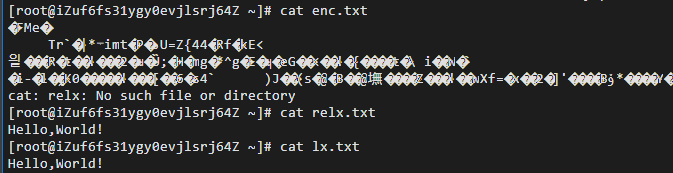
Files before and after encryption/decryption
4.4 Digital Signature
Digitally sign lx.txt and verify
sha1 -out digest.txt lx.txtrsautl -sign -inkey RsaPrivateKey.pem -in digest.txt -out signT.binrsautl -verify -inkey RsaPublicKey.pem -pubin -keyform PEM -in signT.bin
4.5 Certificate
Create a self-signed certificate using openssl
genrsa -des3 -out ca.key 1024rsa -in ca.key -out ca.keyreq -new -x509 -key ca.key -out ca.crt -days 365genrsa -des3 -out server.key 2048req -new -key server.key -out server.csrx509 -req -in server.csr -CA ca.crt -CAkey ca.key -set_serial 01 -out server.crt -days 365
5. Experimental Summary
5.1 Issues and Solutions
During the digital signature step, the command sha1 -out digest.txt lx.txt produced an error. The fix was that sha1 had been mistyped as shal; after entering sha1 -out digest.txt lx.txt, it worked.
5.2 Reflections
- This experiment familiarized me with applying OpenSSL to encrypt files and create self-signed certificates, reinforcing the knowledge presented in class. Through this experiment, I have mastered the concrete workflow of using OpenSSL, learned the basic usage of common Linux configuration software, and improved my programming ability.
- Through these common Linux command operations and OpenSSL configuration and usage, I validated the knowledge learned in class.
If this article helped you, please share it with others!
Some information may be outdated