



1. Objectives
- Understand the Internet’s domain name structure, the DNS (Domain Name System), and its domain name servers
- Be familiar with the DNS protocol and the basic composition of its messages, as well as the principles of DNS name resolution
- Master using the common DNS measurement tool dig and the basic techniques of DNS measurement
2. Experimental Environment
- Hardware requirements: One Alibaba Cloud ECS instance
- Software requirements: Linux/Windows operating systems
3. Experimental Content
3.1 View and configure the local DNS system
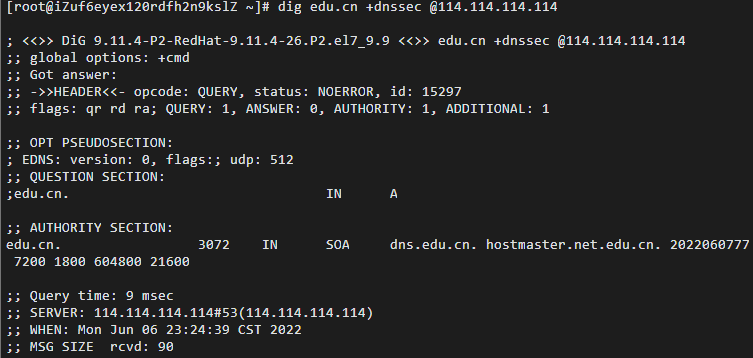
First view the configuration of the local machine’s DNS servers; then add a DNS server: 114.114.114.114 or 8.8.8.8.
3.2 DNS Information Measurement
dig is a well-known DNS analysis and measurement tool provided by the DNS software BIND. Dig can query DNS information including NS records, A records, MX records, etc.; it can be used for DNS measurement and analysis. Install the dig command and perform the following queries and measurements
dig www.xju.edu.cndig aaaa www.xju.edu.cndig cname www.sohu.comdig www.xju.edu.cn @8.8.8.8dig mx xju.edu.cndig ns xju.edu.cn @8.8.8.8dig www.xju.edu.cn +trace 重要dig edu.cn +dnssec @8.8.8.8 重要dig edu.cn +dnssec @114.114.114.114 //解释RRSIG作用References: https://www.isc.org/bind/https://www.cnblogs.com/machangwei-8/p/10353216.html
3.3 DNS Protocol Analysis
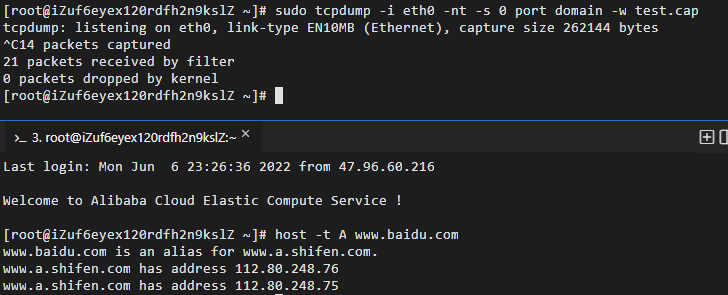
Use tcpdump to capture DNS query network traffic packets, and analyze UDP and DNS protocol data with wireshark.
4. Experimental Results and Analysis
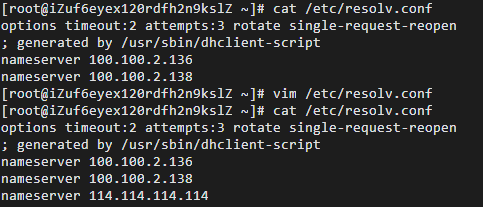
3.1 View and configure the local DNS system
First view the configuration of the local machine’s DNS servers, then add a DNS server: 114.114.114.114.
3.2 DNS Information Measurement
dig is a well-known DNS analysis and measurement tool provided by the DNS software BIND. Dig can query DNS information including NS records, A records, MX records, etc., and can be used for DNS measurement and analysis, below are the following queries and measurements.
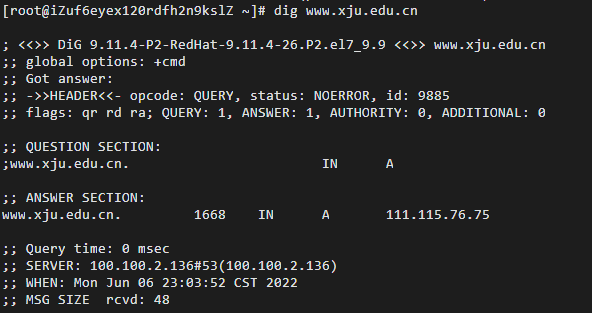
1.****dig www.xju.edu.cn
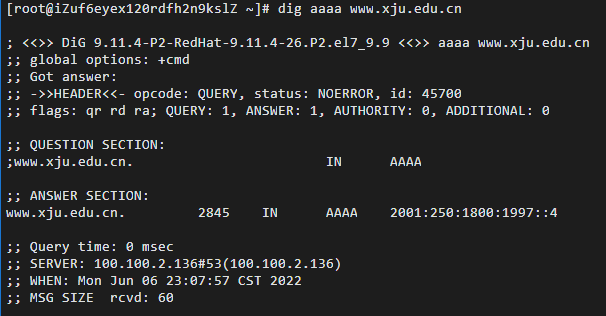
2.****dig aaaa www.xju.edu.cn
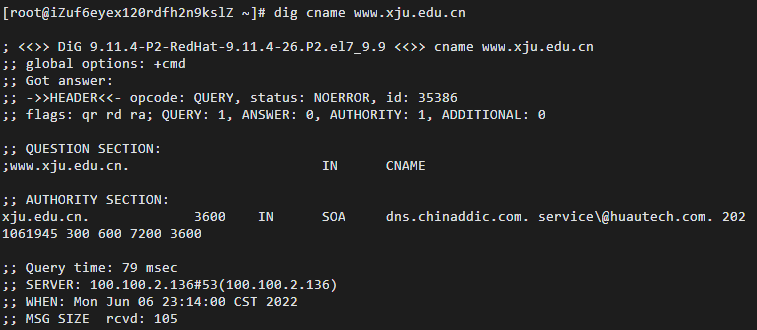
3.****dig cname www.sohu.com
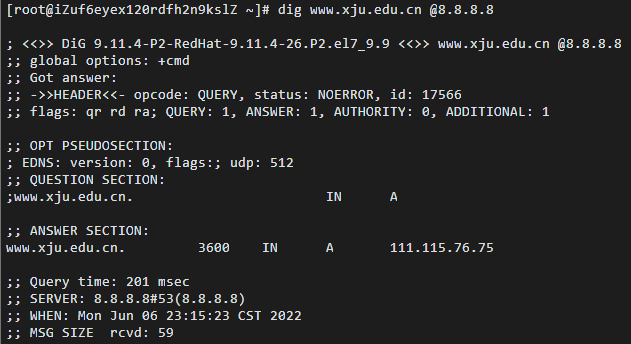
4. dig www.xju.edu.cn @8.8.8.8
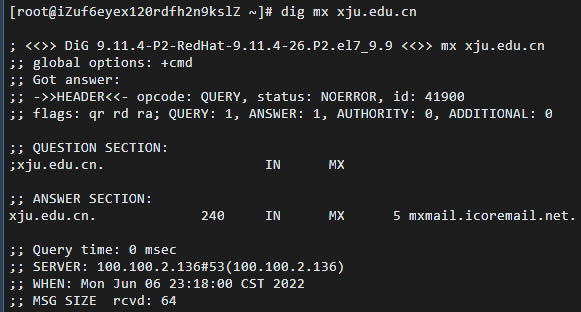
5. dig mx xju.edu.cn
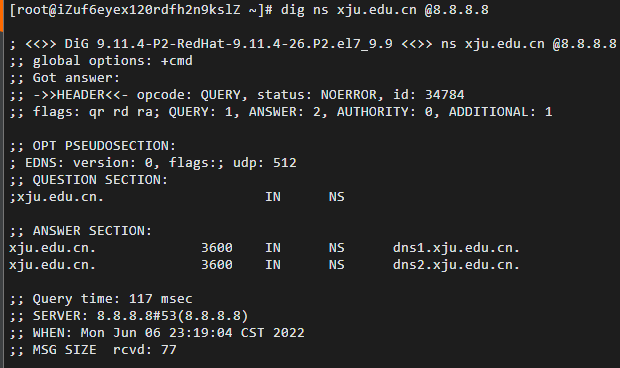
6. dig ns xju.edu.cn @8.8.8.8
7. dig www.xju.edu.cn +trace

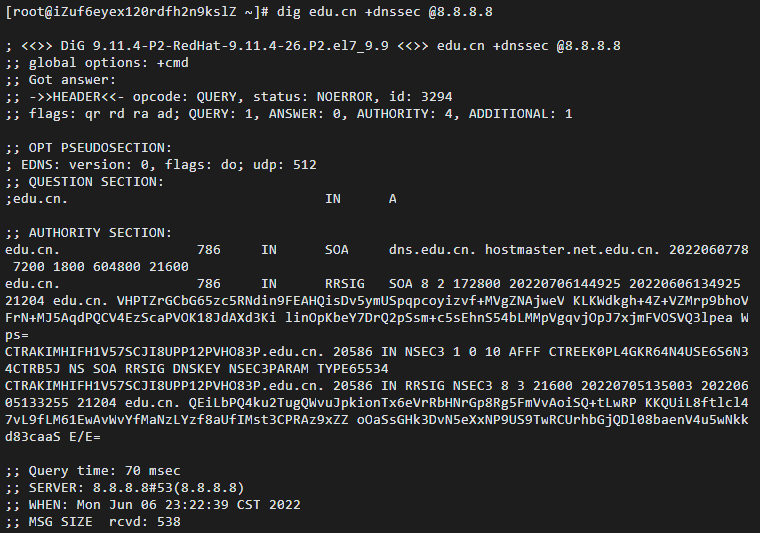
8. dig edu.cn +dnssec @8.8.8.8
9. dig edu.cn +dnssec @114.114.114.114
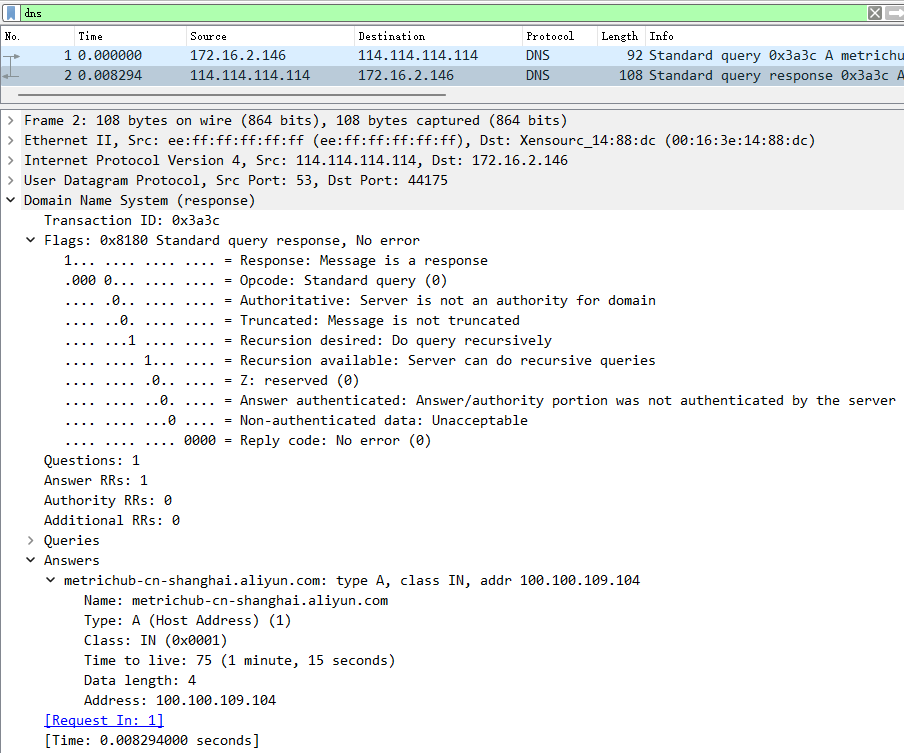
3.3 DNS Protocol Analysis
1. Using**tcpdump**to capture DNS queries
2. Analyze with**wireshark****
- DNS Query UDP data analysis
Filter and analyze UDP data from the captured packet, as shown below
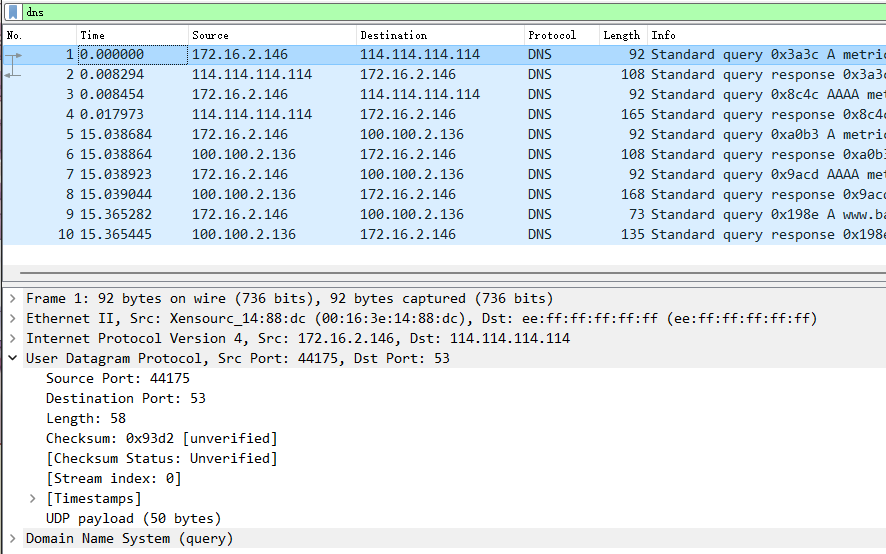
Fill the obtained data into the table below
| Field name | Field value | Field information |
|---|---|---|
| Source Port | 44175 | Source Port: 44175 |
| Destination Port | 53 | Destination Port: 53 |
| Length | 58 | Length: 58 |
| Checksum | 0x93d2 | Checksum: 0x93d2 [unverified] |
- DNS Protocol Analysis
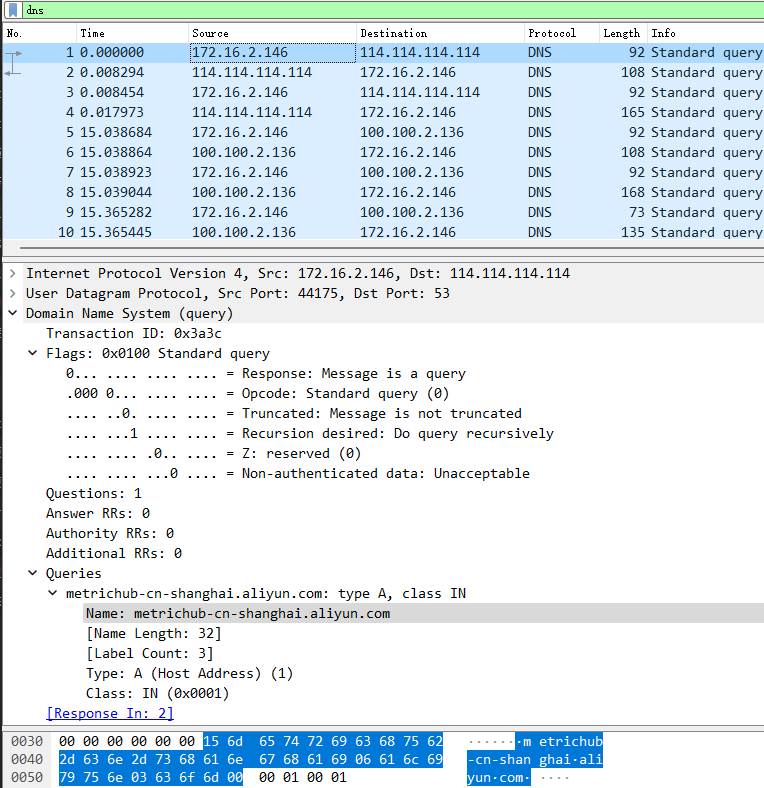
The DNS message contains mainly the following fields:
| Field | Description |
|---|---|
| Transaction ID (2 bytes) | Identifier, used to match DNS responses to requests |
| Flags (2 bytes) | Flag field, the meaning of each bit varies |
| QR (1 bit) | Query/Response flag, 0 for query messages, 1 for responses |
| opcode (4 bits) | 0 indicates standard query, 1 inverse query, 2 server status request, 3–15 reserved |
| AA (1 bit) | Authoritative answer; meaningful only in responses, indicates the responding server is the authoritative DNS server for the queried domain |
| TC (1 bit) | Truncated; indicates the message is longer than the permitted length and was truncated |
| RD (1 bit) | Recursion desired; this field is set in the request and the same value is returned in the response. If RD is set, it is suggested that the name server perform a recursive lookup. Recursive query support is optional |
| RA (1 bit) | Recursion available; set or cleared in the response to indicate whether the server supports recursive queries |
| ZERO (1 bit) | All zeros reserved field |
| RCODE (4 bits) | Return code, 0 for no error, 1 format error, 2 server failure, 3 name error, 4 not implemented, 5 refused, 6–15 reserved |
| Questions (2 bytes) | Number of questions, usually 1 |
| Answer RRs (2 bytes) | Number of answer resource records |
| Authority RRs (2 bytes) | Number of authority resource records |
| Additional RRs (2 bytes) | Number of additional resource records |
| Queries (38 bytes) | The payload of the query or response, consisting of Name, Type, Class |
| Name (34 bytes) | Query name, here the parameter after ping, ends with 0, variable length |
| Type (2 bytes) | Query type, here A record |
| Class (2 bytes) | Class, IN indicates Internet data, usually 1 |
Analysis of the request packet
Field name Field value Field information UDP Dst Port 53 UDP Dst Port: 53 IPv4 Src 172.16.2.146 IPv4 Src: 172.16.2.146 Transaction ID (2 bytes) 0x3a3c Transaction ID: 0x3a3c QR (1 bit) 0 0… … … … = Response: Message is a query opcode (4bit) 0 .000 0… … … = Opcode: Standard query (0) TC (1bit) 0 … ..0. … … = Truncated: Message is not truncated RD (1bit) 1 … …1 … … = Recursion desired: Do query recursively ZERO (1bit) 0 … … .0.. … = Z: reserved (0) Questions (2 bytes) 1 Questions: 1 Answer RRs (2 bytes) 0 Answer RRs: 0 Authority RRs (2 bytes) 0 Authority RRs: 0 Additional RRs (2 bytes) 0 Additional RRs: 0 Name (34 bytes) metrichub-cn-shanghai.aliyun.com Name: metrichub-cn-shanghai.aliyun.com Type (2 bytes) 1 Type: A (Host Address) (1) Class (2 bytes) 1 Class: IN (0x0001)
- Analysis of the response packet
Among them, because the Answer RRs is 1, there is one result in the Answers section.
The Answers field can be viewed as a List; each item in the collection is a resource record. In addition to the Name, Type, and Class mentioned above, there are Time to Live, Data length, and Address.
Field name Field value Field information Time to live 75 Time to live: 75 (1 minute, 15 seconds) Data length 4 Data length: 4 Address 100.100.109.104 Address: 100.100.109.104
5. Experimental Summary
5.1 Problems and Solutions
When using the dig command, the error -bash: dig: command not found occurred. The solution is that the dig support components were not installed; the system default lacks the bind-utils package. Install with yum: yum -y install bind-utils
5.2 Reflections
- This lab report familiarized me with the operation of code and software involved in DNS protocol analysis, as well as the analysis and extraction of UDP packets, validating the knowledge taught in class. Through this experiment, I have mastered the concrete workflow of using the dig command, understood the basic usage of common DNS protocol analysis software, and improved my programming skills.
- Through these common DNS protocol analysis commands, tracing and analyzing the DNS protocol, and the structure analysis of DNS and UDP packets, I have validated the knowledge learned in class.
If this article helped you, please share it with others!
Some information may be outdated