



1. Objectives
- Understand the HTTP protocol and its message structure
- Understand the HTTP operation process: TCP three-way handshake, request and response interaction
- Master the techniques for capturing and analyzing HTTP packets using
tcpdumpandwireshark
2. Experimental Environment
- Hardware requirement: One Alibaba Cloud ECS instance
- Software requirement: Linux/Windows operating systems
3. Experimental Content
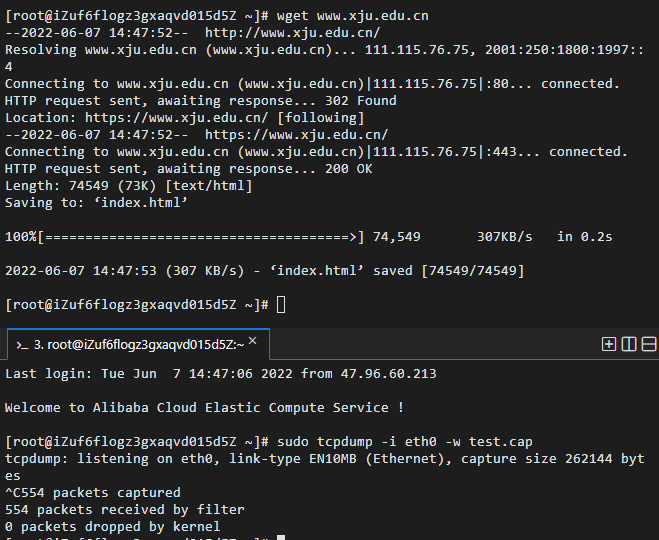
Use wget to download Xinjiang University homepage www.xju.edu.cn, capture packets with tcpdump, and analyze with wireshark.
- Does the browser run HTTP version 1 or 1.1? What version is the server running?
- What are your computer’s IP address and the server’s?
- What is the status code returned from the server to the browser?
- When was the HTML file retrieved on the server last modified?
- How many bytes of content were returned to the browser?
- In addition to the fields already mentioned, what other header fields exist? In the data packet content window, check the raw data to see if there are headers not shown in the packet list?
4. Experimental Results and Analysis
1. Download Xinjiang University homepage and capture packets
2. Use wireshark to analyze the captured file
2.1 Filter the HTTP protocol
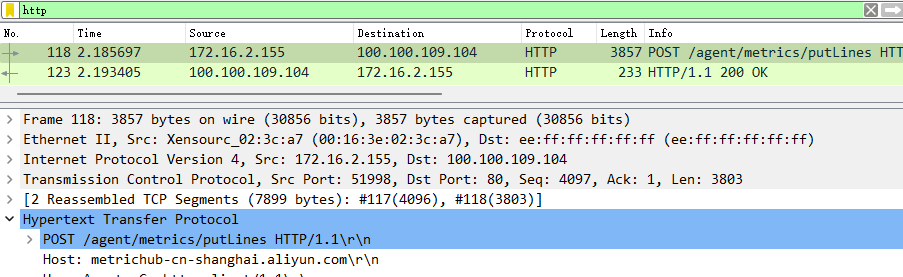
From the packet capture results, you can see that the client requests a simple HTML file from the server, and the server returns that file to the client.
2.2 Answers
Does the browser run HTTP version 1 or 1.1? What version is the server running? The browser uses HTTP version 1.1, and the server also uses HTTP version 1.1. What are the IP addresses of your computer and the server? The computer’s IP is 172.16.2.155, the server’s IP is 100.100.109.104. What is the status code returned from the server to the browser? The status code is 200, indicating successful processing of the request. When was the HTML file on the server last modified? The time is Tue, 07 Jun 2022 07:02:12 GMT. How many bytes of content were returned to the browser? 0 bytes were returned. Besides the fields already answered above, what other header fields are there? In the data packet content window, check the raw data; are there headers not displayed in the packet list? The HTTP request message also includes Host, Connection, Accept, User-Agent, Accept-Encoding fields, etc. The HTTP response message also includes Server, Connection fields, etc.
5. Experiment Summary
5.1 Problems and Solutions
The problem: When using Xftp to connect to the server, a connection error occurred. The solution: After switching to the campus network, the connection returned to normal; after investigation, it was found to be caused by the server firewall.
5.2 Reflections
- This experiment report familiarized me with the operation of code and software during HTTP protocol analysis, validating the knowledge learned in class. Through this experiment, I mastered the concrete workflow of using the wget command, understood the basic usage of common HTTP protocol analysis software, and improved my programming ability.
- Through these commonly used HTTP analysis command operations, the tracking and analysis of HTTP protocol usage and the structural analysis of HTTP messages reinforced the knowledge learned in class.
If this article helped you, please share it with others!
Some information may be outdated