



This article is based primarily on HeiMa’s Redis video
Redis in Practice - Mall System
- SMS login: implemented using Redis-shared sessions
- Merchant query cache: understand issues such as cache breakdown, cache penetration, cache avalanche, etc.
- Coupon flash sale: Redis counters, combined with Lua to achieve high-performance Redis operations, while also understanding the principles of Redis distributed locks, including Redis’s three types of message queues
- Nearby merchants: use Redis GEOHash to handle geographic coordinates
- UV statistics: implement statistics using Redis
- User check-in: Redis Bitmap data statistics
- Friend follows: follow, unfollow, mutual follows, and related features based on Set
- Shop exploration: like-list operations based on List, and a like leaderboard based on SortedSet
Project structure model:
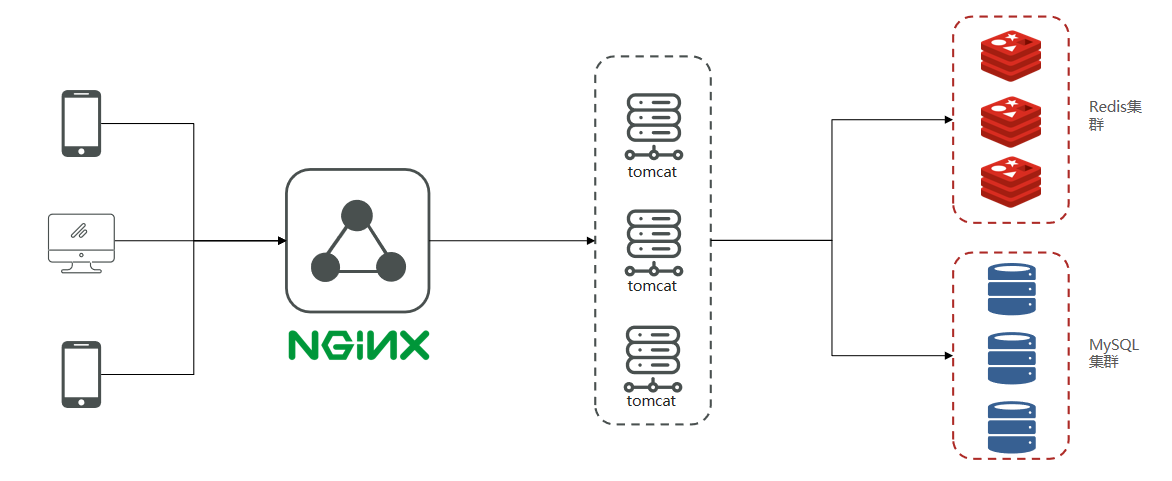
Mobile phone or app clients initiate requests to our Nginx server. Nginx, following the seven-layer model, speaks HTTP, and can directly access Redis via Lua to bypass Tomcat, or act as a static resource server, easily handling tens of thousands of concurrent connections, load balance to downstream Tomcat servers, and distribute traffic. We all know a Tomcat with 4 cores and 8G RAM, optimized for simple business logic, might handle around 1000 concurrent requests; after Nginx load balancing and downflow distribution, the project is supported by a cluster. When the frontend project is deployed, static/dynamic separation is possible, further reducing pressure on Tomcat. All these features rely on Nginx, making it a crucial part of the project.
After Tomcat handles the concurrency, if Tomcat directly accesses MySQL, based on experience, enterprise-grade MySQL servers with some concurrency typically use a 16- or 32-core CPU, 32 or 64GB memory; with SSDs, the concurrency they can sustain is around 4,000–7,000, and tens of thousands of concurrency can overwhelm CPU and disks, causing crashes. Therefore, in high-concurrency scenarios we choose MySQL clustering, and to further reduce MySQL pressure and improve access performance, we also add Redis, and use Redis clustering to provide better external service.
SMS login
Verifications via session
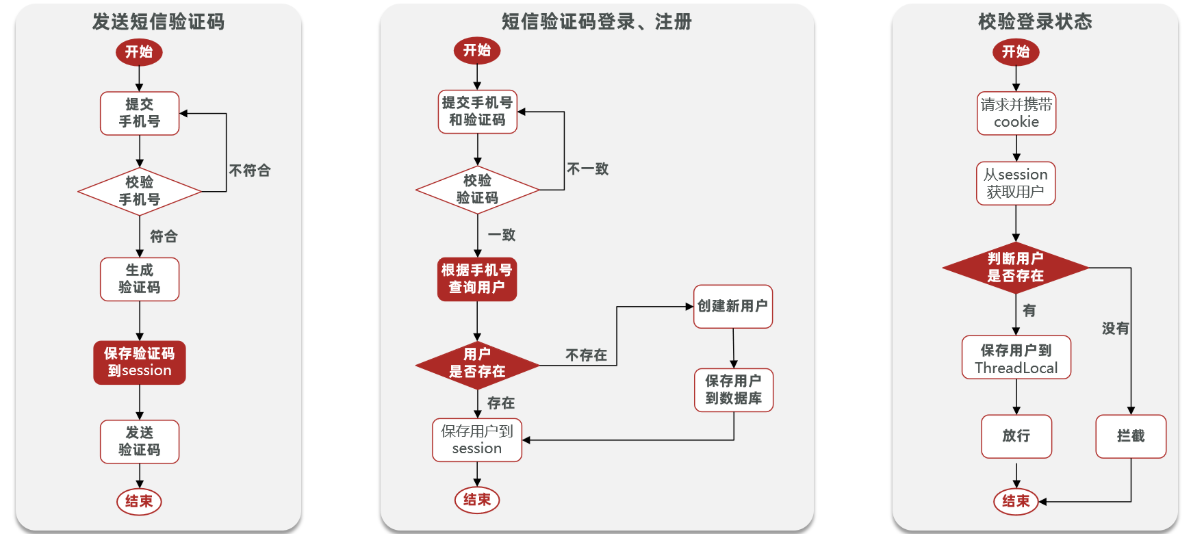
- Send verification code
@Override public Result sendCode(String phone, HttpSession session) { // 1. Validate phone number if (RegexUtils.isPhoneInvalid(phone)) { // 2. If not valid, return error return Result.fail("手机号格式错误!"); } // 3. Valid, generate verification code String code = RandomUtil.randomNumbers(6);
// 4. Save verification code to session session.setAttribute("code",code); // 5. Send verification code log.debug("发送短信验证码成功,验证码:{}", code); // Return ok return Result.ok(); }- Login
@Override public Result login(LoginFormDTO loginForm, HttpSession session) { // 1. Validate phone number String phone = loginForm.getPhone(); if (RegexUtils.isPhoneInvalid(phone)) { // 2. If not valid, return error return Result.fail("手机号格式错误!"); } // 3. Validate verification code Object cacheCode = session.getAttribute("code"); String code = loginForm.getCode(); if(cacheCode == null || !cacheCode.toString().equals(code)){ // 3. Not match, error return Result.fail("验证码错误"); } // Match, query user by phone User user = query().eq("phone", phone).one();
// 5. Check if user exists if(user == null){ // If not, create user = createUserWithPhone(phone); } // 7. Save user info to session session.setAttribute("user",user);
return Result.ok(); }- Login interception
Interceptor code
public class LoginInterceptor implements HandlerInterceptor {
@Override public boolean preHandle(HttpServletRequest request, HttpServletResponse response, Object handler) throws Exception { //1. Get session HttpSession session = request.getSession(); //2. Get user from session Object user = session.getAttribute("user"); //3. Check if user exists if(user == null){ //4. Not exist, intercept, return 401 response.setStatus(401); return false; } //5. Exists, save user info to ThreadLocal UserHolder.saveUser((User)user); //6. Let it pass return true; }}Make the interceptors effective
@Configurationpublic class MvcConfig implements WebMvcConfigurer {
@Resource private StringRedisTemplate stringRedisTemplate;
@Override public void addInterceptors(InterceptorRegistry registry) { // Login interceptor registry.addInterceptor(new LoginInterceptor()) .excludePathPatterns( "/shop/**", "/voucher/**", "/shop-type/**", "/upload/**", "/blog/hot", "/user/code", "/user/login" ).order(1); // Token refresh interceptor registry.addInterceptor(new RefreshTokenInterceptor(stringRedisTemplate)).addPathPatterns("/**").order(0); }}- Modify safe return object
//7. Save user info to sessionsession.setAttribute("user", BeanUtils.copyProperties(user,UserDTO.class));
//5. If exists, save user info to ThreadLocalUserHolder.saveUser((UserDTO) user);Redis-based session replacement
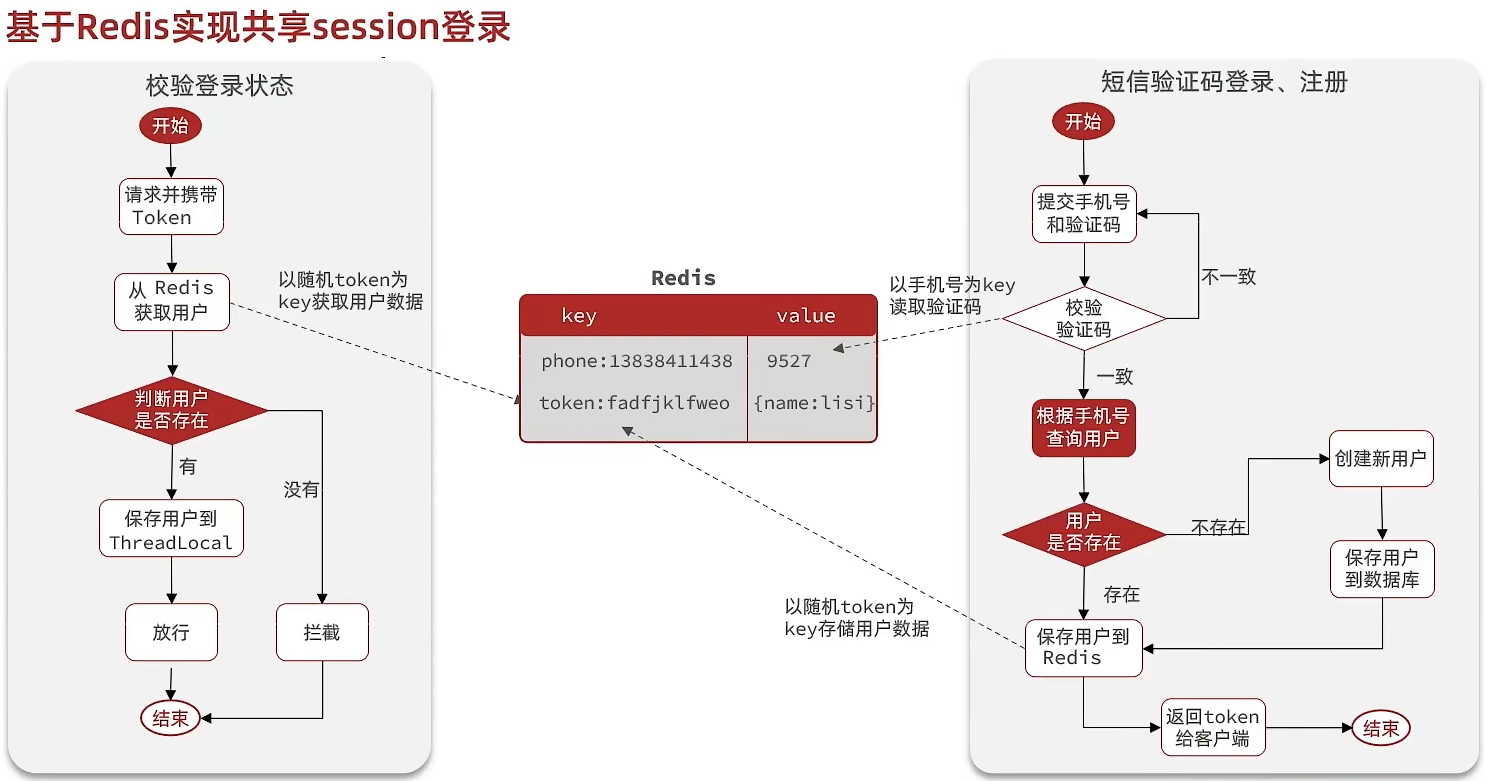
@Overridepublic Result login(LoginFormDTO loginForm, HttpSession session) { // 1. Validate phone number String phone = loginForm.getPhone(); if (RegexUtils.isPhoneInvalid(phone)) { // 2. If not valid, return error return Result.fail("手机号格式错误!"); } // 3. Retrieve verification code from Redis and validate String cacheCode = stringRedisTemplate.opsForValue().get(LOGIN_CODE_KEY + phone); String code = loginForm.getCode(); if (cacheCode == null || !cacheCode.equals(code)) { // Inconsistent, error return Result.fail("验证码错误"); }
// 4. Consistent, query user by phone User user = query().eq("phone", phone).one();
// 5. Check if user exists if (user == null) { // 6. Not exist, create new user and save user = createUserWithPhone(phone); }
// 7. Save user info to Redis // 7.1 Generate a random token as login token String token = UUID.randomUUID().toString(true); // 7.2 Convert User to HashMap for storage UserDTO userDTO = BeanUtil.copyProperties(user, UserDTO.class); Map<String, Object> userMap = BeanUtil.beanToMap(userDTO, new HashMap<>(), CopyOptions.create() .setIgnoreNullValue(true) .setFieldValueEditor((fieldName, fieldValue) -> fieldValue.toString())); // 7.3 Store String tokenKey = LOGIN_USER_KEY + token; stringRedisTemplate.opsForHash().putAll(tokenKey, userMap); // 7.4 Set token TTL stringRedisTemplate.expire(tokenKey, LOGIN_USER_TTL, TimeUnit.MINUTES);
// 8. Return token return Result.ok(token);}Refresh login status
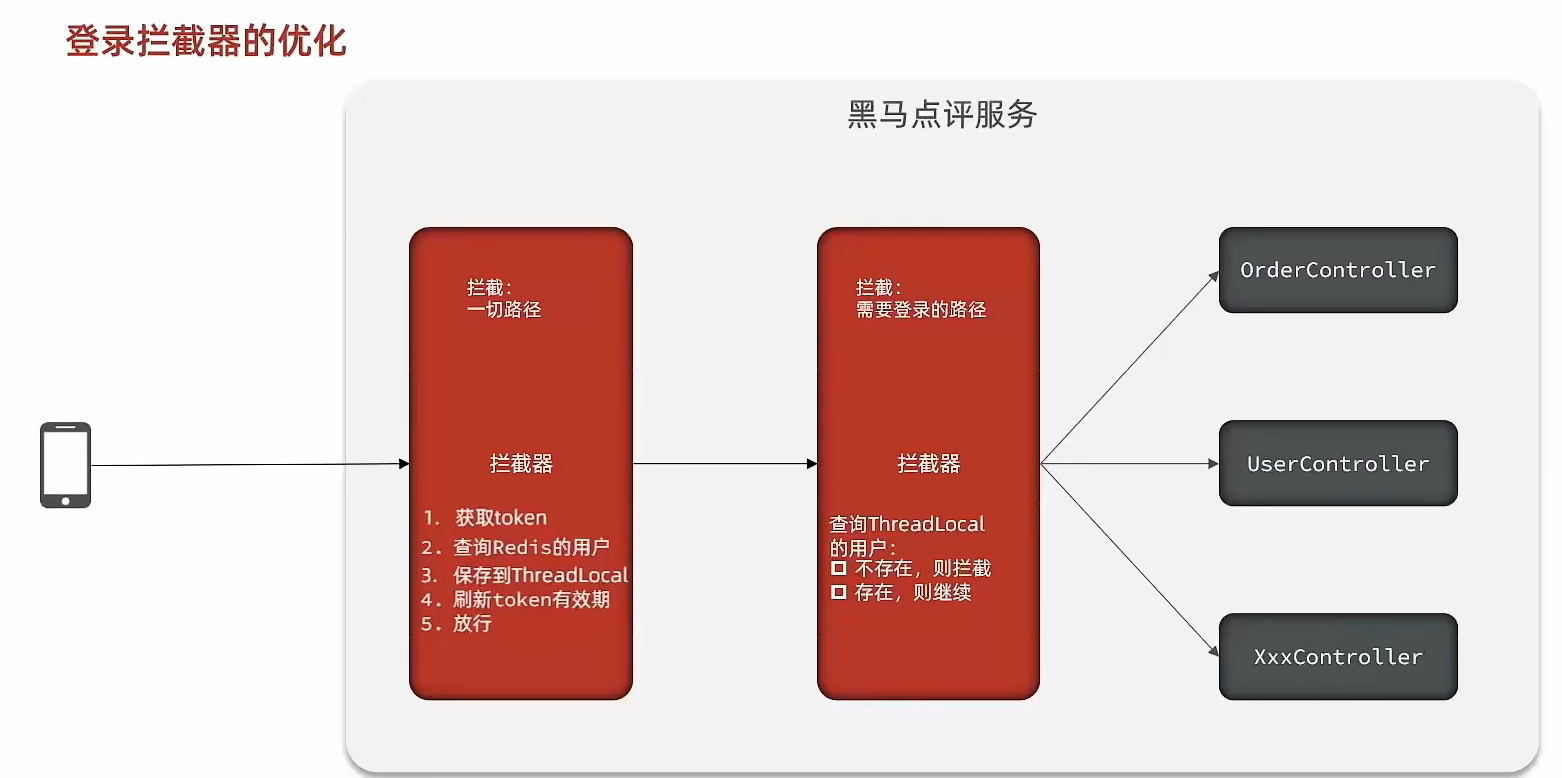
RefreshTokenInterceptor
public class RefreshTokenInterceptor implements HandlerInterceptor {
private StringRedisTemplate stringRedisTemplate;
public RefreshTokenInterceptor(StringRedisTemplate stringRedisTemplate) { this.stringRedisTemplate = stringRedisTemplate; }
@Override public boolean preHandle(HttpServletRequest request, HttpServletResponse response, Object handler) throws Exception { // 1. Get token from request header String token = request.getHeader("authorization"); if (StrUtil.isBlank(token)) { return true; } // 2. Get user from Redis by token String key = LOGIN_USER_KEY + token; Map<Object, Object> userMap = stringRedisTemplate.opsForHash().entries(key); // 3. Check existence if (userMap.isEmpty()) { return true; } // 5. Convert hash to UserDTO UserDTO userDTO = BeanUtil.fillBeanWithMap(userMap, new UserDTO(), false); // 6. Save user to ThreadLocal UserHolder.saveUser(userDTO); // 7. Refresh token TTL stringRedisTemplate.expire(key, LOGIN_USER_TTL, TimeUnit.MINUTES); // 8. Pass return true; }
@Override public void afterCompletion(HttpServletRequest request, HttpServletResponse response, Object handler, Exception ex) throws Exception { // Remove user UserHolder.removeUser(); }}LoginInterceptor
public class LoginInterceptor implements HandlerInterceptor {
@Override public boolean preHandle(HttpServletRequest request, HttpServletResponse response, Object handler) throws Exception { // 1. Check if needs to intercept (is there a user in ThreadLocal) if (UserHolder.getUser() == null) { // Not present, intercept, set status response.setStatus(401); // Intercept return false; } // 2. Present, pass return true; }}Merchant query cache
Cache (Cache) is the data exchange buffer, commonly referred to as the buffer. It is the data in the buffer, usually fetched from the database and stored in local code (for example:
例1:Static final ConcurrentHashMap<K,V> map = new ConcurrentHashMap<>(); Local cache for high concurrency
例2:static final Cache<K,V> USER_CACHE = CacheBuilder.newBuilder().build(); Used for Redis, etc. caching
例3:Static final Map<K,V> map = new HashMap(); Local cacheBecause it is marked as Static, it is loaded into memory when the class is loaded, acting as a local cache. Since it is also marked final, the relationship between the reference (example 3: map) and the object (example 3: new HashMap()) cannot be changed, so you don’t have to worry about assignment causing cache invalidation.
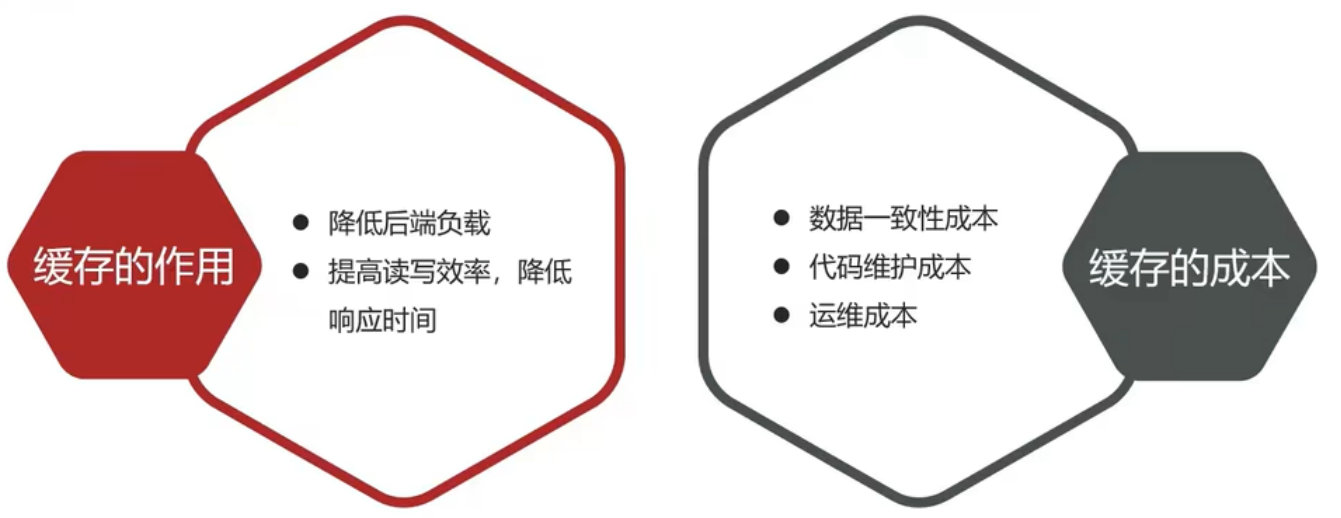
Browser cache: primarily exists on the browser side
- Application layer cache: can include Tomcat local caches like the earlier mentioned map, or Redis as a cache
- Database cache: a buffer pool in the database; operations like insert/update/select are first loaded into MySQL’s cache
- CPU cache: modern computers face the issue that CPU speed increases but memory I/O does not keep up, so CPUs add L1, L2, L3 caches
Merchant cache
The standard approach is to query the database after querying the cache. If cache data exists, return directly from the cache. If not, query the database, then store the data in Redis.
@Overridepublic Result queryById(Long id) { String key = RedisConstants.CACHE_SHOP_KEY + id; String shopJson = stringRedisTemplate.opsForValue().get(key);
if(StrUtil.isNotBlank(shopJson)) { Shop shop = JSONUtil.toBean(shopJson,Shop.class); return Result.ok(shop); } Shop shop = getById(id); if(shop == null) { return Result.fail("店铺不存在!"); } stringRedisTemplate.opsForValue().set(key,JSONUtil.toJsonStr(shop), RedisConstants.CACHE_SHOP_TTL, TimeUnit.MINUTES);
return Result.ok(shop);}Cache and database write-behind
- Cache update
- *Memory eviction: Redis automatically evicts when memory reaches configured max memory; eviction policy can be set
- *TTL expiration: When TTL is set, Redis will delete expired data to free up cache space
- *Manual update: Manually invalidate or update cache to resolve cache-database inconsistency
- Database cache inconsistency
Cache Aside Pattern: manual coding approach where the cache is updated after the database update (dual-write)
Read/Write Through Pattern: handled by the system itself; database-cache issues managed by the system
Write Behind Caching Pattern: the caller only operates on the cache; another thread asynchronously updates the database to achieve eventual consistency
- Manual coding approach
- Delete cache or update cache?
- Update cache: update cache every time the database is updated; many writes
- Delete cache: when updating the database, invalidate the cache; on query, update the cache
- How to ensure cache and database operations succeed or fail together?
- Monolithic systems: put cache and database operations in a single transaction
- Distributed systems: use distributed transaction solutions like TCC
- First operate on the database, then delete the cache
- Delete cache or update cache?
Cache-database write consistency for shops
Modify the business logic in ShopController to satisfy the following requirements:
- When querying a shop by id, if the cache misses, query the database, write the result to the cache, and set an expiration
- When updating a shop by id, first update the database, then delete the cache
// Query add expirationstringRedisTemplate.opsForValue().set(key,JSONUtil.toJsonStr(shop), RedisConstants.CACHE_SHOP_TTL, TimeUnit.MINUTES);
// Add update method@Override@Transactionalpublic Result update(Shop shop) { Long id = shop.getId(); if (id == null) { return Result.fail("店铺id不能为空"); } updateById(shop);
stringRedisTemplate.delete(RedisConstants.CACHE_SHOP_KEY + id); return Result.ok();
}Cache penetration
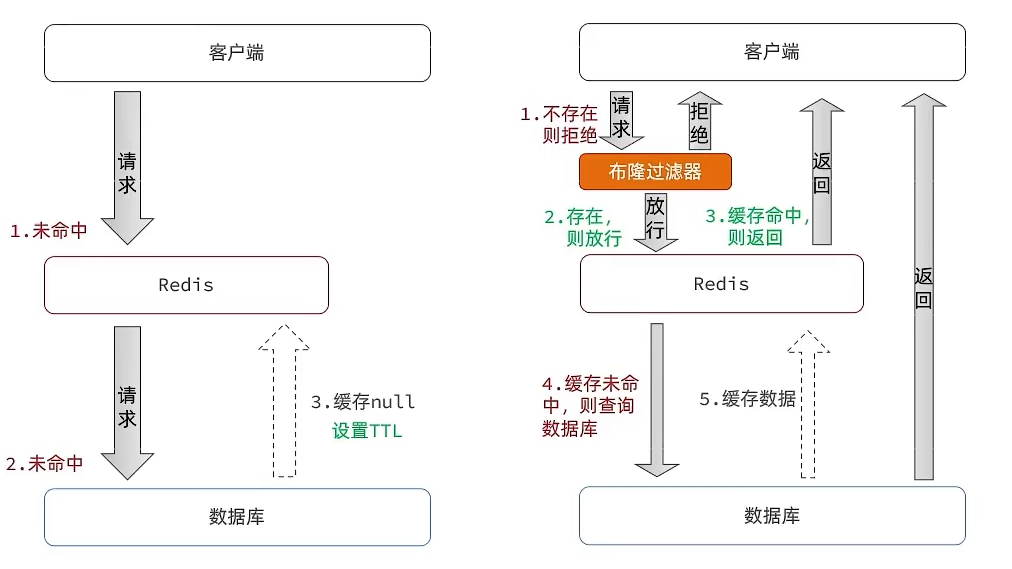
Cache penetration: it occurs when the requested data does not exist in both the cache and the database, so the cache never becomes valid; these requests reach the database.
There are two common solutions:
-
Cache empty objects
When the client requests data that does not exist, first request Redis; if Redis has no data, it will reach the database, which also has no data; this data penetrates the cache and hits the database. We know the database’s concurrency isn’t as high as Redis, so if many requests hit this non-existent data at once, they all hit the database. A simple fix is to cache this non-existent data in Redis as well; next time, the data will be found in Redis and won’t go to the database again.
- Advantages: simple to implement, easy to maintain
- Disadvantages: extra memory consumption; may cause short-term inconsistency
-
Bloom filter
Bloom filters use hashing to reduce misses by testing membership with a large bit array. If the Bloom filter says the item exists, allow the request to Redis; even if Redis data expired, the database must contain the data, so it can be loaded and put back in Redis. If Bloom filter says the data does not exist, return immediately
- Advantages: lower memory usage, no extra keys
- Disadvantages: more complex to implement; possible false positives
@Overridepublic Result queryById(Long id) { String key = RedisConstants.CACHE_SHOP_KEY + id; String shopJson = stringRedisTemplate.opsForValue().get(key);
if(StrUtil.isNotBlank(shopJson)) { Shop shop = JSONUtil.toBean(shopJson,Shop.class); return Result.ok(shop); } // Check if cached null if(shopJson != null) { return Result.fail("店铺信息不存在"); }
Shop shop = getById(id); if(shop == null) { // Write a null to cache stringRedisTemplate.opsForValue().set(key,"", RedisConstants.CACHE_NULL_TTL, TimeUnit.MINUTES); return Result.fail("店铺不存在!"); } stringRedisTemplate.opsForValue().set(key,JSONUtil.toJsonStr(shop), RedisConstants.CACHE_SHOP_TTL, TimeUnit.MINUTES);
return Result.ok(shop);}What are the solutions to cache penetration?
- Cache null values
- Bloom filters
- Increase id complexity to avoid guessing id patterns
- Validate data format thoroughly
- Strengthen user authorization checks
- Rate-limit hot parameters
Cache avalanche
Cache avalanche is when many cache keys expire at the same time or Redis service goes down, causing many requests to hit the database and apply huge pressure.
Solutions:
- Add random variations to TTLs for different keys
- Use Redis clustering to improve service availability
- Add downgrade and rate-limiting strategies to cache
- Introduce multi-level caching
Cache breakdown
Cache breakdown, also called hot-key problem, occurs when a heavily accessed key with a complex rebuild process suddenly becomes invalid, causing many requests to hit the database at once.
Two common solutions:
- Mutex lock: guarantees mutual exclusion, simple to implement with a single lock, no extra memory; downside: locks can cause deadlock and serial execution
- Logical expiration: threads can read without waiting; one thread holds a lock to rebuild data; while rebuilding, other threads may return old data; more complex to implement
Mutex lock to solve cache breakdown
During a query, if the cache misses, acquire a mutex lock; if the lock cannot be acquired, sleep briefly and retry until obtained; once the lock is obtained, query the database, write to Redis, release the lock, and return data. This ensures only one thread rebuilds the cache.
private boolean tryLock(String key) { Boolean flag = stringRedisTemplate.opsForValue().setIfAbsent(key, "1", RedisConstants.LOCK_SHOP_TTL, TimeUnit.SECONDS); return BooleanUtil.isTrue(flag);}
private void unlock(String key) { stringRedisTemplate.delete(key);}
public Shop queryWithMutex(Long id) { String key = CACHE_SHOP_KEY + id; // 1. query Redis String shopJson = stringRedisTemplate.opsForValue().get("key"); // 2. check exists if (StrUtil.isNotBlank(shopJson)) { // exists, return return JSONUtil.toBean(shopJson, Shop.class); } // check if value is empty if (shopJson != null) { // return error return null; } // 4. rebuild cache // 4.1 get mutex String lockKey = RedisConstants.LOCK_SHOP_KEY + id; Shop shop = null; try { boolean isLock = tryLock(lockKey); // 4.2 if not acquired if(!isLock){ // 4.3 sleep and retry Thread.sleep(50); return queryWithMutex(id); } // 4.4 acquired, query DB shop = getById(id); // 5. null existence if(shop == null){ // write empty stringRedisTemplate.opsForValue().set(key,"",CACHE_NULL_TTL,TimeUnit.MINUTES); // return error return null; } // 6. write to Redis stringRedisTemplate.opsForValue().set(key,JSONUtil.toJsonStr(shop),CACHE_NULL_TTL,TimeUnit.MINUTES);
}catch (Exception e){ throw new RuntimeException(e); } finally { // 7. release lock unlock(lockKey); } return shop;}Logical expiration to solve cache breakdown
When a user starts querying Redis, if cache miss, return empty data; once a value is hit, take it out and check if the expiration time has passed. If not expired, return data from Redis; if expired, spawn a separate thread to rebuild the data, and release the mutex after rebuilding.
@Datapublic class RedisData { private LocalDateTime expireTime; private Object data;}
private static final ExecutorService CACHE_REBUILD_EXECUTOR = Executors.newFixedThreadPool(10);
public Shop queryWithLogicalExpire(Long id) { String key = CACHE_SHOP_KEY + id; // 1. query Redis for cache String json = stringRedisTemplate.opsForValue().get(key); // 2. check existence if (StrUtil.isBlank(json)) { return null; } // 4. hit: deserialize to object RedisData redisData = JSONUtil.toBean(json, RedisData.class); Shop shop = JSONUtil.toBean((JSONObject) redisData.getData(), Shop.class); LocalDateTime expireTime = redisData.getExpireTime(); // 5. check expiration if(expireTime.isAfter(LocalDateTime.now())) { // 5.1 not expired, return return shop; } // 5.2 expired: trigger cache rebuild // 6. rebuild cache // 6.1 get mutex String lockKey = LOCK_SHOP_KEY + id; boolean isLock = tryLock(lockKey); // 6.2 if acquired if (isLock){ CACHE_REBUILD_EXECUTOR.submit( ()->{
try{ // rebuild cache this.saveShop2Redis(id,20L); }catch (Exception e){ throw new RuntimeException(e); }finally { unlock(lockKey); } }); } // 6.4 return expired data return shop;}
public void saveShop2Redis(Long id,Long expireSeconds) { Shop shop = getById(id);
RedisData redisData = new RedisData(); redisData.setData(shop); redisData.setExpireTime(LocalDateTime.now().plusSeconds(expireSeconds));
stringRedisTemplate.opsForValue().set(CACHE_SHOP_KEY+id,JSONUtil.toJsonStr(redisData));}Encapsulated Redis utility class
Encapsulate a cache utility class based on StringRedisTemplate to meet the following requirements:
- Method 1: Serialize any Java object to JSON and store it in a string-type key, with TTL expiration
- Method 2: Serialize any Java object to JSON and store it in a string-type key, with a logical expiration time to handle cache breakdown
- Method 3: Query the cache by a given key and deserialize to a specified type, using a cache-null value to solve cache penetration
- Method 4: Query the cache by a given key and deserialize to a specified type, using a logical expiration to solve cache breakdown
@Slf4j@Componentpublic class CacheClient {
private final StringRedisTemplate stringRedisTemplate;
private static final ExecutorService CACHE_REBUILD_EXECUTOR = Executors.newFixedThreadPool(10);
public CacheClient(StringRedisTemplate stringRedisTemplate) { this.stringRedisTemplate = stringRedisTemplate; }
public void set(String key, Object value, Long time, TimeUnit unit) { stringRedisTemplate.opsForValue().set(key, JSONUtil.toJsonStr(value), time, unit); }
public void setWithLogicalExpire(String key, Object value, Long time, TimeUnit unit) { // set logical expiration RedisData redisData = new RedisData(); redisData.setData(value); redisData.setExpireTime(LocalDateTime.now().plusSeconds(unit.toSeconds(time))); // write to Redis stringRedisTemplate.opsForValue().set(key, JSONUtil.toJsonStr(redisData)); }
public <R,ID> R queryWithPassThrough( String keyPrefix, ID id, Class<R> type, Function<ID, R> dbFallback, Long time, TimeUnit unit){ String key = keyPrefix + id; // 1. query Redis String json = stringRedisTemplate.opsForValue().get(key); // 2. check if (StrUtil.isNotBlank(json)) { // 3. exists, return return JSONUtil.toBean(json, type); } // check if empty value if (json != null) { // return null return null; }
// 4. not exist, query DB R r = dbFallback.apply(id); // 5. not exist if (r == null) { // cache null stringRedisTemplate.opsForValue().set(key, "", CACHE_NULL_TTL, TimeUnit.MINUTES); return null; } // 6. exist, write to Redis this.set(key, r, time, unit); return r; }
public <R, ID> R queryWithLogicalExpire( String keyPrefix, ID id, Class<R> type, Function<ID, R> dbFallback, Long time, TimeUnit unit) { String key = keyPrefix + id; // 1. query cache String json = stringRedisTemplate.opsForValue().get(key); // 2. check if (StrUtil.isBlank(json)) { return null; } // 4. hit, deserialize RedisData redisData = JSONUtil.toBean(json, RedisData.class); R r = JSONUtil.toBean((JSONObject) redisData.getData(), type); LocalDateTime expireTime = redisData.getExpireTime(); // 5. check expiration if(expireTime.isAfter(LocalDateTime.now())) { return r; } // 6. expired: rebuild String lockKey = LOCK_SHOP_KEY + id; boolean isLock = tryLock(lockKey); if (isLock){ CACHE_REBUILD_EXECUTOR.submit(() -> { try { R newR = dbFallback.apply(id); this.setWithLogicalExpire(key, newR, time, unit); } catch (Exception e) { throw new RuntimeException(e); }finally { unlock(lockKey); } }); } return r; }
public <R, ID> R queryWithMutex( String keyPrefix, ID id, Class<R> type, Function<ID, R> dbFallback, Long time, TimeUnit unit) { String key = keyPrefix + id; // 1. query Redis String shopJson = stringRedisTemplate.opsForValue().get(key); // 2. check if (StrUtil.isNotBlank(shopJson)) { // 3. exists return JSONUtil.toBean(shopJson, type); } // check if empty if (shopJson != null) { return null; }
// 4. rebuild String lockKey = LOCK_SHOP_KEY + id; R r = null; try { boolean isLock = tryLock(lockKey); if (!isLock) { Thread.sleep(50); return queryWithMutex(keyPrefix, id, type, dbFallback, time, unit); } r = dbFallback.apply(id); if (r == null) { stringRedisTemplate.opsForValue().set(key, "", CACHE_NULL_TTL, TimeUnit.MINUTES); return null; } this.set(key, r, time, unit); } catch (InterruptedException e) { throw new RuntimeException(e); }finally { unlock(lockKey); } return r; }
private boolean tryLock(String key) { Boolean flag = stringRedisTemplate.opsForValue().setIfAbsent(key, "1", 10, TimeUnit.SECONDS); return BooleanUtil.isTrue(flag); }
private void unlock(String key) { stringRedisTemplate.delete(key); }}Coupon Flash Sale
Global ID generation
Global ID generator is a tool used in distributed systems to generate globally unique IDs. To increase ID security, we can avoid directly using Redis’ auto-increment values and instead concatenate additional information:
ID composition: Sign bit: 1 bit, always 0
Timestamp: 31 bits, in seconds, covers about 69 years
Sequence: 32 bits, per-second counter, supports up to 2^32 IDs per second
@Componentpublic class RedisIdWorker { /** * Starting timestamp */ private static final long BEGIN_TIMESTAMP = 1640995200L; /** * Bits for the sequence */ private static final int COUNT_BITS = 32;
private StringRedisTemplate stringRedisTemplate;
public RedisIdWorker(StringRedisTemplate stringRedisTemplate) { this.stringRedisTemplate = stringRedisTemplate; }
public long nextId(String keyPrefix) { // 1. Generate timestamp LocalDateTime now = LocalDateTime.now(); long nowSecond = now.toEpochSecond(ZoneOffset.UTC); long timestamp = nowSecond - BEGIN_TIMESTAMP;
// 2. Generate sequence // 2.1. Get current date, daily granularity String date = now.format(DateTimeFormatter.ofPattern("yyyy:MM:dd")); // 2.2. Auto-increment long count = stringRedisTemplate.opsForValue().increment("icr:" + keyPrefix + ":" + date);
// 3. Assemble and return return timestamp << COUNT_BITS | count; }}Add flash-sale voucher:
@Override@Transactionalpublic void addSeckillVoucher(Voucher voucher) { // Save voucher save(voucher); // Save seckill info SeckillVoucher seckillVoucher = new SeckillVoucher(); seckillVoucher.setVoucherId(voucher.getId()); seckillVoucher.setStock(voucher.getStock()); seckillVoucher.setBeginTime(voucher.getBeginTime()); seckillVoucher.setEndTime(voucher.getEndTime()); seckillVoucherService.save(seckillVoucher); // Save stock to Redis stringRedisTemplate.opsForValue().set(SECKILL_STOCK_KEY + voucher.getId(), voucher.getStock().toString());}Seckill ordering
When placing an order, two checks are needed:
- Whether the seckill has started or ended; if not started or already ended, cannot place order
- Whether stock is sufficient; insufficient stock cannot place order
@Overridepublic Result seckillVoucher(Long voucherId) { // 1. Query voucher SeckillVoucher voucher = seckillVoucherService.getById(voucherId); // 2. Check if seckill started if (voucher.getBeginTime().isAfter(LocalDateTime.now())) { // Not started yet return Result.fail("秒杀尚未开始!"); } // 3. Check if seckill ended if (voucher.getEndTime().isBefore(LocalDateTime.now())) { // Already ended return Result.fail("秒杀已经结束!"); } // 4. Check stock if (voucher.getStock() < 1) { // Out of stock return Result.fail("库存不足!"); } //5, Deduct stock boolean success = seckillVoucherService.update() .setSql("stock= stock -1") .eq("voucher_id", voucherId).update(); if (!success) { // Deduction failed return Result.fail("库存不足!"); } //6. Create order VoucherOrder voucherOrder = new VoucherOrder(); // 6.1 Order ID long orderId = redisIdWorker.nextId("order"); voucherOrder.setId(orderId); // 6.2 User ID Long userId = UserHolder.getUser().getId(); voucherOrder.setUserId(userId); // 6.3 Voucher ID voucherOrder.setVoucherId(voucherId); save(voucherOrder);
return Result.ok(orderId);}Inventory oversell
Oversell is a classic multi-threading safety issue. Common solutions involve locking.
Pessimistic lock:
Pessimistic locks serialize access to data, e.g., synchronized or lock is a representative; within pessimistic locks you can have fair, unfair, reentrant locks, etc.
Optimistic lock:
Optimistic locking uses a version number; each data operation increments the version by 1; when committing, validate that the version increased by 1; if so, the operation succeeds. If not, the data has been modified. There are variants like CAS.
A typical example of optimistic locking is CAS, which uses CAS for lock-free locking; var5 is the memory value read before, var1+var2 in the loop is the predicted value; if predicted equals memory, it means no one modified it; then replace the memory value.
boolean success = seckillVoucherService.update() .setSql("stock= stock -1") .eq("voucher_id", voucherId) .gt("stock",0) .update(); //where id = ? and stock > 0One person, one order
Basic logic:
// 5. One person, one order logic// 5.1. User IDLong userId = UserHolder.getUser().getId();int count = query().eq("user_id", userId).eq("voucher_id", voucherId).count();// 5.2. Check existenceif (count > 0) { // User has already purchased return Result.fail("用户已经购买过一次!");}Concurrency: Pessimistic lock
<!-- maven --><dependency> <groupId>org.aspectj</groupId> <artifactId>aspectjweaver</artifactId></dependency>
// Servicesynchronized(userId.toString().intern()) { // Get proxy object (transaction) IVoucherOrderService proxy = (IVoucherOrderService) AopContext.currentProxy(); return proxy.createVoucherOrder(voucherId);}
@Transactionalpublic Result createVoucherOrder(Long voucherId) { // 5. One person, one order logic // 5.1. User ID Long userId = UserHolder.getUser().getId();
int count = query().eq("user_id", userId).eq("voucher_id", voucherId).count(); // 5.2. Check existence if (count > 0) { // User has already purchased return Result.fail("用户已经购买过一次!"); }
//5, Deduct stock boolean success = seckillVoucherService.update() .setSql("stock= stock -1") .eq("voucher_id", voucherId) .gt("stock",0) .update(); //where id = ? and stock > 0 if (!success) { // Deduction failed return Result.fail("库存不足!"); } //6. Create order VoucherOrder voucherOrder = new VoucherOrder(); // 6.1: Order ID long orderId = redisIdWorker.nextId("order"); voucherOrder.setId(orderId); // 6.2: User ID voucherOrder.setUserId(userId); // 6.3: Voucher ID voucherOrder.setVoucherId(voucherId); save(voucherOrder); return Result.ok(orderId);
}Distributed locks
Concurrency in a clustered environment
Because we deploy multiple Tomcat instances, each with its own JVM, even if two threads inside Tomcat A share the same code, their lock objects are the same, enabling mutual exclusion within A. But Tomcat B also has two threads with the same code, and their lock objects are not the same as A’s; thus threads in B cannot coordinate with A. This is why locks from a single JVM (synchronized) fail in a cluster; distributed locks are needed.
Distributed lock: a lock that is visible across processes in a distributed system or cluster and ensures mutual exclusion.
Requirements for distributed locks
- Visibility: multiple threads can see the same result. Note: this visibility refers to inter-process visibility, not the memory visibility in concurrent programming.
- Mutual exclusion: the lock ensures serial execution.
- High availability: the program remains available; not easily crashed.
- High performance: locking and unlocking should be fast.
Three common distributed locks
- MySQL: MySQL has locking, but its inherent performance is limited; distributed locks with MySQL are rare
- Redis: Redis-based distributed locks are very common. Use setnx; if the key insert succeeds, the lock is acquired; if someone else inserts, lock acquisition fails; this is the basis for distributed locking
- Zookeeper: Zookeeper is another mature approach for distributed locks, using node uniqueness and ordering to implement mutual exclusion
Distributed lock implementation approach
- Acquire lock:
- Mutex: ensure only one thread can acquire the lock
- Non-blocking: try once; success returns true; failure returns false
- Release lock:
- Manual release
- Timeout release: add a timeout when acquiring the lock
@Overridepublic boolean tryLock(long timeoutSec) { // Get thread identifier Long threadId = Thread.currentThread().getId(); // Acquire lock Boolean success = stringRedisTemplate.opsForValue() .setIfAbsent(KEY_PREFIX + name, threadId + "", timeoutSec, TimeUnit.SECONDS); return Boolean.TRUE.equals(success);}
@Overridepublic void unlock() { // Delete lock by key stringRedisTemplate.delete(KEY_PREFIX + name);}
// Business code// Create a lock object (new code)SimpleRedisLock lock = new SimpleRedisLock("order:" + userId, stringRedisTemplate);// Acquire lockboolean isLock = lock.tryLock(1200);// If lock failsif (!isLock) { return Result.fail("不允许重复下单");}try { // Get proxy object (transaction) IVoucherOrderService proxy = (IVoucherOrderService) AopContext.currentProxy(); return proxy.createVoucherOrder(voucherId);} finally { // Release lock lock.unlock();}Distributed lock mis-deletion
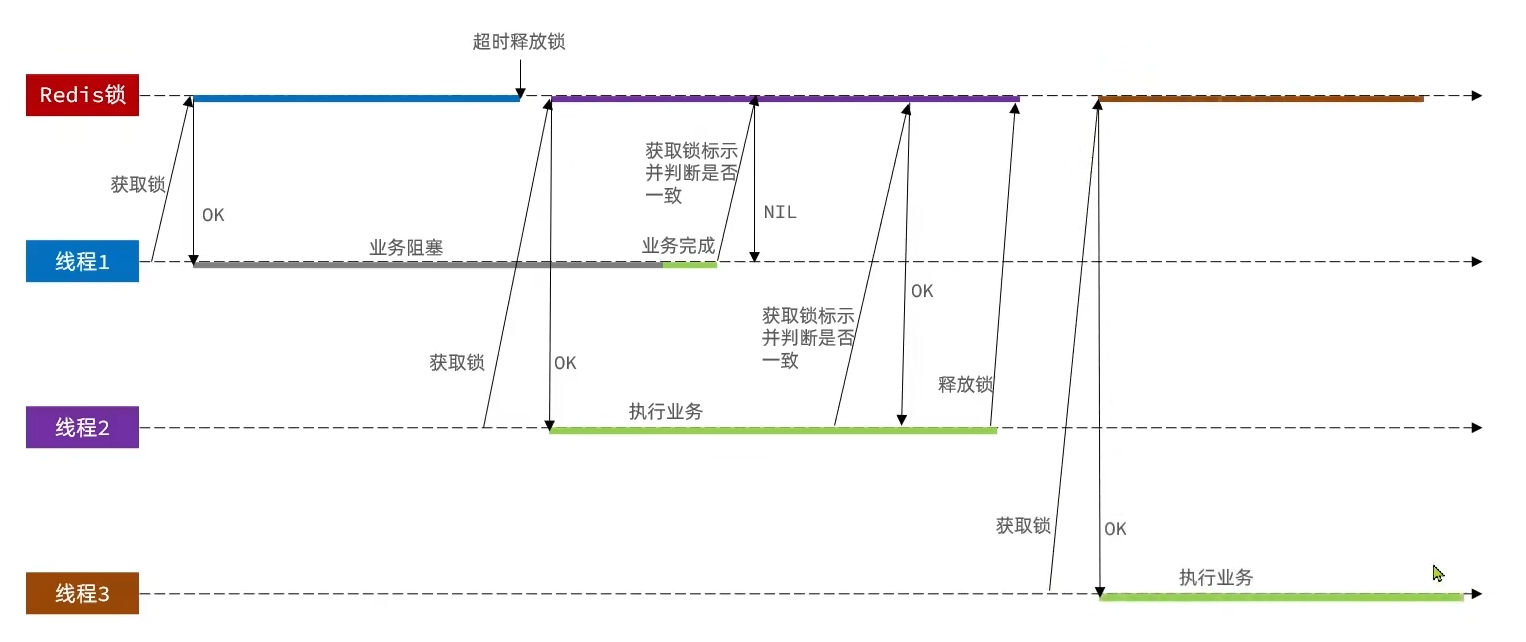
Solution: store a unique identifier in the lock when acquiring; when deleting, check if the current lock’s identifier matches the one stored. If it matches, delete; otherwise do not delete.
private static final String ID_PREFIX = UUID.randomUUID().toString() + "-";@Overridepublic boolean tryLock(long timeoutSec) { // Get thread identifier String threadId = ID_PREFIX + Thread.currentThread().getId(); // Acquire lock Boolean success = stringRedisTemplate.opsForValue() .setIfAbsent(KEY_PREFIX + name, threadId, timeoutSec, TimeUnit.SECONDS); return Boolean.TRUE.equals(success);}
@Overridepublic void unlock() { // Get thread identifier String threadId = ID_PREFIX + Thread.currentThread().getId(); String id = stringRedisTemplate.opsForValue().get(KEY_PREFIX + name);
// Delete lock if this thread holds it if(threadId.equals(id)){ stringRedisTemplate.delete(KEY_PREFIX + name); }}Distributed lock atomicity issue
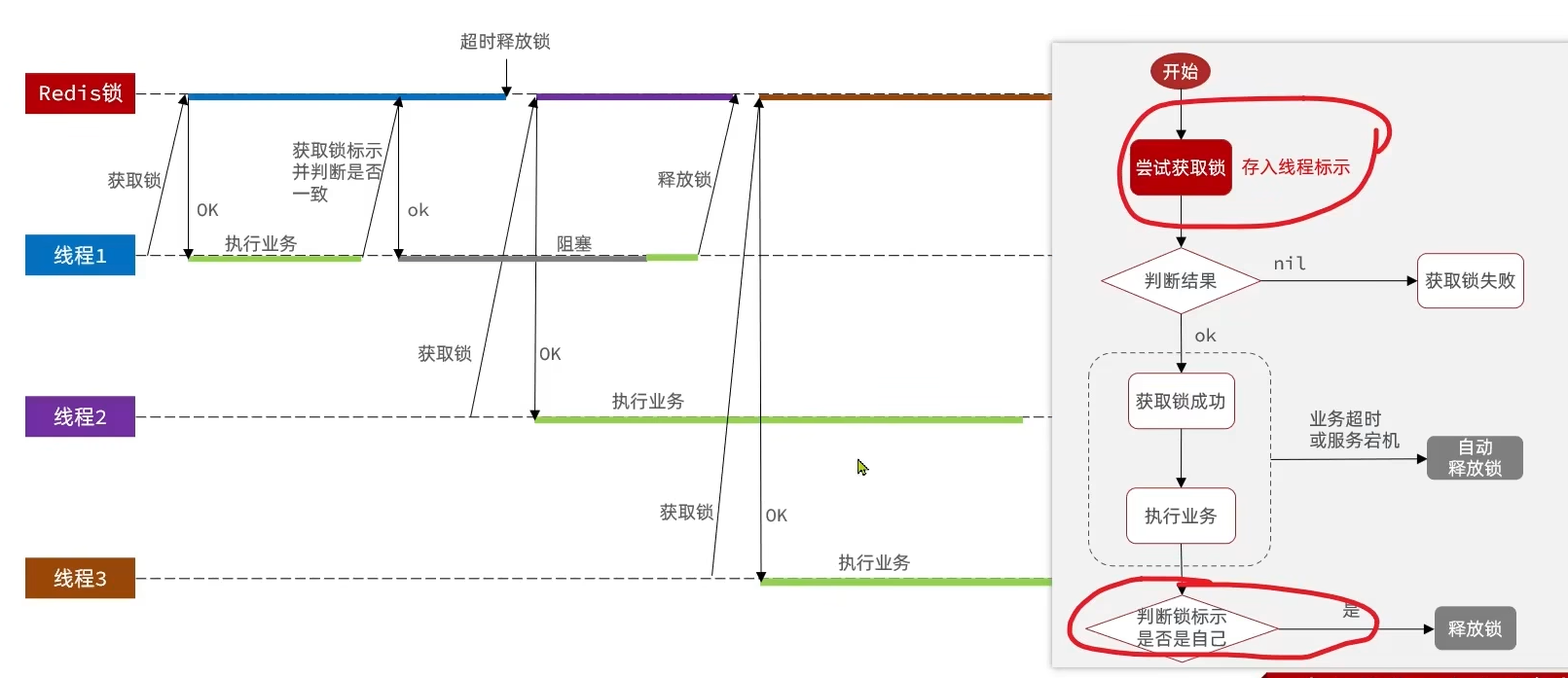
Solution: a Lua script that executes multiple Redis commands atomically
- Get the thread identifier inside the lock
- Check if it matches the current thread’s identifier
- If matches, release the lock (delete)
- If not, do nothing
-- KEYS[1] is the lock key; ARGV[1] is the current thread identifier-- Get the lock's identifier and compareif (redis.call('GET', KEYS[1]) == ARGV[1]) then -- If matches, delete the lock return redis.call('DEL', KEYS[1])end-- If not matched, returnreturn 0private static final DefaultRedisScript<Long> UNLOCK_SCRIPT; static { UNLOCK_SCRIPT = new DefaultRedisScript<>(); UNLOCK_SCRIPT.setLocation(new ClassPathResource("unlock.lua")); UNLOCK_SCRIPT.setResultType(Long.class); }
public void unlock() { // Call Lua script stringRedisTemplate.execute( UNLOCK_SCRIPT, Collections.singletonList(KEY_PREFIX + name), ID_PREFIX + Thread.currentThread().getId());}Redisson distributed lock
setnx-based distributed lock issues:
Reentrancy: The lock can be re-entered by the same thread; reentrant locks prevent deadlocks.
Non-retryable: The current distributed lock can only attempt once; a reasonable expectation is that after failing to acquire the lock, a thread should be able to retry.
- Timeout release: We add a timeout when locking to prevent deadlocks; but if a stall lasts too long, the safety risk remains even though Lua is used to prevent deleting others’ locks during unlock.
Master-slave consistency: If Redis is deployed in a master-slave cluster, the master asynchronously replicates to slaves; if the master crashes before replication completes, deadlock can occur.
Redisson is a Java in-memory data grid built on Redis. It provides distributed Java objects and services, including various distributed locks.
Using Redisson
<dependency> <groupId>org.redisson</groupId> <artifactId>redisson</artifactId> <version>3.13.6</version></dependency>@Configurationpublic class RedissonConfig { @Bean public RedissonClient redissonClient(){ // Configuration Config config = new Config(); config.useSingleServer().setAddress("redis://127.0.0.1:6379"); // Create RedissonClient object return Redisson.create(config); }}
// Create lock objectRLock lock = redissonClient.getLock("lock:order:" + userId);// Acquire lockboolean isLock = lock.tryLock();
// If failed to lockif (!isLock) { return Result.fail("不允许重复下单");}try { // Get proxy object (transaction) IVoucherOrderService proxy = (IVoucherOrderService) AopContext.currentProxy(); return proxy.createVoucherOrder(voucherId);} finally { // Release lock lock.unlock();}Redisson reentrant locks
Lock information is stored in a hash structure to record thread and reentrancy counts.
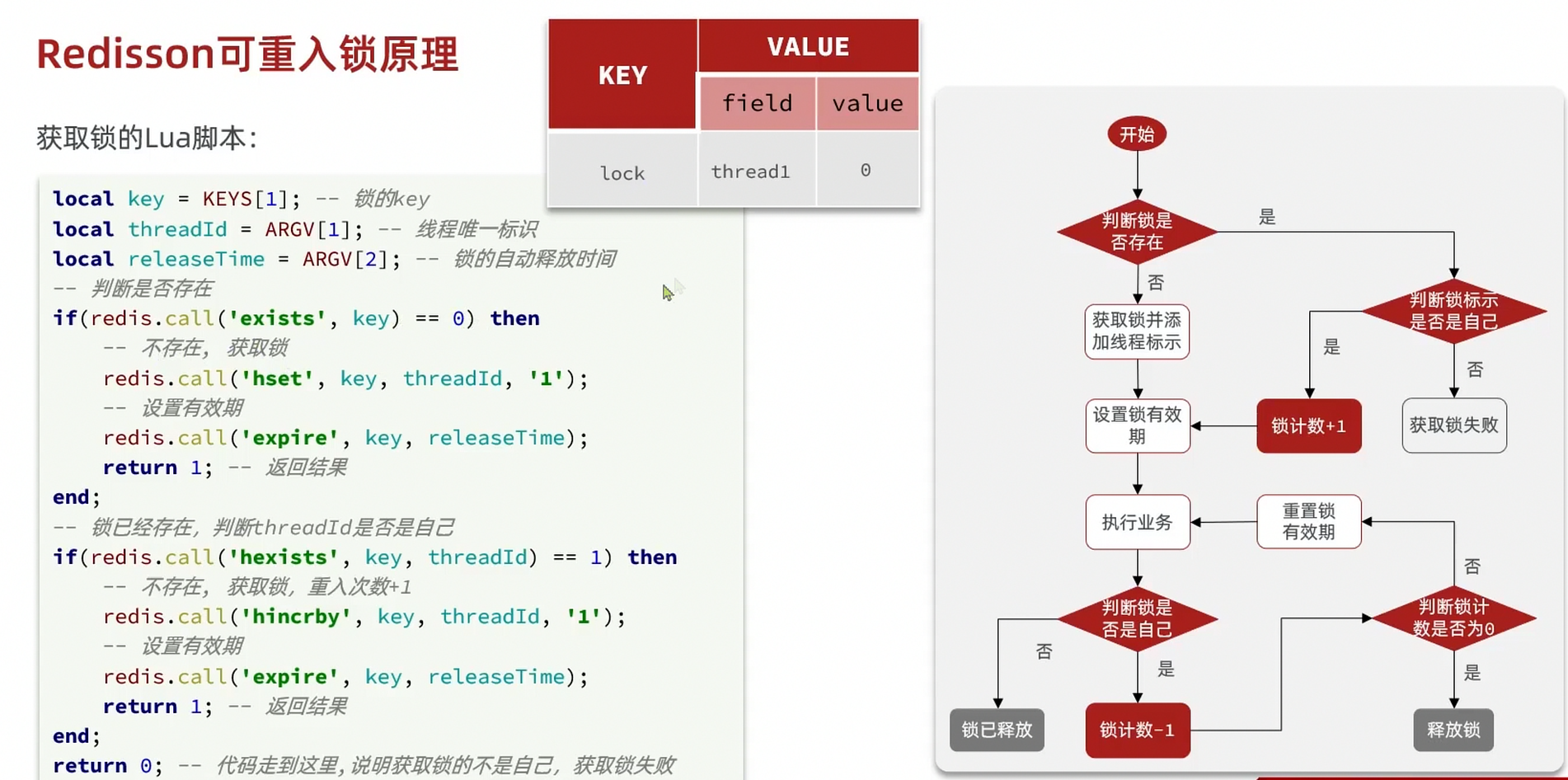
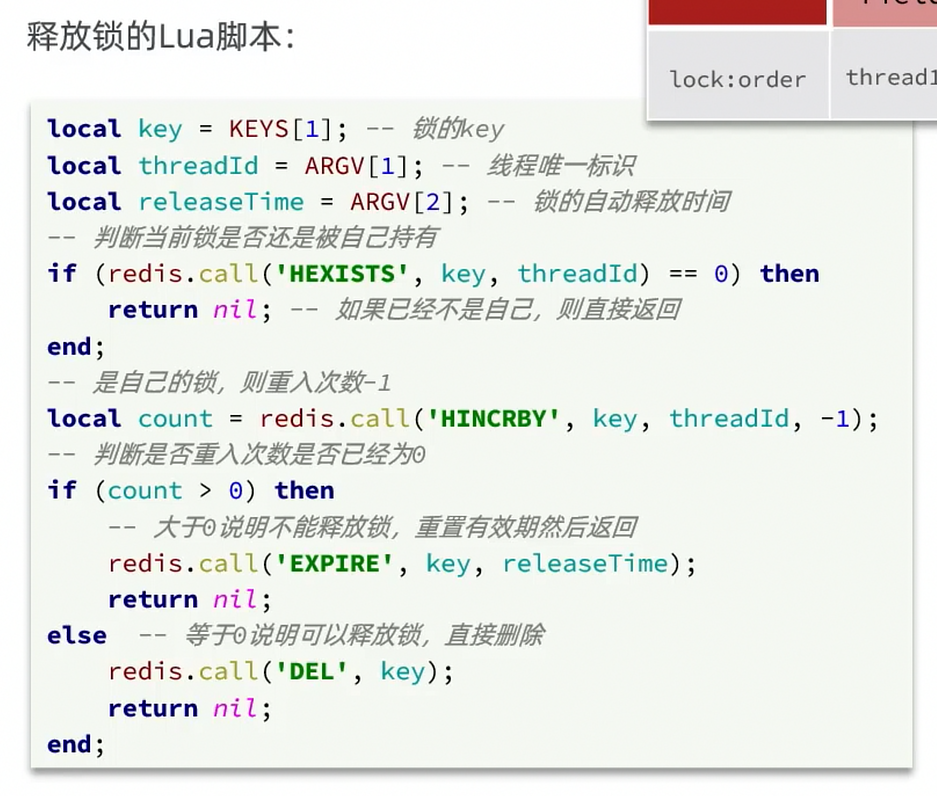
Redisson lock retry and WatchDog mechanism
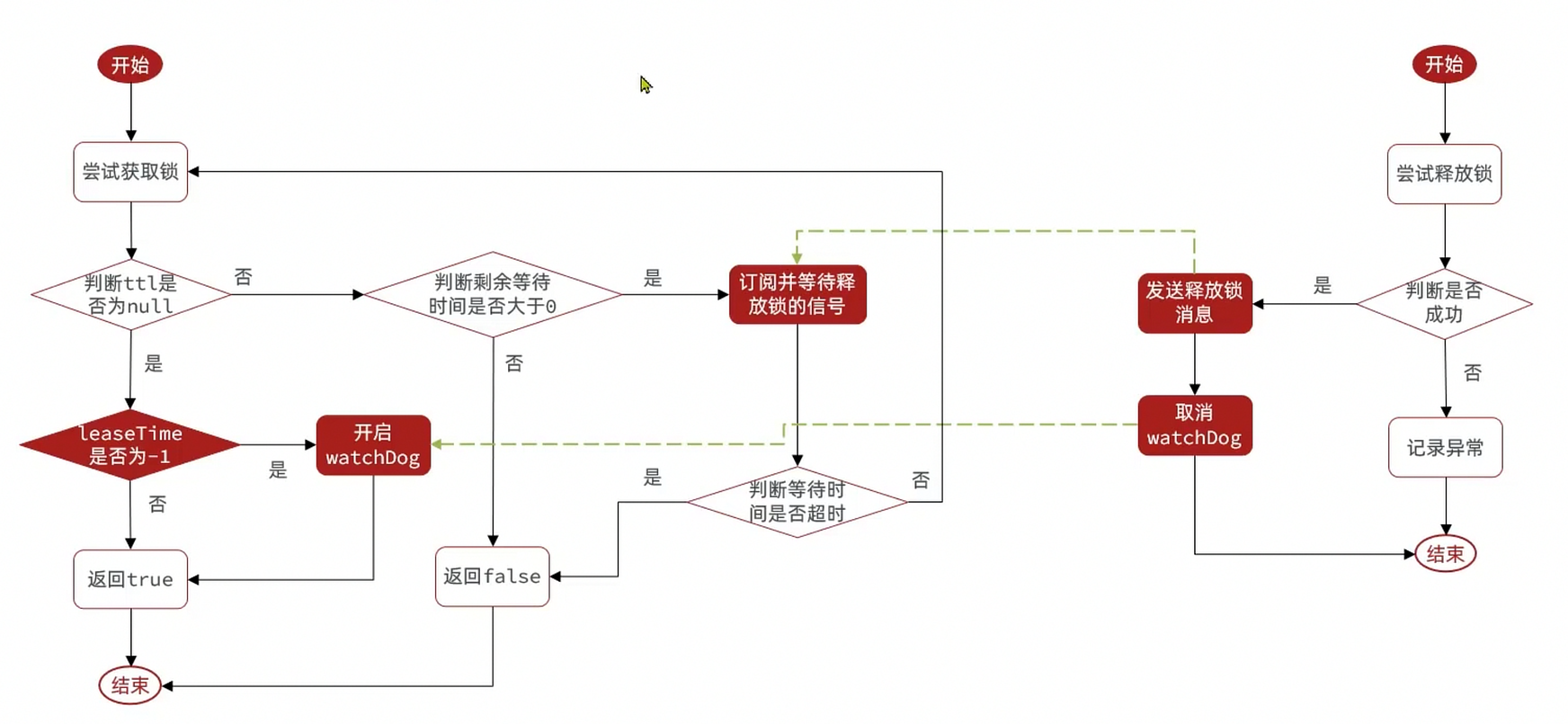
- Retry: use semaphores and Pub/Sub to implement waiting, waking, and retrying when lock acquisition fails
- Timeout extension: use a WatchDog to periodically extend the lock expiry time
Redisson solves master-slave consistency - MutiLock
To address this, Redisson introduces MutiLock. With this lock, you don’t rely on master-slave; every node has equal status. The locking logic must be written across all master nodes; only when all servers succeed writing does the lock succeed. If any node fails to acquire, the lock is not considered acquired, ensuring reliability.
When multiple locks are set, Redisson adds them to a collection and uses a loop to keep trying to acquire locks. There is a total locking time, calculated as the number of locks times 1500 ms. If all locks succeed within this time, the lock is considered acquired; if any fail within the time, retries occur.
Seckill optimization
Asynchronous seckill
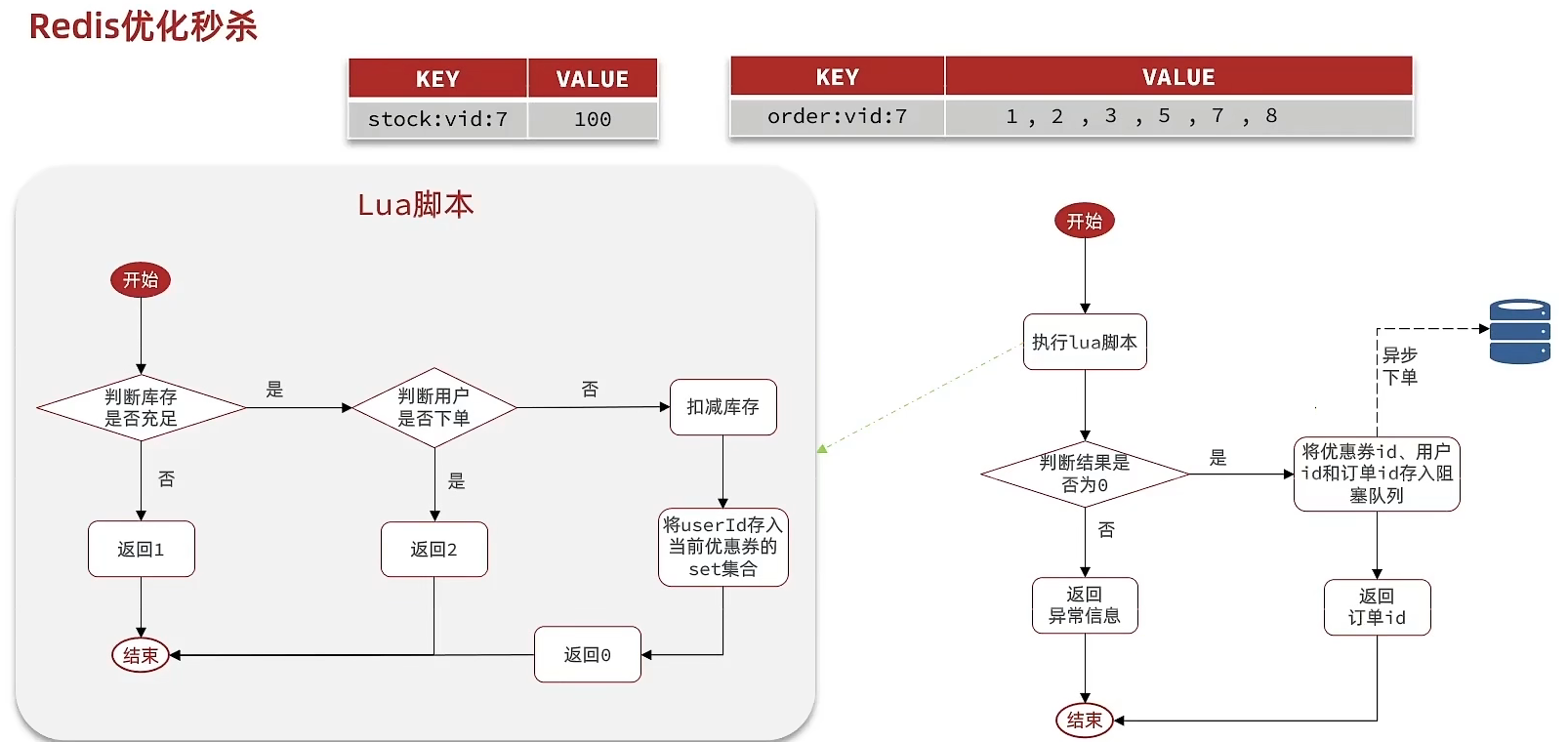
Requirements:
- When adding a new seckill coupon, also save the coupon information to Redis
- Use Lua script to check seckill stock and one-per-person order, determining whether the user succeeded
- If successful, encapsulate coupon ID and user ID and store into a blocking queue
- Start a thread task on startup to continuously fetch messages from the blocking queue and place orders
XGROUP CREATE stream.orders g1 0 MKSTREAM # Create message queueprivate class VoucherOrderHandler implements Runnable {
@Override public void run() { while (true) { try { // 1. Fetch order info from stream List<MapRecord<String, Object, Object>> list = stringRedisTemplate.opsForStream().read( Consumer.from("g1", "c1"), StreamReadOptions.empty().count(1).block(Duration.ofSeconds(2)), StreamOffset.create("stream.orders", ReadOffset.lastConsumed()) ); // 2. Check if there is data if (list == null || list.isEmpty()) { // No messages continue; } // Parse data MapRecord<String, Object, Object> record = list.get(0); Map<Object, Object> value = record.getValue(); VoucherOrder voucherOrder = BeanUtil.fillBeanWithMap(value, new VoucherOrder(), true); // 3. Create order createVoucherOrder(voucherOrder); // 4. Acknowledge stringRedisTemplate.opsForStream().acknowledge("s1", "g1", record.getId()); } catch (Exception e) { log.error("处理订单异常", e); // Handle exceptional messages handlePendingList(); } } }
private void handlePendingList() { while (true) { try { // 1. Get pending list List<MapRecord<String, Object, Object>> list = stringRedisTemplate.opsForStream().read( Consumer.from("g1", "c1"), StreamReadOptions.empty().count(1), StreamOffset.create("stream.orders", ReadOffset.from("0")) ); // 2. Check if (list == null || list.isEmpty()) { break; } // Parse MapRecord<String, Object, Object> record = list.get(0); Map<Object, Object> value = record.getValue(); VoucherOrder voucherOrder = BeanUtil.fillBeanWithMap(value, new VoucherOrder(), true); // 3. Create order createVoucherOrder(voucherOrder); // 4. Acknowledge stringRedisTemplate.opsForStream().acknowledge("s1", "g1", record.getId()); } catch (Exception e) { log.error("处理pendding订单异常", e); try{ Thread.sleep(20); }catch(Exception e){ e.printStackTrace(); } } } }}Influencer Store Visits
Publish store visit notes
Store visit notes are similar to reviews on review sites, typically a mix of images and text. There are two related tables: tb_blog: store visit notes table, including the note’s title, text, images, etc. tb_blog_comments: other users’ comments on the store notes
- Upload, send, view:
@Slf4j@RestController@RequestMapping("upload")public class UploadController {
@PostMapping("blog") public Result uploadImage(@RequestParam("file") MultipartFile image) { try { // Get original filename String originalFilename = image.getOriginalFilename(); // Generate new filename String fileName = createNewFileName(originalFilename); // Save file image.transferTo(new File(SystemConstants.IMAGE_UPLOAD_DIR, fileName)); // Return result log.debug("文件上传成功,{}", fileName); return Result.ok(fileName); } catch (IOException e) { throw new RuntimeException("文件上传失败", e); } }}
@PostMappingpublic Result saveBlog(@RequestBody Blog blog) { // Get logged-in user UserDTO user = UserHolder.getUser(); blog.setUpdateTime(user.getId()); // Save store visit blog blogService.saveBlog(blog); // Return id return Result.ok(blog.getId());}
@Overridepublic Result queryBlogById(Long id) { // 1. Query blog Blog blog = getById(id); if (blog == null) { return Result.fail("笔记不存在!"); } // 2. Query blog's related user queryBlogUser(blog);
return Result.ok(blog);}-
Like
Requirements:
- The same user can like only once; clicking again cancels the like
- If the current user has already liked it, the like button should be highlighted (frontend implemented; determined by Blog’s isLike field)
Implementation steps:
- Add an isLike field to Blog to indicate whether the current user has liked it
- Modify the like feature to use Redis sets to determine if liked; if not liked, increment like count; if already liked, decrement
- Modify the query for Blog by id to determine whether the current logged-in user has liked it, set isLike
- Modify the paginated query for Blog to determine whether the current logged-in user has liked it, set isLike
private void isBlogLiked(Blog blog) { // 1. Get logged-in user Long userId = UserHolder.getUser().getId(); // 2. Check if current user has liked String key = BLOG_LIKED_KEY + blog.getId(); Boolean isMember = stringRedisTemplate.opsForSet().isMember(key, userId.toString()); blog.setIsLike(BooleanUtil.isTrue(isMember));}
@Overridepublic Result likeBlog(Long id) { // 1. Get logged-in user Long userId = UserHolder.getUser().getId(); // 2. Check if user has liked String key = BLOG_LIKED_KEY + id; Boolean isMember = stringRedisTemplate.opsForSet().isMember(key, userId.toString()); if(BooleanUtil.isFalse(isMember)){ // 3. If not liked, like // 3.1 DB like count +1 boolean isSuccess = update().setSql("liked = liked + 1").eq("id", id).update(); // 3.2 Save to Redis set if(isSuccess){ stringRedisTemplate.opsForSet().add(key,userId.toString()); } }else { // 4. If already liked, cancel like // 4.1 DB like count -1 boolean isSuccess = update().setSql("liked = liked - 1").eq("id", id).update(); // 4.2 Remove from Redis set if (isSuccess) { stringRedisTemplate.opsForSet().remove(key, userId.toString()); } } return Result.ok();}- Like leaderboard
Change from set to sorted set: set -> zset
Double score = stringRedisTemplate.opsForZSet().score(key, userId.toString());
stringRedisTemplate.opsForZSet().add(key, userId.toString(), System.currentTimeMillis());stringRedisTemplate.opsForZSet().remove(key, userId.toString());
// Top 5 likes display@Overridepublic Result queryBlogLikes(Long id) { String key = BLOG_LIKED_KEY + id; // 1. Top 5 likers: zrange Set<String> top5 = stringRedisTemplate.opsForZSet().range(key, 0, 4); if (top5 == null || top5.isEmpty()) { return Result.ok(Collections.emptyList()); } // 2. Extract user IDs List<Long> ids = top5.stream().map(Long::valueOf).collect(Collectors.toList()); String idStr = StrUtil.join(",", ids); // 3. Query users by ID List<UserDTO> userDTOS = userService.query() .in("id", ids).last("ORDER BY FIELD(id," + idStr + ")").list() .stream() .map(user -> BeanUtil.copyProperties(user, UserDTO.class)) .collect(Collectors.toList()); // 4. Return return Result.ok(userDTOS);}Friends/Follows
Follow / Unfollow
Requirement: implement two interfaces based on the data structure:
- Follow and unfollow interfaces
- Check whether a user is following another user
FollowController
// Follow@PutMapping("/{id}/{isFollow}")public Result follow(@PathVariable("id") Long followUserId, @PathVariable("isFollow") Boolean isFollow) { return followService.follow(followUserId, isFollow);}// Unfollow@GetMapping("/or/not/{id}")public Result isFollow(@PathVariable("id") Long followUserId) { return followService.isFollow(followUserId);}FollowService
// Unfollow service@Overridepublic Result isFollow(Long followUserId) { // 1. Get logged-in user Long userId = UserHolder.getUser().getId(); // 2. Check if following Integer count = query().eq("user_id", userId).eq("follow_user_id", followUserId).count(); // 3. Return return Result.ok(count > 0); }
// Follow service @Override public Result follow(Long followUserId, Boolean isFollow) { // 1. Get logged-in user Long userId = UserHolder.getUser().getId(); String key = "follows:" + userId; // 1. Determine follow or unfollow if (isFollow) { // 2. Follow, add data Follow follow = new Follow(); follow.setUserId(userId); follow.setFollowUserId(followUserId); boolean isSuccess = save(follow);
} else { // 3. Unfollow, delete remove(new QueryWrapper<Follow>() .eq("user_id", userId).eq("follow_user_id", followUserId));
} return Result.ok(); }Mutual follows
set intersection
FollowServiceImpl
@Overridepublic Result follow(Long followUserId, Boolean isFollow) { // 1. Get current user Long userId = UserHolder.getUser().getId(); String key = "follows:" + userId; // 1. Determine follow or unfollow if (isFollow) { // 2. Follow, add data Follow follow = new Follow(); follow.setUserId(userId); follow.setFollowUserId(followUserId); boolean isSuccess = save(follow); if (isSuccess) { // Put followed user's id into Redis set stringRedisTemplate.opsForSet().add(key, followUserId.toString()); } } else { // 3. Unfollow, delete boolean isSuccess = remove(new QueryWrapper<Follow>() .eq("user_id", userId).eq("follow_user_id", followUserId)); if (isSuccess) { // Remove from Redis set stringRedisTemplate.opsForSet().remove(key, followUserId.toString()); } } return Result.ok();}Specific follow code:
FollowServiceImpl
@Overridepublic Result followCommons(Long id) { // 1. Get current user Long userId = UserHolder.getUser().getId(); String key = "follows:" + userId; // 2. Intersection String key2 = "follows:" + id; Set<String> intersect = stringRedisTemplate.opsForSet().intersect(key, key2); if (intersect == null || intersect.isEmpty()) { // No intersection return Result.ok(Collections.emptyList()); } // 3. Parse IDs List<Long> ids = intersect.stream().map(Long::valueOf).collect(Collectors.toList()); // 4. Query users List<UserDTO> users = userService.listByIds(ids) .stream() .map(user -> BeanUtil.copyProperties(user, UserDTO.class)) .collect(Collectors.toList()); return Result.ok(users);}Feed flow
When we follow a user and that user posts, we should push the updates to the followers. This feature is often called a Feed, i.e., Feed flow; it provides a continuously immersive experience via consuming feeds with infinite scrolling.
There are two common feed modes:
Timeline: no content filtering; sorts by creation time; used for friends or follows, e.g., Moments
- Pros: complete information; no content misses; simple to implement
- Cons: more noise; users may not be interested; slower content retrieval
Smart ranking: use intelligent algorithms to filter out inappropriate or uninteresting content; push content the user is interested in
- Pros: push content users like; high engagement
- Cons: if the algorithm isn’t precise, it may backfire
For our follower-based operation, we use Timeline mode: fetch followed users’ infos and sort by time
There are three implementation approaches:
-
Pull model (read diffusion)
Pros: space-efficient (no duplication in readers’ inbox); Cons: latency high; reading data requires pulling many items; large follower base implies heavy server load
-
Push model (write diffusion)
Pros: timely; no need to pull
Cons: heavy memory pressure; if a KOL posts, many followers receive data
-
Push-pull hybrid: combine both advantages
- Fan pushing
Requirements:
- Modify the blog creation flow: when saving to DB, also push to fans’ inboxes
- The inbox must be sortable by timestamp; Redis data structures must be used
- When querying inbox data, support pagination
Core idea: after saving the store visit note, obtain the note’s fans and push the data into fans’ Redis data structures.
@Overridepublic Result saveBlog(Blog blog) { // 1. Get logged-in user UserDTO user = UserHolder.getUser(); blog.setUserId(user.getId()); // 2. Save the blog note boolean isSuccess = save(blog); if(!isSuccess){ return Result.fail("新增笔记失败!"); } // 3. Query all fans of the author List<Follow> follows = followService.query().eq("follow_user_id", user.getId()).list(); // 4. Push blog id to all fans' inboxes for (Follow follow : follows) { // 4.1 Get fan id Long userId = follow.getUserId(); // 4.2 Push String key = FEED_KEY + userId; stringRedisTemplate.opsForZSet().add(key, blog.getId().toString(), System.currentTimeMillis()); } // 5. Return id return Result.ok(blog.getId());}- Inbox pagination query
Using ZREVRANGEBYSCORE key Max Min LIMIT offset count
@Overridepublic Result queryBlogOfFollow(Long max, Integer offset) { // 1. Get current user Long userId = UserHolder.getUser().getId(); // 2. Query inbox: ZREVRANGEBYSCORE key Max Min LIMIT offset count String key = FEED_KEY + userId; Set<ZSetOperations.TypedTuple<String>> typedTuples = stringRedisTemplate.opsForZSet() .reverseRangeByScoreWithScores(key, 0, max, offset, 2); // 3. Non-empty check if (typedTuples == null || typedTuples.isEmpty()) { return Result.ok(); } // 4. Parse data: blogId, minTime, offset List<Long> ids = new ArrayList<>(typedTuples.size()); long minTime = 0; // 2 int os = 1; // 2 for (ZSetOperations.TypedTuple<String> tuple : typedTuples) { // 5 4 4 2 2 // 4.1 Get id ids.add(Long.valueOf(tuple.getValue())); // 4.2 Get distance/time long time = tuple.getScore().longValue(); if(time == minTime){ os++; }else{ minTime = time; os = 1; } } os = minTime != max ? os : os + offset; // 5. Query blogs by id String idStr = StrUtil.join(",", ids); List<Blog> blogs = query().in("id", ids).last("ORDER BY FIELD(id," + idStr + ")").list(); for (Blog blog : blogs) { // 5.1 Query blog's user queryBlogUser(blog); // 5.2 Check if blog is liked isBlogLiked(blog); }
// 6. Return ScrollResult r = new ScrollResult(); r.setList(blogs); r.setOffset(os); r.setMinTime(minTime);
return Result.ok(r);}Nearby Merchants GEO
GEO is short for Geolocation, representing geographic coordinates. Redis 3.2 added GEO support to store geospatial info; we can search data by longitude and latitude. Common commands:
- GEOADD: add a geospatial item; fields: longitude, latitude, member
- GEODIST: calculate distance between two points
- GEOHASH: convert a member’s coordinates to a hash string
- GEOPOS: return coordinates of specified members
- GEORADIUS: find all members within a circle around a center, sorted by distance
- GEOSEARCH: search within a range around a point; results sorted by distance; range can be circular or rectangular
- GEOSEARCHSTORE: same as GEOSEARCH, but store results to a specified key
Import data
@Testvoid loadShopData() { // 1. Query shop info List<Shop> list = shopService.list(); // 2. Group by typeId Map<Long, List<Shop>> map = list.stream().collect(Collectors.groupingBy(Shop::getTypeId)); // 3. Write Redis in batches for (Map.Entry<Long, List<Shop>> entry : map.entrySet()) { // 3.1 Get type id Long typeId = entry.getKey(); String key = SHOP_GEO_KEY + typeId; // 3.2 Get shops of the same type List<Shop> value = entry.getValue(); List<RedisGeoCommands.GeoLocation<String>> locations = new ArrayList<>(value.size()); // 3.3 Write to Redis GEOADD key longitude latitude member for (Shop shop : value) { // stringRedisTemplate.opsForGeo().add(key, new Point(shop.getX(), shop.getY()), shop.getId().toString()); locations.add(new RedisGeoCommands.GeoLocation<>( shop.getId().toString(), new Point(shop.getX(), shop.getY()) )); } stringRedisTemplate.opsForGeo().add(key, locations); }}Implementation:
- Add dependencies
<dependency> <groupId>org.springframework.boot</groupId> <artifactId>spring-boot-starter-data-redis</artifactId> <exclusions> <exclusion> <artifactId>spring-data-redis</artifactId> <groupId>org.springframework.data</groupId> </exclusion> <exclusion> <artifactId>lettuce-core</artifactId> <groupId>io.lettuce</groupId> </exclusion> </exclusions></dependency><dependency> <groupId>org.springframework.data</groupId> <artifactId>spring-data-redis</artifactId> <version>2.6.2</version></dependency><dependency> <groupId>io.lettuce</groupId> <artifactId>lettuce-core</artifactId> <version>6.1.6.RELEASE</version></dependency>- Implement features (Query | Pagination | Sorting)
@Overridepublic Result queryShopByType(Integer typeId, Integer current, Double x, Double y) { // 1. Check if need coordinate-based query if (x == null || y == null) { // No coordinate-based query; query by database Page<Shop> page = query() .eq("type_id", typeId) .page(new Page<>(current, SystemConstants.DEFAULT_PAGE_SIZE)); // Return data return Result.ok(page.getRecords()); }
// 2. Compute pagination parameters int from = (current - 1) * SystemConstants.DEFAULT_PAGE_SIZE; int end = current * SystemConstants.DEFAULT_PAGE_SIZE;
// 3. Query Redis, sort by distance, paginate. Result: shopId, distance String key = SHOP_GEO_KEY + typeId; GeoResults<RedisGeoCommands.GeoLocation<String>> results = stringRedisTemplate.opsForGeo() // GEOSEARCH key BYLONLAT x y BYRADIUS 10 WITHDISTANCE .search( key, GeoReference.fromCoordinate(x, y), new Distance(5000), RedisGeoCommands.GeoSearchCommandArgs.newGeoSearchArgs().includeDistance().limit(end) ); // 4. Parse IDs if (results == null) { return Result.ok(Collections.emptyList()); } List<GeoResults.GeoLocation<String>> content = results.getContent().stream() .map(GeoResult::getContent) .collect(Collectors.toList());
List<GeoResult<RedisGeoCommands.GeoLocation<String>>> list = results.getContent(); if (list.size() <= from) { // No next page return Result.ok(Collections.emptyList()); } // 4.1 Take the from ~ end portion List<Long> ids = new ArrayList<>(list.size()); Map<String, Distance> distanceMap = new HashMap<>(list.size()); list.stream().skip(from).forEach(result -> { // 4.2 Get shop id String shopIdStr = result.getContent().getName(); ids.add(Long.valueOf(shopIdStr)); // 4.3 Get distance Distance distance = result.getDistance(); distanceMap.put(shopIdStr, distance); }); // 5. Query Shop by IDs String idStr = StrUtil.join(",", ids); List<Shop> shops = query().in("id", ids).last("ORDER BY FIELD(id," + idStr + ")").list(); for (Shop shop : shops) { shop.setDistance(distanceMap.get(shop.getId().toString()).getValue()); } // 6. Return return Result.ok(shops);}User check-in
Bitmap operations include:
- SETBIT: store 0 or 1 at a given offset
- GETBIT: get the bit value at an offset
- BITCOUNT: count bits set to 1
- BITFIELD: get, set, or increment a bitfield value at an offset
- BITFIELD_RO: get bitfield as decimal
- BITOP: bitwise operations on multiple bitmaps
- BITPOS: find the first 0 or 1 in a range of bits
Check-in:
@Overridepublic Result sign() { // 1. Get current user Long userId = UserHolder.getUser().getId(); // 2. Get date LocalDateTime now = LocalDateTime.now(); // 3. Build key String keySuffix = now.format(DateTimeFormatter.ofPattern(":yyyyMM")); String key = USER_SIGN_KEY + userId + keySuffix; // 4. Determine which day of the month today is int dayOfMonth = now.getDayOfMonth(); // 5. Write to Redis: SETBIT key offset 1 stringRedisTemplate.opsForValue().setBit(key, dayOfMonth - 1, true); return Result.ok();}UV statistics
- UV stands for Unique Visitor; also called unique visitors. It counts distinct humans visiting a site within a time period.
- PV stands for Page View; counts page visits. Each page view by a user counts as one PV. Used to measure site traffic.
Generally UV is larger than PV, so they are used as reference values.
HyperLogLog (HLL) is a probabilistic counting algorithm derived from the LogLog method, used to estimate cardinalities of very large datasets. Redis HLL is implemented on top of strings; a single HLL uses less than 16 KB of memory, with low memory usage. As a trade-off, its measurement is probabilistic with an error of less than 0.81%.
@Testvoid testHLL() { String[] users = new String[1000]; int idx = 0; for(int i= 1;i<=100000;i++){ users[idx++] = "user_" + i; if(i % 1000 == 0){ idx = 0; stringRedisTemplate.opsForHyperLogLog().add("hll1",users); } } Long size = stringRedisTemplate.opsForHyperLogLog().size("hll1"); System.out.println("size = "+ size);}If this article helped you, please share it with others!
Some information may be outdated