



This article is mainly based on HeiMa’s Redis video
Redis is a key-value NoSQL database. There are two keywords here:
- Key-value type
- NoSql
Here, key-value means that data in Redis is stored as key.value pairs, and the value can take many forms, such as strings, numbers, or even JSON.
Redis Basics
NoSQL
NoSQL can be understood as “Not Only SQL” or “No SQL.” Compared with traditional relational databases, it is a special kind of database with major differences, so it is also called a non-relational database.
- Comparison with relational databases
Traditional relational databases store structured data. Each table has strict constraints such as field names, field types, and field constraints, and inserted data must follow these rules.
- NoSQL databases usually do not strictly constrain data formats. They are often more flexible and can be key-value, document, or graph based.
Tables in traditional databases are often related to each other, for example through foreign keys.
Non-relational databases generally do not have built-in table relationships. Relationships must be maintained either by business logic in code or by coupling between pieces of data.
Traditional relational databases use SQL for queries, with a relatively unified syntax standard.
By contrast, different NoSQL databases can have very different query syntaxes.
Traditional relational databases can satisfy ACID transaction properties.
NoSQL databases often do not support transactions, or cannot strictly guarantee ACID properties, and instead provide basic consistency.

- Storage method
- Relational databases are disk-based, which involves a lot of disk I/O and can affect performance.
- NoSQL databases rely more on in-memory operations. Memory read/write speed is much faster, so performance is usually better.
- Scalability
- Relational database clustering is usually master-slave, where data consistency between master and slave is used for backup; this is often considered vertical scaling.
- NoSQL databases can split data across multiple machines, store massive amounts of data, and solve memory size limitations. This is horizontal scaling.
- Because relational databases have inter-table relationships, horizontal scaling can make data queries much more complicated.
Redis
Redis stands for Remote Dictionary Server. It is an in-memory key-value NoSQL database.
Features:
- Key-value model; values support many data structures and are very flexible
- Single-threaded, with each command being atomic
- Low latency and high speed (thanks to memory, I/O multiplexing, and efficient implementation)
- Supports data persistence
- Supports master-slave replication and sharding clusters
- Supports multi-language clients
Redis Installation
Install via Docker
docker search redisdocker pul redisdocker run --restart=always -p 6379:6379 --name myredis -v /home/redis/myredis/myredis.conf:/etc/redis/redis.conf -v /home/redis/myredis/data:/data -d redis redis-server /etc/redis/redis.conf --appendonly yes
docker exec -it <容器名> /bin/bashCommon Redis Commands
Redis Data Structure Overview
Redis is a key-value database. Keys are usually of type String, while values can be of many different types:
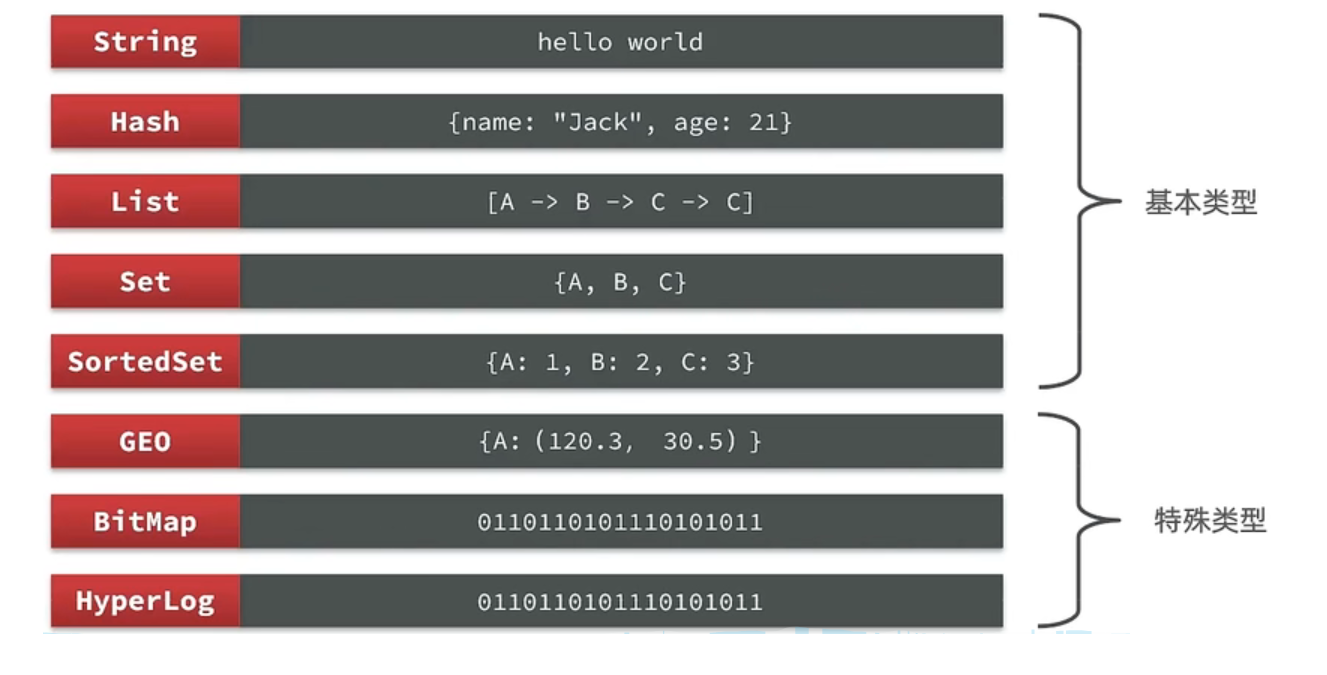
Redis Generic Commands
Generic commands can be used across multiple data types. Common ones include:
KEYS: View all keys matching a pattern
127.0.0.1:6379> keys *
# 查询以a开头的key127.0.0.1:6379> keys a*1) "age"In production environments, KEYS is not recommended because it becomes inefficient when there are too many keys.
DEL: Delete a specified key
127.0.0.1:6379> del name #删除单个(integer) 1 #成功删除1个
127.0.0.1:6379> keys *1) "age"
127.0.0.1:6379> MSET k1 v1 k2 v2 k3 v3 #批量添加数据OK
127.0.0.1:6379> keys *1) "k3"2) "k2"3) "k1"4) "age"
127.0.0.1:6379> del k1 k2 k3 k4(integer) 3 #此处返回的是成功删除的key,由于redis中只有k1,k2,k3 所以只成功删除3个,最终返回
127.0.0.1:6379> keys * #再查询全部的key1) "age" #只剩下一个了EXISTS: Check whether a key exists
127.0.0.1:6379> exists age(integer) 1
127.0.0.1:6379> exists name(integer) 0EXPIRE: Set a TTL for a key; the key is automatically deleted when it expiresTTL: Check the remaining lifetime of a key
127.0.0.1:6379> expire age 10(integer) 1
127.0.0.1:6379> ttl age(integer) 8
127.0.0.1:6379> ttl age(integer) -2
127.0.0.1:6379> ttl age(integer) -2 #当这个key过期了,那么此时查询出来就是-2
127.0.0.1:6379> keys *(empty list or set)
127.0.0.1:6379> set age 10 #如果没有设置过期时间OK
127.0.0.1:6379> ttl age(integer) -1 # ttl的返回值就是-1Redis Commands - String
The String type is the simplest storage type in Redis.
Its value is a string, but based on the format it can be divided into three categories:
string: regular stringint: integer type, supports increment/decrementfloat: floating-point type, supports increment/decrement
Common String commands include:
SET: Add or modify a String key-value pairGET: Get the String value by keyMSET: Batch set multiple String key-value pairsMGET: Batch get String values by multiple keysINCR: Increment an integer key by 1INCRBY: Increment an integer key by a specified step, e.g.incrby num 2INCRBYFLOAT: Increment a floating-point value by a specified stepSETNX: Set a String key-value pair only if the key does not existSETEX: Set a String key-value pair with an expiration time
Redis Commands - Hierarchical Key Naming
Redis does not have a concept like MySQL tables, so how do we distinguish different types of keys?
Redis keys can use multiple words to form a hierarchical structure, separated by :.
This format is not fixed; you can add or remove segments based on your own needs.
For example, if the project name is heima and we have user and product data, we can define keys like this:
- User-related key: heima:user<1>
- Product-related key: heima:product<1>
If the value is a Java object (for example, a User object), you can serialize it into a JSON string and store it:
| KEY | VALUE |
|---|---|
| heima:user<1> | {“id”<1>, “name”: “Jack”, “age”: 21} |
| heima:product<1> | {“id”<1>, “name”: “Xiaomi 11”, “price”: 4999} |
Once data is stored in Redis this way, visual tools can display keys hierarchically, which makes data management more convenient.
Redis Commands - Hash
The Hash type is an unordered dictionary, similar to a HashMap in Java.
With the String approach, objects are stored as serialized JSON strings, which is inconvenient when you need to modify a single field.
The Hash structure stores each field of an object independently, making CRUD operations on individual fields easier.
Common Hash commands
HSET key field value: Add or modify the value of a field in a hash keyHGET key field: Get the value of a field in a hash keyHMSET: Batch set multiple fields in a hash keyHMGET: Batch get multiple fields from a hash keyHGETALL: Get all fields and values in a hash keyHKEYS: Get all fields in a hash keyHINCRBY: Increment a numeric field in a hash key by a specified stepHSETNX: Set a field in a hash key only if that field does not exist
Redis Commands - List
The List type in Redis is similar to Java’s LinkedList. It can be viewed as a doubly linked list and supports both forward and reverse access.
Its characteristics are also similar to LinkedList:
- Ordered
- Elements can be duplicated
- Fast insertion and deletion
- Average query performance
It is commonly used to store ordered data, such as like lists or comment lists.
Common List commands include:
LPUSH key element ...: Insert one or more elements on the left side of the listLPOP key: Remove and return the first element on the left side of the list; returnsnilif none existsRPUSH key element ...: Insert one or more elements on the right side of the listRPOP key: Remove and return the first element on the right side of the listLRANGE key start end: Return all elements in an index rangeBLPOP/BRPOP: Similar toLPOPandRPOP, but wait for a specified time when no element exists instead of returningnilimmediately
Redis Commands - Set
Redis Set is similar to Java’s HashSet, and can be viewed as a HashMap whose values are null. Since it is also hash-table-based, it has characteristics similar to HashSet:
- Unordered
- Elements are unique
- Fast lookup
- Supports intersection, union, and difference operations
Common Set commands
SADD key member ...: Add one or more elements to a setSREM key member ...: Remove specified elements from a setSCARD key: Return the number of elements in a setSISMEMBER key member: Check whether an element exists in a setSMEMBERS: Get all elements in a setSINTER key1 key2 ...: Compute the intersection of setsSDIFF key1 key2 ...: Compute the difference of setsSUNION key1 key2 ...: Compute the union of sets
Redis Commands - SortedSet
Redis SortedSet is a sortable set collection, somewhat similar to Java’s TreeSet, but with a very different underlying data structure. Each element in a SortedSet has a score, and elements are ordered by that score. The underlying implementation combines a skip list (SkipList) and a hash table.
SortedSet has the following characteristics:
- Sortable
- Unique elements
- Fast lookup
Because of its sortable nature, SortedSet is often used to implement leaderboard-like features.
Common SortedSet commands include:
ZADD key score member: Add one or more elements to a sorted set; if an element exists, update its scoreZREM key member: Remove a specified element from a sorted setZSCORE key member: Get the score of a specified element in a sorted setZRANK key member: Get the ascending rank of a specified element in a sorted setZCARD key: Get the number of elements in a sorted setZCOUNT key min max: Count elements whose score is within a given rangeZINCRBY key increment member: Increment the score of a specified element by a given amountZRANGE key min max: Get elements within a specified rank range after sorting by scoreZRANGEBYSCORE key min max: Get elements within a specified score range after sorting by scoreZDIFF,ZINTER,ZUNION: Difference / intersection / union operations
Note: All ranking commands are ascending by default. For descending order, add REV (or use the reverse variants), for example:
- Ascending rank of a specified element in a sorted set:
ZRANK key member - Descending rank of a specified element in a sorted set:
ZREVRANK key member
Java Client - Jedis
https://redis.io/docs/clients/
- Jedis and Lettuce: These primarily provide APIs corresponding to Redis commands for easier Redis operations. Spring Data Redis further abstracts and wraps both, so we will mainly use Spring Data Redis later.
- Redisson: Builds distributed, scalable Java data structures on top of Redis (such as
Map,Queue, etc.) and supports cross-process synchronization primitives such asLockandSemaphore, which makes it suitable for more specialized requirements.
Jedis Basics
Dependency:
<!--jedis--><dependency> <groupId>redis.clients</groupId> <artifactId>jedis</artifactId> <version>3.7.0</version></dependency>Test:
private Jedis jedis;
@BeforeEachvoid setup() { // 1.建立连接 // jedis = new Jedis("192.168.150.101", 6379);// jedis = JedisConnectionFactory.getJedis(); jedis = new Jedis("127.0.0.1",6379); // 2.设置密码// jedis.auth("123321"); // 3.选择库 jedis.select(0);}
@Testvoid testString() { // 存入数据 String result = jedis.set("name", "虎哥"); System.out.println("result = " + result); // 获取数据 String name = jedis.get("name"); System.out.println("name = " + name);}
@Testvoid testHash() { // 插入hash数据 jedis.hset("user:1", "name", "Jack"); jedis.hset("user:1", "age", "21");
// 获取 Map<String, String> map = jedis.hgetAll("user:1"); System.out.println(map);}
@AfterEachvoid tearDown() { if (jedis != null) { jedis.close(); }}Jedis Connection Pool
Jedis itself is not thread-safe, and frequently creating and destroying connections causes performance overhead. Therefore, it is recommended to use a Jedis connection pool instead of direct Jedis connections.
Pooling is not only used here; it is a common design idea in many places, such as database connection pools and thread pools in Tomcat.
public class JedisConnectionFacotry {
private static final JedisPool jedisPool;
static { //配置连接池 JedisPoolConfig poolConfig = new JedisPoolConfig(); poolConfig.setMaxTotal(8); poolConfig.setMaxIdle(8); poolConfig.setMinIdle(0); poolConfig.setMaxWaitMillis(1000); //创建连接池对象 jedisPool = new JedisPool(poolConfig,"127.0.0.1",6379,1000); }
public static Jedis getJedis(){ return jedisPool.getResource(); }}Get a Jedis connection from JedisFactory:
@BeforeEachvoid setup() { // 建立连接 jedis = JedisConnectionFacotry.getJedis(); // 选择库 jedis.select(0);}SpringDataRedis
Spring Data is Spring’s data access module, which integrates with various databases. Its Redis integration module is called Spring Data Redis. Official site: https://spring.io/projects/spring-data-redis
- Integrates different Redis clients (Lettuce and Jedis)
- Provides the unified
RedisTemplateAPI to operate on Redis - Supports Redis pub/sub model
- Supports Redis Sentinel and Redis Cluster
- Supports reactive programming based on Lettuce
- Supports serialization/deserialization for JDK objects, JSON, strings, and Spring objects
- Supports JDK collection implementations backed by Redis
Spring Data Redis provides the RedisTemplate utility class, which wraps various Redis operations. It also organizes operation APIs for different data types into different helper types:
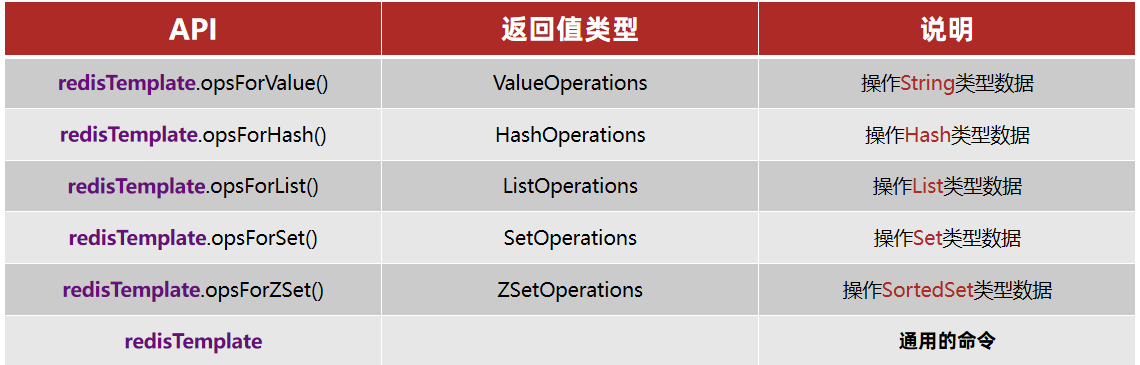
SpringDataRedis Basics
pom dependencies:
<!--redis依赖--><dependency> <groupId>org.springframework.boot</groupId> <artifactId>spring-boot-starter-data-redis</artifactId></dependency><!--common-pool--><dependency> <groupId>org.apache.commons</groupId> <artifactId>commons-pool2</artifactId></dependency><!--Jackson依赖--><dependency> <groupId>com.fasterxml.jackson.core</groupId> <artifactId>jackson-databind</artifactId></dependency><dependency> <groupId>org.projectlombok</groupId> <artifactId>lombok</artifactId> <optional>true</optional></dependency>YAML configuration:
spring: redis: host: 127.0.0.1 port: 6379# password: 123321 lettuce: pool: max-active: 8 #最大连接 max-idle: 8 #最大空闲连接 min-idle: 0 #最小空闲连接 max-wait: 100ms #连接等待时间Test:
@SpringBootTestclass JedisDemoApplicationTests {
@Autowired private RedisTemplate redisTemplate;
@Test void testString(){ redisTemplate.opsForValue().set("name","hg");
Object name = redisTemplate.opsForValue().get("name"); System.out.println(name); }
}- Add the
spring-boot-starter-data-redisdependency - Configure Redis connection information in
application.yml - Inject
RedisTemplate
Data Serialization
RedisTemplate can accept any Object as a value and write it to Redis:
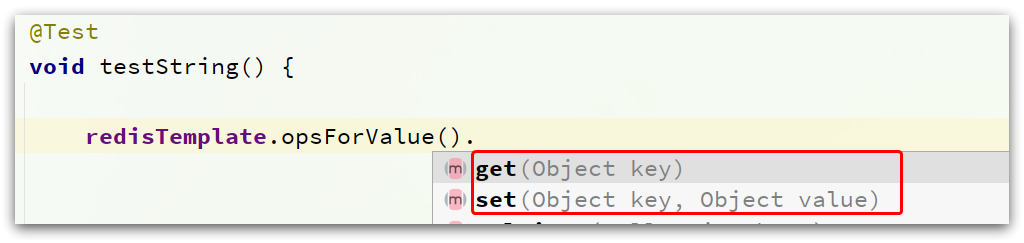
Before writing, the object is serialized into bytes. By default, JDK serialization is used, and the result looks like this:
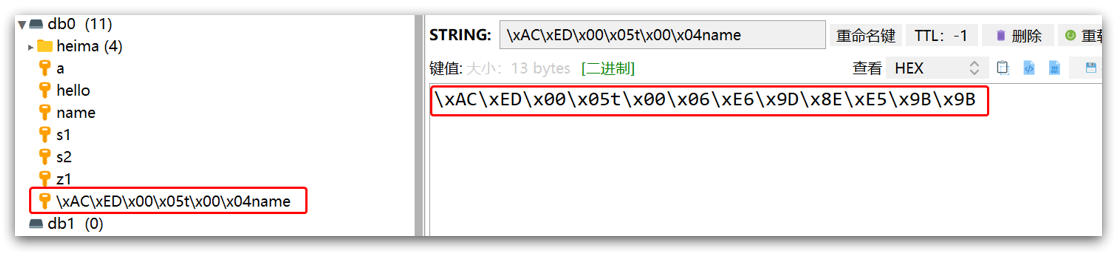
Disadvantages:
- Poor readability
- Higher memory usage
Custom serialization strategy
@Configurationpublic class RedisConfig {
@Bean public RedisTemplate redisTemplate(RedisConnectionFactory connectionFactory){ // 创建RedisTemplate对象 RedisTemplate template = new RedisTemplate(); // 设置连接工厂 template.setConnectionFactory(connectionFactory); // 创建JSON序列化工具 GenericJackson2JsonRedisSerializer jsonRedisSerializer = new GenericJackson2JsonRedisSerializer(); // 设置Key的序列化 template.setKeySerializer(RedisSerializer.string()); template.setHashKeySerializer(RedisSerializer.string()); // 设置Value的序列化 template.setValueSerializer(jsonRedisSerializer); template.setHashValueSerializer(jsonRedisSerializer); // 返回 return template; }
}StringRedisTemplate
To know the object type during deserialization, the JSON serializer writes the class type into the JSON stored in Redis, which introduces extra memory overhead.
To reduce memory usage, we can use manual serialization. In other words, instead of relying on the default serializer, we control the serialization process ourselves and only use the String serializer. This avoids storing extra type metadata in Redis values and saves memory.
@Autowiredprivate StringRedisTemplate stringRedisTemplate;
private static final ObjectMapper mapper = new ObjectMapper();
@Testvoid testSaveUser() throws JsonProcessingException { // 创建对象 User user = new User("hg", 21); // 手动序列化 String json = mapper.writeValueAsString(user); // 写入数据 stringRedisTemplate.opsForValue().set("user:200", json);
// 获取数据 String jsonUser = stringRedisTemplate.opsForValue().get("user:200"); // 手动反序列化 User user1 = mapper.readValue(jsonUser, User.class); System.out.println("user1 = " + user1);}Two practical serialization approaches for RedisTemplate:
- Option 1:
- Customize
RedisTemplate - Change the
RedisTemplateserializer toGenericJackson2JsonRedisSerializer
- Customize
- Option 2:
- Use
StringRedisTemplate - Manually serialize objects to JSON before writing to Redis
- Manually deserialize JSON back into objects after reading from Redis
- Use
If this article helped you, please share it with others!
Some information may be outdated