



Message Queue - RabbitMQ
Getting to Know MQ
Synchronous and Asynchronous Communication
There are two modes of communication between microservices: synchronous and asynchronous.
Synchronous communication: like making a phone call, requires real-time response.
Asynchronous communication: like sending an email, no immediate reply required.
Synchronous Communication
Advantages of synchronous calls:
- Higher immediacy; results can be obtained right away
Problems with synchronous calls:
- High coupling
- Decreased performance and throughput
- Additional resource consumption
- Cascading failure issues
Asynchronous Communication
Asynchronous calls can avoid the above issues:
Take purchasing goods as an example: after the user pays, we need to call the order service to update the order status, call the logistics service, allocate the corresponding stock from the warehouse, and prepare for shipment.
In event-driven mode, the payment service is the event publisher; after payment is completed, it only needs to publish a payment-success event (event), with the order ID included. The order service and logistics service are event subscribers (Consumers); they subscribe to the payment success event and, upon receiving it, complete their own business logic.
To decouple publishers and subscribers, there is a broker in between. The publisher publishes events to the Broker, not worrying about who subscribes. The subscriber subscribes to events from the Broker, not worrying about who sent the message.

Broker is something like a data bus; every service sends data to and receives data from this bus. This bus, like a protocol, makes inter-service communication standard and controllable.
Benefits:
- Throughput increases: no need to wait for subscribers to finish processing; responses are faster
- Fault isolation: services do not call each other directly; no cascading failures
- Non-blocking calls between services; no wasted resource occupancy
- Very low coupling; each service can be flexibly plugged in or replaced
- Traffic shaping: regardless of publish traffic fluctuations, the Broker receives it, and subscribers process at their own pace
Drawbacks:
- Architecture becomes more complex; business processes lack an obvious flow, making management harder
- Requires Broker reliability, security, and performance
MQ Technology Comparison
MQ, in Chinese, means Message Queue; literally, a queue that stores messages. It is the broker in an event-driven architecture.
Common MQ implementations:
- ActiveMQ
- RabbitMQ
- RocketMQ
- Kafka
Comparison of common MQs:
| RabbitMQ | ActiveMQ | RocketMQ | Kafka | |
|---|---|---|---|---|
| Company/Community | Rabbit | Apache | Alibaba | Apache |
| Programming Language | Erlang | Java | Java | Scala & Java |
| Protocol Support | AMQP, XMPP, SMTP, STOMP | OpenWire, STOMP, REST, XMPP, AMQP | Custom protocol | Custom protocol |
| Availability | High | Moderate | High | High |
| Single-node Throughput | Moderate | Poor | High | Very High |
| Message Latency | Microseconds | Milliseconds | Milliseconds | Less than a millisecond |
| Message Reliability | High | Moderate | High | Moderate |
Availability-focused: Kafka, RocketMQ, RabbitMQ
Reliability-focused: RabbitMQ, RocketMQ
Throughput-focused: RocketMQ, Kafka
Low-latency-focused: RabbitMQ, Kafka
Quick Start
Installing RabbitMQ
Install via Docker:
First determine the version, pull the image, then run the install commands
docker pull rabbitmq:${your_version}
docker run \\ -e RABBITMQ_DEFAULT_USER=${your_name} \\ -e RABBITMQ_DEFAULT_PASS=${your_pwd} \\ --name mq \\ --hostname mq1 \\ -p 15672:15672 \\ -p 5672:5672 \\ -d \\ rabbitmq:${your_version}
# If the web page after install cannot be accesseddocker exec -it rabbitMQ bashrabbitmq-plugins ebable rabbitmq_management # enable the plugin
echo management_agent.disable_metrics_collector = false > management_agent.disable_metrics_collector.confCluster configuration
- Normal mode: In normal mode clustering, data is not synchronized. Each MQ has its own queue and data (other metadata such as exchanges are synchronized). For example, if we have two MQs: mq1 and mq2, and your message is on mq1 but you are connected to mq2, mq2 will pull the message from mq1 and return it to you. If mq1 goes down, the messages will be lost.
- Mirror mode: Unlike normal mode, queues are synchronized across the mirror nodes of each MQ, so you can connect to any mirror node and obtain the messages. Also, if a node goes down, data will not be lost. However, this mode increases the bandwidth consumption for data synchronization.
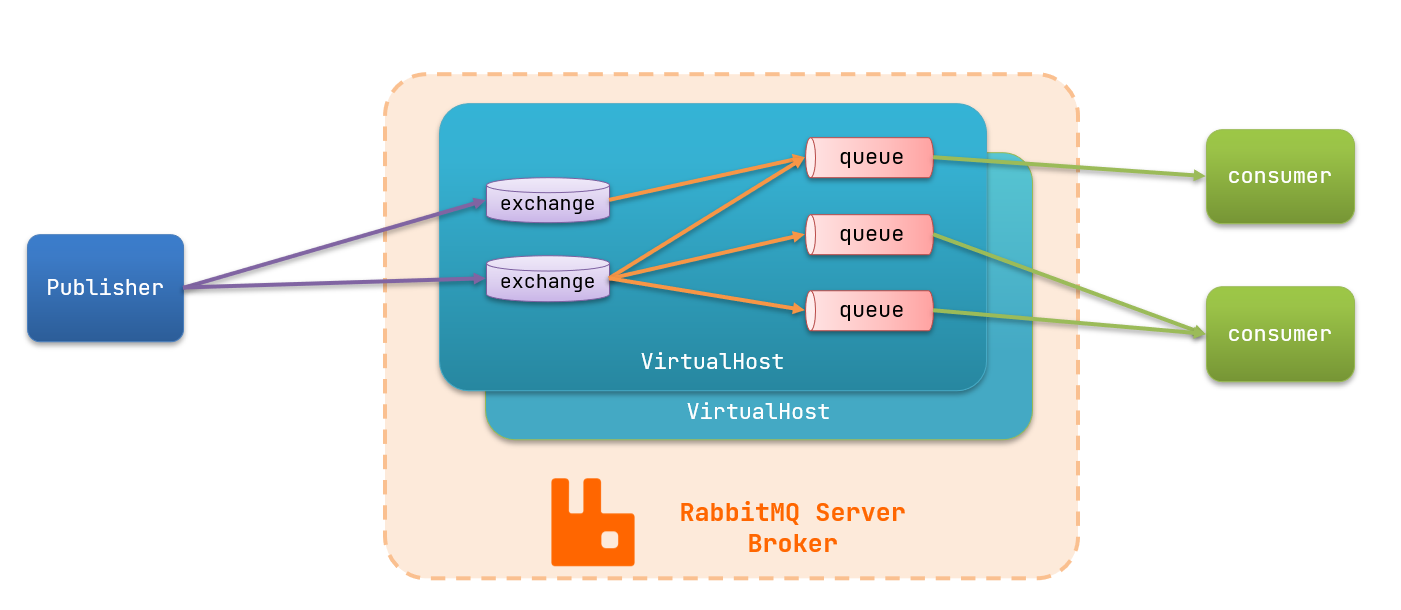
Some roles in RabbitMQ:
- publisher: producer
- consumer: consumer
- exchange: exchange, responsible for message routing
- queue: queue, stores messages
- virtualHost: virtual host, isolates exchanges, queues, and messages for different tenants
RabbitMQ Messaging Model
The RabbitMQ official documentation provides five different demo examples corresponding to different messaging models
- Basic Queue
- Work Queue
Publish/Subscribe, Exchange types:
- Fanout Exchange: Broadcast
- Direct Exchange: Routing
- Topic Exchange: Topic
Getting Started Case
The official HelloWorld is implemented based on the simplest messaging queue model and includes three roles:
- publisher: the message publisher, sends messages to the queue
- queue: message queue, receives and caches messages
- consumer: subscribes to the queue, processes messages in the queue
Publisher Implementation
Approach:
- Establish a connection
- Create a Channel
- Declare a queue
- Send a message
- Close the connection and channel
Code implementation:
package cn.itcast.mq.helloworld;
import com.rabbitmq.client.Channel;import com.rabbitmq.client.Connection;import com.rabbitmq.client.ConnectionFactory;import org.junit.Test;
import java.io.IOException;import java.util.concurrent.TimeoutException;
public class PublisherTest { @Test public void testSendMessage() throws IOException, TimeoutException { // 1.建立连接 ConnectionFactory factory = new ConnectionFactory(); // 1.1.设置连接参数,分别是:主机名、端口号、vhost、用户名、密码 factory.setHost("192.168.150.101"); factory.setPort(5672); factory.setVirtualHost("/"); factory.setUsername("itcast"); factory.setPassword("123321"); // 1.2.建立连接 Connection connection = factory.newConnection();
// 2.创建通道Channel Channel channel = connection.createChannel();
// 3.创建队列 String queueName = "simple.queue"; channel.queueDeclare(queueName, false, false, false, null);
// 4.发送消息 String message = "hello, rabbitmq!"; channel.basicPublish("", queueName, null, message.getBytes()); System.out.println("发送消息成功:【" + message + "】");
// 5.关闭通道和连接 channel.close(); connection.close();
}}Consumer Implementation
Code idea:
- Establish a connection
- Create a Channel
- Declare a queue
- Subscribe to messages
Code implementation:
package cn.itcast.mq.helloworld;
import com.rabbitmq.client.*;
import java.io.IOException;import java.util.concurrent.TimeoutException;
public class ConsumerTest {
public static void main(String[] args) throws IOException, TimeoutException { // 1.建立连接 ConnectionFactory factory = new ConnectionFactory(); // 1.1.设置连接参数,分别是:主机名、端口号、vhost、用户名、密码 factory.setHost("192.168.150.101"); factory.setPort(5672); factory.setVirtualHost("/"); factory.setUsername("itcast"); factory.setPassword("123321"); // 1.2.建立连接 Connection connection = factory.newConnection();
// 2.创建通道Channel Channel channel = connection.createChannel();
// 3.创建队列 String queueName = "simple.queue"; channel.queueDeclare(queueName, false, false, false, null);
// 4.订阅消息 channel.basicConsume(queueName, true, new DefaultConsumer(channel){ @Override public void handleDelivery(String consumerTag, Envelope envelope, AMQP.BasicProperties properties, byte[] body) throws IOException { // 5.处理消息 String message = new String(body); System.out.println("接收到消息:【" + message + "】"); } }); System.out.println("等待接收消息。。。。"); }}Spring AMQP
Spring AMQP is a template packaged on top of RabbitMQ, and it also leverages Spring Boot for automatic configuration, making it very convenient to use.
Spring AMQP provides three features:
- Auto-declare queues, exchanges, and their bindings
- Annotation-based listener pattern for asynchronous message reception
- Wraps the RabbitTemplate tool for sending messages
Basic Queue
Dependency Introduction
<!--AMQP依赖,包含RabbitMQ--><dependency> <groupId>org.springframework.boot</groupId> <artifactId>spring-boot-starter-amqp</artifactId></dependency>Sending Messages
First configure the MQ address; add the configuration in the publisher service’s application.yml:
spring: rabbitmq: host: 192.168.150.101 # Host port: 5672 # Port virtual-host: / # Virtual host username: itcast # Username password: 123321 # PasswordThen in the publisher service, write a test class SpringAmqpTest and use RabbitTemplate to send messages:
package cn.itcast.mq.spring;
import org.junit.Test;import org.junit.runner.RunWith;import org.springframework.amqp.rabbit.core.RabbitTemplate;import org.springframework.beans.factory.annotation.Autowired;import org.springframework.boot.test.context.SpringBootTest;import org.springframework.test.context.junit4.SpringRunner;
@RunWith(SpringRunner.class)@SpringBootTestpublic class SpringAmqpTest {
@Autowired private RabbitTemplate rabbitTemplate;
@Test public void testSimpleQueue() { // 队列名称 String queueName = "simple.queue"; // 消息 String message = "hello, spring amqp!"; // 发送消息 rabbitTemplate.convertAndSend(queueName, message); }}Receiving Messages
First configure the MQ address; add the configuration in the consumer service’s application.yml:
spring: rabbitmq: host: 192.168.150.101 # Host port: 5672 # Port virtual-host: / # Virtual host username: itcast # Username password: 123321 # PasswordThen in the consumer service, create a class SpringRabbitListener in the cn.itcast.mq.listener package, as shown below:
package cn.itcast.mq.listener;
import org.springframework.amqp.rabbit.annotation.RabbitListener;import org.springframework.stereotype.Component;
@Componentpublic class SpringRabbitListener {
@RabbitListener(queues = "simple.queue") public void listenSimpleQueueMessage(String msg) throws InterruptedException { System.out.println("spring 消费者接收到消息:【" + msg + "】"); }}WorkQueue
Work queues, also known as (Task queues), are a task model. Put simply, it means that multiple consumers are bound to one queue to collectively consume messages from the queue.
When message processing is time-consuming, production rate may far exceed consumption rate. Over time, messages accumulate and cannot be processed in time. In this case, you can use the work model, where multiple consumers collectively process messages, greatly increasing speed.
Sending Messages
This time we loop to send, simulating a large amount of message buildup.
In the publisher service’s SpringAmqpTest class, add a test method:
/** * workQueue * 向队列中不停发送消息,模拟消息堆积。 */@Testpublic void testWorkQueue() throws InterruptedException { // 队列名称 String queueName = "simple.queue"; // 消息 String message = "hello, message_"; for (int i = 0; i < 50; i++) { // 发送消息 rabbitTemplate.convertAndSend(queueName, message + i); Thread.sleep(20); }}Receiving Messages
To simulate multiple consumers bound to the same queue, add two new methods in the consumer service’s SpringRabbitListener:
@RabbitListener(queues = "simple.queue")public void listenWorkQueue1(String msg) throws InterruptedException { System.out.println("消费者1接收到消息:【" + msg + "】" + LocalTime.now()); Thread.sleep(20);}
@RabbitListener(queues = "simple.queue")public void listenWorkQueue2(String msg) throws InterruptedException { System.err.println("消费者2........接收到消息:【" + msg + "】" + LocalTime.now()); Thread.sleep(200);}Configuration Optimization
After starting the ConsumerApplication, run the sending test method testWorkQueue in the publisher service.
You will see Consumer 1 quickly finishing its 25 messages, while Consumer 2 processes its 25 messages slowly.
In other words, messages are distributed evenly among consumers, without considering each consumer’s processing capacity. This is clearly problematic.
There is a simple Spring configuration to address this issue. Modify the consumer service’s application.yml and add:
spring: rabbitmq: listener: simple: prefetch: 1 # Only fetch one message at a time; fetch the next only after processing the current onePublish/Subscribe
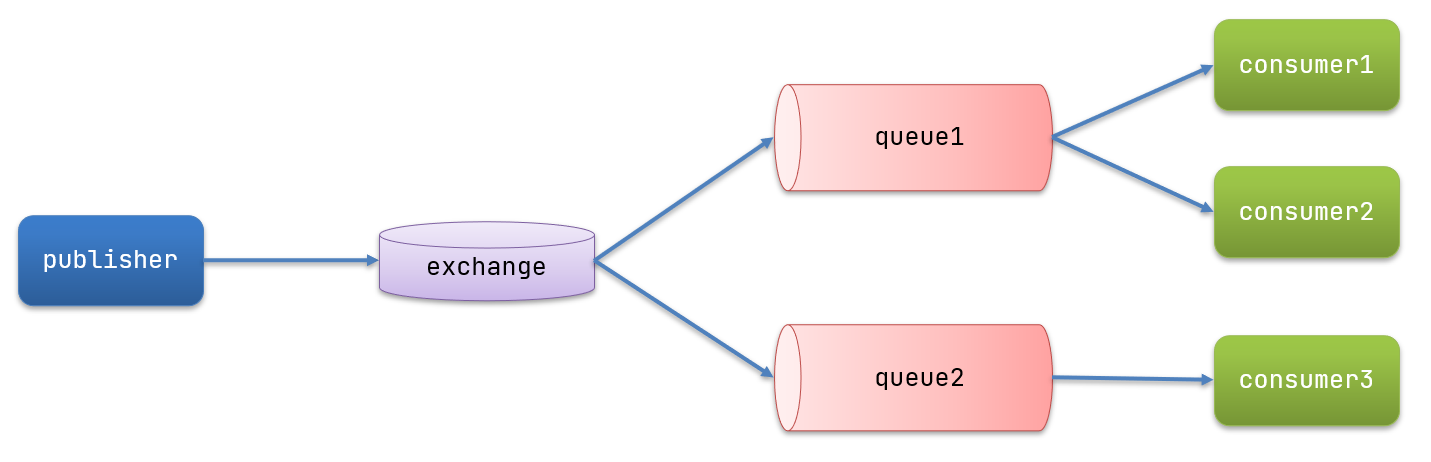
In the publish/subscriber model, there is an extra Exchange role, and the process changes slightly:
- Publisher: the producer, the program that sends messages, but it no longer sends to a queue; it sends to X (the Exchange)
- Exchange: the Exchange, the X in the diagram. On one hand, it receives messages from producers. On the other hand, it knows how to process messages, for example by delivering to a particular queue, delivering to all queues, or discarding messages. Exactly how it operates depends on the Exchange type. Exhanges come in three types:
- Fanout: broadcast; deliver messages to all queues bound to the Exchange
- Direct: routing; deliver messages to queues that match the specified routing key
- Topic: wildcard; deliver messages to queues that match routing patterns (routing patterns)
- Consumer: consumer, as before, subscribes to queues; no change
- Queue: message queue, as before, receives and caches messages
Exchange only forwards messages; it does not store messages. Therefore, if there are no queues bound to the Exchange, or if no queues match the routing rules, messages will be lost!
Fanout
In broadcast mode, the message sending flow is:
- There can be multiple queues
- Each queue must be bound to an Exchange
- The producer’s message can only be sent to the Exchange; the Exchange decides which queue to send to; the producer cannot decide
- The Exchange sends the message to all bound queues
- Consumers subscribed to the queues can receive the messages
The test plan is as follows:
- Create an Exchange itcast.fanout of type Fanout
- Create two queues fanout.queue1 and fanout.queue2, bound to the Exchange itcast.fanout
Declaring Queues and Exchanges
Spring provides an interface Exchange to represent all different exchange types
In the consumer, create a class that declares the queues and exchanges:
package cn.itcast.mq.config;
import org.springframework.amqp.core.Binding;import org.springframework.amqp.core.BindingBuilder;import org.springframework.amqp.core.FanoutExchange;import org.springframework.amqp.core.Queue;import org.springframework.context.annotation.Bean;import org.springframework.context.annotation.Configuration;
@Configurationpublic class FanoutConfig { /** * 声明交换机 * @return Fanout类型交换机 */ @Bean public FanoutExchange fanoutExchange(){ return new FanoutExchange("itcast.fanout"); }
/** * 第1个队列 */ @Bean public Queue fanoutQueue1(){ return new Queue("fanout.queue1"); }
/** * 绑定队列和交换机 */ @Bean public Binding bindingQueue1(Queue fanoutQueue1, FanoutExchange fanoutExchange){ return BindingBuilder.bind(fanoutQueue1).to(fanoutExchange); }
/** * 第2个队列 */ @Bean public Queue fanoutQueue2(){ return new Queue("fanout.queue2"); }
/** * 绑定队列和交换机 */ @Bean public Binding bindingQueue2(Queue fanoutQueue2, FanoutExchange fanoutExchange){ return BindingBuilder.bind(fanoutQueue2).to(fanoutExchange); }}Sending Messages
In the publisher service’s SpringAmqpTest class, add a test method:
@Testpublic void testFanoutExchange() { // 队列名称 String exchangeName = "itcast.fanout"; // 消息 String message = "hello, everyone!"; rabbitTemplate.convertAndSend(exchangeName, "", message);}Receiving Messages
In the consumer service’s SpringRabbitListener, add two methods as consumers:
@RabbitListener(queues = "fanout.queue1")public void listenFanoutQueue1(String msg) { System.out.println("消费者1接收到Fanout消息:【" + msg + "】");}
@RabbitListener(queues = "fanout.queue2")public void listenFanoutQueue2(String msg) { System.out.println("消费者2接收到Fanout消息:【" + msg + "】");}What is the role of the Exchange?
- Receive messages sent by publishers
- Route messages to bound queues according to rules
- Cannot cache messages; routing failures cause message loss
- FanoutExchange will route messages to every bound queue
What are the Beans that declare queues, exchanges, and bindings?
- Queue
- FanoutExchange
- Binding
Direct
In Fanout mode, a message is consumed by all subscribed queues. But in some scenarios, we want different messages to be consumed by different queues. This is where Direct type Exchange is used.
In Direct model:
- The binding between the queue and the Exchange cannot be arbitrary; you must specify a RoutingKey
- The sender when sending to the Exchange must also specify the message’s RoutingKey
- The Exchange no longer sends the message to every bound queue; it routes based on the message’s RoutingKey; only queues whose RoutingKey matches exactly will receive the message
Case requirements are as follows:
- Use @RabbitListener to declare the Exchange, Queue, RoutingKey
- In the consumer service, write two consumer methods, listening on direct.queue1 and direct.queue2
- In the publisher, write a test method to send a message to itcast.direct
Declaring Queues and Exchanges with Annotations
Declaring queues and exchanges via @Bean is more cumbersome; Spring also provides annotation-based declarations.
In the consumer’s SpringRabbitListener, add two consumers, also declaring queues and exchanges via annotations:
@RabbitListener(bindings = @QueueBinding( value = @Queue(name = "direct.queue1"), exchange = @Exchange(name = "itcast.direct", type = ExchangeTypes.DIRECT), key = {"red", "blue"}))public void listenDirectQueue1(String msg){ System.out.println("消费者接收到direct.queue1的消息:【" + msg + "】");}
@RabbitListener(bindings = @QueueBinding( value = @Queue(name = "direct.queue2"), exchange = @Exchange(name = "itcast.direct", type = ExchangeTypes.DIRECT), key = {"red", "yellow"}))public void listenDirectQueue2(String msg){ System.out.println("消费者接收到direct.queue2的消息:【" + msg + "】");}Sending Messages
In the publisher service’s SpringAmqpTest class, add a test method:
@Testpublic void testSendDirectExchange() { // 交换机名称 String exchangeName = "itcast.direct"; // 消息 String message = "红色警报!日本乱排核废水,导致海洋生物变异,惊现哥斯拉!"; // 发送消息 rabbitTemplate.convertAndSend(exchangeName, "red", message);}Describe the differences between Direct and Fanout exchanges?
- Fanout exchanges route messages to every queue bound to them
- Direct exchanges route based on the RoutingKey to a specific queue
- If multiple queues share the same RoutingKey, it behaves similarly to Fanout
What common annotations exist for declaring queues and exchanges with @RabbitListener?
- @Queue
- @Exchange
Topic
Explanation
The Topic type of Exchange, compared with Direct, can route messages to different queues based on the RoutingKey. However, a Topic Exchange allows the binding key to use wildcards!
RoutingKey generally consists of one or more words, separated by dots, for example: item.insert
Wildcard rules:
Examples:
- item.# can match item.spu.insert or item.spu
- item.* can only match item.spu
Implementation approach:
- Use @RabbitListener to declare Exchange, Queue, RoutingKey
- In the consumer service, write two consumers, listening on topic.queue1 and topic.queue2
- In the publisher, write a test method to send a message to itcast.topic
Sending Messages
In the publisher service’s SpringAmqpTest class, add a test method:
/** * topicExchange */@Testpublic void testSendTopicExchange() { // 交换机名称 String exchangeName = "itcast.topic"; // 消息 String message = "This is a impossible land!"; // 发送消息 rabbitTemplate.convertAndSend(exchangeName, "china.news", message);}Receiving Messages
In the consumer service’s SpringRabbitListener, add methods:
@RabbitListener(bindings = @QueueBinding( value = @Queue(name = "topic.queue1"), exchange = @Exchange(name = "itcast.topic", type = ExchangeTypes.TOPIC), key = "china.#"))public void listenTopicQueue1(String msg){ System.out.println("消费者接收到topic.queue1的消息:【" + msg + "】");}
@RabbitListener(bindings = @QueueBinding( value = @Queue(name = "topic.queue2"), exchange = @Exchange(name = "itcast.topic", type = ExchangeTypes.TOPIC), key = "#.news"))public void listenTopicQueue2(String msg){ System.out.println("消费者接收到topic.queue2的消息:【" + msg + "】");}Describe the differences between Direct and Topic exchanges?
- The RoutingKey for Topic exchanges must consist of multiple words, separated by dots
- When binding a queue to a Topic exchange, the bindingKey can include wildcards
#represents zero or more words*represents exactly one word
Message Converters
Earlier it was mentioned that Spring serializes the messages you send into bytes to send to the MQ, and when receiving, it deserializes the bytes back into Java objects.
However, by default Spring uses Java Serialization (JDK serialization). As is well known, JDK serialization has the following issues:
- Large payload size
- Security vulnerabilities
- Poor readability
Testing Default Converter
We modify the message sending code to send a Map object:
@Testpublic void testSendMap() throws InterruptedException { // Prepare message Map<String,Object> msg = new HashMap<>(); msg.put("name", "Jack"); msg.put("age", 21); // Send message rabbitTemplate.convertAndSend("simple.queue","", msg);}Sending the message:
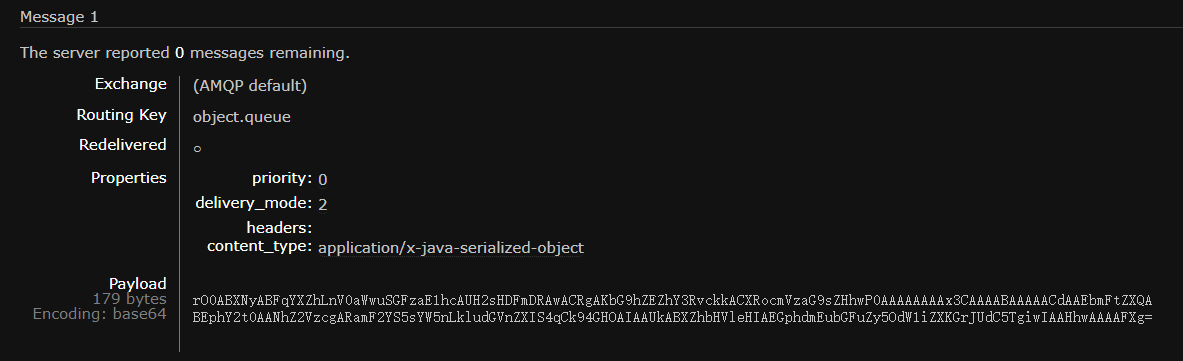
Configuring JSON Converter
Clearly, the JDK serialization method is not suitable. We want smaller message bodies and better readability, so we can use JSON for serialization and deserialization.
Add dependencies in both the publisher and consumer services:
<dependency> <groupId>com.fasterxml.jackson.dataformat</groupId> <artifactId>jackson-dataformat-xml</artifactId> <version>2.9.10</version></dependency>Configure the message converter.
Add a Bean in the startup class:
@Beanpublic MessageConverter jsonMessageConverter(){ return new Jackson2JsonMessageConverter();}If this article helped you, please share it with others!
Some information may be outdated