



Getting Started with Elasticsearch
Understanding ES
The role of Elasticsearch
Elasticsearch is a very powerful open-source search engine with many capabilities, which can help us quickly find the content we need from vast amounts of data.
For example:
- Search code on GitHub
- Search products on e-commerce sites
- Search for answers on Baidu
- Search for nearby taxis in ride-hailing apps
ELK Stack
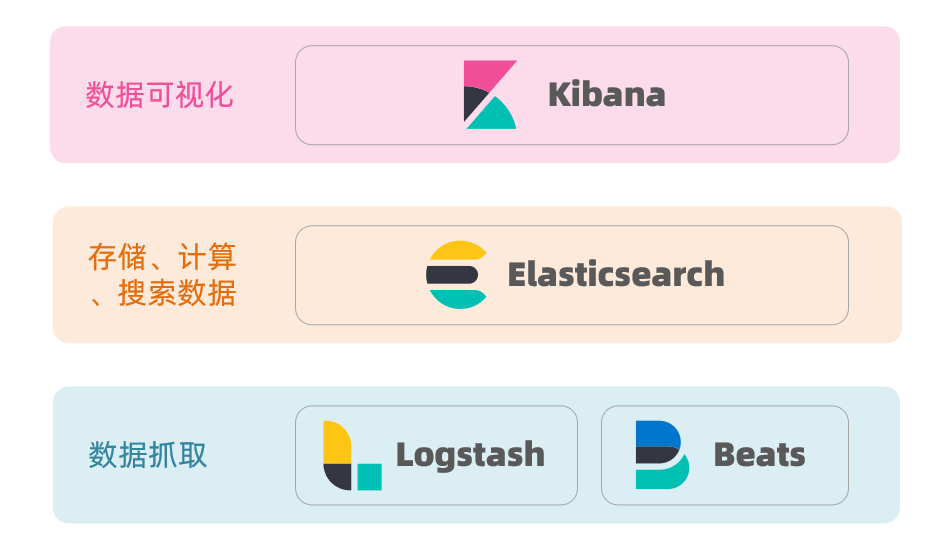
Elasticsearch, together with Kibana, Logstash, and Beats, is the Elastic Stack (ELK). It is widely used in log data analysis, real-time monitoring, and related fields.
And Elasticsearch is the core of the Elastic Stack, responsible for storing, searching, and analyzing data.
Elasticsearch and Lucene
The underlying implementation of Elasticsearch is based on Lucene.
Lucene is a Java-based search engine library, a top-level project of the Apache Software Foundation, developed by Doug Cutting in 1999.
Elasticsearch history:
- In 2004, Shay Banon developed Compass based on Lucene
- In 2010, Shay Banon rewrote Compass and named it Elasticsearch.
What is Elasticsearch?
- An open-source distributed search engine that can be used to implement search, log statistics, analytics, system monitoring, and more
What is the Elastic Stack (ELK)?
- A technology stack centered on Elasticsearch, including Beats, Logstash, Kibana, and Elasticsearch
What is Lucene?
- An Apache open-source search engine library that provides the core APIs for search
Inverted Index
The concept of an inverted index is based on forward indexing, like what is used in MySQL.
Forward Index
If you create an index on the id in a table, queries based on id will go through the index, and the lookup is very fast.
But if you want to perform fuzzy searches on the title, you can only scan row by row, with the following process:
- The user searches data with the condition that the title matches “%phone%”
- Retrieve data row by row, for example data with id = 1
- Check whether the title in the data matches the user’s search condition
- If it matches, add it to the result set; otherwise discard. Go back to step 1
Row-by-row scanning, i.e., full table scan, becomes slower as data volume grows. When data volume reaches millions, it becomes a disaster.
Inverted Index
There are two very important concepts in inverted indexes:
- Document: the data used for searching; each item is a document. For example, a webpage, a product description
- Term: a meaningful word produced by tokenizing the document data or the user search data using some algorithm
Creating an inverted index is a special treatment of forward indexing. The process is:
- Tokenize each document’s data using an algorithm to obtain terms
- Create a table where each row includes a term, the document id where the term resides, position, etc.
- Because terms are unique, you can create an index on terms, such as a hash-table index
The search process for an inverted index (using the query for “Xiaomi phone” as an example):
-
The user enters the query “Xiaomi phone” to search.
-
Tokenize the user input to obtain terms: Xiaomi, phone.
-
Look up the terms in the inverted index to obtain document ids that contain the terms: 1, 2, 3.
-
Use the document ids to look up the actual documents in the forward index.
Although you first query the inverted index, then the forward index, both the terms and the document ids have indexes, so the query is very fast—no full table scans.
Forward vs Inverted
So why is one called forward index and the other inverted index?
-
Forward index is the traditional approach, indexed by id. But when querying by terms, you must first retrieve each document one by one, then check whether the document contains the needed terms. This is a process of finding terms from documents.
-
Inverted index is the opposite: first find the terms the user wants to search for, obtain the document ids containing those terms, then retrieve the documents by id. This is a process of finding documents from terms.
Forward index:
- Advantages:
- You can create indexes on multiple fields
- Search and sort by indexed fields are very fast
- Disadvantages:
- For non-indexed fields, or when querying by a subset of terms in an indexed field, you may need a full table scan
Inverted index:
- Advantages:
- Very fast for term-based and fuzzy searches
- Disadvantages:
- You can only index terms, not fields
- Cannot sort by fields
Some concepts in ES
Elasticsearch has many unique concepts, somewhat different from MySQL, but with similarities.
Documents and Fields
Elasticsearch stores data as documents. A document can be a database row of product data or an order record. Document data is serialized to JSON when stored in Elasticsearch.
JSON documents typically contain many fields, similar to columns in a database.
Index and Mapping
Index is the collection of documents of the same type.
For example:
- All user documents can be organized together as the user index
- All product documents can be organized together as the product index
- All order documents can be organized together as the order index
Therefore, an index can be treated as a table in a database.
A database table has constraints that define its structure, field names, types, and so on. Therefore, the index has mapping, which is the field constraint information for documents in the index, similar to the structure of a table.
MySQL vs Elasticsearch
| MySQL | Elasticsearch | Notes |
|---|---|---|
| Table | Index | An index is a collection of documents, similar to a table in a database |
| Row | Document | A document is a row of data, JSON-formatted |
| Column | Field | A field in a JSON document, similar to a database column |
| Schema | Mapping | Mapping defines field types and constraints, like a table schema |
| SQL | DSL | DSL is Elasticsearch’s JSON-style request language for CRUD |
Both have their strengths:
- MySQL: strong for transactional operations, ensuring data safety and consistency
- Elasticsearch: strong for searching, analyzing, and computing large-scale data
In enterprises, they are often used together:
- Use MySQL for write operations requiring strong safety
- Use Elasticsearch for search needs requiring high query performance
- Then implement data synchronization between the two to ensure consistency
Installation
Install Elasticsearch and Kibana
docker run -d \\ --name es \\ -e "ES_JAVA_OPTS=-Xms512m -Xmx512m" \\ -e "discovery.type=single-node" \\ -v es-data:/usr/share/elasticsearch/data \\ -v es-plugins:/usr/share/elasticsearch/plugins \\ --privileged \\ --network es-net \\ -p 9200:9200 \\ -p 9300:9300 \\elasticsearch:8.8.1
# If ports won't open, remember to disable SSL and password authenticationxpack.security.enabled: falsexpack.security.http.ssl: enabled: false keystore.path: certs/http.p12
docker run -d \\--name kibana \\-e ELASTICSEARCH_HOSTS=http://es:9200 \\--network=es-net \\-p 5601:5601 \\kibana:8.8.1Install IK Analyzer
docker exec -it es bash
./bin/elasticsearch-plugin install <https://github.com/medcl/elasticsearch-analysis-ik/releases/download/v8.8.1/elasticsearch-analysis-ik-8.8.1.zip>
exit#Restart the containerdocker restart elasticsearchIKAnalyzer.cfg.xml configuration content:
<?xml version="1.0" encoding="UTF-8"?><!DOCTYPE properties SYSTEM "<http://java.sun.com/dtd/properties.dtd>"><properties> <comment>IK Analyzer extension configuration</comment> <!-- Users can configure their own extension dictionaries here *** add extension dictionary --> <entry key="ext_dict">ext.dic</entry> <!-- Users can configure their own extension stopword dictionary here *** add stopword dictionary --> <entry key="ext_stopwords">stopword.dic</entry></properties>After editing the corresponding file, restart.
What is the role of the tokenizer?
- Tokenize documents when creating the inverted index
- Tokenize user input when searching
What modes does the IK tokenizer have?
- ik_smart: Smart segmentation, coarse granularity
- ik_max_word: Finest segmentation, fine granularity
How to extend terms for IK tokenizer? How to disable terms?
- Use the IkAnalyzer.cfg.xml file in the config directory to add extension dictionaries and stopword dictionaries
- Add extended terms or stopwords in the dictionaries
Index management
An index is similar to a database table, and mapping is similar to the table structure.
To store data in ES, you must first create an “index” and a “mapping”.
Mapping properties
Mapping constrains the documents in an index. Common mapping properties include:
- type: field data type; common simple types include:
- Strings: text (tokenizable text), keyword (exact values, e.g., brand, country, IP address)
- Numeric: long, integer, short, byte, double, float
- Boolean: boolean
- Date: date
- Object: object
- index: whether to create an index; default true
- analyzer: which analyzer to use
- properties: sub-fields of this field
CRUD for index management
- Create an index: PUT /index_name
- Get an index: GET /index_name
- Delete an index: DELETE /index_name
- Add fields: PUT /index_name/_mapping
Create index and mapping
Basic syntax:
- Method: PUT
- Path: /index_name (customizable)
- Parameters: mapping
Format:
PUT /IndexName{ "mappings": { "properties": { "fieldName": { "type": "text", "analyzer": "ik_smart" }, "fieldName2": { "type": "keyword", "index": "false" }, "fieldName3": { "properties": { "subfield": { "type": "keyword" } } }, // ... omitted } }}Query index
Basic syntax:
- Method: GET
- Path: /IndexName
- Parameters: none
Format:
GET /IndexNameModify index
Although the inverted index structure is not complex, if the data structure changes (for example, changing the tokenizer), you would need to recreate the inverted index. This is why an index’s mapping cannot be modified after creation.
Although you cannot modify existing fields in the mapping, you can add new fields to the mapping without affecting the inverted index.
Syntax:
PUT /IndexName/_mapping{ "properties": { "newFieldName": { "type": "integer" } }}Delete index
Syntax:
- Method: DELETE
- Path: /IndexName
- Parameters: none
Format:
DELETE /IndexNameDocument operations
What document operations exist?
- Create a document: POST /{IndexName}/_doc/{id} { json document }
- Get a document: GET /{IndexName}/_doc/{id}
- Delete a document: DELETE /{IndexName}/_doc/{id}
- Update a document:
- Full update: PUT /{IndexName}/_doc/{id} { json document }
- Partial update: POST /{IndexName}/_update/{id} { “doc”: {field}}
Create a new document
Syntax:
POST /{IndexName}/_doc/{id}{ "field1": "value1", "field2": "value2", "field3": { "subProperty1": "value3", "subProperty2": "value4" }, // ...}Query a document
Following REST conventions, creation uses POST, retrieval uses GET, but queries usually require conditions; here we include the document id.
Syntax:
GET /{IndexName}/_doc/{id}Delete a document
Deletion uses a DELETE request and you delete by id:
Syntax:
DELETE /{IndexName}/_doc/{id}Update a document
There are two ways to update:
- Full update: essentially delete by id, then add
- Partial update: modify specific fields in the document
In the RestClient API, full update and add use the same API; the difference is based on the ID:
- If adding and the ID already exists, it is an update
- If adding and the ID does not exist, it is an addition
We won’t go into detail here; we focus on partial updates.
- Prepare the Request object. This time it’s an UpdateRequest
- Prepare the parameters. The JSON document contains the fields to be updated
- Update the document. Here we call client.update()
Unit test:
@Testvoid testUpdateDocument() throws IOException { // 1. Prepare Request UpdateRequest request = new UpdateRequest("IndexName", "61083"); // 2. Prepare request parameters request.doc( "price", "952", "starName", "四钻" ); // 3. Send the request client.update(request, RequestOptions.DEFAULT);}Bulk import documents
Case: use BulkRequest to bulk import data from the database into the index.
Steps:
- Use MyBatis-Plus to query hotel data
- Convert queried hotels (Hotel) to document type data (HotelDoc)
- Use BulkRequest to batch add documents
Bulk processing with BulkRequest essentially groups multiple CRUD requests and sends them together. It provides an add method to add other requests:
- IndexRequest: insert
- UpdateRequest: update
- DeleteRequest: delete
Unit test:
@Testvoid testBulkRequest() throws IOException { // Bulk query hotel data List<Hotel> hotels = hotelService.list();
// 1. Create Request BulkRequest request = new BulkRequest(); // 2. Prepare parameters; add multiple insert requests for (Hotel hotel : hotels) { // 2.1 Convert to document type HotelDoc HotelDoc hotelDoc = new HotelDoc(hotel); // 2.2 Create a request to add a new document request.add(new IndexRequest("hotel") .id(hotelDoc.getId().toString()) .source(JSON.toJSONString(hotelDoc), XContentType.JSON)); } // 3. Send the request client.bulk(request, RequestOptions.DEFAULT);}DSL Querying documents
Elasticsearch queries are still implemented using a JSON-style DSL.
DSL query categories
Elasticsearch provides a JSON-based DSL (Domain Specific Language) to define queries. Common query types include:
- Match all: query all data; usually used for testing. Example: match_all
- Full-text search: tokenize user input via an analyzer, then match against the inverted index. Examples:
- match_query
- multi_match_query
- Exact queries: search by exact terms for fields like keyword, numeric, date, boolean, etc. Examples:
- ids
- range
- term
- Geo queries: geographic queries. Examples:
- geo_distance
- geo_bounding_box
- Compound queries: combine multiple queries for more complex search logic. Examples:
- bool
- function_score
The query syntax is generally consistent:
GET /indexName/_search{ "query": { "queryType": { "queryField": "value" } }}Full-text search
The basic flow for full-text search is:
- Tokenize the user’s search content into terms
- Use the terms to match in the inverted index and get document ids
- Retrieve documents by id and return them
Common scenarios include:
- E-commerce site search boxes
- Baidu search box
Common full-text search queries include:
- match query: single-field search
GET /indexName/_search{ "query": { "match": { "FIELD": "TEXT" } }}- multi_match query: multi-field search; a match on any field qualifies the query; the more fields involved, the slower the query
GET /indexName/_search{ "query": { "multi_match": { "query": "TEXT", "fields": ["FIELD1", " FIELD12"] } }}Exact queries
Exact queries usually target keyword, numeric, date, boolean type fields, so they are not tokenized. Common examples:
-
term: exact value on a term; used for keyword, numeric, boolean, date fields
Because the field is not tokenized, the query value must also be a non-tokenized term. If the user input does not match exactly, results may not be found.
// term queryGET /indexName/_search{ "query": { "term": { "FIELD": { "value": "VALUE" } } }}- range: range queries for numeric or date types
// range queryGET /indexName/_search{ "query": { "range": { "FIELD": { "gte": 10, // gte means greater than or equal; gt would be greater than "lte": 20 // lte means less than or equal; lt would be less than } } }}Geo queries
Geographic queries are queries based on latitude and longitude.
Common scenarios include:
- Travel sites: search for hotels near me
- Ride-hailing: search for taxis near me
- WeChat: search for nearby people
- Bounding box queries
Bounding box queries select documents whose geo_point fields fall within a rectangle defined by two points (top_left and bottom_right).
// geo_bounding_box queryGET /indexName/_search{ "query": { "geo_bounding_box": { "FIELD": { "top_left": { // top-left point "lat": 31.1, "lon": 121.5 }, "bottom_right": { // bottom-right point "lat": 30.9, "lon": 121.7 } } } }}- Nearby (geo_distance) queries define a center point and a radius; all documents within the distance are returned.
// geo_distance queryGET /indexName/_search{ "query": { "geo_distance": { "distance": "15km", // radius "FIELD": "31.21,121.5" // center } }}Compound queries
Compound queries combine other queries to implement more complex search logic. Two common forms:
- function_score: score-based queries to control relevance
- bool query: boolean combination of other queries
Relevance scoring
When using a match query, documents are scored by their relevance (_score) and results are returned in descending order of score.
Historically, TF-IDF was used, with formulas such as:
TF(term frequency) = (number of occurrences of the term) / (total number of terms in the document)
IDF(inverse document frequency) = Log(total number of documents / number of documents containing the term)
score = sum of TF × IDF
In later versions, BM25 was introduced, with a formula like:
Score(Q,d) = sum over i of log(1 + (N - n + 0.5) / (n + 0.5)) × (f_i / (f_i + k1 × (1 - b + b × dl / avgdl)))
TF-IDF has a drawback: as term frequency increases, the document score increases for a single term. BM25 provides a ceiling and a smoother curve.
Function score queries
Using function_score to influence scoring can be important when the product needs control over relevance, e.g., the Baidu ranking example.
A function_score query contains four parts:
- Original query: the query condition; search and assign the original score (query score) based on BM25
- Filter: documents that meet the filter condition will be re-scored
- Score functions: for documents meeting the filter, apply the function score; four types:
- weight: the function result is a constant
- field_value_factor: use a field’s value as the function result
- random_score: use a random value as the function result
- script_score: a custom scoring function
- Boost mode: how to combine function score with the original query score; options include:
- multiply
- replace
- sum, avg, max, min, etc.
The flow:
- Query documents with the original condition and compute the initial score (query score)
- Filter documents
- For documents that pass the filter, compute the function score
- Combine the query score and function score according to the boost_mode to obtain the final relevance score
GET /hotel/_search{ "query": { "function_score": { "query": { .... }, // original query "functions": [ // scoring functions { "filter": { // condition to match "term": { "brand": "如家" } }, "weight": 2 // scoring weight } ], "boost_mode": "sum" // how to combine } }}What are the three elements defined by a function_score query?
- Filter: which documents should be scored
- Score function: how to calculate the function score
- Boost mode: how to combine function score with the query score
Bool query
Bool query combines one or more sub-queries. Each sub-query is a sub-clause. Sub-clauses can be combined as:
- must: must match each sub-query (AND)
- should: optionally match sub-queries (OR)
- must_not: must not match; does not participate in scoring (NOT)
- filter: must match; does not participate in scoring
Note that the more fields participate in scoring, the worse the query performance. For multi-criteria searches, consider:
- Keyword search in the search box uses a full-text query with must (participates in scoring)
- Other filters use filter (do not participate in scoring)
GET /hotel/_search{ "query": { "bool": { "must": [ {"term": {"city": "上海" }} ], "should": [ {"term": {"brand": "皇冠假日" }}, {"term": {"brand": "华美达" }} ], "must_not": [ { "range": { "price": { "lte": 500 } } } ], "filter": [ { "range": {"score": { "gte": 45 } } } ] } }}Processing search results
Search results can be processed or displayed according to user preferences.
Sorting
By default, Elasticsearch sorts by relevance score (_score), but you can sort in custom ways. Sortable field types include: keyword, numeric, geo_point, date, etc.
-
Plain field sorting
The syntax for sorting by keyword, numeric, and date types is basically the same.
GET /indexName/_search{ "query": { "match_all": {} }, "sort": [ { "FIELD": "desc" // sort field, sort direction ASC or DESC } ]}The sort criteria are an array, so you can specify multiple sort conditions. They are applied in the order declared; if the first condition is equal, then the second, and so on.
-
Geo distance sorting
Geo distance sorting is a bit different.
GET /indexName/_search{ "query": { "match_all": {} }, "sort": [ { "_geo_distance" : { "FIELD" : "latitude, longitude", // geo_point field name, target coordinates "order" : "asc", // sort order "unit" : "km" // distance unit } } ]}This query means:
- Specify a coordinate as the target point
- For every document, compute the distance between the coordinate in the specified field (which must be geo_point) and the target point
- Sort by distance
Pagination
By default, Elasticsearch returns only the top 10 results. To fetch more, adjust from and size:
- from: which document index to start from
- size: how many documents to return
Similar to MySQL’s LIMIT ?, ?
The basic pagination syntax:
GET /hotel/_search{ "query": { "match_all": {} }, "from": 0, // starting offset; default 0 "size": 10, // number of documents to retrieve "sort": [ {"price": "asc"} ]}When deep pagination is used, large result sets can strain memory and CPU, so Elasticsearch forbids from + size exceeding 10000.
For deep pagination, ES offers two approaches:
- search after: requires sorting; starts from the last sort value to fetch the next page. Official recommended approach.
- scroll: creates a snapshot of the sorted results and keeps it in memory. Official guidance is not to use it for new developments.
Common pagination approaches and their pros/cons:
-
from + size:- Pros: supports random page navigation
- Cons: depth pagination limit (from + size) is 10000 by default
- Use case: search pages with random access (Baidu, JD, Google, Taobao)
-
aftersearch:- Pros: no hard limit (per-query size should not exceed 10000)
- Cons: only forward paging; no random access
- Use case: pages that do not require random access
-
scroll:- Pros: no hard limit (per-query size should not exceed 10000)
- Cons: extra memory consumption, and results are not real-time
- Use case: retrieving large datasets, migrations
- Not recommended since ES 7.1; use after search instead.
Highlighting
When we search Baidu or JD, keywords appear highlighted in red; this is highlighting.
Highlighting is implemented in two steps:
- Add tags around all keywords in the document, e.g., tags
- Apply CSS styling to the tags on the page
Highlight syntax:
GET /hotel/_search{ "query": { "match": { "FIELD": "TEXT" // query, highlighting must be used with full-text search } }, "highlight": { "fields": { // specify fields to highlight "FIELD": { "pre_tags": "<em>", // tag before highlighted text "post_tags": "</em>" // tag after highlighted text } } }}Notes:
- Highlighting highlights keywords; the search query must contain keywords, not range queries
- By default, highlighted fields must match the fields specified in the search; otherwise, highlighting will not occur
- To highlight non-search fields, set required_field_match=false
RestClient query documentation
Querying with RestClient follows the same pattern as with RestHighLevelClient. The core is to obtain an index’s operations via the client.indices() object.
Document operations follow these basic steps:
- Initialize RestHighLevelClient
- Create XxxRequest. XXX can be Index, Get, Update, Delete, Bulk
- Prepare parameters (for Index, Update, Bulk)
- Send the request. Call RestHighLevelClient#xxx() where xxx is index, get, update, delete, bulk
- Parse the results (Get requires parsing)
Quick start
@Testvoid testMatchAll() throws IOException { // 1. Prepare Request SearchRequest request = new SearchRequest("hotel"); // 2. Prepare DSL request.source() .query(QueryBuilders.matchAllQuery()); // 3. Send the request SearchResponse response = client.search(request, RequestOptions.DEFAULT);
// 4. Parse the response handleResponse(response);}
private void handleResponse(SearchResponse response) { // 4. Parse the response SearchHits searchHits = response.getHits(); // 4.1. Get total hits long total = searchHits.getTotalHits().value; System.out.println("Total hits: " + total); // 4.2. Documents array SearchHit[] hits = searchHits.getHits(); // 4.3. Iterate for (SearchHit hit : hits) { // Get document source String json = hit.getSourceAsString(); // Deserialize HotelDoc hotelDoc = JSON.parseObject(json, HotelDoc.class); System.out.println("hotelDoc = " + hotelDoc); }}- Step 1: Create a SearchRequest, specifying the index name
- Step 2: Use request.source() to build the DSL, which can include queries, pagination, sorting, highlighting, etc.
- query(): represents the query condition; use QueryBuilders.matchAllQuery() to build a match_all DSL; QueryBuilders includes match, term, function_score, bool, and other queries
- Step 3: Use client.search() to send the request and obtain the response
Elasticsearch returns a JSON string with the following structure:
- hits: the matched results
- total: total number of hits; the value is the actual total
- max_score: the highest relevance score among the results
- hits: array of documents; each document is a JSON object
- _source: the original document data, also a JSON object
Therefore, parsing the response means parsing the JSON string layer by layer:
- SearchHits: obtained via response.getHits(); this is the outermost hits in the JSON, representing matched results
- SearchHits#getTotalHits().value: obtain total count
- SearchHits#getHits(): get the SearchHit array, i.e., the documents array
- SearchHit#getSourceAsString(): obtain the _source from the document result, i.e., the original JSON document
match query
Full-text match and multi_match queries have APIs similar to that of match_all; the difference lies in the query portion.
Therefore, the Java code differences are mainly in the parameters of request.source().query(), still using the methods provided by QueryBuilders
@Testvoid testMatch() throws IOException { // 1. Prepare Request SearchRequest request = new SearchRequest("hotel"); // 2. Prepare DSL request.source() .query(QueryBuilders.matchQuery("all", "如家")); // 3. Send request SearchResponse response = client.search(request, RequestOptions.DEFAULT); // 4. Parse the response handleResponse(response);
}Exact queries
Exact queries are mainly about:
- term: exact match on a term
- range: range query
Compared with other queries, the difference is in the query condition; the rest of the code remains the same.
// term queryQueryBuilders.termQuery("city","杭州");
// range queryQueryBuilders.rangeQuery("price").gte(100).lte(150);Bool queries
Bool queries combine other queries with must, must_not, filter, etc.
You can see that the API differences lie in how the query is constructed via QueryBuilders; the result parsing and other code remain unchanged.
@Testvoid testBool() throws IOException { // 1. Prepare Request SearchRequest request = new SearchRequest("hotel"); // 2. Prepare DSL // 2.1 Prepare BooleanQuery BoolQueryBuilder boolQuery = QueryBuilders.boolQuery(); // 2.2 Add term boolQuery.must(QueryBuilders.termQuery("city", "杭州")); // 2.3 Add range boolQuery.filter(QueryBuilders.rangeQuery("price").lte(250));
request.source().query(boolQuery); // 3. Send request SearchResponse response = client.search(request, RequestOptions.DEFAULT); // 4. Parse the response handleResponse(response);}Sorting, pagination
Sorting and pagination for search results are set at the same level as the query, so you also use request.source() to configure them.
@Testvoid testPageAndSort() throws IOException { // Page number and page size int page = 1, size = 5;
// 1. Prepare Request SearchRequest request = new SearchRequest("hotel"); // 2. Prepare DSL // 2.1 query request.source().query(QueryBuilders.matchAllQuery()); // 2.2 sort request.source().sort("price", SortOrder.ASC); // 2.3 pagination from, size request.source().from((page - 1) * size).size(5); // 3. Send request SearchResponse response = client.search(request, RequestOptions.DEFAULT); // 4. Parse the response handleResponse(response);
}Highlighting
Highlighting code differs from prior code in two ways:
-
The DSL for the query includes highlighting conditions at the same level as the query
-
The results parsing must also parse the highlighted results
-
Step 1: Obtain the source with hit.getSourceAsString(); this is non-highlighted JSON; deserialize to HotelDoc
-
Step 2: Get highlighted results with hit.getHighlightFields(); returns a Map whose key is the highlight field name and value is a HighlightField
-
Step 3: From the map, get the HighlightField by its name
-
Step 4: Get fragments from the HighlightField and convert to strings to obtain the highlighted text
-
Step 5: Replace the non-highlighted text in HotelDoc with the highlighted text
@Testvoid testHighlight() throws IOException { // 1. Prepare Request SearchRequest request = new SearchRequest("hotel"); // 2. Prepare DSL // 2.1 query request.source().query(QueryBuilders.matchQuery("all", "如家")); // 2.2.Highlight request.source().highlighter(new HighlightBuilder().field("name").requireFieldMatch(false)); // 3. Send request SearchResponse response = client.search(request, RequestOptions.DEFAULT); // 4. Parse the response handleResponse(response);}
private void handleResponse(SearchResponse response) { // 4. Parse the response SearchHits searchHits = response.getHits(); // 4.1 Get total long total = searchHits.getTotalHits().value; System.out.println("Total hits: " + total); // 4.2 Documents array SearchHit[] hits = searchHits.getHits(); // 4.3 Iterate for (SearchHit hit : hits) { // Get document source String json = hit.getSourceAsString(); // Deserialize HotelDoc hotelDoc = JSON.parseObject(json, HotelDoc.class); // Get highlighted results Map<String, HighlightField> highlightFields = hit.getHighlightFields(); if (!CollectionUtils.isEmpty(highlightFields)) { // Get highlight result by field name HighlightField highlightField = highlightFields.get("name"); if (highlightField != null) { // Get highlighted value String name = highlightField.getFragments()[0].string(); // Overwrite non-highlighted result hotelDoc.setName(name); } } System.out.println("hotelDoc = " + hotelDoc); }}Heima Travel Case
Next, we will practice the knowledge learned earlier through the Heima Travel case.
We implement four parts:
- Hotel search with pagination
- Hotel result filtering
- Nearby hotels
- Hotel bidding ranking
Hotel search and pagination
Case requirement: implement Heima Travel’s hotel search feature, including keyword search and pagination
Define entity classes
There are two: one for the request parameters from the frontend, and one for the response returned by the service.
// Requestpackage cn.itcast.hotel.pojo;import lombok.Data;
@Datapublic class RequestParams { private String key; private Integer page; private Integer size; private String sortBy;}
// Responseimport lombok.Data;import java.util.List;
@Datapublic class PageResult { private Long total; private List<HotelDoc> hotels;
public PageResult() { }
public PageResult(Long total, List<HotelDoc> hotels) { this.total = total; this.hotels = hotels; }}Define controller
Define a HotelController with a query interface that meets the following requirements:
- Request method: Post
- Path: /hotel/list
- Request parameter: an object of type RequestParams
- Return value: PageResult, containing two fields
Long total: total countList<HotelDoc> hotels: hotel data
@RestController@RequestMapping("/hotel")public class HotelController {
@Autowired private IHotelService hotelService; // Search hotel data @PostMapping("/list") public PageResult search(@RequestBody RequestParams params){ return hotelService.search(params); }}Implement search logic
We rely on RestHighLevelClient, and we need to register it as a Spring bean in the application.
In the HotelDemoApplication under cn.itcast.hotel, declare this bean:
@Beanpublic RestHighLevelClient client(){ return new RestHighLevelClient(RestClient.builder( HttpHost.create("<http://127.0.0.1:9200>") ));}
// Service@Overridepublic PageResult search(RequestParams params) { try { // 1. Prepare Request SearchRequest request = new SearchRequest("hotel"); // 2. Prepare DSL // 2.1 query String key = params.getKey(); if (key == null || "".equals(key)) { boolQuery.must(QueryBuilders.matchAllQuery()); } else { boolQuery.must(QueryBuilders.matchQuery("all", key)); }
// 2.2. Pagination int page = params.getPage(); int size = params.getSize(); request.source().from((page - 1) * size).size(size);
// 3. Send request SearchResponse response = client.search(request, RequestOptions.DEFAULT); // 4. Parse response return handleResponse(response); } catch (IOException e) { throw new RuntimeException(e); }}
// Result parsingprivate PageResult handleResponse(SearchResponse response) { // 4. Parse response SearchHits searchHits = response.getHits(); // 4.1 Get total long total = searchHits.getTotalHits().value; // 4.2 Documents array SearchHit[] hits = searchHits.getHits(); // 4.3 Iterate List<HotelDoc> hotels = new ArrayList<>(); for (SearchHit hit : hits) { // Get document source String json = hit.getSourceAsString(); // Deserialize HotelDoc hotelDoc = JSON.parseObject(json, HotelDoc.class); // Add to collection hotels.add(hotelDoc); } // 4.4 Wrap and return return new PageResult(total, hotels);}Hotel results filtering
Requirement: add filters for brand, city, star, price
In the HotelService’s search method, there is only one place to modify: the query condition inside request.source().query(…). Previously it was a match query by keywords; now we need to add filter conditions, including:
- Brand filter: keyword type, using term
- Star filter: keyword type, using term
- Price filter: numeric type, using range
- City filter: keyword type, using term
Multiple conditions should be combined with a boolean query:
- The keyword search goes into must to participate in scoring
- Other filters go into filter to not participate in scoring
private void buildBasicQuery(RequestParams params, SearchRequest request) { // 1. Build BooleanQuery BoolQueryBuilder boolQuery = QueryBuilders.boolQuery(); // 2. Keyword search String key = params.getKey(); if (key == null || "".equals(key)) { boolQuery.must(QueryBuilders.matchAllQuery()); } else { boolQuery.must(QueryBuilders.matchQuery("all", key)); } // 3. City condition if (params.getCity() != null && !params.getCity().equals("")) { boolQuery.filter(QueryBuilders.termQuery("city", params.getCity())); } // 4. Brand condition if (params.getBrand() != null && !params.getBrand().equals("")) { boolQuery.filter(QueryBuilders.termQuery("brand", params.getBrand())); } // 5. Star condition if (params.getStarName() != null && !params.getStarName().equals("")) { boolQuery.filter(QueryBuilders.termQuery("starName", params.getStarName())); } // 6. Price if (params.getMinPrice() != null && params.getMaxPrice() != null) { boolQuery.filter(QueryBuilders .rangeQuery("price") .gte(params.getMinPrice()) .lte(params.getMaxPrice()) ); } // 7. Put into source request.source().query(boolQuery);}My Nearby Hotels
Sort nearby hotels by distance based on location coordinates. The approach:
- Extend RequestParams to accept a location field
- In the search method, if location has a value, add geo_distance sorting
GET /indexName/_search{ "query": { "match_all": {} }, "sort": [ { "price": "asc" }, { "_geo_distance" : { "FIELD" : "latitude, longitude", "order" : "asc", "unit" : "km" } } ]}In the search method, add sorting:
// 2.3. SortingString location = params.getLocation();if (location != null && !location.equals("")) { request.source().sort(SortBuilders .geoDistanceSort("location", new GeoPoint(location)) .order(SortOrder.ASC) .unit(DistanceUnit.KILOMETERS) );}Hotel bidding ranking
Requirement: Let a specified hotel rank at the top of the results, with an advertising tag.
Function_score queries can influence scoring; a higher score leads to higher ranking. A function_score query has three parts:
- Filter conditions: which docs get scored
- Scoring function: how to compute the function score
- Weighting mode: how function score and query score are combined
Here the need is to rank a specified hotel higher, so we add a tag to these hotels and use that in a filter to boost scoring.
We can place the previously written boolean query as the original query condition in the query, then add filter, scoring function, and boost mode:
// 2. Scoring controlFunctionScoreQueryBuilder functionScoreQuery = QueryBuilders.functionScoreQuery( // Original query, the relevance-scoring query boolQuery, // Array of function_score elements new FunctionScoreQueryBuilder.FilterFunctionBuilder[]{ // One function_score element new FunctionScoreQueryBuilder.FilterFunctionBuilder( // Filter condition QueryBuilders.termQuery("isAD", true), // Scoring function ScoreFunctionBuilders.weightFactorFunction(10) ) });request.source().query(functionScoreQuery);Data Aggregation
- Aggregations make it very convenient to perform statistics, analysis, and computations on data. For example:
- Which brand of phones is the most popular?
- What are the average, maximum, and minimum prices of these phones?
- How are these phones selling each month?
These aggregations are much easier and faster than SQL, and can achieve near real-time search results.
Types of aggregations
There are three common kinds of aggregations:
- Bucket aggregations: group documents
- TermAggregation: group by field values, e.g., by brand or by country
- Date Histogram: group by date intervals, e.g., weekly or monthly
- Metric aggregations: compute values like max, min, average
- Avg: average
- Max: maximum
- Min: minimum
- Stats: compute max, min, avg, sum, etc.
- Pipeline aggregations: base aggregations on the results of other aggregations
Note: The fields participating in aggregations must be keyword, date, numeric, or boolean types.
Implementing aggregations with DSL
Now we want to count how many hotel brands exist in all data, i.e., group by brand name. This means performing a Bucket aggregation on the hotel brand name.
Bucket aggregation syntax
GET /hotel/_search{ "size": 0, // set size to 0 to exclude documents; only return aggregations "aggs": { // define aggregations "brandAgg": { // give the aggregation a name "terms": { // aggregation type: group by brand value "field": "brand", // field participating in aggregation "size": 20 // number of aggregation results } } }}Sorting aggregation results
By default, a Bucket aggregation counts documents in each bucket as _count and sorts by _count in descending order. We can specify the order to customize sorting:
GET /hotel/_search{ "size": 0, "aggs": { "brandAgg": { "terms": { "field": "brand", "order": { "_count": "asc" // sort by _count in ascending order }, "size": 20 } } }}Limiting the aggregation scope
By default, Bucket aggregations run over all documents in the index, but in real scenarios users provide search criteria, so aggregations should be limited to the search results.
You can restrict the documents to be aggregated by adding a query condition:
GET /hotel/_search{ "query": { "range": { "price": { "lte": 200 // aggregate only documents with price <= 200 } } }, "size": 0, "aggs": { "brandAgg": { "terms": { "field": "brand", "size": 20 } } }}Metric aggregation syntax
Now we want to perform calculations within each bucket, such as the min, max, and average user scores per brand.
This uses Metric aggregations, e.g., stats, to obtain min, max, avg, etc.
GET /hotel/_search{ "size": 0, "aggs": { "brandAgg": { "terms": { "field": "brand", "size": 20 }, "aggs": { // a sub-aggregation for each brand "score_stats": { // aggregation name "stats": { // type of aggregation to compute "field": "score" // aggregation field } } } } }}Here, the score_stats aggregation is nested inside the brandAgg aggregation, since we want to compute it for each bucket.
Aggregations are defined at the same level as the query; the query’s role is to:
- Limit the documents that participate in the aggregation
Three essential elements of an aggregation:
- Aggregation name
- Aggregation type
- Aggregation field
Configurable properties include:
- size: specify the number of aggregation results
- order: specify the order of the aggregation results
- field: specify the aggregation field
RestAPI implementation of aggregations
Aggregation conditions are at the same level as the query, so you specify them via request.source().
Using aggregations, bucket aggregations group documents in the search results by brand or by city, so you can know which brands and which cities exist.
Because the aggregation is performed on search results, it is a scoped aggregation; its scope matches the search document criteria.
@Overridepublic Map<String, List<String>> filters(RequestParams params) { try { // 1. Prepare Request SearchRequest request = new SearchRequest("hotel"); // 2. Prepare DSL // 2.1. query buildBasicQuery(params, request); // 2.2. set size request.source().size(0); // 2.3. aggregation buildAggregation(request); // 3. Send request SearchResponse response = client.search(request, RequestOptions.DEFAULT); // 4. Parse results Map<String, List<String>> result = new HashMap<>(); Aggregations aggregations = response.getAggregations(); // 4.1. Get brand results List<String> brandList = getAggByName(aggregations, "brandAgg"); result.put("Brand", brandList); // 4.2. Get city results List<String> cityList = getAggByName(aggregations, "cityAgg"); result.put("City", cityList); // 4.3. Get star results List<String> starList = getAggByName(aggregations, "starAgg"); result.put("Star", starList);
return result; } catch (IOException e) { throw new RuntimeException(e); }}
private void buildAggregation(SearchRequest request) { request.source().aggregation(AggregationBuilders .terms("brandAgg") .field("brand") .size(100) ); request.source().aggregation(AggregationBuilders .terms("cityAgg") .field("city") .size(100) ); request.source().aggregation(AggregationBuilders .terms("starAgg") .field("starName") .size(100) );}
private List<String> getAggByName(Aggregations aggregations, String aggName) { // 4.1 Get the aggregation by name Terms brandTerms = aggregations.get(aggName); // 4.2 Get buckets List<? extends Terms.Bucket> buckets = brandTerms.getBuckets(); // 4.3 Iterate List<String> brandList = new ArrayList<>(); for (Terms.Bucket bucket : buckets) { // 4.4 Get key String key = bucket.getKeyAsString(); brandList.add(key); } return brandList;}Auto-completion
When users type characters in the search box, we should suggest items related to the input; this is auto-complete, which suggests complete terms from partial input.
Pinyin-based tokenizer
To implement prefix-based completion, documents must be tokenized using Pinyin. There is a Elasticsearch pinyin tokenizer plugin on GitHub.
docker exec -it es bash
./bin/elasticsearch-plugin install <https://github.com/medcl/elasticsearch-analysis-pinyin/releases/download/v7.12.1/elasticsearch-analysis-pinyin-7.12.1.zip>
exit#Restart the containerdocker restart elasticsearchCustom analyzers
The default pinyin analyzer tokenizes each Chinese character individually; we want a set of pinyin terms to form a group of terms, so we need to customize the pinyin tokenizer to create a custom analyzer.
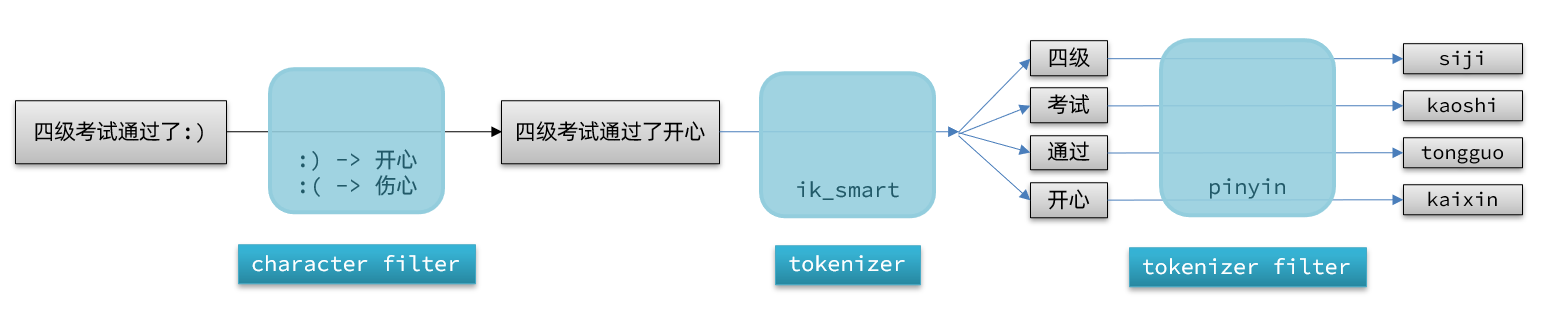
An analyzer in Elasticsearch consists of three parts:
- character filters: preprocess text before tokenization (e.g., removing or replacing characters)
- tokenizer: splits text into terms. Examples: keyword (no tokenization) and ik_smart
- tokenizer filters: further process tokens, such as case conversion, synonyms, or pinyin processing
Tokenization proceeds through these three components for documents:
PUT /test{ "settings": { "analysis": { "analyzer": { // Custom analyzer "my_analyzer": { // Analyzer name "tokenizer": "ik_max_word", "filter": "py" } }, "filter": { // Custom tokenizer filter "py": { // Filter name "type": "pinyin", // Filter type "keep_full_pinyin": false, "keep_joined_full_pinyin": true, "keep_original": true, "limit_first_letter_length": 16, "remove_duplicated_term": true, "none_chinese_pinyin_tokenize": false } } } }, "mappings": { "properties": { "name": { "type": "text", "analyzer": "my_analyzer", "search_analyzer": "ik_smart" } } }}Auto-complete query
Elasticsearch provides the Completion Suggester to implement auto-completion. This query matches terms that start with the user input and returns them. To improve efficiency, there are constraints on the field types used for completion:
- The field participating in completion queries must be of type completion.
- The content is typically an array of terms used for completion.
Implementation of auto-completion:
@Overridepublic List<String> getSuggestions(String prefix) { try { // 1. Prepare Request SearchRequest request = new SearchRequest("hotel"); // 2. Prepare DSL request.source().suggest(new SuggestBuilder().addSuggestion( "suggestions", SuggestBuilders.completionSuggestion("suggestion") .prefix(prefix) .skipDuplicates(true) .size(10) )); // 3. Send request SearchResponse response = client.search(request, RequestOptions.DEFAULT); // 4. Parse results Suggest suggest = response.getSuggest(); // 4.1 Get suggestions by name CompletionSuggestion suggestions = suggest.getSuggestion("suggestions"); // 4.2 Get options List<CompletionSuggestion.Entry.Option> options = suggestions.getOptions(); // 4.3 Iterate List<String> list = new ArrayList<>(options.size()); for (CompletionSuggestion.Entry.Option option : options) { String text = option.getText().toString(); list.add(text); } return list; } catch (IOException e) { throw new RuntimeException(e); }}Data synchronization
Elasticsearch hotel data comes from a MySQL database, so when MySQL data changes, Elasticsearch must be updated as well. This is the data synchronization between Elasticsearch and MySQL.
There are three common approaches:
- Synchronous invocation
- hotel-demo exposes an API to modify Elasticsearch data
- The hotel management service calls the hotel-demo API after performing DB operations
- Asynchronous notification
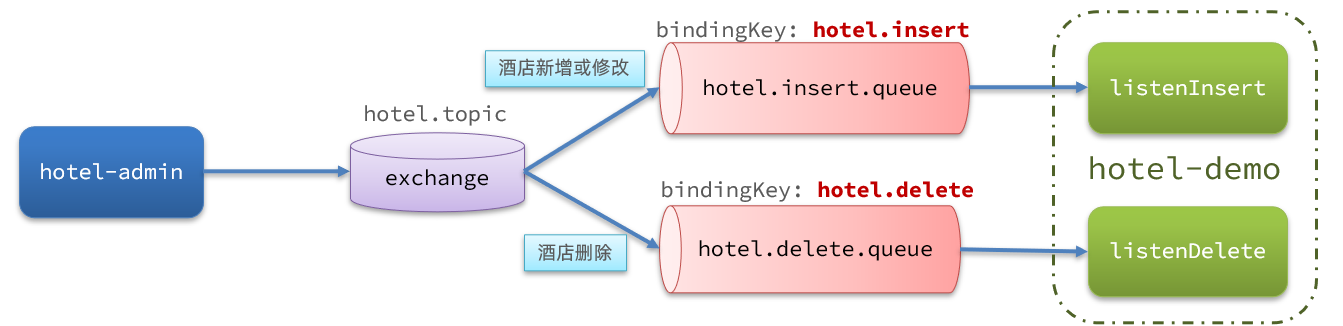
- The hotel-admin service emits MQ messages after MySQL insert/update/delete
- The hotel-demo listens for MQ messages and updates Elasticsearch accordingly
- Binlog listening
- Enable MySQL binlog
- All insert, update, delete operations are logged in binlog
- hotel-demo listens to binlog changes via Canal and updates Elasticsearch in real time
Approach 1: Synchronous invocation
- Pros: simple, crude
- Cons: tight coupling between services
Approach 2: Asynchronous notification
- Pros: low coupling, moderate implementation difficulty
- Cons: depends on MQ reliability
Approach 3: Binlog listening
- Pros: completely decouples services
- Cons: enabling binlog adds DB overhead; implementation is complex
Implementing data synchronization
Use the pre-course material’s hotel-admin project as the hotel management service. When hotel data is added, deleted, or updated, Elasticsearch data should be updated accordingly.
- Start and test hotel data CRUD
- Declare exchanges, queues, RoutingKeys
- In hotel-admin’s add/delete/update operations, publish messages
- In hotel-demo, implement message listening and update Elasticsearch data
- Start and test data synchronization
Declare exchanges and queues
MQ structure as follows:
Add dependencies
<!--amqp--><dependency> <groupId>org.springframework.boot</groupId> <artifactId>spring-boot-starter-amqp</artifactId></dependency>Define configuration class to declare the beans
import cn.itcast.hotel.constants.MqConstants;import org.springframework.amqp.core.Binding;import org.springframework.amqp.core.BindingBuilder;import org.springframework.amqp.core.Queue;import org.springframework.amqp.core.TopicExchange;import org.springframework.context.annotation.Bean;import org.springframework.context.annotation.Configuration;
@Configurationpublic class MqConfig { @Bean public TopicExchange topicExchange(){ return new TopicExchange(MqConstants.HOTEL_EXCHANGE, true, false); }
@Bean public Queue insertQueue(){ return new Queue(MqConstants.HOTEL_INSERT_QUEUE, true); }
@Bean public Queue deleteQueue(){ return new Queue(MqConstants.HOTEL_DELETE_QUEUE, true); }
@Bean public Binding insertQueueBinding(){ return BindingBuilder.bind(insertQueue()).to(topicExchange()).with(MqConstants.HOTEL_INSERT_KEY); }
@Bean public Binding deleteQueueBinding(){ return BindingBuilder.bind(deleteQueue()).to(topicExchange()).with(MqConstants.HOTEL_DELETE_KEY); }}In the add, delete, and update operations in hotel-admin, MQ messages are sent respectively:
Sending MQ messages
@PostMappingpublic void saveHotel(@RequestBody Hotel hotel){ hotelService.save(hotel);
rabbitTemplate.convertAndSend(MqConstants.HOTEL_EXCHANGE,HOTEL_INSERT_KEY,hotel.getId());}
@PutMapping()public void updateById(@RequestBody Hotel hotel){ if (hotel.getId() == null) { throw new InvalidParameterException("id不能为空"); } hotelService.updateById(hotel);
rabbitTemplate.convertAndSend(MqConstants.HOTEL_EXCHANGE,HOTEL_INSERT_KEY,hotel.getId());}
@DeleteMapping("/{id}")public void deleteById(@PathVariable("id") Long id) { hotelService.removeById(id);
rabbitTemplate.convertAndSend(MqConstants.HOTEL_EXCHANGE,MqConstants.HOTEL_DELETE_KEY, id);}Receiving MQ messages
Create a listener
In hotel-demo under the cn.itcast.hotel.mq package, add a class:
@Componentpublic class HotelListener {
@Autowired private IHotelService hotelService;
/** * Listen for hotel add or update operations * @param id hotel id */ @RabbitListener(queues = MqConstants.HOTEL_INSERT_QUEUE) public void listenHotelInsertOrUpdate(Long id){ hotelService.insertById(id); }
/** * Listen for hotel deletion * @param id hotel id */ @RabbitListener(queues = MqConstants.HOTEL_DELETE_QUEUE) public void listenHotelDelete(Long id){ hotelService.deleteById(id); }}Implementing the business logic:
@Overridepublic void deleteById(Long id) { try { // 1. Prepare Request DeleteRequest request = new DeleteRequest("hotel", id.toString()); // 2. Send request client.delete(request, RequestOptions.DEFAULT); } catch (IOException e) { throw new RuntimeException(e); }}
@Overridepublic void insertById(Long id) { try { // 0. Query hotel data by id Hotel hotel = getById(id); // Convert to document type HotelDoc hotelDoc = new HotelDoc(hotel);
// 1. Prepare Request object IndexRequest request = new IndexRequest("hotel").id(hotel.getId().toString()); // 2. Prepare JSON document request.source(JSON.toJSONString(hotelDoc), XContentType.JSON); // 3. Send request client.index(request, RequestOptions.DEFAULT); } catch (IOException e) { throw new RuntimeException(e); }}Clusters
Running Elasticsearch on a single machine inevitably faces two issues: handling massive data and single point of failure.
- Mass data storage: shard the index into several pieces and store across multiple nodes
- Single point of failure: back up shards on different nodes (replicas)
ES cluster concepts:
-
Cluster: A set of nodes that share the same cluster name
-
Node: A single Elasticsearch instance in the cluster
-
Shard: An index can be partitioned into parts; in a cluster, different shards can reside on different nodes
-
Primary shard: as defined relative to replica shards
-
Replica shard: Each primary shard can have one or more replicas; data and primary shards are replicated
Data backups provide high availability but the more replicas you have, the more nodes you need, which increases cost
To balance availability and cost, you can:
- Shard data to different nodes
- Then back up each shard on the other nodes, achieving mutual backup
This can significantly reduce the number of service nodes required
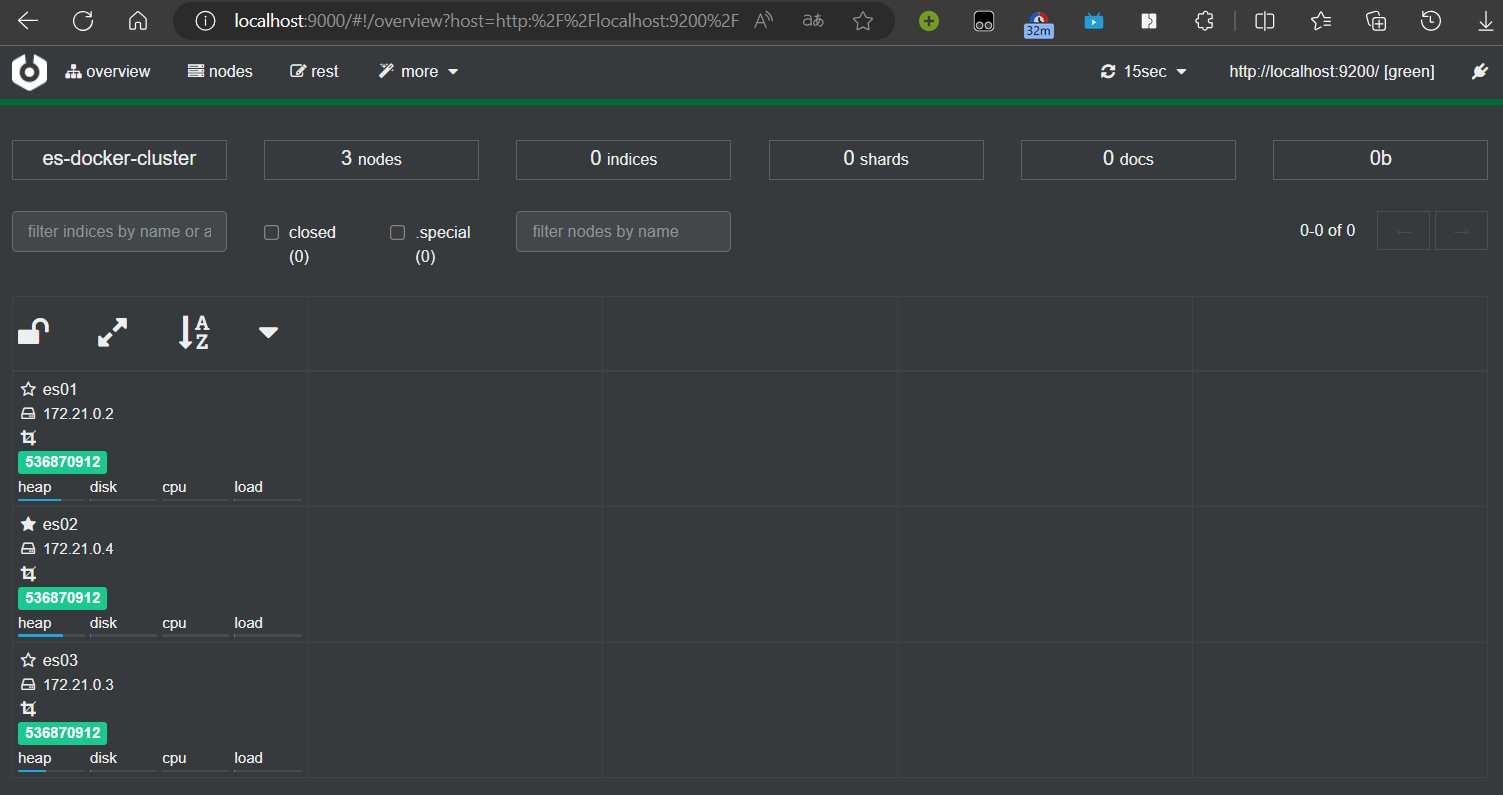
Creating an ES cluster
Using docker-compose:
version: '2.2'services: es01: image: elasticsearch:7.12.1 container_name: es01 environment: - node.name=es01 - cluster.name=es-docker-cluster - discovery.seed_hosts=es02,es03 - cluster.initial_master_nodes=es01,es02,es03 - "ES_JAVA_OPTS=-Xms512m -Xmx512m" volumes: - data01:/usr/share/elasticsearch/data ports: - 9200:9200 networks: - elastic es02: image: elasticsearch:7.12.1 container_name: es02 environment: - node.name=es02 - cluster.name=es-docker-cluster - discovery.seed_hosts=es01,es03 - cluster.initial_master_nodes=es01,es02,es03 - "ES_JAVA_OPTS=-Xms512m -Xmx512m" volumes: - data02:/usr/share/elasticsearch/data ports: - 9201:9200 networks: - elastic es03: image: elasticsearch:7.12.1 container_name: es03 environment: - node.name=es03 - cluster.name=es-docker-cluster - discovery.seed_hosts=es01,es02 - cluster.initial_master_nodes=es01,es02,es03 - "ES_JAVA_OPTS=-Xms512m -Xmx512m" volumes: - data03:/usr/share/elasticsearch/data networks: - elastic ports: - 9202:9200volumes: data01: driver: local data02: driver: local data03: driver: local
networks: elastic: driver: bridgeIf running on WSL makes it difficult to start, increase memory with:
wsl -d docker-desktopecho 262144 >> /proc/sys/vm/max_map_countMonitor the ES cluster with Cerebro
Cluster split-brain
Cluster role separation
In Elasticsearch, cluster nodes have different roles:
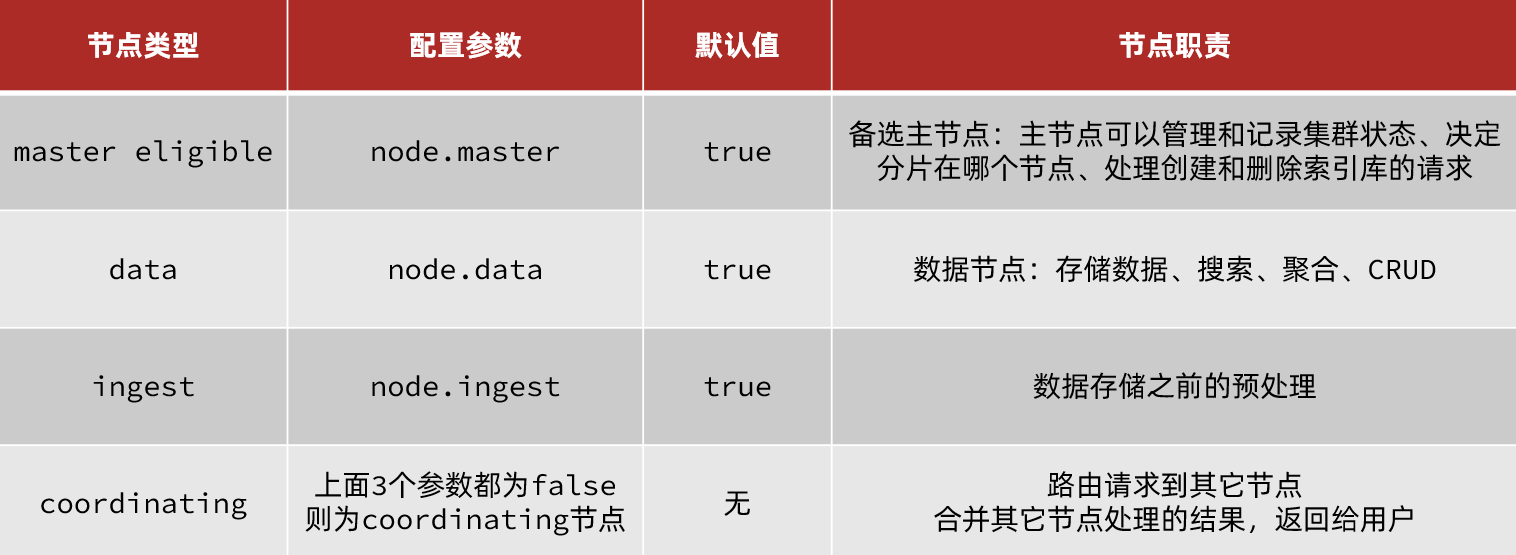
By default, any node in the cluster can assume all four roles.
In real deployments, roles should be separated:
- Master node: high CPU requirements, memory needs as well
- Data node: high CPU and memory requirements
- Coordinating node: high network bandwidth and CPU requirements
Role separation allows you to allocate different hardware to different nodes and avoid cross-service interference.
Split-brain
Split-brain occurs when nodes in the cluster lose contact.
When the network recovers, if there are two masters, the cluster state may diverge, causing split-brain:
The solution is to require consensus votes greater than (eligible nodes + 1) / 2 to elect a master; hence an odd number of eligible nodes is preferable. The configuration is discovery.zen.minimum_master_nodes. After ES 7.0, this is usually on by default, so split-brain is rarely an issue.
What is the role of master-eligible nodes?
- Participate in master election
- Master nodes manage the cluster state, shard information, and requests to create/delete indices
What is the role of data nodes?
- CRUD operations on data
What is the role of coordinating nodes?
- Route requests to other nodes
- Merge results from different nodes and return to the user
Cluster distributed storage
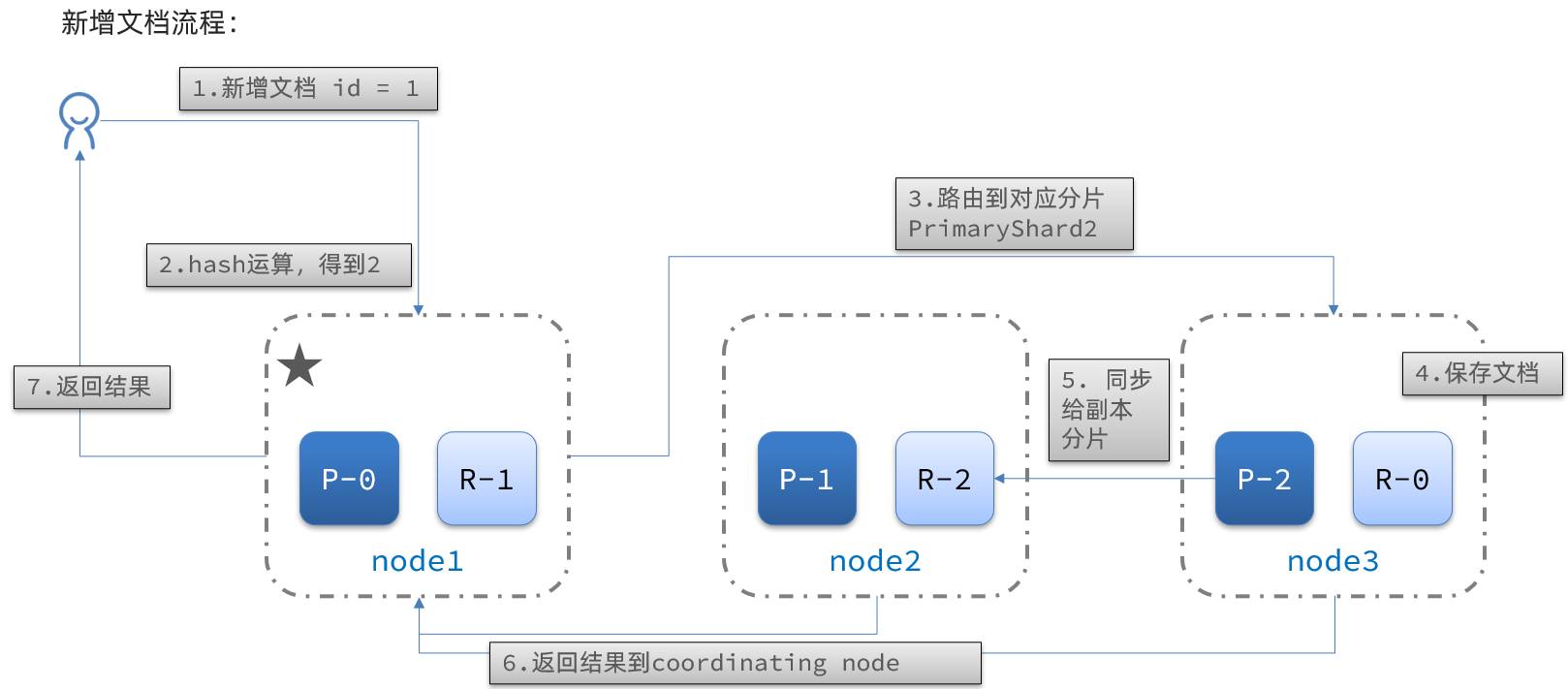
When adding a new document, it should be stored on different shards to balance data. How does the coordinating node decide which shard to store data on?
Sharding principle
Elasticsearch uses a hash function to determine which shard a document should be stored on:
shard = hash(_routing) % number_of_shards
Notes:
- _routing defaults to the document id
- The algorithm depends on the number of shards; once an index is created, the shard count cannot be changed
Cluster distributed querying
Elasticsearch queries operate in two phases:
- scatter phase: the coordinating node distributes the request to each shard
- gather phase: the coordinating node collects results from data nodes and returns the final results to the user
Cluster failover
The cluster’s master node monitors node status. If a node fails, the master will immediately relocate the failed node’s shards to other nodes to ensure data safety; this is failover.
- node1 is the master, the other two nodes are replicas
- node1 fails; a new master is elected, for example node2
- node2 detects the cluster state and finds shards-1 and -0 have no replica nodes
- migrate data from node1 to node2 and node3
If this article helped you, please share it with others!
Some information may be outdated