



本文主要基于黑马的redis视频 编写
Redis是一种键值型的NoSql数据库,这里有两个关键字:
- 键值型
- NoSql
其中键值型,是指Redis中存储的数据都是以key.value对的形式存储,而value的形式多种多样,可以是字符串.数值.甚至json:
redis入门
NoSQL
NoSql可以翻译做Not Only Sql(不仅仅是SQL),或者是No Sql(非Sql的)数据库。是相对于传统关系型数据库而言,有很大差异的一种特殊的数据库,因此也称之为非关系型数据库。
- 与关系型数据库对比
传统关系型数据库是结构化数据,每一张表都有严格的约束信息:字段名.字段数据类型.字段约束等等信息,插入的数据必须遵守这些约束:
而NoSql则对数据库格式没有严格约束,往往形式松散,自由。可以是键值型;文档型;图格式
传统数据库的表与表之间往往存在关联,例如外键
而非关系型数据库不存在关联关系,要维护关系要么靠代码中的业务逻辑,要么靠数据之间的耦合
传统关系型数据库会基于Sql语句做查询,语法有统一标准;
而不同的非关系数据库查询语法差异极大,五花八门各种各样。
传统关系型数据库能满足事务ACID的原则
而非关系型数据库往往不支持事务,或者不能严格保证ACID的特性,只能实现基本的一致性。

- 存储方式
- 关系型数据库基于磁盘进行存储,会有大量的磁盘IO,对性能有一定影响
- 非关系型数据库,他们的操作更多的是依赖于内存来操作,内存的读写速度会非常快,性能自然会好一些
- 扩展性
- 关系型数据库集群模式一般是主从,主从数据一致,起到数据备份的作用,称为垂直扩展。
- 非关系型数据库可以将数据拆分,存储在不同机器上,可以保存海量数据,解决内存大小有限的问题。称为水平扩展。
- 关系型数据库因为表之间存在关联关系,如果做水平扩展会给数据查询带来很多麻烦
Redis
Redis全称是Remote Dictionary Server 远程词典服务器,是一个基于内存的键值型NoSQL数据库。
特征:
- 键值(key-value)型,value支持多种不同数据结构,功能丰富
- 单线程,每个命令具备原子性
- 低延迟,速度快(基于内存.IO多路复用.良好的编码)。
- 支持数据持久化
- 支持主从集群.分片集群
- 支持多语言客户端
Redis安装
通过Docker安装
docker search redisdocker pul redisdocker run --restart=always -p 6379:6379 --name myredis -v /home/redis/myredis/myredis.conf:/etc/redis/redis.conf -v /home/redis/myredis/data:/data -d redis redis-server /etc/redis/redis.conf --appendonly yes
docker exec -it <容器名> /bin/bashRedis常见命令
Redis数据结构介绍
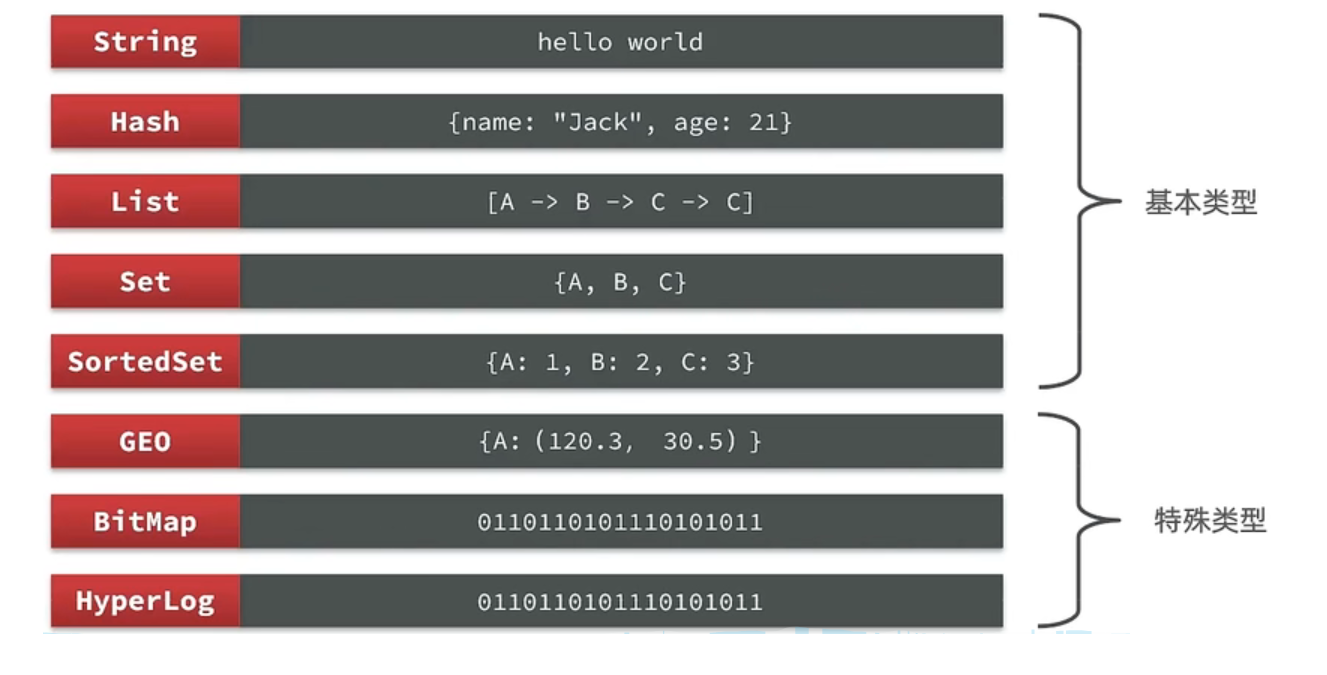
Redis是一个key-value的数据库,key一般是String类型,不过value的类型多种多样:
Redis 通用命令
通用指令是部分数据类型的,都可以使用的指令,常见的有:
- KEYS:查看符合模板的所有key
127.0.0.1:6379> keys *
# 查询以a开头的key127.0.0.1:6379> keys a*1) "age"在生产环境下,不推荐使用keys 命令,因为这个命令在key过多的情况下,效率不高
- DEL:删除一个指定的key
127.0.0.1:6379> del name #删除单个(integer) 1 #成功删除1个
127.0.0.1:6379> keys *1) "age"
127.0.0.1:6379> MSET k1 v1 k2 v2 k3 v3 #批量添加数据OK
127.0.0.1:6379> keys *1) "k3"2) "k2"3) "k1"4) "age"
127.0.0.1:6379> del k1 k2 k3 k4(integer) 3 #此处返回的是成功删除的key,由于redis中只有k1,k2,k3 所以只成功删除3个,最终返回
127.0.0.1:6379> keys * #再查询全部的key1) "age" #只剩下一个了- EXISTS:判断key是否存在
127.0.0.1:6379> exists age(integer) 1
127.0.0.1:6379> exists name(integer) 0- EXPIRE:给一个key设置有效期,有效期到期时该key会被自动删除
- TTL:查看一个KEY的剩余有效期
127.0.0.1:6379> expire age 10(integer) 1
127.0.0.1:6379> ttl age(integer) 8
127.0.0.1:6379> ttl age(integer) -2
127.0.0.1:6379> ttl age(integer) -2 #当这个key过期了,那么此时查询出来就是-2
127.0.0.1:6379> keys *(empty list or set)
127.0.0.1:6379> set age 10 #如果没有设置过期时间OK
127.0.0.1:6379> ttl age(integer) -1 # ttl的返回值就是-1Redis命令-String命令
String类型,也就是字符串类型,是Redis中最简单的存储类型。
其value是字符串,不过根据字符串的格式不同,又可以分为3类:
- string:普通字符串
- int:整数类型,可以做自增.自减操作
- float:浮点类型,可以做自增.自减操作
String的常见命令有:
- SET:添加或者修改已经存在的一个String类型的键值对
- GET:根据key获取String类型的value
- MSET:批量添加多个String类型的键值对
- MGET:根据多个key获取多个String类型的value
- INCR:让一个整型的key自增1
- INCRBY:让一个整型的key自增并指定步长,例如:incrby num 2 让num值自增2
- INCRBYFLOAT:让一个浮点类型的数字自增并指定步长
- SETNX:添加一个String类型的键值对,前提是这个key不存在,否则不执行
- SETEX:添加一个String类型的键值对,并且指定有效期
Redis命令-Key的层级结构
Redis没有类似MySQL中的Table的概念,我们该如何区分不同类型的key呢?
Redis的key允许有多个单词形成层级结构,多个单词之间用’:‘隔开
这个格式并非固定,也可以根据自己的需求来删除或添加词条。
例如我们的项目名称叫 heima,有user和product两种不同类型的数据,我们可以这样定义key:
- user相关的key:heima:user:1
- product相关的key:heima:product:1
如果Value是一个Java对象,例如一个User对象,则可以将对象序列化为JSON字符串后存储:
| KEY | VALUE |
|---|---|
| heima:user:1 | {“id”:1, “name”: “Jack”, “age”: 21} |
| heima:product:1 | {“id”:1, “name”: “小米11”, “price”: 4999} |
一旦我们向redis采用这样的方式存储,那么在可视化界面中,redis会以层级结构来进行存储,更加方便Redis获取数据
Redis命令-Hash命令
Hash类型,也叫散列,其value是一个无序字典,类似于Java中的HashMap结构。
String结构是将对象序列化为JSON字符串后存储,当需要修改对象某个字段时很不方便:
Hash结构可以将对象中的每个字段独立存储,可以针对单个字段做CRUD:
Hash类型的常见命令
- HSET key field value:添加或者修改hash类型key的field的值
- HGET key field:获取一个hash类型key的field的值
- HMSET:批量添加多个hash类型key的field的值
- HMGET:批量获取多个hash类型key的field的值
- HGETALL:获取一个hash类型的key中的所有的field和value
- HKEYS:获取一个hash类型的key中的所有的field
- HINCRBY:让一个hash类型key的字段值自增并指定步长
- HSETNX:添加一个hash类型的key的field值,前提是这个field不存在,否则不执行
Redis命令-List命令
Redis中的List类型与Java中的LinkedList类似,可以看做是一个双向链表结构。既可以支持正向检索和也可以支持反向检索。
特征也与LinkedList类似:
- 有序
- 元素可以重复
- 插入和删除快
- 查询速度一般
常用来存储一个有序数据,例如:朋友圈点赞列表,评论列表等。
List的常见命令有:
- LPUSH key element … :向列表左侧插入一个或多个元素
- LPOP key:移除并返回列表左侧的第一个元素,没有则返回nil
- RPUSH key element … :向列表右侧插入一个或多个元素
- RPOP key:移除并返回列表右侧的第一个元素
- LRANGE key star end:返回一段角标范围内的所有元素
- BLPOP和BRPOP:与LPOP和RPOP类似,只不过在没有元素时等待指定时间,而不是直接返回nil
Redis命令-Set命令
Redis的Set结构与Java中的HashSet类似,可以看做是一个value为null的HashMap。因为也是一个hash表,因此具备与HashSet类似的特征:
- 无序
- 元素不可重复
- 查找快
- 支持交集.并集.差集等功能
Set类型的常见命令
- SADD key member … :向set中添加一个或多个元素
- SREM key member … : 移除set中的指定元素
- SCARD key: 返回set中元素的个数
- SISMEMBER key member:判断一个元素是否存在于set中
- SMEMBERS:获取set中的所有元素
- SINTER key1 key2 … :求key1与key2的交集
- SDIFF key1 key2 … :求key1与key2的差集
- SUNION key1 key2 ..:求key1和key2的并集
redis命令-SortedSet类型
Redis的SortedSet是一个可排序的set集合,与Java中的TreeSet有些类似,但底层数据结构却差别很大。SortedSet中的每一个元素都带有一个score属性,可以基于score属性对元素排序,底层的实现是一个跳表(SkipList)加 hash表。
SortedSet具备下列特性:
- 可排序
- 元素不重复
- 查询速度快
因为SortedSet的可排序特性,经常被用来实现排行榜这样的功能。
SortedSet的常见命令有:
- ZADD key score member:添加一个或多个元素到sorted set ,如果已经存在则更新其score值
- ZREM key member:删除sorted set中的一个指定元素
- ZSCORE key member : 获取sorted set中的指定元素的score值
- ZRANK key member:获取sorted set 中的指定元素的排名
- ZCARD key:获取sorted set中的元素个数
- ZCOUNT key min max:统计score值在给定范围内的所有元素的个数
- ZINCRBY key increment member:让sorted set中的指定元素自增,步长为指定的increment值
- ZRANGE key min max:按照score排序后,获取指定排名范围内的元素
- ZRANGEBYSCORE key min max:按照score排序后,获取指定score范围内的元素
- ZDIFF.ZINTER.ZUNION:求差集.交集.并集
注意:所有的排名默认都是升序,如果要降序则在命令的Z后面添加REV即可,例如:
- 升序获取sorted set 中的指定元素的排名:ZRANK key member
- 降序获取sorted set 中的指定元素的排名:ZREVRANK key memeber
Java客户端-Jedis
https://redis.io/docs/clients/
- Jedis和Lettuce:这两个主要是提供了Redis命令对应的API,方便我们操作Redis,而SpringDataRedis又对这两种做了抽象和封装,因此我们后期会直接以SpringDataRedis来学习。
- Redisson:是在Redis基础上实现了分布式的可伸缩的java数据结构,例如Map.Queue等,而且支持跨进程的同步机制:Lock.Semaphore等待,比较适合用来实现特殊的功能需求。
Jedis入门
依赖:
<!--jedis--><dependency> <groupId>redis.clients</groupId> <artifactId>jedis</artifactId> <version>3.7.0</version></dependency>测试:
private Jedis jedis;
@BeforeEachvoid setup() { // 1.建立连接 // jedis = new Jedis("192.168.150.101", 6379);// jedis = JedisConnectionFactory.getJedis(); jedis = new Jedis("127.0.0.1",6379); // 2.设置密码// jedis.auth("123321"); // 3.选择库 jedis.select(0);}
@Testvoid testString() { // 存入数据 String result = jedis.set("name", "虎哥"); System.out.println("result = " + result); // 获取数据 String name = jedis.get("name"); System.out.println("name = " + name);}
@Testvoid testHash() { // 插入hash数据 jedis.hset("user:1", "name", "Jack"); jedis.hset("user:1", "age", "21");
// 获取 Map<String, String> map = jedis.hgetAll("user:1"); System.out.println(map);}
@AfterEachvoid tearDown() { if (jedis != null) { jedis.close(); }}Jedis连接池
Jedis本身是线程不安全的,并且频繁的创建和销毁连接会有性能损耗,因此我们推荐大家使用Jedis连接池代替Jedis的直连方式
有关池化思想,并不仅仅是这里会使用,很多地方都有,比如说我们的数据库连接池,比如我们tomcat中的线程池,这些都是池化思想的体现。
public class JedisConnectionFacotry {
private static final JedisPool jedisPool;
static { //配置连接池 JedisPoolConfig poolConfig = new JedisPoolConfig(); poolConfig.setMaxTotal(8); poolConfig.setMaxIdle(8); poolConfig.setMinIdle(0); poolConfig.setMaxWaitMillis(1000); //创建连接池对象 jedisPool = new JedisPool(poolConfig,"127.0.0.1",6379,1000); }
public static Jedis getJedis(){ return jedisPool.getResource(); }}从JedisFactory中取出Jedis连接:
@BeforeEachvoid setup() { // 建立连接 jedis = JedisConnectionFacotry.getJedis(); // 选择库 jedis.select(0);}SpringDataRedis
SpringData是Spring中数据操作的模块,包含对各种数据库的集成,其中对Redis的集成模块就叫做SpringDataRedis,官网地址:https://spring.io/projects/spring-data-redis
- 提供了对不同Redis客户端的整合(Lettuce和Jedis)
- 提供了RedisTemplate统一API来操作Redis
- 支持Redis的发布订阅模型
- 支持Redis哨兵和Redis集群
- 支持基于Lettuce的响应式编程
- 支持基于JDK.JSON.字符串.Spring对象的数据序列化及反序列化
- 支持基于Redis的JDKCollection实现
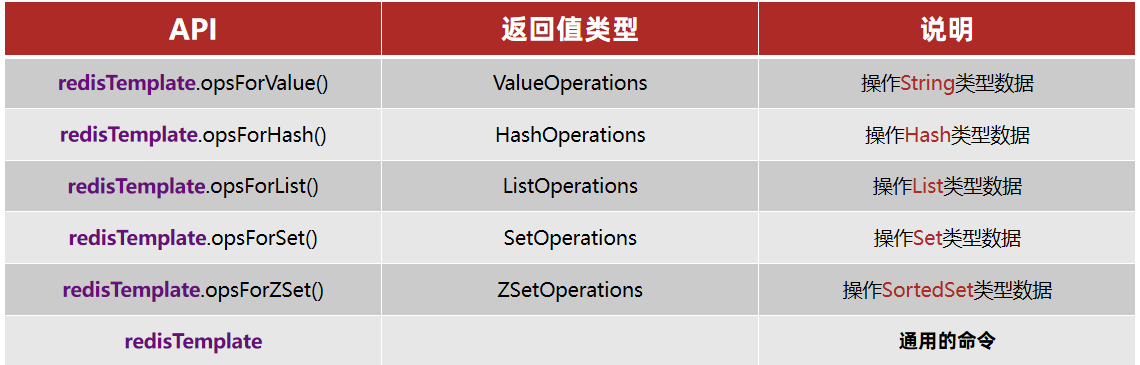
SpringDataRedis中提供了RedisTemplate工具类,其中封装了各种对Redis的操作。并且将不同数据类型的操作API封装到了不同的类型中:
SpringDataRedis入门
pom依赖:
<!--redis依赖--><dependency> <groupId>org.springframework.boot</groupId> <artifactId>spring-boot-starter-data-redis</artifactId></dependency><!--common-pool--><dependency> <groupId>org.apache.commons</groupId> <artifactId>commons-pool2</artifactId></dependency><!--Jackson依赖--><dependency> <groupId>com.fasterxml.jackson.core</groupId> <artifactId>jackson-databind</artifactId></dependency><dependency> <groupId>org.projectlombok</groupId> <artifactId>lombok</artifactId> <optional>true</optional></dependency>yml配置:
spring: redis: host: 127.0.0.1 port: 6379# password: 123321 lettuce: pool: max-active: 8 #最大连接 max-idle: 8 #最大空闲连接 min-idle: 0 #最小空闲连接 max-wait: 100ms #连接等待时间测试:
@SpringBootTestclass JedisDemoApplicationTests {
@Autowired private RedisTemplate redisTemplate;
@Test void testString(){ redisTemplate.opsForValue().set("name","hg");
Object name = redisTemplate.opsForValue().get("name"); System.out.println(name); }
}- 引入spring-boot-starter-data-redis依赖
- 在application.yml配置Redis信息
- 注入RedisTemplate
数据序列化
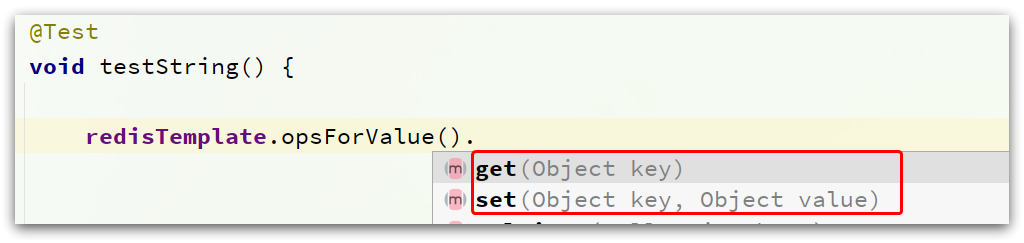
RedisTemplate可以接收任意Object作为值写入Redis:
只不过写入前会把Object序列化为字节形式,默认是采用JDK序列化,得到的结果是这样的:
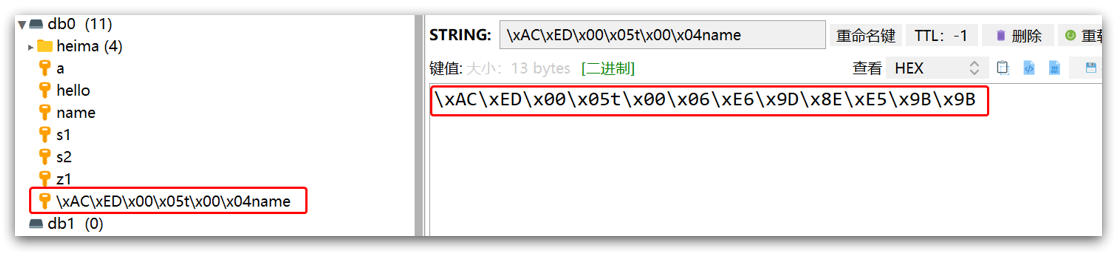
缺点:
- 可读性差
- 内存占用较大
自定义序列化方式
@Configurationpublic class RedisConfig {
@Bean public RedisTemplate redisTemplate(RedisConnectionFactory connectionFactory){ // 创建RedisTemplate对象 RedisTemplate template = new RedisTemplate(); // 设置连接工厂 template.setConnectionFactory(connectionFactory); // 创建JSON序列化工具 GenericJackson2JsonRedisSerializer jsonRedisSerializer = new GenericJackson2JsonRedisSerializer(); // 设置Key的序列化 template.setKeySerializer(RedisSerializer.string()); template.setHashKeySerializer(RedisSerializer.string()); // 设置Value的序列化 template.setValueSerializer(jsonRedisSerializer); template.setHashValueSerializer(jsonRedisSerializer); // 返回 return template; }
}StringRedisTemplate
为了在反序列化时知道对象的类型,JSON序列化器会将类的class类型写入json结果中,存入Redis,会带来额外的内存开销。
为了减少内存的消耗,我们可以采用手动序列化的方式,换句话说,就是不借助默认的序列化器,而是我们自己来控制序列化的动作,同时,我们只采用String的序列化器,这样,在存储value时,我们就不需要在内存中就不用多存储数据,从而节约我们的内存空间
@Autowiredprivate StringRedisTemplate stringRedisTemplate;
private static final ObjectMapper mapper = new ObjectMapper();
@Testvoid testSaveUser() throws JsonProcessingException { // 创建对象 User user = new User("hg", 21); // 手动序列化 String json = mapper.writeValueAsString(user); // 写入数据 stringRedisTemplate.opsForValue().set("user:200", json);
// 获取数据 String jsonUser = stringRedisTemplate.opsForValue().get("user:200"); // 手动反序列化 User user1 = mapper.readValue(jsonUser, User.class); System.out.println("user1 = " + user1);}RedisTemplate的两种序列化实践方案:
- 方案一:
- 自定义RedisTemplate
- 修改RedisTemplate的序列化器为GenericJackson2JsonRedisSerializer
- 方案二:
- 使用StringRedisTemplate
- 写入Redis时,手动把对象序列化为JSON
- 读取Redis时,手动把读取到的JSON反序列化为对象
This article is mainly based on HeiMa’s Redis video
Redis is a key-value NoSQL database. There are two keywords here:
- Key-value type
- NoSql
Here, key-value means that data in Redis is stored as key.value pairs, and the value can take many forms, such as strings, numbers, or even JSON.
Redis Basics
NoSQL
NoSQL can be understood as “Not Only SQL” or “No SQL.” Compared with traditional relational databases, it is a special kind of database with major differences, so it is also called a non-relational database.
- Comparison with relational databases
Traditional relational databases store structured data. Each table has strict constraints such as field names, field types, and field constraints, and inserted data must follow these rules.
- NoSQL databases usually do not strictly constrain data formats. They are often more flexible and can be key-value, document, or graph based.
Tables in traditional databases are often related to each other, for example through foreign keys.
Non-relational databases generally do not have built-in table relationships. Relationships must be maintained either by business logic in code or by coupling between pieces of data.
Traditional relational databases use SQL for queries, with a relatively unified syntax standard.
By contrast, different NoSQL databases can have very different query syntaxes.
Traditional relational databases can satisfy ACID transaction properties.
NoSQL databases often do not support transactions, or cannot strictly guarantee ACID properties, and instead provide basic consistency.
- Storage method
- Relational databases are disk-based, which involves a lot of disk I/O and can affect performance.
- NoSQL databases rely more on in-memory operations. Memory read/write speed is much faster, so performance is usually better.
- Scalability
- Relational database clustering is usually master-slave, where data consistency between master and slave is used for backup; this is often considered vertical scaling.
- NoSQL databases can split data across multiple machines, store massive amounts of data, and solve memory size limitations. This is horizontal scaling.
- Because relational databases have inter-table relationships, horizontal scaling can make data queries much more complicated.
Redis
Redis stands for Remote Dictionary Server. It is an in-memory key-value NoSQL database.
Features:
- Key-value model; values support many data structures and are very flexible
- Single-threaded, with each command being atomic
- Low latency and high speed (thanks to memory, I/O multiplexing, and efficient implementation)
- Supports data persistence
- Supports master-slave replication and sharding clusters
- Supports multi-language clients
Redis Installation
Install via Docker
docker search redisdocker pul redisdocker run --restart=always -p 6379:6379 --name myredis -v /home/redis/myredis/myredis.conf:/etc/redis/redis.conf -v /home/redis/myredis/data:/data -d redis redis-server /etc/redis/redis.conf --appendonly yes
docker exec -it <容器名> /bin/bashCommon Redis Commands
Redis Data Structure Overview
Redis is a key-value database. Keys are usually of type String, while values can be of many different types:
Redis Generic Commands
Generic commands can be used across multiple data types. Common ones include:
KEYS: View all keys matching a pattern
127.0.0.1:6379> keys *
# 查询以a开头的key127.0.0.1:6379> keys a*1) "age"In production environments, KEYS is not recommended because it becomes inefficient when there are too many keys.
DEL: Delete a specified key
127.0.0.1:6379> del name #删除单个(integer) 1 #成功删除1个
127.0.0.1:6379> keys *1) "age"
127.0.0.1:6379> MSET k1 v1 k2 v2 k3 v3 #批量添加数据OK
127.0.0.1:6379> keys *1) "k3"2) "k2"3) "k1"4) "age"
127.0.0.1:6379> del k1 k2 k3 k4(integer) 3 #此处返回的是成功删除的key,由于redis中只有k1,k2,k3 所以只成功删除3个,最终返回
127.0.0.1:6379> keys * #再查询全部的key1) "age" #只剩下一个了EXISTS: Check whether a key exists
127.0.0.1:6379> exists age(integer) 1
127.0.0.1:6379> exists name(integer) 0EXPIRE: Set a TTL for a key; the key is automatically deleted when it expiresTTL: Check the remaining lifetime of a key
127.0.0.1:6379> expire age 10(integer) 1
127.0.0.1:6379> ttl age(integer) 8
127.0.0.1:6379> ttl age(integer) -2
127.0.0.1:6379> ttl age(integer) -2 #当这个key过期了,那么此时查询出来就是-2
127.0.0.1:6379> keys *(empty list or set)
127.0.0.1:6379> set age 10 #如果没有设置过期时间OK
127.0.0.1:6379> ttl age(integer) -1 # ttl的返回值就是-1Redis Commands - String
The String type is the simplest storage type in Redis.
Its value is a string, but based on the format it can be divided into three categories:
string: regular stringint: integer type, supports increment/decrementfloat: floating-point type, supports increment/decrement
Common String commands include:
SET: Add or modify a String key-value pairGET: Get the String value by keyMSET: Batch set multiple String key-value pairsMGET: Batch get String values by multiple keysINCR: Increment an integer key by 1INCRBY: Increment an integer key by a specified step, e.g.incrby num 2INCRBYFLOAT: Increment a floating-point value by a specified stepSETNX: Set a String key-value pair only if the key does not existSETEX: Set a String key-value pair with an expiration time
Redis Commands - Hierarchical Key Naming
Redis does not have a concept like MySQL tables, so how do we distinguish different types of keys?
Redis keys can use multiple words to form a hierarchical structure, separated by :.
This format is not fixed; you can add or remove segments based on your own needs.
For example, if the project name is heima and we have user and product data, we can define keys like this:
- User-related key: heima:user:1
- Product-related key: heima:product:1
If the value is a Java object (for example, a User object), you can serialize it into a JSON string and store it:
| KEY | VALUE |
|---|---|
| heima:user:1 | {“id”:1, “name”: “Jack”, “age”: 21} |
| heima:product:1 | {“id”:1, “name”: “Xiaomi 11”, “price”: 4999} |
Once data is stored in Redis this way, visual tools can display keys hierarchically, which makes data management more convenient.
Redis Commands - Hash
The Hash type is an unordered dictionary, similar to a HashMap in Java.
With the String approach, objects are stored as serialized JSON strings, which is inconvenient when you need to modify a single field.
The Hash structure stores each field of an object independently, making CRUD operations on individual fields easier.
Common Hash commands
HSET key field value: Add or modify the value of a field in a hash keyHGET key field: Get the value of a field in a hash keyHMSET: Batch set multiple fields in a hash keyHMGET: Batch get multiple fields from a hash keyHGETALL: Get all fields and values in a hash keyHKEYS: Get all fields in a hash keyHINCRBY: Increment a numeric field in a hash key by a specified stepHSETNX: Set a field in a hash key only if that field does not exist
Redis Commands - List
The List type in Redis is similar to Java’s LinkedList. It can be viewed as a doubly linked list and supports both forward and reverse access.
Its characteristics are also similar to LinkedList:
- Ordered
- Elements can be duplicated
- Fast insertion and deletion
- Average query performance
It is commonly used to store ordered data, such as like lists or comment lists.
Common List commands include:
LPUSH key element ...: Insert one or more elements on the left side of the listLPOP key: Remove and return the first element on the left side of the list; returnsnilif none existsRPUSH key element ...: Insert one or more elements on the right side of the listRPOP key: Remove and return the first element on the right side of the listLRANGE key start end: Return all elements in an index rangeBLPOP/BRPOP: Similar toLPOPandRPOP, but wait for a specified time when no element exists instead of returningnilimmediately
Redis Commands - Set
Redis Set is similar to Java’s HashSet, and can be viewed as a HashMap whose values are null. Since it is also hash-table-based, it has characteristics similar to HashSet:
- Unordered
- Elements are unique
- Fast lookup
- Supports intersection, union, and difference operations
Common Set commands
SADD key member ...: Add one or more elements to a setSREM key member ...: Remove specified elements from a setSCARD key: Return the number of elements in a setSISMEMBER key member: Check whether an element exists in a setSMEMBERS: Get all elements in a setSINTER key1 key2 ...: Compute the intersection of setsSDIFF key1 key2 ...: Compute the difference of setsSUNION key1 key2 ...: Compute the union of sets
Redis Commands - SortedSet
Redis SortedSet is a sortable set collection, somewhat similar to Java’s TreeSet, but with a very different underlying data structure. Each element in a SortedSet has a score, and elements are ordered by that score. The underlying implementation combines a skip list (SkipList) and a hash table.
SortedSet has the following characteristics:
- Sortable
- Unique elements
- Fast lookup
Because of its sortable nature, SortedSet is often used to implement leaderboard-like features.
Common SortedSet commands include:
ZADD key score member: Add one or more elements to a sorted set; if an element exists, update its scoreZREM key member: Remove a specified element from a sorted setZSCORE key member: Get the score of a specified element in a sorted setZRANK key member: Get the ascending rank of a specified element in a sorted setZCARD key: Get the number of elements in a sorted setZCOUNT key min max: Count elements whose score is within a given rangeZINCRBY key increment member: Increment the score of a specified element by a given amountZRANGE key min max: Get elements within a specified rank range after sorting by scoreZRANGEBYSCORE key min max: Get elements within a specified score range after sorting by scoreZDIFF,ZINTER,ZUNION: Difference / intersection / union operations
Note: All ranking commands are ascending by default. For descending order, add REV (or use the reverse variants), for example:
- Ascending rank of a specified element in a sorted set:
ZRANK key member - Descending rank of a specified element in a sorted set:
ZREVRANK key member
Java Client - Jedis
https://redis.io/docs/clients/
- Jedis and Lettuce: These primarily provide APIs corresponding to Redis commands for easier Redis operations. Spring Data Redis further abstracts and wraps both, so we will mainly use Spring Data Redis later.
- Redisson: Builds distributed, scalable Java data structures on top of Redis (such as
Map,Queue, etc.) and supports cross-process synchronization primitives such asLockandSemaphore, which makes it suitable for more specialized requirements.
Jedis Basics
Dependency:
<!--jedis--><dependency> <groupId>redis.clients</groupId> <artifactId>jedis</artifactId> <version>3.7.0</version></dependency>Test:
private Jedis jedis;
@BeforeEachvoid setup() { // 1.建立连接 // jedis = new Jedis("192.168.150.101", 6379);// jedis = JedisConnectionFactory.getJedis(); jedis = new Jedis("127.0.0.1",6379); // 2.设置密码// jedis.auth("123321"); // 3.选择库 jedis.select(0);}
@Testvoid testString() { // 存入数据 String result = jedis.set("name", "虎哥"); System.out.println("result = " + result); // 获取数据 String name = jedis.get("name"); System.out.println("name = " + name);}
@Testvoid testHash() { // 插入hash数据 jedis.hset("user:1", "name", "Jack"); jedis.hset("user:1", "age", "21");
// 获取 Map<String, String> map = jedis.hgetAll("user:1"); System.out.println(map);}
@AfterEachvoid tearDown() { if (jedis != null) { jedis.close(); }}Jedis Connection Pool
Jedis itself is not thread-safe, and frequently creating and destroying connections causes performance overhead. Therefore, it is recommended to use a Jedis connection pool instead of direct Jedis connections.
Pooling is not only used here; it is a common design idea in many places, such as database connection pools and thread pools in Tomcat.
public class JedisConnectionFacotry {
private static final JedisPool jedisPool;
static { //配置连接池 JedisPoolConfig poolConfig = new JedisPoolConfig(); poolConfig.setMaxTotal(8); poolConfig.setMaxIdle(8); poolConfig.setMinIdle(0); poolConfig.setMaxWaitMillis(1000); //创建连接池对象 jedisPool = new JedisPool(poolConfig,"127.0.0.1",6379,1000); }
public static Jedis getJedis(){ return jedisPool.getResource(); }}Get a Jedis connection from JedisFactory:
@BeforeEachvoid setup() { // 建立连接 jedis = JedisConnectionFacotry.getJedis(); // 选择库 jedis.select(0);}SpringDataRedis
Spring Data is Spring’s data access module, which integrates with various databases. Its Redis integration module is called Spring Data Redis. Official site: https://spring.io/projects/spring-data-redis
- Integrates different Redis clients (Lettuce and Jedis)
- Provides the unified
RedisTemplateAPI to operate on Redis - Supports Redis pub/sub model
- Supports Redis Sentinel and Redis Cluster
- Supports reactive programming based on Lettuce
- Supports serialization/deserialization for JDK objects, JSON, strings, and Spring objects
- Supports JDK collection implementations backed by Redis
Spring Data Redis provides the RedisTemplate utility class, which wraps various Redis operations. It also organizes operation APIs for different data types into different helper types:
SpringDataRedis Basics
pom dependencies:
<!--redis依赖--><dependency> <groupId>org.springframework.boot</groupId> <artifactId>spring-boot-starter-data-redis</artifactId></dependency><!--common-pool--><dependency> <groupId>org.apache.commons</groupId> <artifactId>commons-pool2</artifactId></dependency><!--Jackson依赖--><dependency> <groupId>com.fasterxml.jackson.core</groupId> <artifactId>jackson-databind</artifactId></dependency><dependency> <groupId>org.projectlombok</groupId> <artifactId>lombok</artifactId> <optional>true</optional></dependency>YAML configuration:
spring: redis: host: 127.0.0.1 port: 6379# password: 123321 lettuce: pool: max-active: 8 #最大连接 max-idle: 8 #最大空闲连接 min-idle: 0 #最小空闲连接 max-wait: 100ms #连接等待时间Test:
@SpringBootTestclass JedisDemoApplicationTests {
@Autowired private RedisTemplate redisTemplate;
@Test void testString(){ redisTemplate.opsForValue().set("name","hg");
Object name = redisTemplate.opsForValue().get("name"); System.out.println(name); }
}- Add the
spring-boot-starter-data-redisdependency - Configure Redis connection information in
application.yml - Inject
RedisTemplate
Data Serialization
RedisTemplate can accept any Object as a value and write it to Redis:
Before writing, the object is serialized into bytes. By default, JDK serialization is used, and the result looks like this:
Disadvantages:
- Poor readability
- Higher memory usage
Custom serialization strategy
@Configurationpublic class RedisConfig {
@Bean public RedisTemplate redisTemplate(RedisConnectionFactory connectionFactory){ // 创建RedisTemplate对象 RedisTemplate template = new RedisTemplate(); // 设置连接工厂 template.setConnectionFactory(connectionFactory); // 创建JSON序列化工具 GenericJackson2JsonRedisSerializer jsonRedisSerializer = new GenericJackson2JsonRedisSerializer(); // 设置Key的序列化 template.setKeySerializer(RedisSerializer.string()); template.setHashKeySerializer(RedisSerializer.string()); // 设置Value的序列化 template.setValueSerializer(jsonRedisSerializer); template.setHashValueSerializer(jsonRedisSerializer); // 返回 return template; }
}StringRedisTemplate
To know the object type during deserialization, the JSON serializer writes the class type into the JSON stored in Redis, which introduces extra memory overhead.
To reduce memory usage, we can use manual serialization. In other words, instead of relying on the default serializer, we control the serialization process ourselves and only use the String serializer. This avoids storing extra type metadata in Redis values and saves memory.
@Autowiredprivate StringRedisTemplate stringRedisTemplate;
private static final ObjectMapper mapper = new ObjectMapper();
@Testvoid testSaveUser() throws JsonProcessingException { // 创建对象 User user = new User("hg", 21); // 手动序列化 String json = mapper.writeValueAsString(user); // 写入数据 stringRedisTemplate.opsForValue().set("user:200", json);
// 获取数据 String jsonUser = stringRedisTemplate.opsForValue().get("user:200"); // 手动反序列化 User user1 = mapper.readValue(jsonUser, User.class); System.out.println("user1 = " + user1);}Two practical serialization approaches for RedisTemplate:
- Option 1:
- Customize
RedisTemplate - Change the
RedisTemplateserializer toGenericJackson2JsonRedisSerializer
- Customize
- Option 2:
- Use
StringRedisTemplate - Manually serialize objects to JSON before writing to Redis
- Manually deserialize JSON back into objects after reading from Redis
- Use
本文は黒马のredis動画 に基づいて作成されています
Redisはキー値型のNoSQLデータベースです。ここには2つのキーワードがあります:
- キー値型
- NoSQL
そのうちキー値型は、Redisに保存されるデータがすべてkey.valueのペアとして保存され、valueの形式は多岐にわたり、文字列・数値・さらにはJSONにもなり得ます:
Redis入門
NoSQL
NoSQLはNot Only SQL(SQLだけではない)と訳されることが多い、あるいはNo SQL(非SQLの)データベースとも呼ばれます。伝統的なリレーショナルデータベースと比較して大きな差異を持つ、特殊なデータベースであり、したがって非リレーショナルデータベースとも呼ばれます。
- リレーショナルデータベースとの比較
従来のリレーショナルデータベースは構造化データで、各テーブルには厳密な制約情報があります:フィールド名、フィールドのデータ型、フィールド制約などの情報。挿入されるデータはこれらの制約を遵守しなければなりません:
一方、NoSQLはデータベースの形式に厳密な制約を課さず、しばしば形式がゆるく、自由です。キー値型、ドキュメント型、グラフ型などになり得ます。
従来のデータベースの表と表の間には関連が存在することが多く、例えば外部キーなど
一方、非リレーショナルデータベースには関連関係が存在しません。関係を維持するには、アプリケーションのビジネスロジックで行うか、データ間の結合に頼る必要があります
従来のリレーショナルデータベースはSQL文に基づいてクエリを実行し、構文には統一された標準があります;
しかし、さまざまなNoSQLデータベースごとにクエリ構文は大きく異なり、千差万別です。
従来のリレーショナルデータベースはACIDの原則を満たすことができます
一方、非リレーショナルデータベースは、トランザクションをサポートしない、あるいはACID特性を厳密に保証できないことが多く、基本的な一貫性のみを実現します
- 保存方式
- リレーショナルデータベースはディスク上に保存するため、多くのディスクI/Oが発生し、パフォーマンスに一定の影響を与えます
- 非リレーショナルデータベースは、操作の多くをメモリ上で行うことが多く、メモリの読み書き速度が非常に速いため、性能は自然と良くなります
- 拡張性
- リレーショナルデータベースのクラスタリングは一般にマスター-スレーブ構成で、データは一致し、データバックアップの役割を果たします。垂直拡張と呼ばれます。
- NoSQLデータベースはデータを分割して異なるマシンに保存することができ、膨大なデータを保存でき、メモリ容量の制限を解決します。水平拡張と呼ばれます。
- テーブル間に関連があるため、水平拡張を行うとデータのクエリに多くの手間が発生します
Redis
Redisの正式名称は、Remote Dictionary Server(リモート辞書サーバー)で、メモリ上に基づくキー値型NoSQLデータベースです。
特徴:
- キー値型(key-value)で、valueは多様なデータ構造をサポートし、機能が豊富
- シングルスレッド、各コマンドは原子性を備えます
- 低遅延、高速(メモリ上に基づく、I/O多重化。良好なエンコード。)
- データの永続化をサポート
- マスター-スレーブ構成とシャーディングをサポート
- 複数言語のクライアントをサポート
Redis安装
Dockerでのインストール
docker search redisdocker pul redisdocker run --restart=always -p 6379:6379 --name myredis -v /home/redis/myredis/myredis.conf:/etc/redis/redis.conf -v /home/redis/myredis/data:/data -d redis redis-server /etc/redis/redis.conf --appendonly yes
docker exec -it <容器名> /bin/bashRedisの一般コマンド
Redisデータ構造の紹介
Redisはキー-valueデータベースで、キーは一般的にString型ですが、valueの型は多様です:
Redisの共通コマンド
共通コマンドは、いくつかのデータ型で使用できるコマンドで、よく使われるものは以下のとおりです:
- KEYS:テンプレートに一致するすべてのキーを表示します
127.0.0.1:6379> keys *
# テンプレート"a"で始まるキーを検索127.0.0.1:6379> keys a*1) "age"本番環境では、keys コマンドの使用は推奨されません。なぜなら、キーが多数ある場合、効率が低いからです
- DEL:指定したキーを削除します
127.0.0.1:6379> del name #削除単一(integer) 1 #成功 delete 1
127.0.0.1:6379> keys *1) "age"
127.0.0.1:6379> MSET k1 v1 k2 v2 k3 v3 #複数データを一括追加OK
127.0.0.1:6379> keys *1) "k3"2) "k2"3) "k1"4) "age"
127.0.0.1:6379> del k1 k2 k3 k4(integer) 3 #この時点で削除されたキーは3つ。Redisにはk1,k2,k3しかないため、実際には3つが削除され、最終的に3を返します
127.0.0.1:6379> keys * #すべてのキーを再度検索1) "age" # 残っているのは1つだけ- EXISTS:キーが存在するかを判定
127.0.0.1:6379> exists age(integer) 1
127.0.0.1:6379> exists name(integer) 0- EXPIRE:キーに有効期限を設定。期限が切れると自動的に削除される
- TTL:キーの残り有効期限を表示
127.0.0.1:6379> expire age 10(integer) 1
127.0.0.1:6379> ttl age(integer) 8
127.0.0.1:6379> ttl age(integer) -2
127.0.0.1:6379> ttl age(integer) -2 # このキーが期限切れの場合、ttlは-2になる
127.0.0.1:6379> keys *(empty list or set)
127.0.0.1:6379> set age 10 # 有効期限を設定していない場合OK
127.0.0.1:6379> ttl age(integer) -1 # ttlの返り値は-1Redis命令-String命令
String型は、Redisで最も基本的なストレージ型です。
その値は文字列ですが、文字列の形式に応じて3つのカテゴリに分けられます:
- string:通常の文字列
- int:整数型、インクリメント・デクリメントが可能
- float:浮動小数点型、インクリメント・デクリメントが可能
Stringの一般的なコマンドは以下のとおり:
- SET:新規作成または既存のStringキーの値を変更します
- GET:キーに応じてString型の値を取得します
- MSET:複数のString型キーと値を一括して追加します
- MGET:複数のキーに対して複数のString値を取得します
- INCR:整数型キーを1ずつ増加させます
- INCRBY:整数型キーを指定したステップ分だけ増加させます。例:INCRBY num 2 で num を2増やします
- INCRBYFLOAT:浮動小数点数を指定したステップ分だけ増加させます
- SETNX:キーが存在しない場合のみString型のキー値ペアを追加します。存在する場合は実行されません
- SETEX:String型のキーと値を追加し、有効期限を指定します
Redis命令-Keyの階層構造
RedisにはMySQLのようなTableの概念はありません。異なるタイプのキーをどう区別しますか?
Redisのキーは複数の単語で階層構造を形成することが許され、複数の単語の間は’:‘で区切ります
この形式は固定ではなく、用途に応じて語を削除したり追加したりできます。
例えばプロジェクト名をheimaとし、userとproductの2種類のデータがある場合、次のようにキーを定義できます:
- user関連のキー:heima:user:1
- product関連のキー:heima:product:1
ValueがJavaオブジェクト(例:Userオブジェクト)である場合、オブジェクトをJSON文字列にシリアライズして保存できます:
| KEY | VALUE |
|---|---|
| heima:user:1 | {“id”:1, “name”: “Jack”, “age”: 21} |
| heima:product:1 | {“id”:1, “name”: “小米11”, “price”: 4999} |
このようにRedisに保存すると、可視化インターフェース上で階層構造として保存され、Redisのデータ取得がより便利になります
Redis命令-Hash命令
Hash型、別名ハッシュ、valueは無秩序な辞書で、JavaのHashMap構造に似ています。
String構造はオブジェクトをJSON文字列にシリアライズして保存します。オブジェクトの特定のフィールドを変更する必要がある場合は非常に不便です:
Hash構造はオブジェクトの各フィールドを個別に保存することができ、単一フィールドに対してCRUDを行えます:
Hash型の一般的コマンド
- HSET key field value:Hash型のkeyのfieldの値を追加または変更します
- HGET key field:Hash型のkeyのfieldの値を取得します
- HMSET:複数のhash型keyのfieldの値を一括で追加します
- HMGET:複数のhash型keyのfieldの値を一括取得します
- HGETALL:Hash型のkeyに含まれるすべてのfieldとvalueを取得します
- HKEYS:Hash型のkeyに含まれるすべてのfieldを取得します
- HINCRBY
型のkeyのフィールド値を指定したステップ分だけ増加させます - HSETNX:Hash型のkeyのfield値を追加します。前提としてそのfieldが存在しない場合のみ実行され、存在する場合は実行されません
Redis命令-List命令
RedisのList型はJavaのLinkedListに似ており、双方向リスト構造と見なすことができます。前方検索も後方検索も可能です。
特徴もLinkedListと似ています:
- 有序
- 要素は重複可能
- 挿入と削除が速い
- 検索速度は普通
しばしば有序データを保存するのに用いられます。例えば、友だちのタイムラインでのいいねリスト、コメントリストなど。
Listの一般的コマンドは以下のとおり:
- LPUSH key element … :リストの左側に1つ以上の要素を挿入します
- LPOP key:リストの左端の最初の要素を削除して返します。なければnilを返します
- RPUSH key element … :リストの右側に1つ以上の要素を挿入します
- RPOP key:リストの右端の最初の要素を削除して返します
- LRANGE key start end:一定範囲のすべての要素を返します
- BLPOPおよびBRPOP:LPOPおよびRPOPと似ていますが、要素がない場合は指定した時間待機し、nilをすぐには返しません
Redis命令-Set命令
RedisのSet型はJavaのHashSetに似ており、値はnullのHashMapと見なすことができます。ハッシュテーブルでもあるため、HashSetと同様の特徴を持ちます:
- 無秩序
- 要素は重複不可
- 検索が速い
- 交差、和集合、差集合などの機能をサポート
Set型の一般的コマンド
- SADD key member …:Setに1つ以上の要素を追加します
- SREM key member …:Setから指定した要素を削除します
- SCARD key:Setの要素数を返します
- SISMEMBER key member:要素がSetに存在するかを判定します
- SMEMBERS:Setの全要素を取得します
- SINTER key1 key2 … :key1とkey2の交差を求めます
- SDIFF key1 key2 … :key1とkey2の差集合を求めます
- SUNION key1 key2 ..:key1とkey2の和集合を求めます
Redis命令-SortedSetタイプ
RedisのSortedSetはソート可能な集合で、JavaのTreeSetに似ていますが、内部データ構造は大きく異なります。SortedSetの各要素はscore属性を持ち、それに基づいてソートされ、内部実装はSkip Listとハッシュテーブルの組み合わせです。
SortedSetの特徴は以下のとおりです:
- ソート可能
- 要素は重複しません
- 検索速度が速い
SortedSetのソート可能という特性のため、ランキングのような機能の実装によく用いられます。
SortedSetの一般的コマンドは以下のとおりです:
- ZADD key score member:1つ以上の要素をSorted Setに追加します。すでに存在する場合はscore値を更新します
- ZREM key member:Sorted Setから指定された要素を削除します
- ZSCORE key member:Sorted Set内の指定要素のscore値を取得します
- ZRANK key member:指定要素の順位を取得します
- ZCARD key:Sorted Setの要素数を取得します
- ZCOUNT key min max:指定範囲内の要素数を統計します
- ZINCRBY key increment member:指定要素をincrement値だけ自動増加させます
- ZRANGE key min max:scoreでソートした後、指定した順位範囲の要素を取得します
- ZRANGEBYSCORE key min max:scoreでソートした後、指定したscore範囲の要素を取得します
- ZDIFF.ZINTER.ZUNION:差集合・交集合・和集合を求めます
注意:すべての順位はデフォルトで昇順です。降順にしたい場合は、コマンドのZの後ろにREVを追加します。例えば:
- 昇順でSorted Setの指定要素の順位を取得:ZRANK key member
- 降順でSorted Setの指定要素の順位を取得:ZREVRANK key member
Javaクライアント-Jedis
https://redis.io/docs/clients/
- JedisとLettuce:この2つはRedisコマンドに対応するAPIを提供しており、Redisの操作を容易にします。Spring Data Redisはこれら2つを抽象化・ラップしているため、今後はSpring Data Redisを使って学習します。
- Redisson:Redisをベースに、Map・Queueなどの分散スケーラブルなJavaデータ構造を実装し、プロセス間の同期機構(Lock・Semaphoreの待機など)をサポートします。特定の機能要件の実現に適しています。
Jedis入門
依存関係:
<!--jedis--><dependency> <groupId>redis.clients</groupId> <artifactId>jedis</artifactId> <version>3.7.0</version></dependency>テスト:
private Jedis jedis;
@BeforeEachvoid setup() { // 1.接続を確立 // jedis = new Jedis("192.168.150.101", 6379);// jedis = JedisConnectionFactory.getJedis(); jedis = new Jedis("127.0.0.1",6379); // 2.パスワード設定// jedis.auth("123321"); // 3.データベースを選択 jedis.select(0);}
@Testvoid testString() { // データを格納 String result = jedis.set("name", "虎哥"); System.out.println("result = " + result); // データを取得 String name = jedis.get("name"); System.out.println("name = " + name);}
@Testvoid testHash() { // hashデータを挿入 jedis.hset("user:1", "name", "Jack"); jedis.hset("user:1", "age", "21");
// 取得 Map<String, String> map = jedis.hgetAll("user:1"); System.out.println(map);}
@AfterEachvoid tearDown() { if (jedis != null) { jedis.close(); }}Jedis连接池
Jedis自体はスレッドセーフではなく、頻繁な接続の作成と破棄はパフォーマンス損耗を招くため、Jedis直結方式の代わりにJedis接続プールを使用することを推奨します
プール化の思想はここだけでなく、さまざまな場面で見られます。たとえばデータベース接続プール、Tomcatのスレッドプールなど、これらはすべてプール化思想の現れです。
public class JedisConnectionFacotry {
private static final JedisPool jedisPool;
static { //接続プールを設定 JedisPoolConfig poolConfig = new JedisPoolConfig(); poolConfig.setMaxTotal(8); poolConfig.setMaxIdle(8); poolConfig.setMinIdle(0); poolConfig.setMaxWaitMillis(1000); //接続プールオブジェクトを作成 jedisPool = new JedisPool(poolConfig,"127.0.0.1",6379,1000); }
public static Jedis getJedis(){ return jedisPool.getResource(); }}JedisFactoryからJedis接続を取り出す:
@BeforeEachvoid setup() { // 接続を確立 jedis = JedisConnectionFacotry.getJedis(); // データベースを選択 jedis.select(0);}SpringDataRedis
Spring DataはSpringのデータ操作モジュールで、さまざまなデータベースの統合を含み、Redisの統合モジュールはSpring Data Redisと呼ばれます。公式サイトのアドレス:https://spring.io/projects/spring-data-redis
- LettuceとJedisという異なるRedisクライアントの統合を提供します
- RedisTemplateを提供し、Redisを操作する統一APIを提供します
- RedisのPub/Subモデルをサポート
- Redis SentinelとRedisクラスタをサポート
- Lettuceベースのリアクティブプログラミングをサポート
- JDK、JSON、文字列、Springオブジェクトのデータのシリアライズ・デシリアライズをサポート
- RedisベースのJDKコレクション実装をサポート
SpringDataRedisにはRedisTemplateツールクラスが提供されており、さまざまなRedis操作を包んでいます。また、異なるデータ型の操作APIを異なるタイプに封装しています:
SpringDataRedis入門
pom依存関係:
<!--redis依存--><dependency> <groupId>org.springframework.boot</groupId> <artifactId>spring-boot-starter-data-redis</artifactId></dependency><!--common-pool--><dependency> <groupId>org.apache.commons</groupId> <artifactId>commons-pool2</artifactId></dependency><!--Jackson依存--><dependency> <groupId>com.fasterxml.jackson.core</groupId> <artifactId>jackson-databind</artifactId></dependency><dependency> <groupId>org.projectlombok</groupId> <artifactId>lombok</artifactId> <optional>true</optional></dependency>yml配置:
spring: redis: host: 127.0.0.1 port: 6379# password: 123321 lettuce: pool: max-active: 8 #最大接続 max-idle: 8 #最大空闲接続 min-idle: 0 #最小空闲接続 max-wait: 100ms #接続待機時間テスト:
@SpringBootTestclass JedisDemoApplicationTests {
@Autowired private RedisTemplate redisTemplate;
@Test void testString(){ redisTemplate.opsForValue().set("name","hg");
Object name = redisTemplate.opsForValue().get("name"); System.out.println(name); }
}- spring-boot-starter-data-redis依存関係を追加
- application.ymlにRedis情報を設定
- RedisTemplateを注入
データのシリアライズ
RedisTemplateは任意のObjectを値としてRedisに書き込むことができます:
ただし書き込む前にObjectをバイト列にシリアライズします。デフォルトではJDKシリアライズを使用し、得られる結果はこのようになります:
欠点:
- 読みやすさが悪い
- メモリ使用量が大きい
カスタムシリアライズ方式
@Configurationpublic class RedisConfig {
@Bean public RedisTemplate redisTemplate(RedisConnectionFactory connectionFactory){ // RedisTemplateオブジェクトを作成 RedisTemplate template = new RedisTemplate(); // 接続ファクトリを設定 template.setConnectionFactory(connectionFactory); // JSONシリアライズツールを作成 GenericJackson2JsonRedisSerializer jsonRedisSerializer = new GenericJackson2JsonRedisSerializer(); // Keyのシリアライズを設定 template.setKeySerializer(RedisSerializer.string()); template.setHashKeySerializer(RedisSerializer.string()); // Valueのシリアライズを設定 template.setValueSerializer(jsonRedisSerializer); template.setHashValueSerializer(jsonRedisSerializer); // 返す return template; }
}StringRedisTemplate
デシリアライズ時にオブジェクトの型を知るため、JSONシリアライザはクラスの型情報をJSON結果に書き込み、Redisに格納します。これにより余分なメモリ使用量が発生します。
メモリの消費を抑えるため、手動シリアライズの方法を採用します。言い換えれば、デフォルトのシリアライザを使わず、自分でシリアライズの動作を制御します。同時に、文字列シリアライザだけを使用します。これにより、valueを保存する際に、メモリ上で余分にデータを保持する必要がなくなり、メモリ空間を節約できます
@Autowiredprivate StringRedisTemplate stringRedisTemplate;
private static final ObjectMapper mapper = new ObjectMapper();
@Testvoid testSaveUser() throws JsonProcessingException { // オブジェクトを作成 User user = new User("hg", 21); // 手動シリアライズ String json = mapper.writeValueAsString(user); // データを書き込む stringRedisTemplate.opsForValue().set("user:200", json);
// データを取得 String jsonUser = stringRedisTemplate.opsForValue().get("user:200"); // 手動デシリアライズ User user1 = mapper.readValue(jsonUser, User.class); System.out.println("user1 = " + user1);}RedisTemplateの2つのシリアライズ実践案:
- 案1:
- 自作RedisTemplate
- RedisTemplateのシリアライザをGenericJackson2JsonRedisSerializerへ変更
- 案2:
- StringRedisTemplateを使用
- Redisへ書き込む際、オブジェクトを手動でJSONにシリアライズ
- Redisから読み取る際、読み取ったJSONを手動でデシリアライズしてオブジェクト化
部分信息可能已经过时