



1. Experiment Objectives
- Master the UDP protocol contents in the transport layer
- Understand the working principle of the UDP protocol
- Understand the relationship between application-layer and transport-layer protocols
2. Experimental Environment
- Hardware requirements: One Alibaba Cloud ECS instance.
- Software requirements: Linux/Windows operating systems
3. Experimental Content
UDP (User Datagram Protocol) is a connectionless transport-layer protocol that provides a simple, unreliable datagram delivery service for individual messages, serving many application-layer protocols including the Network File System (NFS), Simple Network Management Protocol (SNMP), the Domain Name System (DNS), and Trivial File Transfer Protocol (TFTP). Unlike TCP, UDP does not provide reliability mechanisms, control, or error recovery for IP. Because UDP is simpler, the UDP header contains fewer bytes and consumes less overhead than TCP.
Complete the following experiments and fill in the tables, answering the questions.
3.1 DNS UDP Data Analysis
Use tcpdump to capture DNS query network packets, and analyze UDP data with Wireshark.
For example:
dig www.xju.edu.cn3.2 QQ UDP Data Analysis
Use Wireshark to capture QQ network communication packets, and analyze UDP data.
Messages between QQ clients are transmitted using UDP. The domestic network environment is very complex, and many users access the Internet via proxy servers sharing a single line; UDP packets can penetrate most proxy servers, so QQ chose UDP as the communication protocol between clients. Therefore, we open the QQ chat window to start capture, chat with a friend, and stopping the capture yields UDP packets.
4. Results and Analysis
4.1 Based on captured packets, analyze the UDP datagram structure and fill in the field names, field values, and field information in the table below:
- DNS UDP Data Analysis
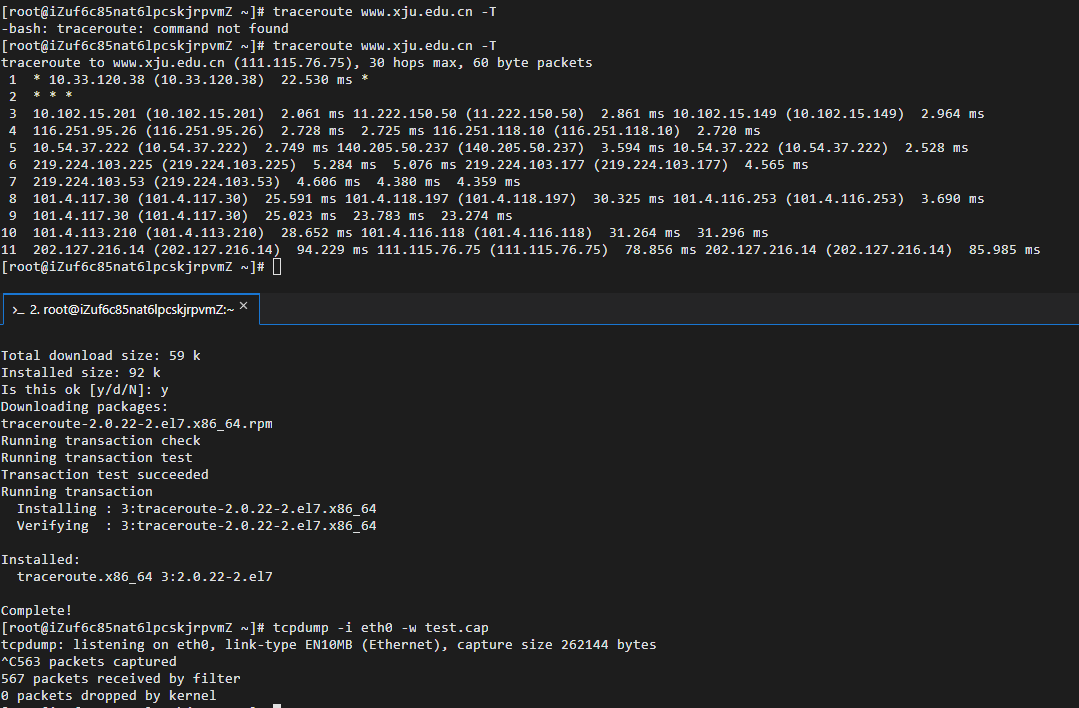
First, capture with tcpdump -i eth0 -w test.cap and traceroute www.xju.edu.cn -T, then analyze the data in test.cap. The procedure is shown in the figure below:
Then filter DNS and analyze UDP data, as shown in the figure below
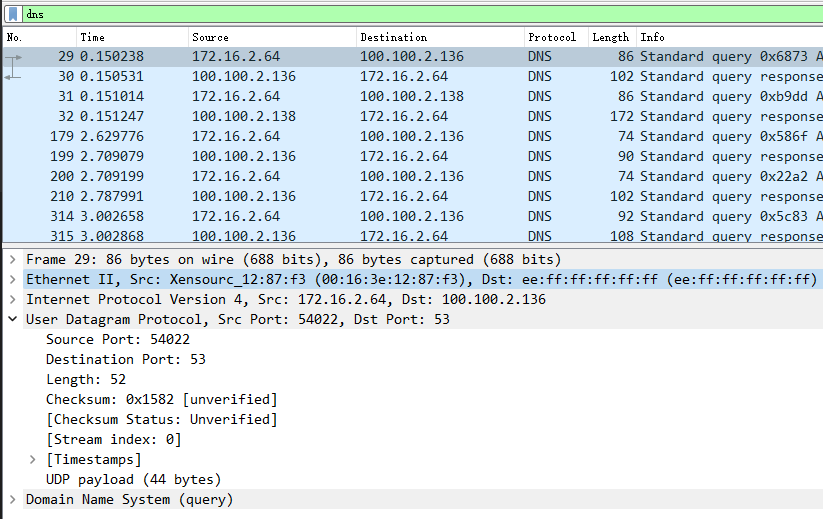
Enter the obtained data into the table below
| Field Name | Field Value | Field Information |
|---|---|---|
| Source Port | 54022 | Source Port: 54022 |
| Destination Port | 53 | Destination Port: 53 |
| Length | 52 | Length: 52 |
| Checksum | 0x1582 | Checksum: 0x1582 [unverified] |
- QQ UDP Data Analysis
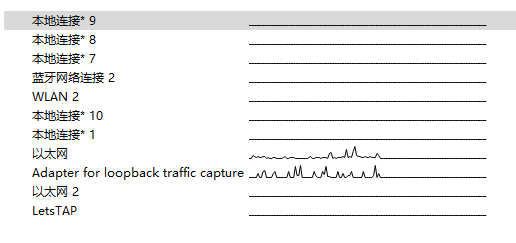
Capture local QQ data with Wireshark, process shown below:
- Select Ethernet
- Stop capture
- Filter OICQ and analyze the obtained data
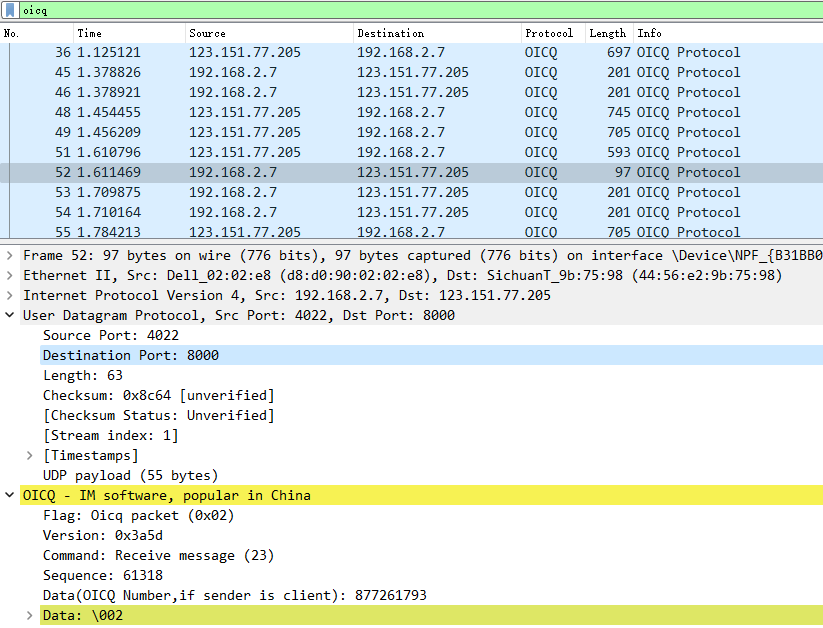
Enter the obtained data into the table below
| Field Name | Field Value | Field Information |
|---|---|---|
| Source Port | 4022 | Source Port: 4022 |
| Destination Port | 8000 | Destination Port: 8000 |
| Length | 63 | Length: 63 |
| Checksum | 0x8c64 | Checksum: 0x8c64 [unverified] |
4.2 From the analysis results, what parts make up the UDP datagram and what are their functions?
From the data obtained in the experiment, we can see that the UDP datagram consists of two parts: UDP header (8 bytes) + UDP data/payload, where the UDP header is composed of source port, destination port, length, and checksum.
The four fields in the UDP header each occupy two bytes (16 bits), and their functions are:
Source Port
The source port helps the server-side application determine the origin of the datagram.
Destination Port
The destination port allows the destination host to deliver the application data to the process listening on the destination port (i.e., the responding process).
Length
The Length field indicates the number of bytes in the UDP datagram (header plus data). Because the length of the data field in a UDP datagram is not fixed, a length field is needed to facilitate processing by the receiving end.
Checksum
The receiver uses the checksum to verify whether errors occurred in this datagram.
5. Summary of the Experiment
5.1 Issues and Solutions
When using traceroute, the error -bash: traceroute: command not found occurred. Solution: install traceroute using the command yum install traceroute, which installs traceroute. When connecting to the server with Xftp, connection errors occurred. Solution: after switching to the campus network, the connection returned to normal; investigation showed the issue was caused by the server firewall.
5.2 Reflections
- This experiment familiarized the operation of code and software in IP protocol analysis, as well as the analysis and extraction of UDP datagrams, validating the knowledge learned in class. Through this experiment, I mastered the concrete workflow of using the traceroute command, understood the basic usage of commonly used IP protocol analysis software, and improved my programming ability.
- Through these common IP protocol analysis commands and the tracing/analysis of IP protocol usage, and UDP datagram structure analysis, I corroborated what was taught in class.
If this article helped you, please share it with others!
Some information may be outdated