



1. Objectives
- Understand the basic concepts of the transport layer TCP protocol and the structure of its messages
- Analyze the TCP header
- Analyze the TCP connection establishment process and connection termination
- Master the use of
tcpdumpandwiresharkfor TCP protocol analysis
2. Experimental Environment
- Hardware requirements: One Alibaba Cloud ECS instance
- Software requirements: Linux/ Windows operating systems
3. Experimental Content
TCP is a connection-oriented protocol that provides reliable end-to-end communication over unreliable interconnected networks. It is the core protocol of the TCP/IP protocol suite.
To ensure reliable transmission, TCP assigns a sequence number to each packet, and the sequence numbers also ensure in-order delivery to the receiving entity. The receiving entity sends back an acknowledgment (ACK) for bytes that have been successfully received; if the sender does not receive an ACK within a reasonable round-trip time (RTT), the corresponding data (assuming it was lost) will be retransmitted.
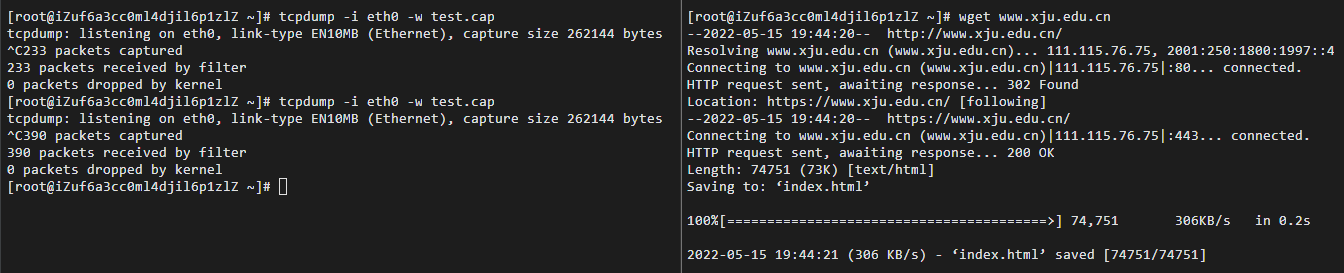
Use wget to download the Xinjiang University homepage www.xju.edu.cn, while capturing packets with tcpdump. Use wireshark to analyze the TCP data report headers, analyze the three-way handshake for establishing a connection, and analyze the four-way handshake for releasing a connection.
4. Experimental Results and Analysis
4.1 Fill in the Table
- First, capture the data during the wget download. The operation is as follows:
- Open the cap file with Wireshark and filter for the TCP protocol. The result is as follows:
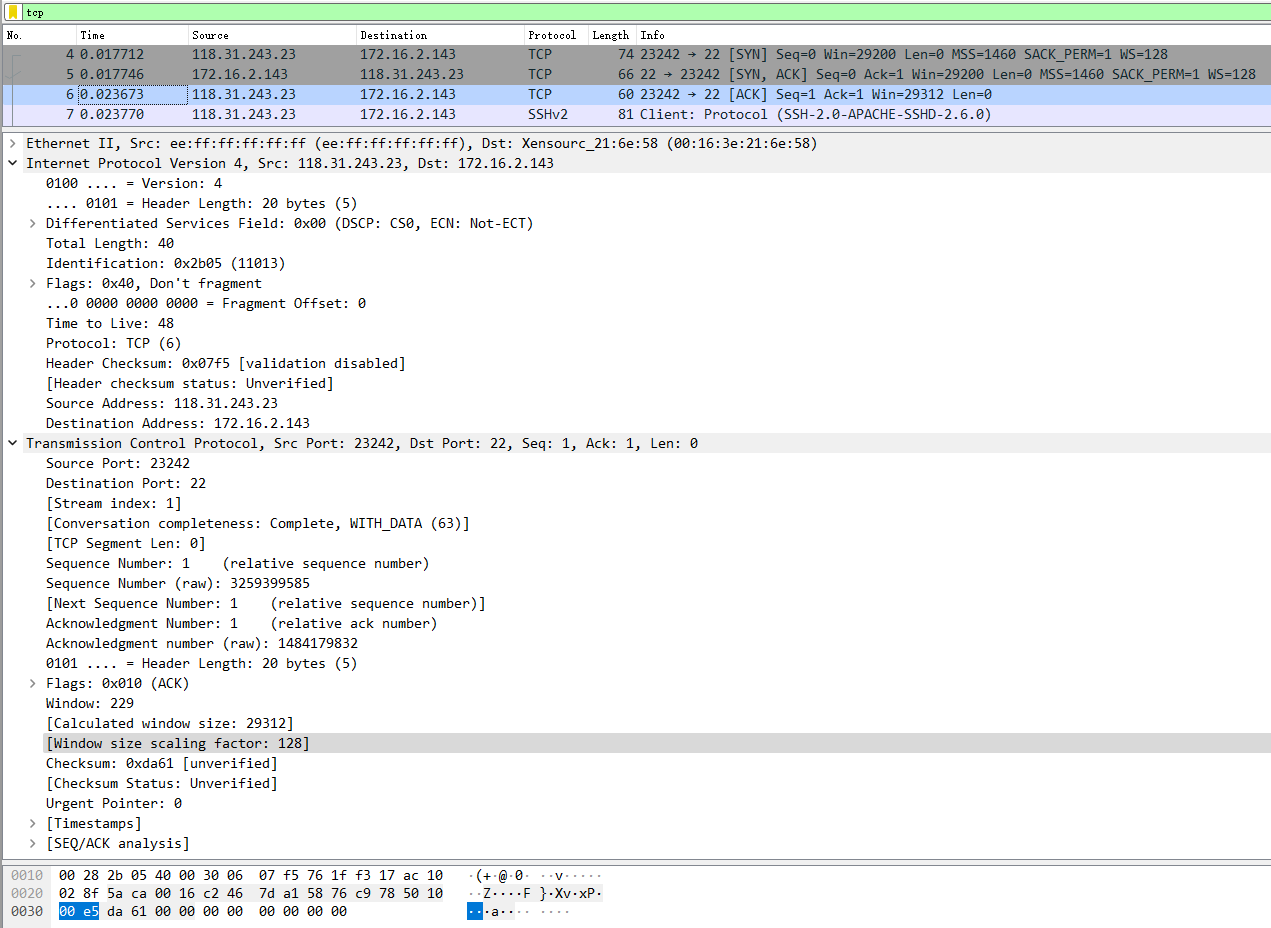
- Based on the captured packets, analyze the TCP segment structure and fill the table with the field names, field lengths, field values, and meanings in the TCP protocol:
| Field name | Field length | Field value | Field meaning |
|---|---|---|---|
| Source Port | 2bit | 23242 | Source Port: 23242 |
| Destination Port | 2bit | 22 | Destination Port: 22 |
| TCP Segment Len | 1bit | 0 | [TCP Segment Len: 0] |
| relative Sequence Number | 4bit | 1 | Sequence Number: 1 (relative sequence number) |
| Sequence Number | 4bit | 3259399585 | Sequence Number (raw): 3259399585 |
| relative Acknowledgment Number | 4bit | 1 | Acknowledgment Number: 1 (relative ack number) |
| Acknowledgment number (raw) | 4bit | 1484179832 | Acknowledgment number (raw): 1484179832 |
| Header Length | 4bit | 20 | 0101 … = Header Length: 20 bytes (5) |
| Reserved | 1bit | 0 | 000. … … = Reserved: Not set |
| Nonce | 1bit | 0 | …0 … … = Nonce: Not set |
| Congestion Window Reduced (CWR) | 1bit | 0 | … 0… … = Congestion Window Reduced (CWR): Not set |
| ECN-Echo | 1bit | 0 | … .0.. … = ECN-Echo: Not set |
| Urgent | 1bit | 0 | … ..0. … = Urgent: Not set |
| Acknowledgment | 1bit | 1 | … …1 … = Acknowledgment: Set |
| Push | 1bit | 0 | … … 0… = Push: Not set |
| Reset | 1bit | 0 | … … .0.. = Reset: Not set |
| Syn | 1bit | 0 | … … ..0. = Syn: Not set |
| Fin | 1bit | 0 | … … …0 = Fin: Not set |
| Window | 2bit | 229 | Window: 229 |
| Calculated window size | 2bit | 29312 | [Calculated window size: 29312] |
| Window size scaling factor | 2bit | 128 | [Window size scaling factor: 128] |
| Checksum | 2bit | 0xda61 | Checksum: 0xda61 [unverified] |
| Urgent Pointer | 2bit | 0 | Urgent Pointer: 0 |
- Based on the analysis results, what parts does the TCP segment structure consist of and what are their functions?
TCP segments can generally be divided into:
- Port numbers: used to identify different application processes on the same computer.
1.1 Source port: The source port, together with the IP address, serves to identify the return address of the packet.
1.2 Destination port: The port specifies the application program interface on the receiving computer.
The source port and destination port in the TCP header, together with the source IP and destination IP in the IP datagram, uniquely determine a TCP connection.
-
Sequence number and acknowledgment number: They are key parts of TCP’s reliable transmission. The sequence number is the sequence number of the first byte of data in this segment, ensuring the ordered delivery of TCP transmission. The acknowledgment number, i.e., ACK, indicates the next byte sequence number expected to be received, showing that all data prior to that sequence has been correctly received.
-
Data offset/header length: 4 bits. Since the header may contain optional content, the length of the TCP header is not fixed; it actually indicates the starting offset of the data region within the segment.
-
Reserved: Reserved for future use, currently set to 0.
-
Flags: URG ACK PSH RST SYN FIN, six in total, each flag represents a control function.
5.1 URG: Urgent pointer flag; when 1, the urgent pointer is valid; when 0, the urgent pointer is ignored.
5.2 ACK: Acknowledgment flag; when 1, the acknowledge number is valid; when 0, the segment does not contain acknowledgment information, and the acknowledgment number field is ignored.
5.3 PSH: Push flag; when 1, this indicates data to be pushed to the receiving application immediately, rather than queued in the buffer.
5.4 RST: Reset connection flag; used to reset a connection that has encountered errors due to host crashes or other reasons, or to reject illegal segments and connection requests.
5.5 SYN: Synchronization sequence; used to establish a connection. In a connection request, SYN=1 and ACK=0 indicate that the segment does not carry a bundled acknowledgment, and the connection response carries an acknowledgment, i.e., SYN=1 and ACK=1.
5.6 FIN: Finish flag; used to release the connection. When 1, it indicates the sender has no more data to send, i.e., the sender’s data stream is closed.
- Window: Sliding window size, used to inform the sender of the receiver’s buffer size, thereby controlling the rate at which the sender transmits data and achieving flow control.
- Checksum: Parity-like checksum; this checksum is computed over the entire TCP segment, including the TCP header and data, using 16-bit words. It is calculated and stored by the sender and verified by the receiver.
- Urgent pointer: Only valid when the URG flag is set to 1. The TCP urgent mechanism is a way for the sender to transmit urgent data to the other end.
- Data portion: The transmitted information.
4.2 Analyze the Three-Way Handshake
- Analyze the flags and sequence numbers of the handshake

First handshake: The client sends to the server a segment with the SYN flag set and Seq=0 (x), requesting to establish a connection with the server.
Second handshake: The server responds to the client with SYN and ACK, Seq=0 (y), ACK=1 (x+1).
Third handshake: The client, upon receiving the server’s SYN segment, responds with ACK=1 (y+1) and the ACK flag set.
4.3 Analyze the Four-Way Handshake for Releasing a Connection
- Analyze the message flags and sequence numbers

First handshake: The client sends FIN to the server, Seq=166, Ack=7725
Second handshake: The server responds with ACK, Seq=7725, Ack=167
Third handshake: The server sends FIN, Seq=7725, Ack=167
Fourth handshake: The client responds with ACK to the server, Seq=167, Ack=7726
- Why Wireshark captured only four segments
From the figure, we can see that at this time there are only three FIN/ACK sequences. This is because TCP is a full-duplex communication, and when the client has no more data to send to the server, it can send a FIN signal to inform the server that its data transmission has ended. However, at this moment the server may still send data to the client. Therefore, the termination of data transfer on both ends may occur independently and may be separated by a relatively long time, requiring at least 2+2=4 uses of the handshake to completely terminate the connection. But if the server, after receiving the client’s FIN, has no more data to send to the client, then the client’s ACK and the server’s own FIN can be combined into a single packet, allowing the four-way handshake to reduce to three.
5. Experimental Summary
5.1 Problems and Solutions
The problem: When using Xftp to connect to the server, a connection error occurred. The solution: After switching to the campus network, the connection returned to normal. Troubleshooting revealed that the cause was the server firewall.
5.2 Reflections
- This experiment familiarized me with the operation of code and software during IP protocol analysis, as well as the analysis and extraction of TCP segments, providing evidence for the knowledge learned in class. Through this experiment, I mastered the concrete workflow of using the wget command, learned the basic usage of commonly used IP protocol analysis software, and improved my programming ability.
- Through these common IP protocol analysis commands, tracking and analyzing IP protocol usage, and analyzing the structure of TCP segments, I have reinforced the knowledge taught in class.
If this article helped you, please share it with others!
Some information may be outdated