



Experiment 1 Common Network Commands
1. Objectives
- Understand the use of Linux command terminals and Windows command line
- Familiarize with the basic usage of common network commands
- Master network status analysis and measurement techniques based on
ping,ifconfig,traceroute,arp,netstat
2. Experimental Environment
- Hardware requirement: one Alibaba Cloud ECS instance.
- Software requirement: Linux/Windows operating system
3. Experiment Content
3.1 Basic ping usage
Using the ping command to test network connectivity. This is very useful for determining whether the network is correctly connected and the state of the connection. If ping runs correctly, you can generally rule out faults in the network access layer, network card, modem input/output lines, cables, and routers, thus narrowing down the problem scope.
ping -c 4 www.baidu.comping -c 4 166.111.4.1003.2 Basic usage of ifconfig/ipconfig (Windows)
The ifconfig utility can be used to display the current TCP/IP configuration settings. This information is generally used to verify whether manually configured TCP/IP settings are correct.
ifconfigifconfig eth03.3 Basic traceroute usage
Using the traceroute command to measure the routing, i.e., to display the path that a data packet takes to reach the destination host.
traceroute www.sohu.comtraceroute 166.111.4.1003.4 Basic arp usage
ARP is an important protocol in the TCP/IP protocol suite, used to determine the physical address of a network interface card corresponding to an IP address. Using the arp command, you can view the current contents of the ARP cache on the local computer or another computer.
arp –aarp -i eth03.5 Basic netstat usage
The netstat command can display active TCP connections, ports the computer is listening on, and Ethernet statistics. Netstat shows active TCP connections.
netstat –anetstat -t4. Experimental Results and Analysis
4.1 Basic ping usage
ping -c 4 www.baidu.comping -c 4 166.111.4.100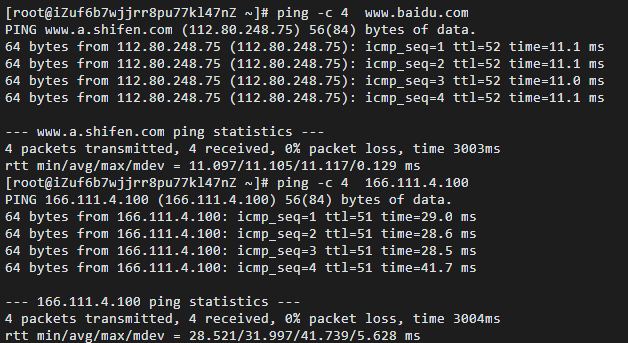
image-20220409224423767
Ping is a service command operating at the application layer within the TCP/IP network architecture. It primarily sends ICMP (Internet Control Message Protocol) Echo Request messages to a specific destination host to test reachability and understand its status. In network reachability testing, the ping command generates ICMP Echo Request and Echo Reply messages. When the destination host receives the ICMP Echo Request, it immediately replies with an ICMP Echo Reply; if the source host receives the ICMP Echo Reply, it indicates that the network to reach that host is normal.
On Linux, the option -c can specify the number of Echo Request messages to send (or receive). Here we test whether www.baidu.com and 166.111.4.100 are reachable. The screenshot shows all four packets were received successfully with no loss, indicating the network is reachable; the hosts www.baidu.com and 166.111.4.100 are reachable, with average round-trip times of 10.105 ms and 31.997 ms, respectively.
4.2 Basic usage of ifconfig/ipconfig (Windows)
ifconfigifconfig eth0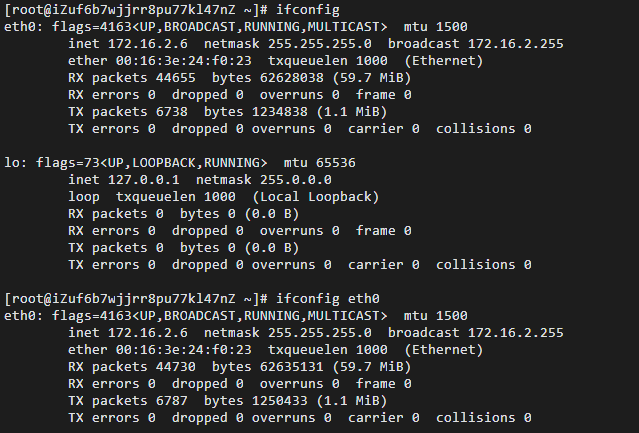
image-20220409230049094
ipconfig is the command in Windows systems used to view network configuration information. The ipconfig utility in Windows is used to display the current TCP/IP configuration settings. This information is generally used to verify whether manually configured TCP/IP settings are correct.
ifconfig is the command in Linux systems used to display or configure network configuration information. ifconfig can be used to view, configure, enable, or disable network interfaces located in the kernel. This tool is very commonly used, and during system boot it is used to set essential network interface parameters. It can be used to temporarily configure the IP address, subnet mask, broadcast address, gateway, etc., of a network interface. It can also be written to a file (for example, /etc/rc.d/rc.local), so after system boot, the file is read and the IP addresses are set for the network interfaces.
ifconfig can display network device information, while ifconfig eth0 can display only the information for the first network card (eth0). Here we view the host’s network device information; we can see that the MTU is 1500, the NIC IP address (172.16.2.6), broadcast address (172.16.2.255), and subnet mask (255.255.255.0).
Lo (lo) represents the host’s loopback address, which is generally used to test a network program, but you don’t want other machines on the LAN or Internet to access it; it only runs and is viewable on this host. For example, binding the HTTPD server to the loopback address, entering 127.0.0.1 in a browser will display the website you are hosting. But only you can see it; other machines on the LAN or on the Internet won’t know.
4.3 Basic traceroute usage
traceroute www.sohu.comtraceroute 166.111.4.100traceroute www.xju.edu.cntraceroute www.xju.edu.cn -T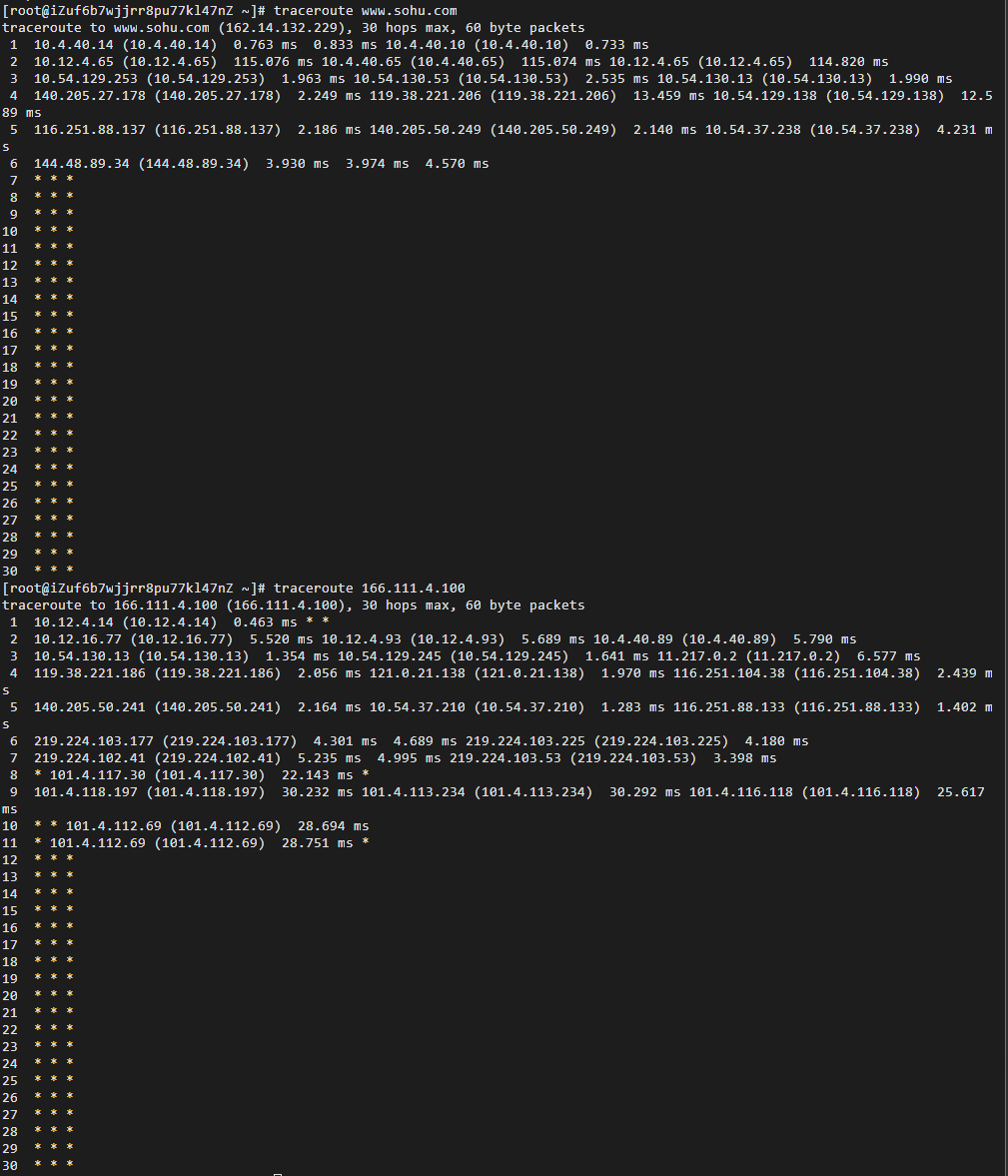
image-20220409232055284
In Linux, the traceroute command is used to display the path between the packet and the host. Traceroute lets you trace the routing path of network data packets; the default packet size is 40 bytes, but it can be adjusted.
The Traceroute program is designed to use ICMP and the IP header TTL (Time To Live) field. First, traceroute sends an IP datagram with TTL equal to 1 to the destination. When the first router on the path receives it, it decrements TTL by 1. At that point, TTL becomes 0, so the router drops the datagram and sends back an ICMP time-exceeded message. When traceroute receives this message, it knows that this router exists on the path, and then traceroute sends another datagram with TTL 2 to discover the second router, and so on. Traceroute repeats this process until a datagram reaches the destination.
WhenTraceroute sends UDP datagrams to the destination, it selects a port number that no ordinary application uses (above 30000). Therefore, when this UDP datagram reaches the destination, that host will send back an ICMP port-unreachable message; when traceroute receives this message, it knows the destination has been reached. So on the server side, there is no daemon required for traceroute.
Traceroute extracts the IP addresses from ICMP TTL expiry messages and performs reverse DNS. Each time, traceroute prints a sequence of data, including the domain name and IP address of each hop, and the round-trip time for the three probes.
Here we use the simplest and most common method, traceroute hostname, to measure the route from the host to www.baidu.com and 166.111.4.100—i.e., to display the path packets take to reach the destination host. In the figure, records start at 1, and each record represents a hop (a gateway). Each line shows three times in milliseconds, representing the time to probe three packets to each gateway and the gateway’s responses. In addition, later lines show asterisks; this can happen if a firewall blocks ICMP return messages, so we have limited data. The -T option indicates TCP SYN probing.
4.4 Basic arp usage
arp –aarp -i eth0
image-20220409233845980
ARP is an important protocol in the TCP/IP suite, used to determine the MAC address corresponding to an IP address. Using the arp command you can display and modify the Address Resolution Protocol (ARP) cache. The ARP cache contains one or more tables that store IP addresses and their corresponding Ethernet or Token Ring addresses. Essentially, it is a table mapping an ip to a mac address.
On Linux, the -a option for the arp command displays ARP tables for all interfaces (each Ethernet or Token Ring network adapter has its own table). arp -i eth0 displays the ARP cache for a specific device (i.e., eth0). The HWaddress shows that the current Ethereum (eth0) physical address is ee:ff:ff:ff:ff:ff.
4.5 Basic netstat usage
netstat can display active TCP connections, the ports the computer is listening on, and Ethernet statistics. Netstat shows active TCP connections.
netstat –anetstat -t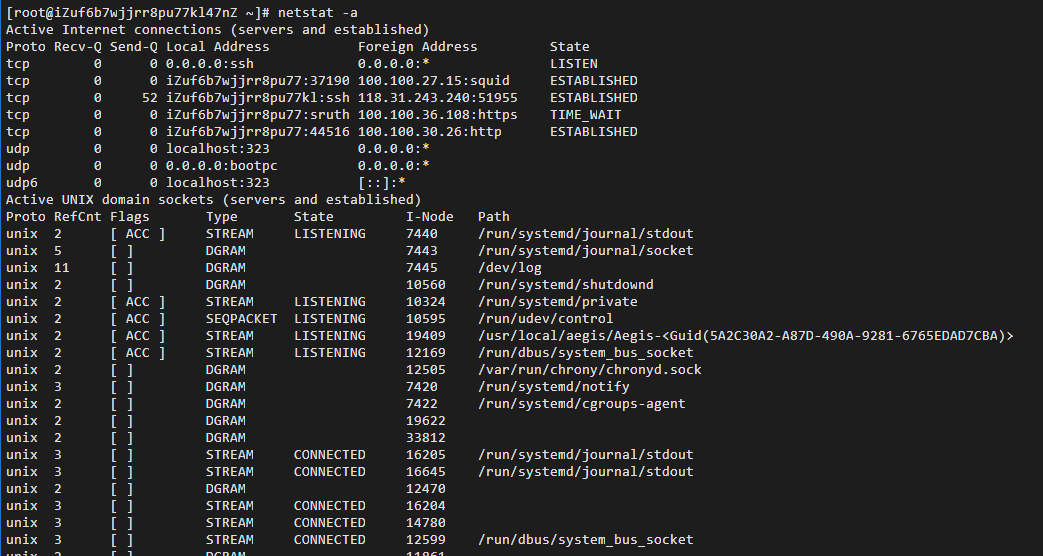
image-20220410000001138

image-20220410000017070
Netstat is a console command and a very useful tool for monitoring TCP/IP networks. It can display the routing table, actual network connections, and the status information of each network interface device. Netstat is used to display statistics related to IP, TCP, UDP, and ICMP protocols, and is generally used to check the network connections of the machine across its ports.
The netstat command on Linux uses the -a option to list all current connections. In the figure above, the command lists all sockets under the tcp, udp, and unix protocols, with LISTEN-related entries not shown by default. By using netstat -t, we can show only tcp related options.
5. Experimental Summary
5.1 Problems and Solutions
The problem when using the traceroute command: -bash: traceroute: command not found. Solution: first install traceroute using yum install traceroute. The problem when using ping -c 4 www.baidu.com on Windows 10 yields an error. Solution: use the command ping /? to view the help for the ping command and find that you need to set the number of requests with -n.
5.2 Reflections
- This experiment report completes the familiarization with common network commands and confirms the knowledge learned in class. Through this experiment, I mastered using the Linux terminal command line, understood the basic usage of common network commands, and improved my programming abilities.
- It is important to realize that, in Linux and Windows environments, the same functionality software may have different parameters. When conducting measurements, refer to the help to correctly set parameter options.
- Through these common network command operations, I performed various tasks across different layers of network hardware and software, reinforcing the knowledge learned in class.
If this article helped you, please share it with others!
Some information may be outdated