



Computer systems consist of hardware and system software that work together to run application programs.
#include<stdio.h>int main(){ printf("hello world! C"); return 0;}Tracing the lifecycle of hello.c—>creation, execution, output, and termination.
1 Information = Bits + Context
hello.c is the source program, the starting point of the hello program: a text file written by a programmer and composed of bytes (groups of 8 bits).
Most systems use the ASCII standard. Programs are stored in files as sequences of bytes, with the integer value of each byte corresponding to a character. Files containing only ASCII characters are called text files; all other files are called binary files.
The fundamental idea is that all information in a system is represented as a sequence of bits. Different data objects are distinguished by the context in which the data appears. Machine representations of numbers differ from their actual values and are finite approximations of the true values.
2 Programs Are Translated into Different Formats by Other Programs
High-level C language—translated—>low-level machine-language instructions—packaged—>executable object program
gcc -o hello hello.c./hello
Compilation system
Compilation system: preprocessor, compiler, assembler, and linker
-
Preprocessing
The preprocessor (cpp) modifies the original program according to directives beginning with #, directly inserting the contents of header files into the program text.
hello.c—cpp—>hello.i
-
Compilation
The compiler (ccl) translates the .i file from the previous step into a .s file containing an assembly-language program.
hello.i—ccl—>hello.s
-
Assembly
The assembler (as) translates the .s file into machine-language instructions and packages them into a relocatable object program stored in a binary .o file.
hello.s—as—>hello.o
-
Linking
The linker (ld) combines the current .o file with precompiled object files for the library functions it calls, producing an executable object file that the system can execute.
hello.o+printf.o—ld—>hello
3 Why Understanding Compilation Systems Helps
- Optimize program performance
- Understand linking errors
- Avoid security vulnerabilities
4 Processors Read and Interpret Instructions
4.1 System Hardware Organization
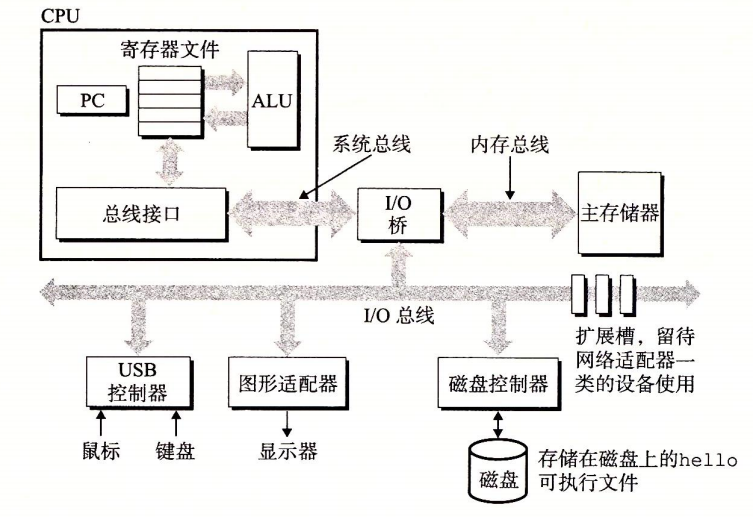
Hardware organization of a system
-
Buses
A bus is a collection of electronic conduits that runs throughout the system and carries bytes of information between components. It transfers fixed-size blocks of bytes called words. The number of bytes in a word varies by system and is a fundamental system parameter, such as 4 bytes (32 bits) or 8 bytes (64 bits).
System bus, memory bus, and I/O bus
-
I/O devices
I/O devices are responsible for communicating between the system and the outside world. Examples include keyboards and mice for input, displays for output, and disks for long-term storage.
I/O devices are connected to the I/O bus through controllers or adapters.
-
Difference between controllers and adapters
They differ in how they are packaged.
Controller: A chipset built into the I/O device itself or the system motherboard.
Adapter: A card inserted into a motherboard slot.
-
-
Main memory
Main memory is a temporary storage device that holds both programs and the data processed by those programs.
Physically, it consists of dynamic random-access memory (DRAM) chips. Logically, it is a linear array of bytes, each with a unique address beginning at zero.
-
Processor
The central processing unit (CPU) is the engine that interprets instructions stored in main memory.
At its core is a word-sized storage device called the program counter (PC), which points to the address of a machine-language instruction in main memory. From the moment the system is powered on, the processor repeatedly executes the instruction indicated by the PC, updates the PC, and executes the next instruction.
The processor operates according to an instruction execution model determined by the instruction set architecture. In this model, instructions are executed in strict sequence. Executing an instruction involves having the CPU read the instruction from the memory address indicated by the PC, interpret its bits, perform the simple operation specified by the instruction, and update the PC to point to the next instruction.
There are relatively few simple operations of this kind. They revolve around main memory, the register file [a small storage device consisting of word-sized registers, each with a unique name], and the arithmetic/logic unit (ALU) [which computes new data and address values].
- Simple operations
-
Load
Copy a byte or word from main memory into a register, overwriting the register’s previous contents.
-
Store
Copy a byte or word from a register to a location in main memory, overwriting the previous contents of that location.
-
Operate
Copy the contents of two registers to the ALU, have the ALU perform an arithmetic operation on the two words, and store the result in a register, overwriting its previous contents.
-
Jump
Extract a word from the instruction itself and copy it into the program counter (PC), overwriting the PC’s previous value.
-
Formally, a processor is a straightforward implementation of its instruction set architecture, but in practice it uses highly complex mechanisms to accelerate program execution. It is therefore important to distinguish between a processor’s instruction set architecture and its microarchitecture: the instruction set architecture describes the effect of each machine-code instruction, whereas the microarchitecture describes how the processor is actually implemented.
- Simple operations
4.2 Running the Program
Process:
The shell program executes instructions while waiting for a command to be entered. After ./hello is entered, the shell reads each character into a register and then stores it in memory. Pressing Enter executes the command. The hello file is loaded, and its code and data are copied from disk into main memory.
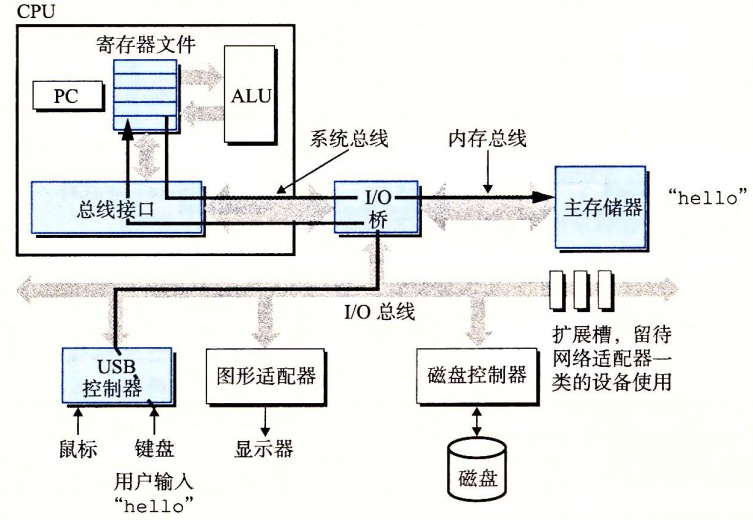
Reading the hello command
With direct memory access (DMA), data can be transferred directly from disk to main memory without passing through the processor.
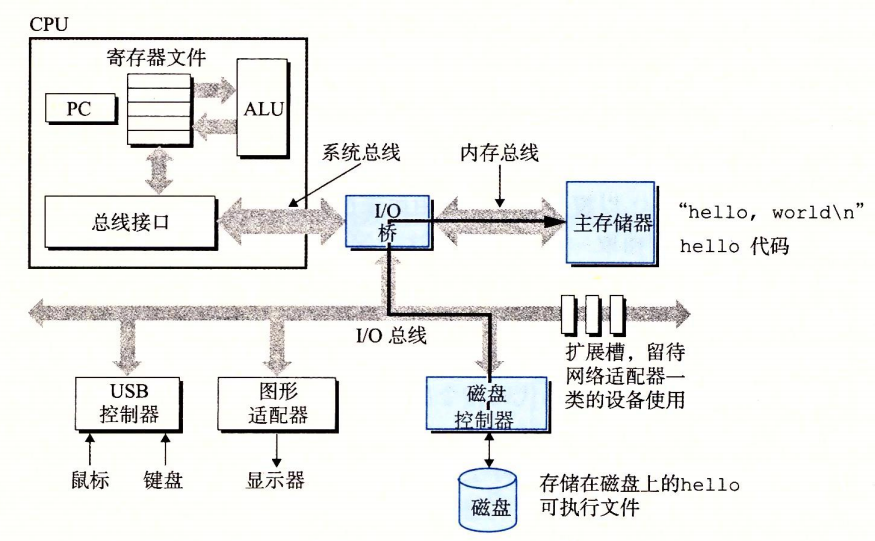
Loading the executable file from disk into main memory
The machine-language instructions in the hello program’s main function then begin executing. The bytes of the “hello world! C” string are copied from main memory into registers and then from the registers to the display device, where they finally appear on the screen.
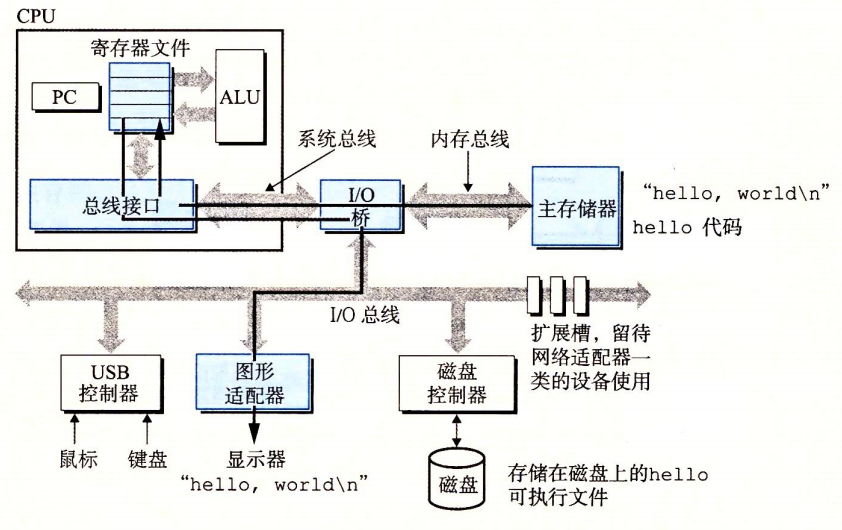
Outputting the string to the screen
5 Caches Matter
As described above, the system spends a great deal of time moving information, and this copying slows down program execution to some extent.
To address the speed difference between the processor and main memory, cache memory is used to store information that is likely to be needed soon. L1 cache, L2 cache, and other caches are implemented using static random-access memory (SRAM) technology. Caches exploit the principle of locality: programs tend to access data and code in localized regions.
Using caches can improve program performance by an order of magnitude.
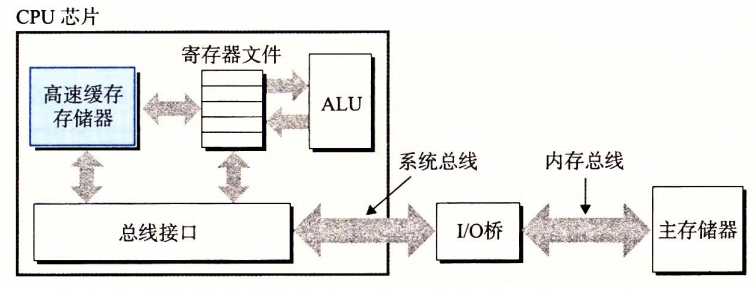
Cache memory
6 The Storage Hierarchy
A memory hierarchy places smaller and faster storage devices between the processor and larger, slower devices.
The main idea is to use storage at one level as a cache for storage at the next lower level.
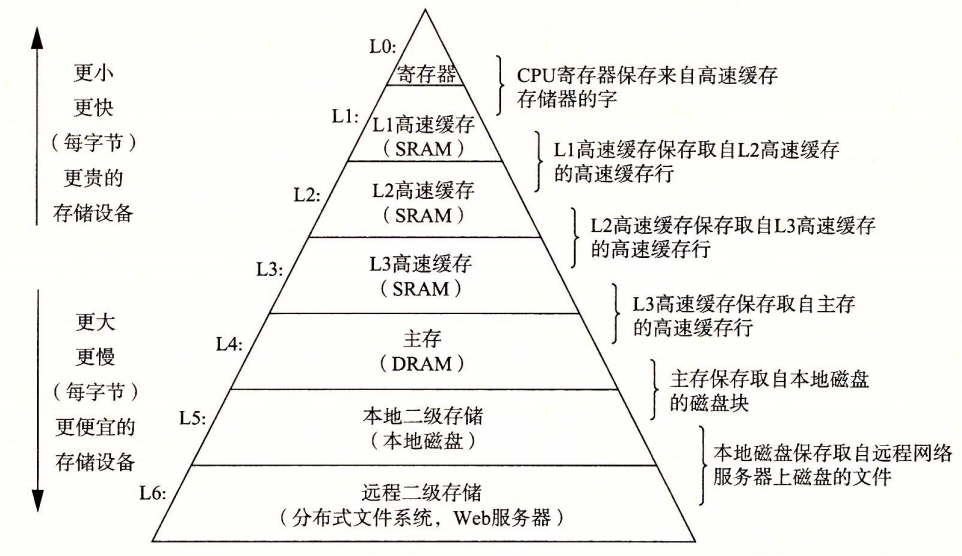
Memory hierarchy
7 The Operating System Manages the Hardware
Programs access hardware through services provided by the operating system. Every application-level operation on hardware must pass through the operating system.
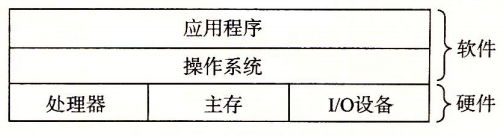
Layered view of a computer system
The operating system prevents hardware from being misused by out-of-control applications and provides applications with simple, consistent mechanisms for controlling complex and diverse hardware devices. It does so through several abstractions: processes, virtual memory, and files.
Files are abstractions of I/O devices, virtual memory is an abstraction of main memory and I/O devices, and processes are abstractions of the processor, main memory, and I/O devices.
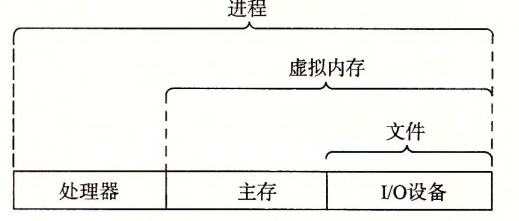
Abstractions provided by the operating system
7.1 Processes
When a program runs, the operating system creates the illusion that the program has exclusive use of the processor, main memory, and I/O devices. This illusion is implemented through processes.
A process is the operating system’s abstraction of a running program. Multiple processes can run concurrently on a system, with each process appearing to have exclusive use of the hardware.
Concurrent execution means that the instructions of one process are interleaved with those of another. It is implemented by switching the processor between processes, using a mechanism known as context switching.
A context consists of all the state information that the operating system tracks and that a process needs in order to run, including the PC, the current values of registers, and the contents of main memory. Because a uniprocessor system can execute the code of only one process at a time, running another process requires a context switch: saving the context of the current process and restoring the context of the new process.
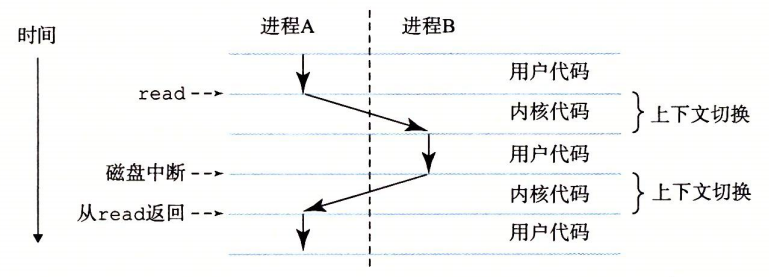
Process context switching
As shown in the figure, process switching is managed by the operating system kernel, the portion of operating system code that always resides in main memory. It is the collection of code and data structures that the operating system uses to manage all processes. When an application requires an operating system function, it executes a special system call instruction that transfers control to the kernel. The kernel then performs the requested operation and returns control to the application.
7.2 Threads
A process can consist of multiple execution units called threads. Each thread runs within the context of the process and shares the same code and global data. Sharing data between threads is easier than sharing it between processes, so threads are generally more efficient than processes.
7.3 Virtual Memory
Virtual memory gives each process the illusion that it has exclusive use of main memory. Every process sees the same memory layout, called the virtual address space. In Linux, the uppermost region of the address space is reserved for operating system code and data, while the lower region stores code and data defined by the user process.
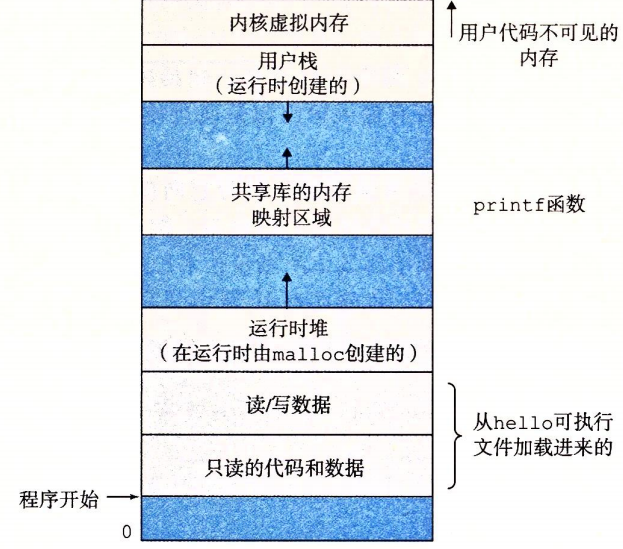
Virtual address space
-
Program code and data
For every process, the code begins at the same fixed address, followed by data locations corresponding to C global variables.
-
Heap
The runtime heap can dynamically expand and contract while the program is running when functions such as
mallocandfreeare called. -
Shared libraries
The middle region of the address space contains the code and data for shared libraries, such as the C standard library and the math library.
-
Stack
The user stack is located at the top of the user virtual address space. The compiler uses it to implement function calls, and it can also dynamically expand and contract at runtime. The stack grows when a function is called and contracts when the function returns.
-
Kernel virtual memory
Kernel virtual memory is located at the top of the address space. Applications are not permitted to read or write the contents of this region or directly call functions defined by kernel code; such functions must be invoked through the kernel.
The fundamental idea is to store the contents of a process’s virtual memory on disk and use main memory as a cache for the disk.
7.4 Files
A file is a sequence of bytes, and every I/O device can be viewed as a file. Input and output on Linux systems are implemented by reading and writing files through a small set of system calls known as Unix I/O.
Files provide applications with a uniform view of different kinds of I/O devices.
8 Network Communication Between Systems
From the perspective of an individual system, a network can be viewed as an I/O device. The system can read data sent from other machines and copy it into its own main memory.
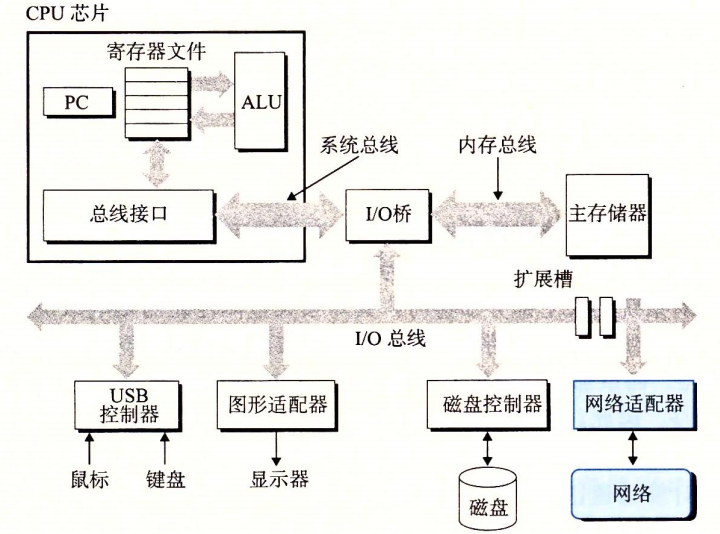
Network device I/O
The hello program can also be run on a remote server. We can communicate with the server over a network and retrieve the returned result.

Running hello remotely over a network using telnet
9 Important Themes
9.1 Amdahl’s Law
When one part of a system is accelerated, the effect on the system’s overall performance depends on both the importance of that part and how much it is accelerated.
$\alpha$ is the proportion of the total execution time spent on that part, and $k$ is the performance improvement factor.
$$
T_{new}=(1-\alpha)T_{old}+(\alpha T_{old})/k = T_{old}[(1-\alpha)+\alpha/k]
$$
The speedup is $S=T_{old}/T_{new}$
$$
S=\frac{1}{(1-\alpha)+\alpha/k}
$$
As k approaches infinity,
$$
S_{\infty}=\frac{1}{(1-\alpha)}
$$
9.2 Concurrency and Parallelism
Concurrency refers to a system with multiple activities in progress at the same time. Parallelism is the use of concurrency to make a system run faster.
-
Thread-level concurrency
Processes allow multiple programs to execute at the same time, resulting in concurrency. This kind of concurrency is simulated by having a computer rapidly switch between the processes it executes. It allows multiple users to interact with the system simultaneously and allows a user to run multiple tasks at once.
A multicore processor integrates multiple CPUs onto a single integrated-circuit chip.
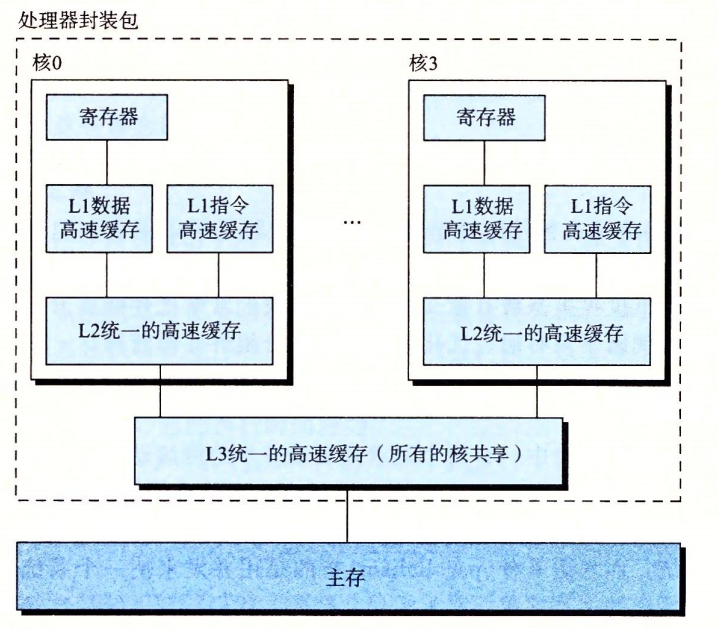
Multicore processor
Hyperthreading, also known as simultaneous multithreading, is a technology that allows a single CPU to execute multiple control flows. A hyperthreaded processor can decide which thread to execute on a cycle-by-cycle basis, allowing the CPU to make better use of its processing resources.
Multiprocessors improve system performance by: 1. reducing the need to simulate concurrency among multiple tasks; and 2. allowing applications to run faster, provided that they are written to use multiple threads.
-
Instruction-level parallelism
Instruction-level parallelism means that a processor can execute multiple instructions simultaneously. Processors increase instruction execution rates through pipelining. Instruction execution is divided into separate steps, and the processor hardware is organized as a sequence of stages, each of which performs one step. These stages operate in parallel, processing different steps of different instructions.
A superscalar processor is a processor capable of executing instructions at a rate faster than one instruction per clock cycle.
-
Single-instruction, multiple-data parallelism
Specialized processor hardware allows a single instruction to produce multiple operations that can execute in parallel. This is called single-instruction, multiple-data, or SIMD parallelism. It is primarily used to accelerate applications that process image, audio, and video data. Programs can be written using special vector data types supported by the compiler.
9.3 The Importance of Abstraction
Abstraction is one of the most important concepts in computer science.
Within a processor, the instruction set architecture provides an abstraction of the actual processor hardware.
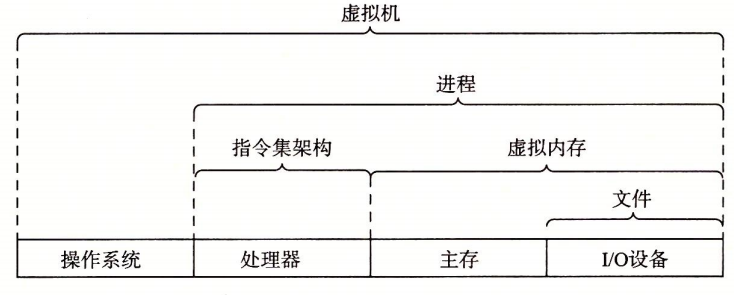
Abstractions in a computer system
A virtual machine is an abstraction of an entire computer, including its operating system, processor, and programs.
If this article helped you, please share it with others!
Some information may be outdated